
Analysis of the Facebook.app for iOS
Analysis of the Facebook.app for iOS
Posted Oct 18, 2016
Did you ever wonder why the Facebook.app for iOS is such a big download? This post tries to give some answers. The version 66.0 (released on 7 October 2016) was analyzed on an iPad Air 2 (64-bit).
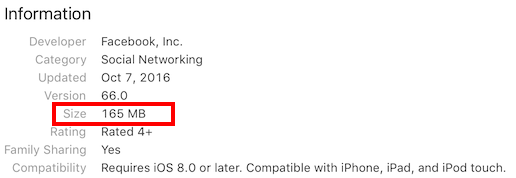
Here is what you see when downloading Facebook on an iPad Air 2:
App content
A scan of the content of the Facebook app using GrandPerspective gives already a good overview:
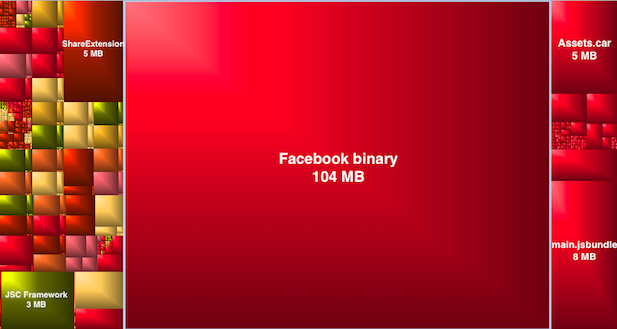
As you can see more than 100 MB are taken by the binary itself. The images (Assets.car), the localizations and other resources are only responsible for a small part of the size.
One note: The Facebook app seems to use the open source JSC framework. Unless there is a technical reason to use it, Facebook could remove this framework and use instead the JavaScriptCore framework built in iOS. JavaScriptCore is available on iOS 7 and later and Facebook targets iOS 8 and later.
Slicing
One important point to note is that the Facebook binary I downloaded only contains 64-bit code. There is no 32-bit code. Facebook uses the Slicing mechanism which is described by Apple here:
Slicing is the process of creating and delivering variants of the app bundle for different target devices. A variant contains only the executable architecture and resources that are needed for the target device.
Entropy
Let’s look at the Facebook binary. The entropy graph generated by Hopper gives a good idea of the content:

The red part (with biggest entropy) is actual code while the green and orange parts are other sections (strings, constants, …). Just by looking at the entropy graph, we know that around 50% of the binary is code.
Sections
By looking at the sections of the binary we indeed see that the (__TEXT, __text) section is more than 50 MB. Here is the list of sections sorted by size:
(__TEXT, __text): 56.60 MB

(__DATA, __objc_const): 16.57 MB

(__RODATA, __cstring): 5.02 MB

(__RODATA, __objc_methname): 4.55 MB

(__DATA, __const): 4.46 MB

(__RODATA, __gcc_except_tab): 3.87 MB

(__RODATA, __objc_methtype): 2.66 MB

(__DATA, __objc_data): 2.41 MB

(__DATA, __cfstring): 2.20 MB

(__DATA, __data): 1.66 MB

(__TEXT, __unwind_info): 1.58 MB

(__RODATA, __objc_classname): 1.42 MB

(__RODATA, __const): 1.40 MB

(__DATA, __bss): 0.89 MB

(__DATA, __objc_selrefs): 0.80 MB

(__DATA, __common): 0.54 MB

(__DATA, __objc_ivar): 0.38 MB

(__DATA, __objc_classlist): 0.24 MB

(__DATA, __objc_classrefs): 0.18 MB

(__DATA, __objc_superrefs): 0.13 MB

(__TEXT, __const): 0.07 MB

(__DATA, __objc_protolist): 0.06 MB

(__TEXT, __stubs): 0.02 MB

(__TEXT, __stub_helper): 0.02 MB

(__DATA, __la_symbol_ptr): 0.01 MB

(__DATA, __got): 0.01 MB

(__TEXT, __ustring): 0.01 MB

(__DATA, fbsessiongks): 0.01 MB

(__TEXT, __eh_frame): 0.01 MB

(__DATA, __mod_init_func): 0.00 MB

(__DATA, __objc_protorefs): 0.00 MB

(__DATA, __objc_catlist): 0.00 MB

(__DATA, __objc_nlclslist): 0.00 MB

(__DATA, FBInjectable): 0.00 MB

(__DATA, __mod_term_func): 0.00 MB

(__DATA, __objc_imageinfo): 0.00 MB
__RODATA segment
If you read carefully the list of sections, you did notice that the Facebook.app has a __RODATAsegment containing sections generally found inside the __TEXT segment. The reason for this oddity is to work around an App Review limitation. As you can read on the App Review page:
Each Mach-O executable file (for example,
app_name.app/app_name) must not exceed these limits:
- For apps whose MinimumOSVersion is less than 7.0: maximum of 80 MB for the total of all __TEXT sections in the binary.
- For apps whose MinimumOSVersion is 7.x through 8.x: maximum of 60 MB per slice for the __TEXT section of each architecture slice in the binary.
- For apps whose MinimumOSVersion is 9.0 or greater: maximum of 400 MB for the size of the Mach-O binary file.
Facebook targets iOS 8.0 and later and as such its __TEXT segment should not exceed 60 MB. But if you sum up the __TEXT and __RODATA segments, you end up with more than 77 MB:
Total size of the __TEXT sections: 58.3 MB

Total size of the __RODATA sections: 18.9 MB
Facebook avoids this limitation by moving some if the __TEXT sections into the read only __RODATAsegment. Implementing this trick is really simple: you just need to add a linker flag to rename the chosen sections. And it appears you need absolutely nothing at runtime: the renamed sections will be found automatically. This linker flag is described in the ld man page:
-rename_section orgSegment orgSection newSegment newSection
Renames section orgSegment/orgSection to newSegment/newSection.
You could use it to rename the (__TEXT, __cstring) section to (__RODATA, __cstring) by simply adding this line into the Other Linker Flags (OTHER_LDFLAGS):
-Wl,-rename_section,__TEXT,__cstring,__RODATA,__cstring
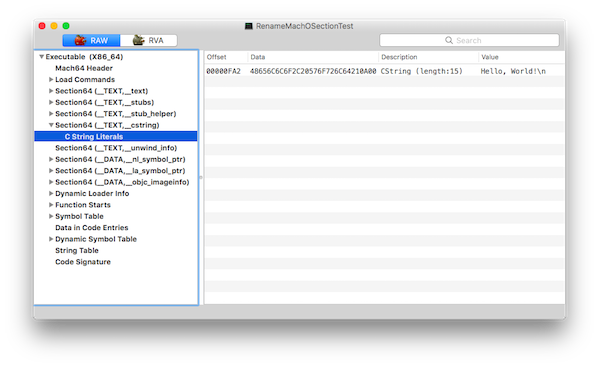
You can download a sample macOS Xcode project here. If you load the original binary (without the section rename) using MachOView, you will see the (__TEXT, __cstring) section:
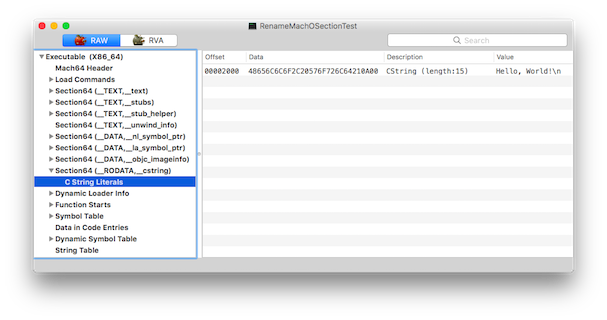
After adding the linker flag and recompiling, a (__RODATA, __cstring) section will be visible and the binary will run as expected:
Note that this workaround is only needed as long as Facebook supports iOS 8. When targeting iOS 9 or later, the limitation is 400 MB which should be enough without splitting the __TEXT segment.
Third party libraries
So what does the code contain? Sadly I could not find a license/readme file containing the list of third party libraries. Also the Info view in Settings.app > Facebook > Settings > Infos is desperately empty - this seems like a Facebook.app bug.
By looking at the class names, I could build a list of third party libraries used. This list is most likely incomplete but hopefully correct:
AsyncDisplayKit: http://asyncdisplaykit.org
keeps even the most complex user interfaces smooth and responsive
Bolts-ObjC: https://github.com/BoltsFramework/Bolts-ObjC
Bolts is a collection of low-level libraries designed to make developing mobile apps easier
CocoaAsyncSocket: https://github.com/robbiehanson/CocoaAsyncSocket
Asynchronous socket networking library for Mac and iOS
CocoaLumberjack: https://github.com/CocoaLumberjack/CocoaLumberjack
A fast & simple, yet powerful & flexible logging framework for Mac and iOS
ComponentKit: http://componentkit.org
ComponentKit takes a functional, declarative approach to building UI
EGODatabase: https://github.com/enormego/egodatabase
EGODatabase is a thread-safe Objective-C SQLite wrapper with full support for asynchronous SQLite calls as well as built in NSOperationQueue support
FLAnimatedImage: https://github.com/Flipboard/FLAnimatedImage
Performant animated GIF engine for iOS
FXBlurView: https://github.com/nicklockwood/FXBlurView
UIView subclass that replicates the iOS 7 realtime background blur effect, but works on iOS 5 and above
Google Toolbox for Mac: https://github.com/google/google-toolbox-for-mac
Google Toolbox for Mac
JSONKit: https://github.com/johnezang/JSONKit
Objective-C JSON
libphonenumber: https://github.com/iziz/libPhoneNumber-iOS
iOS port from libphonenumber
OAuth2Client: https://github.com/nxtbgthng/OAuth2Client
Client library for OAuth2
OCMock: http://ocmock.org
Mock objects for Objective-C
pop: https://github.com/facebook/pop
An extensible iOS and OS X animation library, useful for physics-based interactions.
nighthawk-webrtc: https://github.com/ceaglest/nighthawk-webrtc
Custom builds of WebRTC for iOS
React Native: https://facebook.github.io/react-native/
Build Native Mobile Apps using JavaScript and React
ZipArchive: https://github.com/ZipArchive/ZipArchive
ZipArchive is a simple utility class for zipping and unzipping files on iOS and Mac
ZipZap: https://github.com/pixelglow/ZipZap
zip file I/O library for Mac OS X and iOS
Objective-C awards
The awards for the best Objective-C classes is attributed to:
NTNativeTemplateHackyWorkaroundBecauseNSMapTableIsBuggyContainer
The award for the longest Objective-C method is attributed to:
- (void)[FBComposerCompositionStateMutation matchBootstrap:

        activityAttachmentUpdatedMutation:

        activitySharingComposition:

        albumDescription:

        albumTitle:

        appProvidedHashtag:

        audienceMutation:

        audienceTouchedByUser:

        author:

        clearContent:

        containerPublishTargetForMediaCollection:

        composerCancelAnalytics:

        defaultAudienceMutation:

        destinationMutation:

        feedOnlyToggleState:

        hashtags:

        inspirationMutation:

        isImplicitLocationExplicitlyBlockedByUser:

        lifeEventDateMutation:

        lifeEventRelationshipUpdated:

        lifeEventTitleOrIconUpdated:

        linkShareMutation:

        shareOriginalPostMutation:

        removeMediaAttachmentWithAssetID:

        replaceAllExistingMediaAttachments:

        addSingleMediaAttachment:

        replaceSingleExistingMediaAttachmentIfExisting:

        mediaAttachmentCaptionMutation:

        mediaAttachmentMentionsMutation:

        mediaReorderingMutation:

        mentions:

        moviesComposition:

        moviesLoadedTaggedUsers:

        photoAutoTaggingState:

        photoTaggingAssetMutation:

        placeMutation:

        placeSuggestions:

        placeTaggingState:

        platformLoadedActionMutation:

        platformLoadedAppAttribution:

        platformLoadedImageAttachments:

        platformLoadedOGMediaAttachmentsMutation:

        platformLoadedPlaceMutation:

        platformLoadedRef:

        platformLoadedRobotext:

        platformLoadedTaggedUsers:

        platformLoadedVideoAttachment:

        postContentTypeMutation:

        postPromptPayload:

        publishAsQuestionAndAnswerSession:

        togglePublishAsQuestionAndAnswerSession:

        preferredMarketplaceMutation:

        productItemCategoryGraphQLID:

        productItemPickupDeliveryInfo:

        productItemPriceMutation:

        productItemShouldPostToMarketplace:

        productItemSuggestedPlace:

        productItemSuggestedZipCode:

        productItemTitle:

        publishTarget:

        remoteImageAttachments:

        removeSponsor:

        removeStorylineAttachment:

        removeStickerAttachment:

        replaceStorylineAttachmentWithMediaAttachments:

        selectedStarRating:

        shouldCreateProfileBadge:

        statusTextMutation:

        stickers:

        taggableActivityComposition:

        targeting:

        withTagsMutation:

        poll:

        sponsor:

        videoAttachmentMutation:

        videoTaggingAssetMutation:

        videoTaggingAnalytics:

        boostedComponentData:

        albumTracker:]
Conclusion
The Facebook app is a complex app and not just a simple web view. It contains a lot of third party libraries and even splits its __TEXT segment in order to not reach the 60 MB limit imposed by Apple.
Update 10.04.2017:
There is a newer blog post about the version 87.0: Analysis of the Facebook.app for iOS [v. 87.0]https://blog.timac.org/2017/0410-analysis-of-the-facebook-app-for-ios-v-87-0
https://blog.timac.org/2016/1018-analysis-of-the-facebook-app-for-ios/
Analysis of the Facebook.app for iOS的更多相关文章
- Using Qt to build an Omi App for iOS (and Android)
JUNE 6, 2014 / HHARTZ Working on projects where the technology is pre-determined, it's often difficu ...
- 不可或缺 Windows Native (25) - C++: windows app native, android app native, ios app native
[源码下载] 不可或缺 Windows Native (25) - C++: windows app native, android app native, ios app native 作者:web ...
- To create my first app in iOS with Xcode(在Xcode创建我的第一个iOS app )
To create my first app in iOS create the project. In the welcome window, click “Create a new Xcode p ...
- 你可能需要为你的 APP 适配 iOS 11
本文来自于腾讯Bugly公众号(weixinBugly),未经作者同意,请勿转载,原文地址:https://mp.weixin.qq.com/s/AZFrqL9dnlgA6Vt2sVhxIw 作者:s ...
- 將UNITY作品上傳到Facebook App!
前言 大家好,今天要來介紹如何用UNITY 將製作好的遊戲上傳到Facebook,也就是Facebook App.近期Facebook與Unity合作而推出了新的插件,利用插件可上傳分數.邀請好友.P ...
- 如何玩facebook app上的H5游戏
一.下载facebook app facebook链接 二.下载vpn 国内是访问不了的,必须vpn 因为vpn被封了厉害 我随便百度了个狸猫加速器,没付费,时断时续... 没有推荐的vpn,哪位大佬 ...
- Redesign Your App for iOS 7 之 页面布局
Redesign Your App for iOS 7 之 页面布局 http://www.vinqon.com/codeblog/?detail/11109
- 支付宝APP支付IOS手机端java后台版
版权声明:http://blog.csdn.net/u012131769/article/details/76639527#t8 转载:http://blog.csdn.net/u012131769/ ...
- Facebook App 的头文件会有更多的收获
最近在看一些 App 架构相关的文章,也看了 Facebook 分享的两个不同时期的架构(2013 和 2014),于是就想一窥 Facebook App 的头文件,看看会不会有更多的收获,确实有,还 ...
随机推荐
- java同步锁的正确使用
同步锁分类 对象锁(this) 类锁(类的字节码文件对象即类名.class) 字符串锁(比较特别) 应用场景 在多线程下对共享资源的安全操作. 需求:启动5个线程对共享资源total进行安全操作. 同 ...
- ASP.NET 页面缓存OutputCache用法实例(附ab压力测试对比图)
本文主要介绍Web窗体页面中的使用方法,MVC中使用方法,大家自行百度. 一.简单一行指令即可实现 <%@ OutputCache VaryByParam=" %> 这样整个页面 ...
- GFM(GitHub Flavored Markdown)与标准Markdown的语法区别
没有就自己造 其实这篇文16年底的时候就写好的,只不过当时是记在自己的笔记上(没错,我笔记大多记在本地,比发表的这寥寥几篇那是多的多的多了
- Json扩展 (转)
https://www.newtonsoft.com/json https://www.cnblogs.com/BrokenIce/p/5902441.html https://blog.csdn.n ...
- Eclipse中修改GIT分支名称
修改GIT分支名称: 1.切换到要修改名称的分支: 2.右击项目——Team——Advanced——Rename Branch…: 3.在弹出的Branch Rename框中选中要修改名的分支——Re ...
- Codeforces Round #499 (Div. 2) C.FLY 数学推导_逆推
本题应该是可以使用实数二分的,不过笔者一直未调出来,而且发现了一种更为优美的解法,那就是逆推. 首先,不难猜到在最优解中当飞船回到 111 号节点时油量一定为 000, 这就意味着减少的油量等于减少之 ...
- vue 页面跳转及参数传递和接收
跳转: this.$router.push({name: 'My',params:{ id:'1',name:'anson'}}); 接收: {{this.$route.params.id}}
- crm 系统项目(二) admin 后台操作表格
crm 系统项目(二) admin 后台操作表格 1. app下创建 templates 运行的时候 先找全局的templates——> 按照app的注册顺序找templates中的文件 2. ...
- Docker决战到底(三) Rancher2.x的安装与使用 - 简书
原文:Docker决战到底(三) Rancher2.x的安装与使用 - 简书 image.png 当越来越多的容器化应用被部署,一个可以管理编排这些容器的工具此时就显得尤为重要了.目前容器编排领域 ...
- POI 详细介绍
Apache POI是一个开源的Java读写Excel.WORD等微软OLE2组件文档的项目.目前POI已经有了Ruby版本. 结构: HSSF - 提供读写Microsoft Excel XLS格式 ...