
SignalR + MVC5 简单示例
本文和前一篇文章很类似,只不过是把 SignalR 应用在了 MVC 中
新建项目,选择 MVC 模板
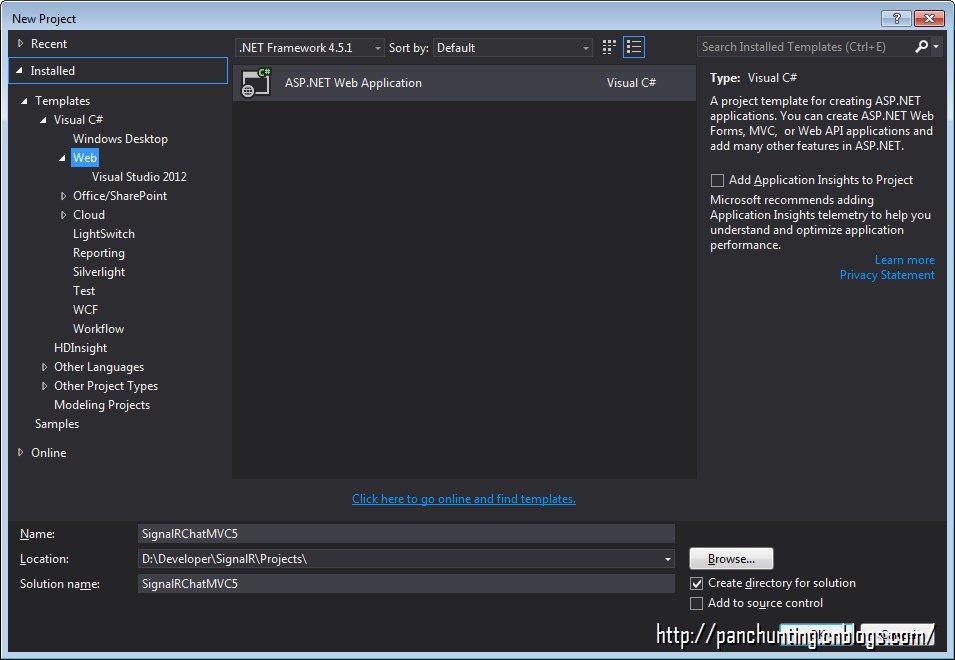
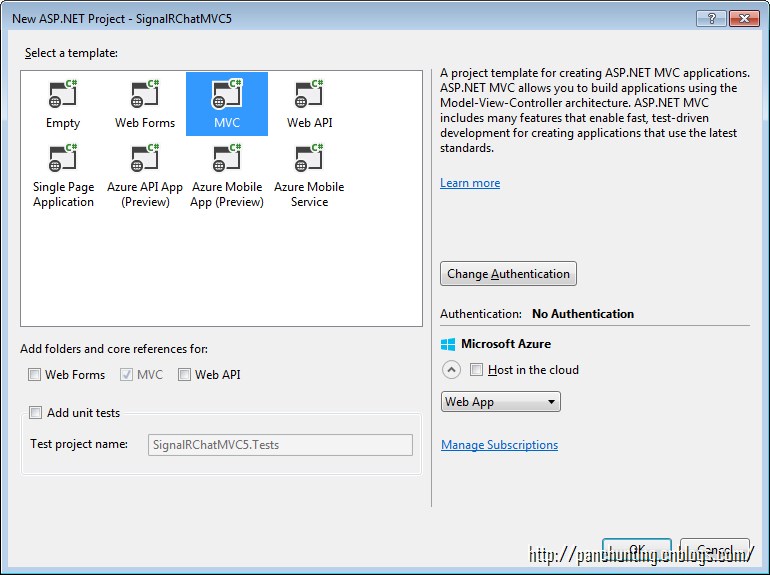
安装 SignalR
Install-Package Microsoft.AspNet.SignalR
在项目中添加文件夹 Hubs
在 Hubs 文件夹中添加 SignalR Hub Class (V2)
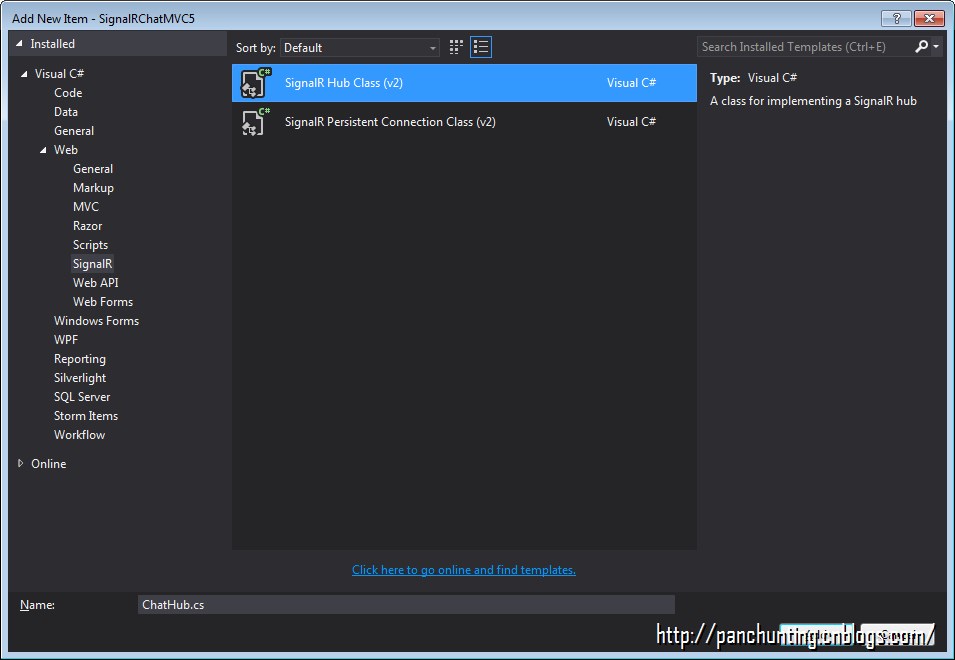
代码如下
using System;

using System.Collections.Generic;

using System.Linq;

using System.Web;

using Microsoft.AspNet.SignalR;

namespace SignalRChatMVC5.Hubs

{

    public class ChatHub : Hub

    {

        public void Send(string name, string message)

        {

            // Call the addNewMessageToPage method to update clients.

            Clients.All.addNewMessageToPage(name, message);

        }

    }

}
添加OWIN Startup Class
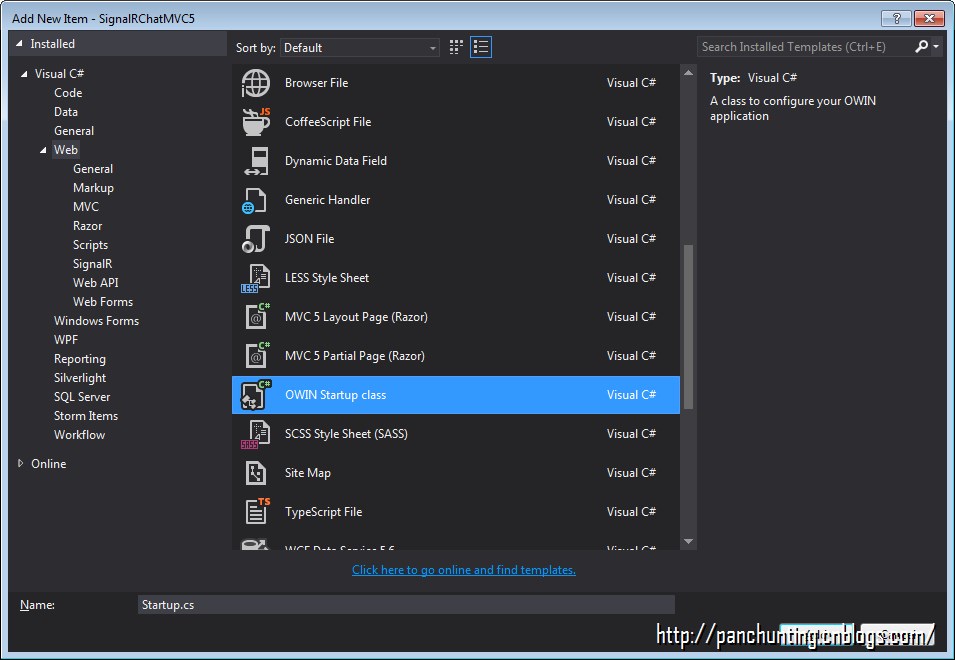
代码如下
using System;

using System.Threading.Tasks;

using Microsoft.Owin;

using Owin;

[assembly: OwinStartup(typeof(SignalRChatMVC5.Startup))]

namespace SignalRChatMVC5

{

    public class Startup

    {

        public void Configuration(IAppBuilder app)

        {

            // Any connection or hub wire up and configuration should go here

            app.MapSignalR();

        }

    }

}
在 HomeController 中添加方法 Chat
public ActionResult Chat()

{

    return View();

}
右击添加 View
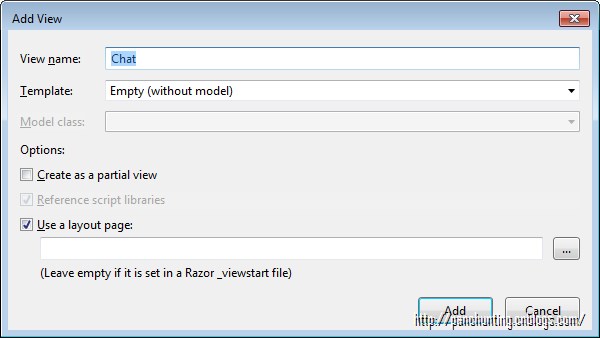
代码如下
@{

    ViewBag.Title = "Chat";

}

<h2>Chat</h2>

<div class="container">

    <input type="text" id="message" />

    <input type="button" id="sendmessage" value="Send" />

    <input type="hidden" id="displayname" />

    <ul id="discussion"></ul>

</div>

@section scripts {

    <!--Script references. -->

    <!--The jQuery library is required and is referenced by default in _Layout.cshtml. -->

    <!--Reference the SignalR library. -->

    <script src="~/Scripts/jquery.signalR-2.2.0.min.js"></script>

    <!--Reference the autogenerated SignalR hub script. -->

    <script src="~/signalr/hubs"></script>

    <!--SignalR script to update the chat page and send messages.-->

    <script>

        $(function () {

            // Reference the auto-generated proxy for the hub.

            var chat = $.connection.chatHub;

            // Create a function that the hub can call back to display messages.

            chat.client.addNewMessageToPage = function (name, message) {

                // Add the message to the page.

                $('#discussion').append('<li><strong>' + htmlEncode(name) + '</strong>: ' + htmlEncode(message) + '</li>');

            };

            // Get the user name and store it to prepend to messages.

            $('#displayname').val(prompt('Enter your name:', ''));

            // Set initial focus to message input box.

            $('#message').focus();

            // Start the connection.

            $.connection.hub.start().done(function () {

                $('#sendmessage').click(function () {

                    // Call the Send method on the hub.

                    chat.server.send($('#displayname').val(), $('#message').val());

                    // Clear text box and reset focus for next comment.

                    $('#message').val('').focus();

                });

            });

        });

        // This optional function html-encodes messages for display in the page.

        function htmlEncode(value) {

            var encodedValue = $('<div />').text(value).html();

            return encodedValue;

        }

    </script>

}
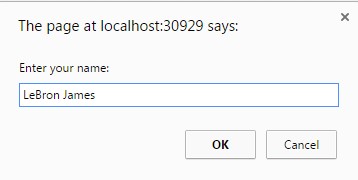
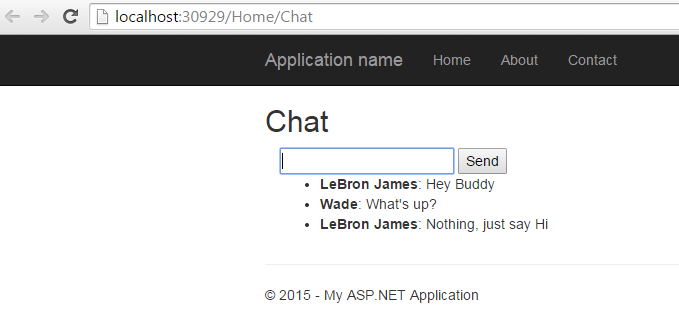
运行效果(开启两个浏览器窗口)
SignalR + MVC5 简单示例的更多相关文章
- SignalR 简单示例
一.什么是 SignalR ASP.NET SignalR is a library for ASP.NET developers that simplifies the process of add ...
- SignalR代理对象异常:Uncaught TypeError: Cannot read property 'client' of undefined 推出的结论 SignalR 简单示例 通过三个DEMO学会SignalR的三种实现方式 SignalR推送框架两个项目永久连接通讯使用 SignalR 集线器简单实例2 用SignalR创建实时永久长连接异步网络应用程序
SignalR代理对象异常:Uncaught TypeError: Cannot read property 'client' of undefined 推出的结论 异常汇总:http://www ...
- SignalR简单示例教程入门版
上周五最后一天在公司上班,无聊之余就想做点什么.介于之前有人让我做个简易版的在线聊天的,于是乎就打算花一天时间来弄下关于SignalR的简单教程制作一个在线的聊天的. 1:前端用了国产的一个MVVM框 ...
- Linux下的C Socket编程 -- server端的简单示例
Linux下的C Socket编程(三) server端的简单示例 经过前面的client端的学习,我们已经知道了如何创建socket,所以接下来就是去绑定他到具体的一个端口上面去. 绑定socket ...
- C# 构建XML(简单示例)
C# 构建XML的简单示例: var pars = new Dictionary<string, string> { {"url","https://www. ...
- 根据juery CSS点击一个标签弹出一个遮罩层的简单示例
<!DOCTYPE html> <html xmlns="http://www.w3.org/1999/xhtml"> <head> <m ...
- ACEXML解析XML文件——简单示例程序
掌握了ACMXML库解析XML文件的方法后,下面来实现一个比较完整的程序. 定义基本结构 xml文件格式如下 <?xml version="1.0"?> <roo ...
- demo工程的清单文件及activity中api代码简单示例
第一步注册一个账户,并创建一个应用.获取app ID与 app Key. 第二步下载sdk 第三步新建工程,修改清单文件,导入相关的sdk文件及调用相应的api搞定. 3.1 修改清单文件,主要是加入 ...
- spring-servlet.xml简单示例
spring-servlet.xml简单示例 某个项目中的spring-servlet.xml 记下来以后研究用 <!-- springMVC简单配置 --> <?xml versi ...
随机推荐
- UVa 10071 - Back to High School Physics
https://uva.onlinejudge.org/index.php?option=com_onlinejudge&Itemid=8&category=94&page=s ...
- Android-ConvenientBanner轻松实现广告头效果
Android-ConvenientBanner通用的广告栏控件,让你轻松实现广告头效果.支持无限循环, 可以设置自动翻页和时间(而且非常智能,手指触碰则暂停翻页,离开自动开始翻页. 你也可以设置在界 ...
- Ubuntu12.04-x64编译Hadoop2.2.0和安装Hadoop2.2.0集群
本文Blog地址:http://www.cnblogs.com/fesh/p/3766656.html 本文对Hadoop-2.2.0源码进行重新编译(64位操作系统下不重新编译会有版本问题) ...
- [python] python 中的" "和' '都是完全转义
dict = {"a" : "apple", "b" : "banana", "g" : " ...
- jdk代理和cglib代理
1.jdk静态代理(静态代理和动态代理) 本质:在内存中构建出接口的实现类. 缺陷:只能对实现接口的类实现动态代理, 使用cglib可以对没有实现接口的类进行动态代理. 2.cglib动态代理 ...
- RPC应用的java实现(转)
一.RPC介绍 什么是RPC?Remote Procedure Call,远程过程调用.也就是说,调用过程代码并不是在调用者本地运行,而是要实现调用者与被调用者二地之间的连接与通信.比较严格的定义是: ...
- String、StringBuffer、StringBuilder源码解读
序 好长时间没有认真写博客了,过去的一年挺忙的.负责过数据库.线上运维环境.写代码.Code review等等东西挺多. 学习了不少多方面的东西,不过还是需要回归实际.加强内功,方能扛鼎. 去年学习M ...
- FreeBSD_11-系统管理——{Part_1-桌面}
一.Xorg 安装 xorg pkg install xorg 清除旧文件(如果已前安装过 xorg) /etc/X11/xorg.conf /usr/local/etc/X11/xorg.conf ...
- vi/vim学习
1.vi3中模式 一般模式.编辑模式.命令模式2.快捷操作 i.I插入:i在目前的光标所在处插入文字:I(大写i)在行首插入 a.A 增加:a由光标所在的下一个字开始输入:A由光标所在行的最后增加 o ...
- Bank homework 10 2016 4 25
#include<iostream>#include<string>using namespace std;class Bank { public: Bank(string _ ...