
从源码看Android中sqlite是怎么读DB的(转)
执行query
执行SQLiteDatabase类中query系列函数时,只会构造查询信息,不会执行查询。
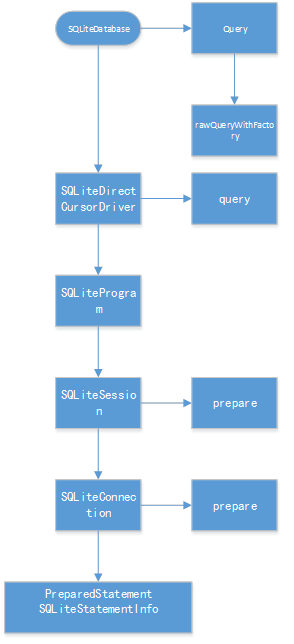
(query的源码追踪路径)
执行move(里面的fillwindow是真正打开文件句柄并分配内存的地方)
当执行Cursor的move系列函数时,第一次执行,会为查询结果集创建一块共享内存,即cursorwindow

moveToPosition源码路径
fillWindow----真正耗时的地方
然后会执行sql语句,向共享内存中填入数据,
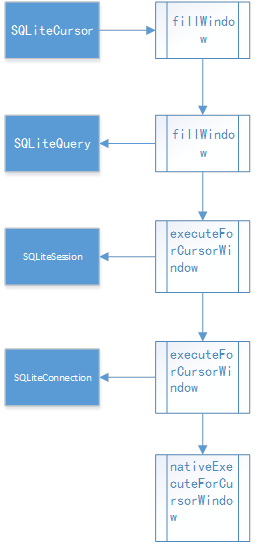
fillWindow源码路径
在SQLiteCursor.java中可以看到

 1 @Override

 2 public boolean onMove(int oldPosition, int newPosition) {

 3     // Make sure the row at newPosition is present in the window

 4     if (mWindow == null || newPosition < mWindow.getStartPosition() ||

 5             newPosition >= (mWindow.getStartPosition() + mWindow.getNumRows())) {

 6         fillWindow(newPosition);

 7     }

 8

 9     return true;

10 }
如果请求查询的位置在cursorWindow的范围内,不会执行fillWindow,
而超出cursorwindow的范围,会调用fillWindow,
而在nativeExecuteForCursorWindow中,
获取记录时,如果要请求的位置超出窗口范围,会发生CursorWindow的清空:
 1 CopyRowResult cpr = copyRow(env, window, statement, numColumns, startPos, addedRows);

 2 if (cpr == CPR_FULL && addedRows && startPos + addedRows < requiredPos) {

 3 // We filled the window before we got to the one row that we really wanted.

 4 // Clear the window and start filling it again from here.

 5 // TODO: Would be nicer if we could progressively replace earlier rows.

 6 window->clear();

 7 window->setNumColumns(numColumns);

 8 startPos += addedRows;

 9 addedRows = 0;

10 cpr = copyRow(env, window, statement, numColumns, startPos, addedRows);

11 }
CursorWindow的清空机制会影响到多线程读(通常认为不可以并发读写,sqlite的并发实际上是串行执行的,但可以并发读,这里要强调的是多线程读也可能有问题),具体见稍后一篇文章“listview并发读写数据库”。
Cursor关闭(显式调用close()的理由)
追踪源码看关闭
 1  //SQLiteCursor

 2

 3 super.close();

 4 synchronized (this) {

 5     mQuery.close();

 6     mDriver.cursorClosed();

 7 }

 8

 9

10 //AbstractCursor

11

12 public void close() {

13     mClosed = true;

14     mContentObservable.unregisterAll();

15     onDeactivateOrClose();

16 }

17

18 protected void onDeactivateOrClose() {

19     if (mSelfObserver != null) {

20         mContentResolver.unregisterContentObserver(mSelfObserver);

21         mSelfObserverRegistered = false;

22     }

23     mDataSetObservable.notifyInvalidated();

24 }

25

26

27 //AbstractWindowedCursor

28

29 /** @hide */

30 @Override

31 protected void onDeactivateOrClose() {

32     super.onDeactivateOrClose();

33     closeWindow();

34 }

35

36 protected void closeWindow() {

37     if (mWindow != null) {

38         mWindow.close();

39         mWindow = null;

40     }

41 }

42

43

44

45 //SQLiteClosable

46

47 public void close() {

48     releaseReference();

49 }

50

51 public void releaseReference() {

52     boolean refCountIsZero = false;

53     synchronized(this) {

54         refCountIsZero = --mReferenceCount == 0;

55     }

56     if (refCountIsZero) {

57         onAllReferencesReleased();

58     }

59 }

60

61 //CursorWindow

62

63 @Override

64 protected void onAllReferencesReleased() {

65     dispose();

66 }

67

68 private void dispose() {

69     if (mCloseGuard != null) {

70         mCloseGuard.close();

71     }

72     if (mWindowPtr != 0) {

73         recordClosingOfWindow(mWindowPtr);

74         nativeDispose(mWindowPtr);

75         mWindowPtr = 0;

76     }

77 }
跟CursorWindow有关的路径里,最终调用nativeDispose()清空cursorWindow;
当Cursor被GC回收时,会调用finalize:
 1 @Override

 2 protected void finalize() {

 3     try {

 4         // if the cursor hasn't been closed yet, close it first

 5         if (mWindow != null) {

 6             if (mStackTrace != null) {

 7                 String sql = mQuery.getSql();

 8                 int len = sql.length();

 9                 StrictMode.onSqliteObjectLeaked(

10                     "Finalizing a Cursor that has not been deactivated or closed. " +

11                     "database = " + mQuery.getDatabase().getLabel() +

12                     ", table = " + mEditTable +

13                     ", query = " + sql.substring(0, (len > 1000) ? 1000 : len),

14                     mStackTrace);

15             }

16             close();

17         }

18     } finally {

19         super.finalize();

20     }

21 }
然而finalize()并没有释放CursorWindow,而super.finalize();里也只是解绑了观察者,没有去释放cursorwindow
所以不调用cursor.close(),最终会导致cursorWindow所在的共享内存(1M或2M)泄露。
http://www.cnblogs.com/hellocwh/p/4924732.html
从源码看Android中sqlite是怎么读DB的(转)的更多相关文章
- 从源码看Android中sqlite是怎么通过cursorwindow读DB的
更多内容在这里查看 https://ahangchen.gitbooks.io/windy-afternoon/content/ 执行query 执行SQLiteDatabase类中query系列函数 ...
- Android so 文件进阶<二> 从dlsym()源码看android 动态链接过程
0x00 前言 这篇文章其实是我之前学习elf文件关于符号表的学习笔记,网上也有很多关于符号表的文章,怎么说呢,感觉像是在翻译elf文件格式的文档一样,千篇一律,因此把自己的学习笔记分享出来.dls ...
- 源码解析Android中View的measure量算过程
Android中的Veiw从内存中到呈现在UI界面上需要依次经历三个阶段:量算 -> 布局 -> 绘图,关于View的量算.布局.绘图的总体机制可参见博文< Android中View ...
- 从源码看java中Integer的缓存问题
在开始详细的说明问题之前,我们先看一段代码 public static void compare1(){ Integer i1 = 127, i2 = 127, i3 = 128, i4 = 128; ...
- 从源码看 Vue 中的 Mixin
最近在做项目的时候碰到了一个奇怪的问题,通过 Vue.mixin 方法注入到 Vue 实例的一个方法不起作用了,后来经过仔细排查发现这个实例自己实现了一个同名方法,导致了 Vue.mixin 注入方法 ...
- 从 php 源码看 php 中的对象
从一个简单的例子说起: class Person { public $name; public $age; public function __construct($name, $age) { $th ...
- 将Android源码导入eclipse中的方法以及编译Android源码指定模块
本文博客地址:http://blog.csdn.net/qq1084283172/article/details/53365659 将android源码导入eclipse.androidstudio. ...
- 从微信小程序开发者工具源码看实现原理(一)- - 小程序架构设计
使用微信小程序开发已经很长时间了,对小程序开发已经相当熟练了:但是作为一名对技术有追求的前端开发,仅仅熟练掌握小程序的开发感觉还是不够的,我们应该更进一步的去理解其背后实现的原理以及对应的考量,这可能 ...
- 从源码看commit和commitAllowingStateLoss方法区别
Fragment介绍 在很久以前,也就是我刚开始写Android时(大约在2012年的冬天--),那时候如果要实现像下面微信一样的Tab切换页面,需要继承TabActivity,然后使用TabHost ...
随机推荐
- Java / Android 基于Http的多线程下载的实现
转载请标明出处:http://blog.csdn.net/lmj623565791/article/details/26994463 有个朋友需要个多线程现在的例子,就帮忙实现了,在此分享下~ 先说下 ...
- 采用SharePoint Designer将JavaScript而他们的网站页面集成的定义
采用SharePoint Designer将JavaScript而他们的网站页面集成的定义 像JavaScript这种动态脚本语言可以给你的页面震撼效果.为了加盟JavaScript要定义自己的网站页 ...
- 达到J2EE在后台action控制接待javascript弹出的对话框
1.后台Action于: request.setAttribute("message", "这项username要么password错误,请重新输入!"); 2 ...
- cocos2dx 遮罩层 android 手机上 失败
1.CCClippingNode使用(在模拟器上ok,在手机上不行),实现多个剪切区域 local layer=CCLayerColor:create(ccc4(0,0,0,110)) --/ ...
- [Django] Base class in the model layer
In the model layer, the Model class is the base class while the ModelBase class is metaclass.
- 升级到tomcat8时Artifact SpringMvcDemo:war exploded: Server is not connected. Deploy is not
The method getDispatcherType() is undefined for the type HttpServletRequest 升级到tomcat8 http://segmen ...
- Windows下效率必备软件
AutoHotKey: 神器!神器!神器!当然也得看使用者咯(^__^) 嘻嘻…… Listary: 本地搜索神器,当然还有别的作用,More&More. Launchy : 快速启动安装的应 ...
- sql取整函数
SQL取整运算2009年04一个月02日本 星期四 10:01有使用说明这种方法记录,就在今天,那么当仍然被遗忘.事实上通常用四舍五入的操作有几种情况,一个是简单的四舍五入,无论是小数点后面的是什么都 ...
- Android截图
Android截图很好的实现,从文档的发展,查看View有一个接口getDrawingCache(),这个接口可以得到View当调用这个接口的位图图像Bitmap. 抓取截图View在图像的某一个时刻 ...
- 联想昭阳e43l笔记本配置
驱动精灵硬件检测报告 版本:2015.3.26.1363(8.1.326.1363)========================================================== ...