
使用Retrofit和RxJava
使用Retrofit和RxJava整合访问网络,然后将数据显示到界面上
def retrofitVersion = '2.0.0-beta1'

dependencies {

    compile fileTree(dir: 'libs', include: ['*.jar'])

    testCompile 'junit:junit:4.12'

    compile 'com.android.support:appcompat-v7:22.2.1'

    compile 'com.android.support:design:22.2.1'

    //Retrofit

    compile "com.squareup.retrofit:retrofit:$retrofitVersion"

    compile "com.squareup.retrofit:converter-gson:$retrofitVersion"

    //RxJava

    compile 'io.reactivex:rxjava:1.0.14'

    compile 'io.reactivex:rxandroid:1.0.1'

}
在app.buidle里面添加ReTrofit和RxJava的依赖,在
dependencies上面一定要注明Retrofit的版本号
def retrofitVersion = '2.0.0-beta1'

MainActivity里面的代码:
public class MainActivity extends Activity implements View.OnClickListener {

    /**

     * 自定义的观察者

     */

    public MyObserver observer;

    @Override

    protected void onCreate(Bundle savedInstanceState) {

        super.onCreate(savedInstanceState);

        setContentView(R.layout.activity_main);

        Button btn = (Button) findViewById(R.id.btn);

        btn.setOnClickListener(this);

        observer = new MyObserver();//创建一个观察者

    }

    //点击按钮就请求网络

    @Override

    public void onClick(View view) {

        if (view.getId() == R.id.btn) {//点击获取好友动态

            Control control = new Control(this);

            control.getFriendsShareFromServer();//访问网络并且解析Json

        }

    }

    /**

     * 自定义的观察者

     */

    class MyObserver implements rx.Observer<Resquest_friends_info> {

        @Override

        public void onCompleted() {

            Log.d("msg", "观察的事件结束了---");

        }

        @Override

        public void onError(Throwable e) {

            Log.d("msg", "观察的事件出错了");

        }

    //订阅观察者后,被观察者会把数据传回来

        @Override

        public void onNext(Resquest_friends_info resquest_friends_info) {

            Log.d("msg", "观察者OnNext");

            ArrayList<Resquest_friends_info.EveryShareInfo> results = resquest_friends_info.getResult();

            Toast.makeText(MainActivity.this,"观察者收到了数据",Toast.LENGTH_SHORT).show();

            for (Resquest_friends_info.EveryShareInfo info : results) {//每条分享的信息

                Log.d("msg", "分享信息++++" + info.getPub_context() + "--->" + info.getPub_datetime() + "----->" + info.getPub_frd_name());

                Log.d("msg", "-----------------------------------------------------");

                for (Resquest_friends_info.EveryShareInfo.Reply reply : info.pub_com) {//每条回复

                    Log.d("msg", "评论+++++" + reply.getPc_name() + "--->" + reply.getPc_txt() + "--->");

                    Log.d("msg", "----------------------------------------------------------------");

                }

                for (Resquest_friends_info.EveryShareInfo.Thumb thumb : info.pub_thumup) {//每个点赞

                    Log.d("msg", "点赞++++" + thumb.getPt_name());

                    Log.d("msg", "---------------------------------------");

                }

            }

        }

    }

}
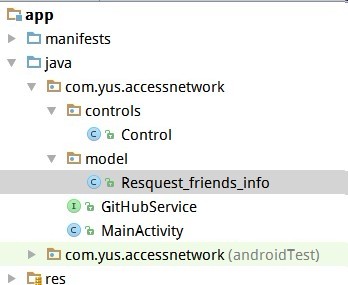
Resquest_friends_info表示一个JavaBean对象,
app结构如下:
//访问网络的接口

public interface GitHubService {

//    ================================================  =   =   ==  ==========
//
  //表示Get请求,里面是地址这是写死的地址,但是地址中的参数要动态改变,就不能这样写

  //  @GET("/index.php?m=home&c=message&a=resquest_friends_info&uid=1234567&p=1")
//参数要动态传进去,所以要这样写
//@GET(value = "/index.php"),  或者@GET("/index.php")也可以
@GET("/index.php")
//用这个方法去访问网络
Call<Resquest_friends_info> getFriendsShareInfo(@Query("m") String m,@Query("c") String c,@Query("a") String a,@Query("uid") String uid,@Query("p") String p);
}

这里的路径可以自己修改,比如,写成这样也是可以的:
//@GET("/index.php?m=home")
//Call<Resquest_friends_info> getFriendsShareInfo(@Query("c") String c,@Query("a") String a,@Query("uid") String uid,@Query("p") String p);
/**此类是访问网络的Control

 * Created by xhj on 15-12-18.

 */

public class Control {

    public static final String TAG="msg";
  //URL根路径,一般就是域名

    public static final String APITrack="http://192.168.1.102";

    private MainActivity activity;

    /**构造方法时把观察者所在的类传进来*/

    public Control(MainActivity activity){

        this.activity=activity;

    }

    /**从服务器获取好友动态*/

    public void getFriendsShareFromServer(){

        Retrofit retrofit = new Retrofit.Builder()

                        .baseUrl(APITrack)

                        .addConverterFactory(GsonConverterFactory.create())//用Gson去解析数据

                        .build();

        GitHubService git = retrofit.create(GitHubService.class);

        Call<Resquest_friends_info> call = git.getFriendsShareInfo();

        call.enqueue(new Callback<Resquest_friends_info>() {
        //访问网络回来,并且成功拿到数据就调用这个方法

            @Override

            public void onResponse(Response<Resquest_friends_info> response) {

                final Resquest_friends_info resquest_friends_info = response.body();

                Observable<Resquest_friends_info> observable = Observable.create(new Observable.OnSubscribe<Resquest_friends_info>() {

                    @Override

                    public void call(Subscriber<? super Resquest_friends_info> subscriber) {

                        subscriber.onNext(resquest_friends_info);

                        subscriber.onCompleted();//事件结束

                    }

                });

                observable.subscribe(activity.observer);//订阅观察者

            }

            @Override

            public void onFailure(Throwable t) {

                Log.d("msg","失败了");

            }

        });

    }

}
使用Retrofit和RxJava的更多相关文章
- Retrofit结合RxJava使用指南
Retrofit结合RxJava使用指南 Retrofit是一个当前很流行的网络请求库, 官网的介绍是: "Type-safe HTTP client for Android and Jav ...
- Android okHttp网络请求之Retrofit+Okhttp+RxJava组合
前言: 通过上面的学习,我们不难发现单纯使用okHttp来作为网络库还是多多少少有那么一点点不太方便,而且还需自己来管理接口,对于接口的使用的是哪种请求方式也不能一目了然,出于这个目的接下来学习一下R ...
- Retrofit与RXJava整合
Retrofit 除了提供了传统的 Callback 形式的 API,还有 RxJava 版本的 Observable 形式 API.下面我用对比的方式来介绍 Retrofit 的 RxJava 版 ...
- Android笔记之Retrofit与RxJava的组合
依赖 implementation 'com.squareup.retrofit2:retrofit:2.5.0' implementation 'com.squareup.retrofit2:con ...
- Retrofit+Okhttp+RxJava打造网络请求之Post
之前一直在准备Android培训的事情,所幸的是终于完事啦,在这过程中真的发现了自身无论从沟通能力还是技术能力上很多的不足,就用一句 路漫漫其修远兮,吾将上下而求索 来勉励自己吧.之前也在项目上用上O ...
- Retrofit与RXJava整合(转)
Retrofit 除了提供了传统的 Callback 形式的 API,还有 RxJava 版本的 Observable 形式 API.下面我用对比的方式来介绍 Retrofit 的 RxJava 版 ...
- Android--带你一点点封装项目 MVP+BaseActivity+Retrofit+Dagger+RxJava(二)
1,昨天我们基本上把MVP给封装起来了,今天接着昨天的东西来结合RxJava把Retrofit把网络框架简单的封装一下,先看一下我们今天实现的效果: 哈哈 ,还是昨天的效果,好吧 ,我认错. 2,由于 ...
- Android--带你一点点封装项目 MVP+BaseActivity+Retrofit+Dagger+RxJava(一)
1,其实早就想把这些东西给封装封装的,一直没有时间,今天刚好项目进入到测试阶段了,Bug同事在哪儿测试的飞起,但发现提bug的尽然是我(得意脸),然后上午把ios的包测试了一下,顺便把服务器给测挂了( ...
- retrofit okhttp RxJava bk Gson Lambda 综合示例【配置】
项目地址:https://github.com/baiqiantao/retrofit2_okhttp3_RxJava_butterknife.git <uses-permission andr ...
随机推荐
- CSS3的box-sizing属性
盒模型的宽度,在 IE5.x 以及 Quirks 模式的 IE6/7 中,将 border 与 padding 都包含在 width 之内 W3C标准中的盒模型宽度为内容宽度,不包括内边距paddin ...
- Activity LauchMode启动模式(转载)
转载于:http://www.cnblogs.com/plokmju/p/android_ActivityLauncherMode.html 在一个Android应用中,不可避免的会包含多个Activ ...
- HTML之打开/另存为/打印/刷新/查看原文件等按钮的代码
■打开■ <input name=Button onClick=document.all.WebBrowser.ExecWB(1,1) type=button value=打开> < ...
- Django:之ORM、CMS和二维码生成
Django ORM Django 的数据库接口非常好用,我们甚至不需要知道SQL语句如何书写,就可以轻松地查询,创建一些内容,所以有时候想,在其它的地方使用Django的 ORM呢?它有这么丰富的 ...
- 【Machine Learning in Action --2】K-近邻算法构造手写识别系统
为了简单起见,这里构造的系统只能识别数字0到9,需要识别的数字已经使用图形处理软件,处理成具有相同的色彩和大小:宽高是32像素的黑白图像.尽管采用文本格式存储图像不能有效地利用内存空间,但是为了方便理 ...
- 使用Visual C++编程
1.Visual C++的主要组件 Visual C++支持遵循C++11语言标准的C++语句,C++11语言标准是在ISO/IEC 14882:2011文档中定义的.Visual C++还没有实现该 ...
- bower 教程
1.运行 - cmd 2.npm install -g bower 3.文件夹右击git bash here
- 获取IP地址bash[转载]
ipaddr=`/sbin/ifconfig | grep 'inet addr:' | grep -v '127.0.0.1' | cut -d : -f2 | awk '{print $1}'`
- 图片应该放在drawable-hdpi下不要放在drawable下
图片应该放在drawable-hdpi下或者mipmap-hdpi 不要放在drawable下,要不然显示有些不同
- 好题 线段树对数据的保存+离线的逆向插入 POJ 2887
题目大意:给一个字符串,有插入和询问操作,每次往一个位置插入一个字符或者询问第p个位置的字符是什么. 思路:我们离线询问,逆向把所有的字符都插入给线段树,然后再查询就好了,每次都要记得插入线段树的最后 ...