
Android OpenGL ES(六)创建实例应用OpenGLDemos程序框架 .
有了前面关于Android OpenGL ES的介绍,可以开始创建示例程序OpenGLDemos。
使用Eclipse 创建一个Android项目
- Project Name: OpenGLDemos
- Build Target: Android 1.6 ( >1.5 即可)
- Application Name: Android OpenGL ES Demos
- Package Name: com.pstreets.opengl.demo
- Create Activity:AndroidOpenGLDemo
package com.example.gltest;

import javax.microedition.khronos.opengles.GL10;

import android.opengl.EGLConfig;

import android.opengl.GLSurfaceView.Renderer;

import android.opengl.GLU;

public class OpenGLRenderer implements Renderer {

     private final IOpenGLDemo openGLDemo;

     public OpenGLRenderer(IOpenGLDemo demo){

     openGLDemo=demo;

     }

     public void onSurfaceCreated(GL10 gl, EGLConfig config) {

     // Set the background color to black ( rgba ).

     gl.glClearColor(0.0f, 0.0f, 0.0f, 0.5f);

     // Enable Smooth Shading, default not really needed.

     gl.glShadeModel(GL10.GL_SMOOTH);

     // Depth buffer setup.

     gl.glClearDepthf(1.0f);

     // Enables depth testing.

     gl.glEnable(GL10.GL_DEPTH_TEST);

     // The type of depth testing to do.

     gl.glDepthFunc(GL10.GL_LEQUAL);

     // Really nice perspective calculations.

     gl.glHint(GL10.GL_PERSPECTIVE_CORRECTION_HINT,

     GL10.GL_NICEST);

     }

     public void onDrawFrame(GL10 gl) {

     if(openGLDemo!=null){

     openGLDemo.DrawScene(gl);

     }

     }

     public void onSurfaceChanged(GL10 gl, int width, int height) {

     // Sets the current view port to the new size.

     gl.glViewport(, , width, height);

     // Select the projection matrix

     gl.glMatrixMode(GL10.GL_PROJECTION);

     // Reset the projection matrix

     gl.glLoadIdentity();

     // Calculate the aspect ratio of the window

     GLU.gluPerspective(gl, 45.0f,

     (float) width / (float) height,

     0.1f, 100.0f);

     // Select the modelview matrix

     gl.glMatrixMode(GL10.GL_MODELVIEW);

     // Reset the modelview matrix

     gl.glLoadIdentity();

     }

    @Override

    public void onSurfaceCreated(GL10 arg0,

            javax.microedition.khronos.egl.EGLConfig arg1) {

        // TODO Auto-generated method stub

    }

    }
为简洁起见,为所有的示例定义了一个接口IOpenGLDemo,
定义在IOpenGLDemo.java
package com.example.gltest;

import javax.microedition.khronos.opengles.GL10;

public interface IOpenGLDemo {

     public void DrawScene(GL10 gl);

    }
DrawScene 用于实际的GL绘图示例代码,其它的初始化工作基本就由GLSurfaceView 和OpenGLRenderer 完成,其中onSurfaceCreated 和 onSurfaceChanged 中的代码含义现在无需了解,后面会有具体介绍,只要知道它们是用来初始化GLSurfaceView就可以了。
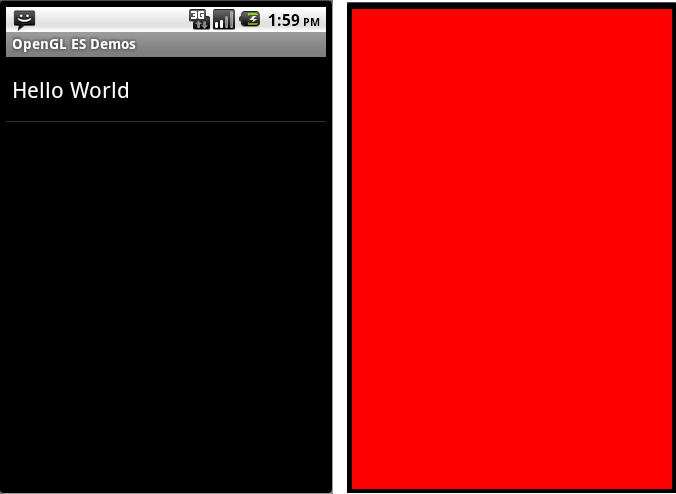
最后使用一个简单的例子“Hello World”结束本篇,“Hello World” 使用红色背景刷新屏幕。
MainActivity.java
package com.example.gltest;

import javax.microedition.khronos.opengles.GL10;

import android.opengl.GLSurfaceView;

import android.os.Bundle;

import android.app.Activity;

import android.view.Menu;

import android.view.Window;

import android.view.WindowManager;

public class MainActivity extends Activity

       implements IOpenGLDemo{

        /** Called when the activity is first created. */

        @Override

        public void onCreate(Bundle savedInstanceState) {

            super.onCreate(savedInstanceState);

            this.requestWindowFeature(Window.FEATURE_NO_TITLE);

            getWindow()

             .setFlags(WindowManager.LayoutParams.FLAG_FULLSCREEN,

                WindowManager.LayoutParams.FLAG_FULLSCREEN);

            mGLSurfaceView = new GLSurfaceView(this);

            mGLSurfaceView.setRenderer(new OpenGLRenderer(this));

            setContentView(mGLSurfaceView);

        }

        public void DrawScene(GL10 gl) {

            gl.glClearColor(1.0f, 0.0f, 0.0f, 0.0f);

            // Clears the screen and depth buffer.

            gl.glClear(GL10.GL_COLOR_BUFFER_BIT

              | GL10.GL_DEPTH_BUFFER_BIT);

        }

        @Override

        protected void onResume() {

            // Ideally a game should implement

            // onResume() and onPause()

            // to take appropriate action when the

            //activity looses focus

            super.onResume();

            mGLSurfaceView.onResume();

        }

        @Override

        protected void onPause() {

            // Ideally a game should implement onResume()

            //and onPause()

            // to take appropriate action when the

            //activity looses focus

            super.onPause();

            mGLSurfaceView.onPause();

        }

        private GLSurfaceView mGLSurfaceView;

    }
结果如下:
Android OpenGL ES(六)创建实例应用OpenGLDemos程序框架 .的更多相关文章
- Android OpenGL ES(六)----进入三维在代码中创建投影矩阵和旋转矩阵
我们如今准备好在代码中加入透视投影了. Android的Matrix类为它准备了两个方法------frustumM()和perspectiveM(). 不幸的是.frustumM()的个缺陷,它会影 ...
- Android OpenGL ES 开发教程 从入门到精通
感谢,摘自:http://blog.csdn.net/mapdigit/article/details/7526556 Android OpenGL ES 简明开发教程 Android OpenGL ...
- Android OpenGL ES(八)绘制点Point ..
上一篇介绍了OpenGL ES能够绘制的几种基本几何图形:点,线,三角形.将分别介绍这几种基本几何图形的例子.为方便起见,暂时在同一平面上绘制这些几何图形,在后面介绍完OpenGL ES的坐标系统和坐 ...
- Android OpenGL ES(七)基本几何图形定义 .
在前面Android OpenGL ES(六):创建实例应用OpenGLDemos程序框架 我们创建了示例程序的基本框架,并提供了一个“Hello World”示例,将屏幕显示为红色. 本例介绍Ope ...
- Android OpenGL ES 开发(一): OpenGL ES 介绍
简介OpenGL ES 谈到OpenGL ES,首先我们应该先去了解一下Android的基本架构,基本架构下图: 在这里我们可以找到Libraries里面有我们目前要接触的库,即OpenGL ES. ...
- Android OpenGL ES 入门系列(一) --- 了解OpenGL ES的前世今生
转载请注明出处 本文出自Hansion的博客 OpenGL ES (OpenGL for Embedded Systems) 是 OpenGL 三维图形 API 的子集,针对手机.PDA和游戏主机等嵌 ...
- Android OpenGL ES .介绍
引自:http://blog.csdn.net/hgl868/article/details/6971624 1. OpenGL ES 简介 Android 3D引擎采用的是OpenGL ES. ...
- Android OpenGL ES(五)GLSurfaceView .
Android OpenGL ES 相关的包主要定义在 javax.microedition.khronos.opengles GL 绘图指令 javax.microedition.khrono ...
- [工作记录] Android OpenGL ES: non-square texture - continue
previous: [工作记录] Android OpenGL ES 2.0: square texture not supported on some device recently I found ...
随机推荐
- Llinux环境下编译并使用OpenCV
http://docs.opencv.org/2.4/doc/tutorials/introduction/linux_install/linux_install.html http://stacko ...
- JavaScript基础知识复习
1,javascript是基于对象和事件驱动的,并有安全性能的脚本语言: 2,javascript的特点: 1)向HTML中添加交互事件: 2)脚本语言,与java语法类似: 3)解释性语言,边执行边 ...
- MVC3+EF4.1学习系列(九)-----EF4.1其他的一些技巧的使用
上节通过一系列重构 简单的项目就实现了 不过还有些EF的功能没有讲 这节就通过项目 讲讲EF其他的功能与技巧 一.直接执行SQL语句 通常来讲 EF 不用写SQL语句的 但是 在有些场合 比如对生 ...
- SignalR的坑爹细节
好吧!SignalR的确是好用,照着官网的例子自己敲了一遍,死活得不到效果... 检查了半天,抱着试一试的心态吧原来在服务端大写开头的Hub类和大写开头的方法在客户端调用的时候,全部改成小写,一刷新, ...
- html5 读写sqlite数据库
var db = openDatabase('MyData','','My Database',102400); //首先它创建一个数据库表,里面有3个字段 db.transaction(functi ...
- Mainline/Stable/Legacy
Nginx官网提供了三个类型的版本Mainline version:Mainline 是 Nginx 目前主力在做的版本,可以说是开发版Stable version:最新稳定版,生产环境上建议使用的版 ...
- Foundations of Computer Science
1, Iteration, Induction and Recursion 2, the running time of program 3, combinatorics and probabilit ...
- 配置mac自带的Apache服务器
第一步: 484 cd /etc/apache2 备份httpd.conf文件,以防万一 486 sudo cp httpd.conf httpd.conf.bak 如果操作错误,可以通过 491 ...
- MFC下调试日志的打印
最近项目出现点小Bug,需要调试跟踪代码,于是乎写了份打印日志的代码. CLogFile.h文件 #if !defined(AFX_LOGFILE_H__288388CA_9A3E_4F3D_A2B8 ...
- Spring 表单提交,后台自动封装有集合对象的对象
from表单: <form action="${pageContext.request.contextPath}/vote/save" method="post&q ...