
iOS 多线程NSThread理解与场景示例
NSThread是相对GCD和NSOperationQuene而言,比较轻量级的一种多线程处理方式。
但同时,它的弊端就是需要自己管理线程的生命周期,以及线程同步;而另外两种不需要自己管理。
常见方法介绍:
一、获取当前线程
NSThread *current = [NSThread currentThread];
二、获取主线程
NSThread *main = [NSThread mainThread];
三、NSThread的创建
1 // 初始化线程

2 NSThread *thread = [[NSThread alloc] initWithTarget:self selector:@selector(run:) object:@"aaa"];

3 // 开启线程

4 [thread start];
.静态方法
+ (void)detachNewThreadSelector:(SEL)selector toTarget:(id)target withObject:(id)argument;
[NSThread detachNewThreadSelector:@selector(run:) toTarget:self withObject:@""];
执行完上面代码后会马上启动一条新线程,并且在这条线程上调用self的run方法。
.隐式创建线程
[self performSelectorInBackground:@selector(run:) withObject:@""];
会隐式地创建一条新线程,并且在这条线程上调用self的run方法。
四、暂停当前线程
[NSThread sleepForTimeInterval:2];
NSDate *date = [NSDate dateWithTimeInterval:2 sinceDate:[NSDate date]];

[NSThread sleepUntilDate:date];
上面两种做法都是暂停当前线程2秒
退出线程
[NSThread exit];
五、线程的其他操作
1.在指定线程上执行操作
1 [self performSelector:@selector(run) onThread:thread withObject:nil waitUntilDone:YES];
* 上面代码的意思是在thread这条线程上调用self的run方法
* 最后的YES代表:上面的代码会阻塞,等run方法在thread线程执行完毕后,上面的代码才会通过
2.在主线程上执行操作
[self performSelectorOnMainThread:@selector(run) withObject:nil waitUntilDone:YES];
在主线程调用self的run方法
3.在当前线程执行操作
[self performSelector:@selector(run) withObject:nil];
在当前线程调用self的run方法
场景1:
异步下载一张图片,下载完在UI显示。
代码实现:
//开启子线程下载
[NSThread detachNewThreadSelector:@selector(downloadPic) toTarget:self withObject:nil];

//下载图片

-(void)downloadPic{

    NSURL *url = [NSURL URLWithString:@"https://res.wx.qq.com/mpres/htmledition/images/mp_qrcode218877.gif"];

    NSData *pic = [NSData dataWithContentsOfURL:url];

    UIImage *img = [UIImage imageWithData:pic];

    //回到主线程显示

    [self performSelectorOnMainThread:@selector(showImg:) withObject:img waitUntilDone:YES];

}

-(void)showImg:(UIImage *)image{

    //imageView.image = image

    NSLog(@"显示 pic");

}
六、多线程安全与加锁
说明:多线程访问同一个资源的时候可能会出现数据错乱等安全问题,解决方法是对必要的代码段进行加锁。
注意:在OC中加互斥锁使用@synchronized(self) {},在swift可以使用objc_sync_enter(self)和objc_sync_exit(self)方法,注意这两个方法必须成对使用,把要加锁的代码放在中间.
场景1:
以售票为例:3个售票员同时售票,票总数为10。
- (void)sailTicket {

    NSThread *thread1 = [[NSThread alloc] initWithTarget:self selector:@selector(sale) object:nil];

    NSThread *thread2 = [[NSThread alloc] initWithTarget:self selector:@selector(sale) object:nil];

    NSThread *thread3 = [[NSThread alloc] initWithTarget:self selector:@selector(sale) object:nil];

    thread1.name = @"售票员1";

    thread2.name = @"售票员2";

    thread3.name = @"售票员3";

    [thread1 start];

    [thread2 start];

    [thread3 start];

}

-(void)sale{

    while () {

        @synchronized (self) {

            for (int i = ; i<; i++) {

                //模拟延迟

            }

            if (_ticketCount>){

                _ticketCount--;

                NSLog(@"%@卖出了一张票,余票还有%lu",[NSThread currentThread].name,(unsigned long)_ticketCount);

            }else{

                NSLog(@"票已售完");

                break;

            }

        }

    }

}

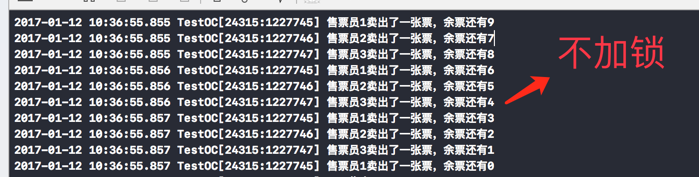
可以很明显看出,每个售票员都是严格按照从10递减的方式售票,不存在票数忽多忽少的情况。
如果不加锁:
iOS 多线程NSThread理解与场景示例的更多相关文章
- iOS多线程 NSThread/GCD/NSOperationQueue
无论是GCD,NSOperationQueue或是NSThread, 都没有线程安全 在需要同步的时候需要使用NSLock或者它的子类进行加锁同步 "] UTF8String], DISPA ...
- ios多线程NSThread
1.简介: 1.1 iOS有三种多线程编程的技术,分别是: 1..NSThread 2.Cocoa NSOperation (iOS多线程编程之NSOperation和NSOperationQueue ...
- iOS多线程NSThread和GCD
在iOS中啊 其实有多种方法实现多线程 这里只记录两个比较常用的 或者说我比较常用的 一个就是BSThread 另一个就是一听名字就比较霸气的妇孺皆知的GCD 先说一下NSThread吧 这个方式 ...
- iOS 多线程之线程锁Swift-Demo示例总结
线程锁是什么 在前面的文章中总结过多线程,总结了多线程之后,线程锁也是必须要好好总结的东西,这篇文章构思的时候可能写的东西得许多,只能挤时间一点点的慢慢的总结了,知道了线程之后要了解线程锁就得先了解一 ...
- IOS 多线程 NSThread
一个正在运行的应用程序是一个进程,一个进程会默认开启一个主线程,但是在主线程中的操作是串行的,也就是当有多个任务同时需要完成的时候,是按照顺序一个个执行.因此,为了提高效率,会在进程中开启多个线程,每 ...
- IOS 多线程-NSThread 和线程状态
@interface HMViewController () - (IBAction)btnClick; @end @implementation HMViewController - (void)v ...
- iOS多线程的详情使用示例--简进祥
大家都知道,在开发过程中应该尽可能减少用户等待时间,让程序尽可能快的完成运算.可是无论是哪种语言开发的程序最终往往转换成汇编语言进而解释成机器码来执行.但是机器码是按顺序执行的,一个复杂的多步操作只能 ...
- iOS多线程开发
概览 大家都知道,在开发过程中应该尽可能减少用户等待时间,让程序尽可能快的完成运算.可是无论是哪种语言开发的程序最终往往转换成汇编语言进而解释成机器码来执行.但是机器码是按顺序执行的,一个复杂的多步操 ...
- iOS 多线程详解
iOS开发 多线程 概览 机器码是按顺序执行的,一个复杂的多步操作只能一步步按顺序逐个执行.改变这种状况可以从两个角度出发: 对于单核处理器,可以将多个步骤放到不同的线程,这样一来用户完成UI操作后其 ...
随机推荐
- 2016"百度之星" - 资格赛(Astar Round1) Problem B
规律题,斐波那契数列,数据有毒,0的时候输出换行.会爆longlong,写个大数模板或者Java搞. import java.io.BufferedInputStream; import java.m ...
- mac ox 配置java和maven
参考http://www.cnblogs.com/iOS-mt/p/5726380.html 以及http://blog.csdn.net/done58/article/details/5113805 ...
- (三)Jquery Mobile按钮详细讲解
Jquery Mobile按钮详细讲解 一.JM按钮说明 按钮如下图所示 1.HTML5中的button 效果: 2. JM中的普通button ...
- cocos2dx 3.2 的中国象棋游戏
改编来源:http://cn.cocos2d-x.org/tutorial/lists?id=103 在cocos2dx官网看到了这么个教程,是cocos2dx 2.x版本的,于是用 cocos2dx ...
- ApexSql Log
网址:https://www.apexsql.com/,可免费试用14天 安装成功后,点击new,配置DB连接: 选择要分析的Log文件: 进行过滤设置: 基本设置:时间,DML和 ...
- LPC1768外部中断与GPIO中断
LPC1768的外部中断严格来说只有四个,分别是EINT0,EINT1,EINT2,EINT3,技术手册上有如下说明 控制这四个外部中断靠以下寄存器 这三个寄存器的0 1 2 3位分别代表中断的0 1 ...
- ASIHTTPRequest异步请求
我们运行程序,如果网速很慢,查询的时候会一直黑屏,直到请求结束画面才出现,这样用户体验很不好.因此同步请求一般只是在某个子线 程中使用,而不在主线程中使用.异步请求的用户体验要比同步请求好,因此一般情 ...
- webstorm 激活码
WebStorm 2016 最新版激活(activation code方式) 注册时,在打开的License Activation窗口中选择“activation code”,在输入框输入下面的注册码 ...
- IOS开发中长按的手势事件编程
长按手势事件: 长按按钮1S后改变按钮颜色: // 长按事件 #import "ViewController.h" @interface ViewController (){ UI ...
- Bzoj1479: [Nerrc1997]Puncher打孔机
1479: [Nerrc1997]Puncher打孔机 Time Limit: 5 Sec Memory Limit: 64 MBSubmit: 22 Solved: 14[Submit][Sta ...