
Windows Phone开发(6):处理屏幕方向的改变
原文:Windows Phone开发(6):处理屏幕方向的改变
俺们都知道,智能手机可以通过旋转手机来改变屏幕的显示方向,更多的时候,对于屏幕方向的改变,我们要做出相应的处理,例如,当手机屏幕方向从纵向变为横向时,可能要重新排列页面上的控件以适应显示区域的变化。
要使页面支持旋转,要把PhoneApplicationPage的SupportedOrientations属性改为PortraitOrLandscape,然后可以通过定义OrientationChanged事件来处理布局。形如:
<phone:PhoneApplicationPage

    ..............

    SupportedOrientations="PortraitOrLandscape"

    Orientation="Portrait"

    OrientationChanged="PhoneApplicationPage_OrientationChanged">
一、Grid控件的处理。
<phone:PhoneApplicationPage

    x:Class="Sample_PageDir.Page1"

    xmlns="http://schemas.microsoft.com/winfx/2006/xaml/presentation"

    xmlns:x="http://schemas.microsoft.com/winfx/2006/xaml"

    xmlns:phone="clr-namespace:Microsoft.Phone.Controls;assembly=Microsoft.Phone"

    xmlns:shell="clr-namespace:Microsoft.Phone.Shell;assembly=Microsoft.Phone"

    xmlns:d="http://schemas.microsoft.com/expression/blend/2008"

    xmlns:mc="http://schemas.openxmlformats.org/markup-compatibility/2006"

    FontFamily="{StaticResource PhoneFontFamilyNormal}"

    FontSize="{StaticResource PhoneFontSizeNormal}"

    Foreground="{StaticResource PhoneForegroundBrush}"

    mc:Ignorable="d" d:DesignHeight="768" d:DesignWidth="480"

    shell:SystemTray.IsVisible="True"

    SupportedOrientations="PortraitOrLandscape"

    Orientation="Portrait"

    OrientationChanged="PhoneApplicationPage_OrientationChanged">

    <Grid x:Name="layoutRoot">

        <Grid.RowDefinitions>

            <RowDefinition Height="Auto" />

            <RowDefinition Height="Auto" />

        </Grid.RowDefinitions>

        <Grid.ColumnDefinitions>

            <ColumnDefinition Width="Auto" />

            <ColumnDefinition Width="Auto" />

        </Grid.ColumnDefinitions>

        <Image x:Name="img" Source="http://gubapic.eastmoney.com/member/e68/e681999/e68199920091216131540.jpg" Stretch="UniformToFill" Width="270" Grid.Row="0" Grid.Column="0" />

        <TextBlock x:Name="txtBlock"

            Grid.Row="1"

            Grid.Column="0"

            FontSize="70"

            Margin="28">

            <Run Foreground="Coral">信春哥</Run>

            <LineBreak/>

            <Run Foreground="Yellow">唱情歌</Run>

            <LineBreak/>

            <Run Foreground="SkyBlue">不挂科</Run>

        </TextBlock>

    </Grid>

</phone:PhoneApplicationPage>
页面主要有两个控件,一个用于显示图片,一个用于显示文本信息,通过事件处理代码来相应改变两个控件的布局。
        private void PhoneApplicationPage_OrientationChanged(object sender, OrientationChangedEventArgs e)

        {

            // 如果是横向的

            if (e.Orientation == PageOrientation.Landscape ||

                e.Orientation == PageOrientation.LandscapeLeft ||

                e.Orientation == PageOrientation.LandscapeRight)

            {

                Grid.SetColumn(this.img, 0);

                Grid.SetRow(this.img, 0);

                Grid.SetRow(this.txtBlock, 0);

                Grid.SetColumn(this.txtBlock, 1);

            }

            // 如果是纵向

            else if (e.Orientation == PageOrientation.Portrait ||

                e.Orientation == PageOrientation.PortraitDown ||

                e.Orientation == PageOrientation.PortraitUp)

            {

                Grid.SetColumn(this.img, 0);

                Grid.SetRow(this.img, 0);

                Grid.SetRow(this.txtBlock, 1);

                Grid.SetColumn(this.txtBlock, 0);

            }

            else

            {

                Grid.SetColumn(this.img, 0);

                Grid.SetRow(this.img, 0);

                Grid.SetRow(this.txtBlock, 1);

                Grid.SetColumn(this.txtBlock, 0);

            }

        }
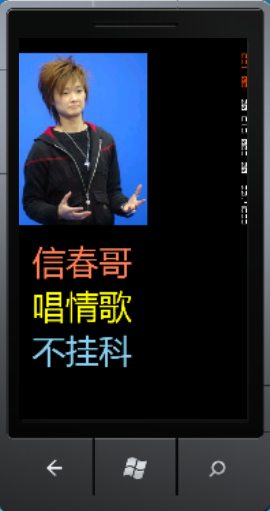
按F5运行程序,默认的屏幕方向是纵向的,如下图所示:
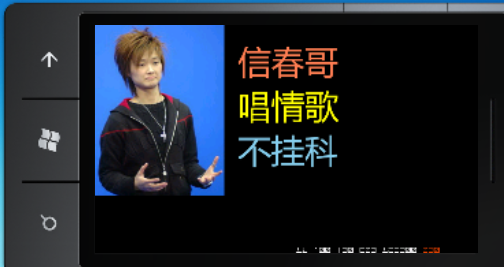
好,现在,我们把屏幕旋转一下,看看会怎么样。
二、StackPanel控件的处理。
<phone:PhoneApplicationPage

    x:Class="Sample_PageDir.Page2"

    xmlns="http://schemas.microsoft.com/winfx/2006/xaml/presentation"

    xmlns:x="http://schemas.microsoft.com/winfx/2006/xaml"

    xmlns:phone="clr-namespace:Microsoft.Phone.Controls;assembly=Microsoft.Phone"

    xmlns:shell="clr-namespace:Microsoft.Phone.Shell;assembly=Microsoft.Phone"

    xmlns:d="http://schemas.microsoft.com/expression/blend/2008"

    xmlns:mc="http://schemas.openxmlformats.org/markup-compatibility/2006"

    FontFamily="{StaticResource PhoneFontFamilyNormal}"

    FontSize="{StaticResource PhoneFontSizeNormal}"

    Foreground="{StaticResource PhoneForegroundBrush}"

    SupportedOrientations="PortraitOrLandscape"

    OrientationChanged="PhoneApplicationPage_OrientationChanged"

    Orientation="Portrait"

    mc:Ignorable="d" d:DesignHeight="768" d:DesignWidth="480"

    shell:SystemTray.IsVisible="True">

    <phone:PhoneApplicationPage.Resources>

        <Style TargetType="TextBlock">

            <Setter Property="FontSize" Value="46"/>

        </Style>

    </phone:PhoneApplicationPage.Resources>

    <StackPanel x:Name="pl">

        <TextBlock Text="文本一"/>

        <TextBlock Text="文本二"/>

        <TextBlock Text="文本三"/>

    </StackPanel>

</phone:PhoneApplicationPage>
后台事件处理代码。
        private void PhoneApplicationPage_OrientationChanged(object sender, OrientationChangedEventArgs e)

        {

            if (e.Orientation == PageOrientation.Landscape ||

                e.Orientation == PageOrientation.LandscapeLeft ||

                e.Orientation == PageOrientation.LandscapeRight)

            {

                this.pl.Orientation = System.Windows.Controls.Orientation.Horizontal;

            }

            else

            {

                this.pl.Orientation = System.Windows.Controls.Orientation.Vertical;

            }

        }
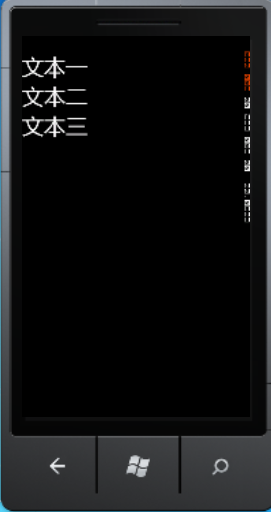
运行,默认方向是纵向。
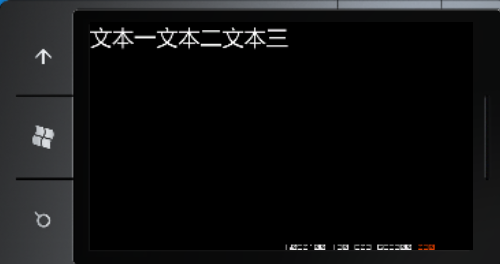
把屏幕旋转后。
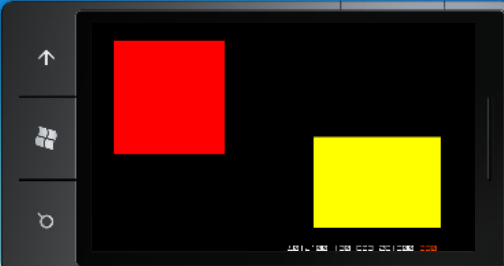
三、Canvas控件的处理。
<phone:PhoneApplicationPage

    x:Class="Sample_PageDir.Page3"

    xmlns="http://schemas.microsoft.com/winfx/2006/xaml/presentation"

    xmlns:x="http://schemas.microsoft.com/winfx/2006/xaml"

    xmlns:phone="clr-namespace:Microsoft.Phone.Controls;assembly=Microsoft.Phone"

    xmlns:shell="clr-namespace:Microsoft.Phone.Shell;assembly=Microsoft.Phone"

    xmlns:d="http://schemas.microsoft.com/expression/blend/2008"

    xmlns:mc="http://schemas.openxmlformats.org/markup-compatibility/2006"

    FontFamily="{StaticResource PhoneFontFamilyNormal}"

    FontSize="{StaticResource PhoneFontSizeNormal}"

    Foreground="{StaticResource PhoneForegroundBrush}"

    SupportedOrientations="PortraitOrLandscape"

    Orientation="Portrait"

    OrientationChanged="PhoneApplicationPage_OrientationChanged"

    mc:Ignorable="d" d:DesignHeight="768" d:DesignWidth="480"

    shell:SystemTray.IsVisible="True">

    <Canvas x:Name="cv">

        <Rectangle x:Name="rect1"

            Width="232"

            Height="238"

            Fill="Red"

            Canvas.Left="88"

            Canvas.Top="88"/>

        <Rectangle x:Name="rect2"

            Height="192"

            Width="275"

            Fill="Yellow"

            Canvas.Top="268"

            Canvas.Left="155"/>

    </Canvas>

</phone:PhoneApplicationPage>
后台代码。后台代码。
        private void PhoneApplicationPage_OrientationChanged(object sender, OrientationChangedEventArgs e)

        {

            if (e.Orientation== PageOrientation.Landscape||e.Orientation== PageOrientation.LandscapeLeft||e.Orientation== PageOrientation.LandscapeRight)

            {

                Canvas.SetTop(this.rect1, 37);

                Canvas.SetLeft(this.rect1, 46);

                Canvas.SetTop(this.rect2, 240);

                Canvas.SetLeft(this.rect2, 462);

            }

            else

            {

                Canvas.SetTop(this.rect1, 88);

                Canvas.SetLeft(this.rect1, 88);

                Canvas.SetTop(this.rect2, 268);

                Canvas.SetLeft(this.rect2, 155);

            }

        }
看看效果。看看效果。
纵向。

横向。
Windows Phone开发(6):处理屏幕方向的改变的更多相关文章
- Android开发之改动屏幕方向
有的场景下.我们须要把手机屏幕方向改变,以下是我写的一个样例. xml页面文件: <RelativeLayout xmlns:android="http://schemas.andro ...
- Silverlight for Windows Phone开发系列课程
Silverlight for Windows Phone开发系列课程(1):Windows Phone平台概况 课程简介:本节开始介绍系列课程的概况,包括课程内容,先决条件,学习目的 ...
- Windows phone开发 页面布局之屏幕方向
(博客部分内容参考Windows phone开发文档) Windows phone的屏幕方向是利用Windows phone设备的方向传感器提供的数据实现切换的. Windows Phone支持纵向和 ...
- 背水一战 Windows 10 (2) - UI: 概述, 启动屏幕, 屏幕方向
[源码下载] 背水一战 Windows 10 (2) - UI: 概述, 启动屏幕, 屏幕方向 作者:webabcd 介绍背水一战 Windows 10 之 UI UI 设计概述 启动屏幕(闪屏) 屏 ...
- Android开发之屏幕方向
一.处理屏幕方向变化的两种技术 1.锚定方法 2.调整大小和重新定位,这种方法一般是分别为横向和纵向两种模式各自定义用户界面xml界面文件,当方向变化时读取对应的界面配置文件即可. 二.检测屏幕方向改 ...
- 【NX二次开发】获得屏幕矩阵并设置WCS为屏幕方向
说明:获得屏幕矩阵并设置WCS为屏幕方向(Z朝向自己,X轴朝右,Y轴超上). 方法: 1 extern DllExport void ufusr(char *param, int *retcode, ...
- Kinect for Windows SDK开发入门(15):进阶指引 下
Kinect for Windows SDK开发入门(十五):进阶指引 下 上一篇文章介绍了Kinect for Windows SDK进阶开发需要了解的一些内容,包括影像处理Coding4Fun K ...
- Windows Phone开发(19):三维透视效果
原文:Windows Phone开发(19):三维透视效果 三维效果也可以叫透视效果,所以,我干脆叫三维透视效果.理论知识少讲,直接用例开场吧,因为这个三维效果其实很简单,比上一节中的变换更省事,不信 ...
- Windows Phone开发(4):框架和页
原文:Windows Phone开发(4):框架和页 在开如之前,我想更正一个小问题,之前我在第一篇文章中说,Visual Studio Express for Windows Phone的中文版没有 ...
随机推荐
- Android 系统搜索框(有浏览记录)
实现Android 系统搜索框(有浏览记录),先看下效果: 一.配置搜索描述文件 要在res中的xml文件加创建sreachable.xml,内容如下: <?xml version=" ...
- centos7里默认python升级到2.7.11
CentOS镜像使用帮助 http://mirrors.163.com/.help/centos.html 安装gcc yum install gcc* openssl openssl-devel ...
- openCV之头文件分析
我们利用openCV开源库进行项目开发时,往往要牵涉到头文件的添加问题,而openCV中头文件众多,该如何选择呢?下面对openCV2.4.10的头文件进行一个简单的梳理,以便能够快速的添加对应的头文 ...
- HDU/HDOJ 2612 Find a way 双向BFS
题目链接:http://acm.hdu.edu.cn/showproblem.php?pid=2612 思路:从两个起点出发,有多个终点,求从两个起点同时能到达的终点具有的最小时间,开两个数组分别保存 ...
- Linux命令之rz - 批量上传文件,简单易用(转载)
用途说明 rz命令能够批量上传文件,当然也可上传单个文件啦.使用的协议是古老的ZMODEM协议,尽管协议古老,但毫不影响的简单易用的特性.一般情 况我们要上传文件到Linux系统,要么使用ftp(还得 ...
- KFC - About KFC - Quality Assurance
KFC - About KFC - Quality Assurance Restaurant Quality The main attributes for KFC restaurant excell ...
- 三框架:使用数据源dbcp注意
使用spring整合hibernate时间,需要使用该数据源,数据源使用apache的dbcp,使用dbcp当需要依靠pool的jar包.选择dbcp和pool当你需要注意. DBCP 2 compi ...
- VSTO学习笔记(三) 开发Office 2010 64位COM加载项
原文:VSTO学习笔记(三) 开发Office 2010 64位COM加载项 一.加载项简介 Office提供了多种用于扩展Office应用程序功能的模式,常见的有: 1.Office 自动化程序(A ...
- hdu3605(最大流+状态压缩)
传送门:Escape 题意:给出每个人适合住的星球信息和该星球能住多少人 ,第一行给出n m 代表有 n 个人 m 个星球,然后接下来n行每行m个数字 1代表适合第 i 个星球 0 代表不适合第 i ...
- [置顶] ※数据结构※→☆线性表结构(stack)☆============栈 序列表结构(stack sequence)(六)
栈(stack)在计算机科学中是限定仅在表尾进行插入或删除操作的线性表.栈是一种数据结构,它按照后进先出的原则存储数据,先进入的数据被压入栈底,最后的数据在栈顶,需要读数据的时候从栈顶开始弹出数据.栈 ...