
第26课 std::async异步任务
一. std::async函数模板
(一)std::async和std::thread的区别
1. 两者最明显的区别在于async采用默认启动策略时并不一定创建新的线程。如果系统资源紧张,那么std::thread创建线程可能失败,系统报告异常,整个程序可能崩溃。而std::async一般则不会,它在无法创建新线程时,会将任务分配给后续调用future.get()函数的线程,并以同步的方式执行(即不创建新线程)。
2. std::async表现为更高阶的抽象,它把用户从线程管理的细节解放出来,将这些责任转交给C++标准库的实现者。而std::thread要求自行处理线程耗尽、超订、负载均衡以及新平台适配问题。
3. std::thread未提供直接获取线程函数返回值的方法。但std::async可以通过future对象来获取。
(二)std::async函数模板及分析
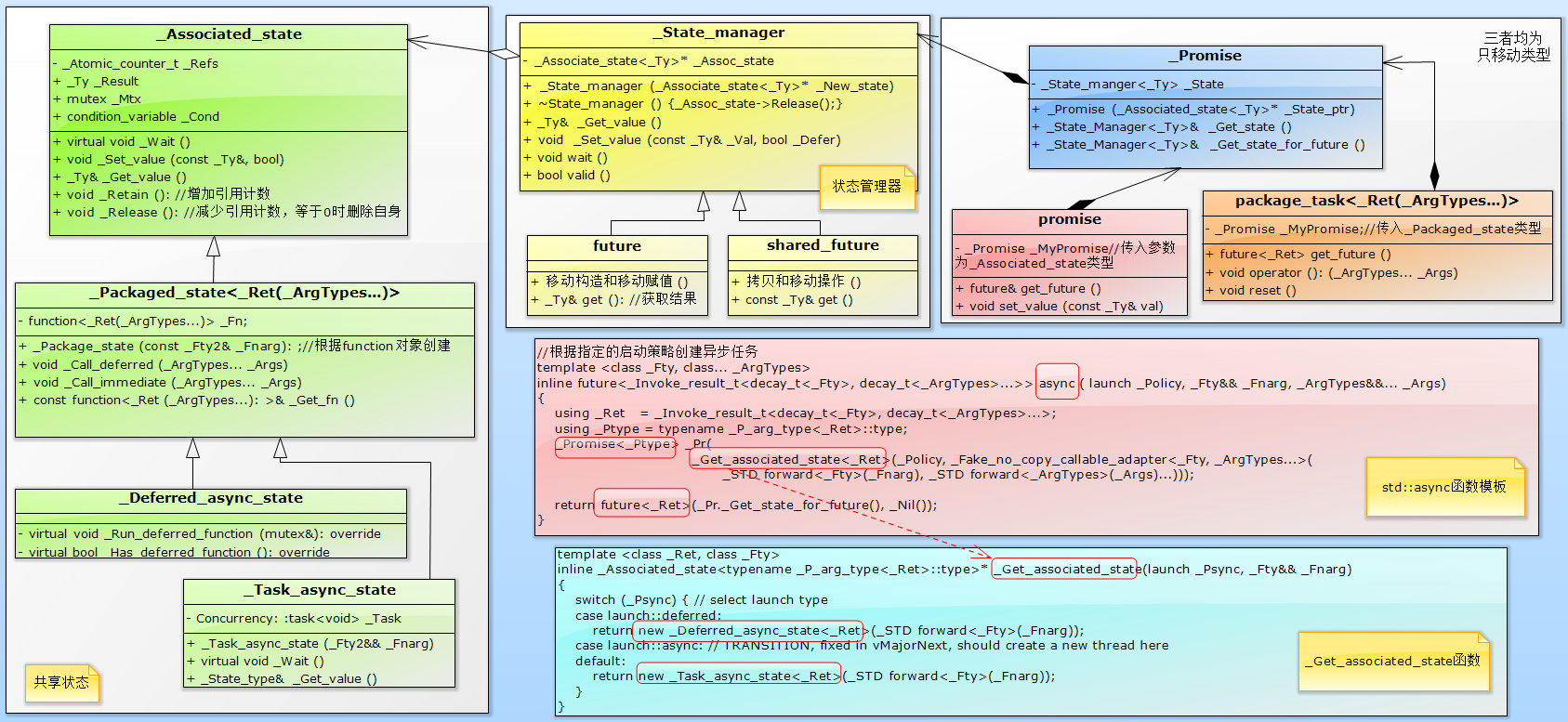
1. “共享状态”对象,用于保存线程函数(一般是可调用对象)及其参数、返回值以及新线程状态等信息。该对象保存在堆中,由std::async、std::promise或std::package_task提供,并交由future或shared_future管理其生命期。被调方(通常指调用promise.set_value()的一方)将计算所得的结果写入“共享状态”,而调用方通过std::future的get()读取该结果。

2. 调用std::async是会创建一个“_Deferred_async_state”或_“Task_async_state”类的“共享状态”对象,该对象是_Packaged_state的子类。注意,直接创建std::promise时,生成的是“_associated_state”类的共享状态对象,而std::package_task创建的是“_Packaged_state”类的共享状态对象。
3. _Get_associated_state是个工厂函数,通过不同的策略创建不同的“共享状态”对象,并将其交由future管理,负责其生命周期。future类似于std::unique_ptr,对“共享状态”对象“独占”所有权。
4. 与std::thread一样,传入std::async中的可调用对象及其参数会被按值以副本形成保存成一个tuple对象,然后再以右值的方式传入线程函数中对应的参数。
【编程实验】创建异步任务
#include <iostream>

#include <thread>

#include <future>

#include <mutex>

#include <vector>

#include <numeric> //for std::accumulate

using namespace std;

std::mutex mtx;

class Widget

{

public:

    void foo(int x, const std::string& s)

    {

        std::lock_guard<std::mutex> lk(mtx);

        cout << "thread id = "<<std::this_thread::get_id()<<

            " void Foo::foo(int, const std::string&): x = " <<  x << ", s = " << s<< endl;

    }

    void bar(const std::string& s)

    {

        std::lock_guard<std::mutex> lk(mtx);

        cout << "thread id = " << std::this_thread::get_id()

             <<" void Widget::bar(const std::string&): s = " << s << endl;

    }

    void operator()(double val)

    {

        std::lock_guard<std::mutex> lk(mtx);

        cout << "thread id = " << std::this_thread::get_id()

             << " void Widget::operator(): val = " << val << endl;

    }

};

class NonCopyable //只移动对象

{

public:

    NonCopyable() {};

    NonCopyable(const NonCopyable&) = delete;

    NonCopyable& operator=(const NonCopyable&) = delete;

    NonCopyable(NonCopyable&&) = default;

    NonCopyable& operator=(NonCopyable&&) = default;

    double operator()(double d)

    {

        std::lock_guard<std::mutex> lk(mtx);

        cout << "thread id = " << std::this_thread::get_id()

             << " void NonCopyable::operator(): d = " << d << endl;

        return d;

    }

};

//并行计算

template<typename RandomIt>

int parallel_sum(RandomIt beg, RandomIt end)

{

    auto len = end - beg;

    if (len < )

    {

        std::lock_guard<std::mutex> lk(mtx);

        cout << "thread id = " << std::this_thread::get_id()

            << " invoke parallel_sum()" << endl;

        return std::accumulate(beg, end, ); //遍历[beg,end)区别的每个元素并累加。初始值为0

    }

    RandomIt mid = beg + len / ;

    auto handle = std::async(std::launch::async,  //子线程将[mid,end)元素进行累加

                            parallel_sum<RandomIt>, mid, end);

    int sum = parallel_sum(beg, mid);//本线程将[begin,mid)区间元素进行累加

    return sum + handle.get(); //返回两个区间结果的累加和

}

int main()

{

    Widget w;

    cout << "main thread id = " << std::this_thread::get_id() << endl;

    //1. 参数传递

    auto fut1 = std::async(&Widget::foo, &w, , "hello"); //传入this指针:&w

    auto fut2 = std::async(&Widget::bar, w, "goodbye"); //传入x的副本如tmp。 tmp.bar(...)

    auto fut3 = std::async(Widget(), 3.14159); //传入Widget临时对象,调用operator()

    auto fut4 = std::async(std::ref(w), 2.718);  //传入w的引用,调用operator();

    NonCopyable mo;    //只移动对象

    auto fut5 = std::async(std::move(mo),3.14159); //mo是只移动对象,必须被转为右值

    //2. 同步、异步

    auto fut6 = std::async(std::launch::async, Widget(), 1.2); //在新线程上运行,operator()

    auto fut7 = std::async(std::launch::deferred, &Widget::bar, &w, "deferred"); //线程延迟到调用get或wait才执行

    auto fut8 = std::async(std::launch::async | std::launch::deferred, //等价于默认启动策略

                         &Widget::bar, &w, "async | deferred");

    fut7.get(); //主线程阻塞,等待fut7子线程。(子线程延迟到这时才执行)。

    //3. 并行计算

    std::vector<int> vec(, ); //10000个1

    int res = parallel_sum(vec.begin(), vec.end());

    {

        std::lock_guard<std::mutex> lk(mtx);

        cout << "The sum is: " << res << endl;

        cout << "main thread  end." << endl;

    }

    return ;

}

/*输出结果

main thread id = 16756

thread id = 1928 void Foo::foo(int, const std::string&): x = 42, s = hello

thread id = 16756 void Widget::bar(const std::string&): s = deferred  //注意,由主线程执行

thread id = 13216 void Widget::bar(const std::string&): s = goodbye

thread id = 7940 void Widget::operator(): val = 3.14159

thread id = 16080 void Widget::operator(): val = 2.718

thread id = 11492 void NonCopyable::operator(): d = 3.14159

thread id = 1928 void Widget::operator(): val = 1.2

thread id = 13216 void Widget::bar(const std::string&): s = async | deferred

thread id = 16756 invoke parallel_sum()

thread id = 7940 invoke parallel_sum()

thread id = 16080 invoke parallel_sum()

thread id = 11492 invoke parallel_sum()

thread id = 1928 invoke parallel_sum()

thread id = 13216 invoke parallel_sum()

thread id = 1928 invoke parallel_sum()

thread id = 7636 invoke parallel_sum()

thread id = 5816 invoke parallel_sum()

thread id = 15856 invoke parallel_sum()

thread id = 15832 invoke parallel_sum()

thread id = 7636 invoke parallel_sum()

thread id = 15400 invoke parallel_sum()

thread id = 16968 invoke parallel_sum()

thread id = 15856 invoke parallel_sum()

thread id = 15476 invoke parallel_sum()

The sum is: 10000

main thread  end.

*/
二. std::async的启动策略
(一)std::async的启动策略
1. 三种启动策略(std::async通过指定不同的启动策略来决定创建是“共享状态”对象)
(1)异步方式(std::launch::async):会创建一个“_Task_async_state”类的共享状态对象。使用该策略时异味着线程函数必须以异步的方式运行,即在另一个线程之上执行。
(2)同步方式(std::launch::deferred):会创建一个“_Deferred_async_state”类的共享状态对象。使用该策略意味着线程函数延迟到调用future的get/wait时才得以运行,而且两者是在同一线程上以同步的方式运行。即调用future的一方会阻塞至线程函数运行结束为止。如果get/wait没有得到调用,则线程函数不会被执行。
(3)默认启动策略(std::launch::async|std::launch::deferred):即两者或运算的结果,这意味着任务可能以异步或同步的方式被运行。也就是说是否创建新线程来运行任务,取决于系统资源是否紧张,由标准库的线程管理组件承担线程创建和销毁、避免超订以及负载均衡的责任。
(二)默认启动策略
1. 带来的问题
(1)用户无法预知是异步还是同步运行,因为线程函数可能被调度为延迟执行。
(2)无法预知线程函数是否与调用future的get/wait函数线程是否在同一线程运行。如果此时线程函数会读取线程局部存储(thread_local storage, TLS),那么也就无法预知会取到哪个线程的局部存储。
(3)有时甚至连线程函数是否会运行,这件起码的事情都是无法预知的。这是因此无法保证在程序的每条路径上future的get或wait都会得以调用。
2. 注意事项:
(1)默认启动策略能正常工作需要满足以下所有条件。
①任务不需要与调用get/wait的线程并发执行。
②读/写哪个线程的thread_local变量无关紧要。
③可以保证在std::async返回的future上调用get/wait,或者可以接受任务可能永不执行。
④用户已清楚使用wait_for或wait_unitil的代码任务可能被推迟执行,这种可能性己被纳入考量。
(2)只要其中一个条件不满足,就必须手动指定启动策略以保证任务以异步或同步的方式运行。
【编程实验】默认启动策略问题的解决
#include <iostream>

#include <future>

using namespace std;

using namespace literals; //for duration suffixes(时长后缀,如1s)

void func()

{

    std::this_thread::sleep_for(1s);

}

//reallyAsync函数模板:用于保证任务被异步执行

template<typename Func, typename ...Args>

inline auto reallyAsync(Func&& f, Args... args)

{

    return std::async(std::launch::async,

                      std::forward<Func>(func),

                      std::forward<Args>(args)...);

}

int main()

{

    //wait_for函数必须可虑任务是同步或异步运行

    auto fut1 = std::async(func); //默认启动策略,无法预估任务是被同步还是异步运行

    //解决方案1:wait_for(0s)

    if (fut1.wait_for(0s) == std::future_status::deferred){ //同步运行,wait_for(0s)

        fut1.get(); //等待结果

    }else { //异步运行

        while (fut1.wait_for(100ms) != std::future_status::ready) { //轮询子线程是否结束

            //...   //并发做其他任务

        }

        //... //fut is ready

    }

    //解决方案2:确实以异步运行任务

    auto fut2 = reallyAsync(func);

    while (fut2.wait_for(100ms) != std::future_status::ready) //异步方式,确保wait_for返回ready的结果

    {                                                         //从而消除future_status::deferred的可能

    }

    return ;

}
第26课 std::async异步任务的更多相关文章
- C++11 使用异步编程std::async和std::future
先说明一点:std::asyanc是std::future的高级封装, 一般我们不会直接使用std::futrue,而是使用对std::future的高级封装std::async. 下面分别说一下. ...
- C++11 使用 std::async创建异步程序
c++11中增加了线程,使得我们可以非常方便的创建线程,它的基本用法是这样的: void f(int n); std::thread t(f, n + 1); t.join(); 但是线程毕竟是属于比 ...
- 异步编程系列第01章 Async异步编程简介
p { display: block; margin: 3px 0 0 0; } --> 2016.10.11补充 三个月过去了,回头来看,我不得不承认这是一系列失败的翻译.过段时间,我将重新翻 ...
- 用C++11的std::async代替线程的创建
c++11中增加了线程,使得我们可以非常方便的创建线程,它的基本用法是这样的: void f(int n); std::thread t(f, n + 1); t.join(); 但是线程毕竟是属于比 ...
- C++ std::async vs async/await in C# - Stack Overflow
C++ std::async vs async/await in C# - Stack Overflow 我想知道新的c ++功能std::async是否与两个C#关键字async / await相当 ...
- C++并发编程之std::async(), std::future, std::promise, std::packaged_task
c++11中增加了线程,使得我们可以非常方便的创建线程,它的基本用法是这样的: void f(int n); std::thread t(f, n + 1); t.join(); 但是线程毕竟是属于比 ...
- (原创)用C++11的std::async代替线程的创建
c++11中增加了线程,使得我们可以非常方便的创建线程,它的基本用法是这样的: void f(int n); std::thread t(f, n + ); t.join(); 但是线程毕竟是属于比较 ...
- C++ 0x std::async 的应用
#include <iostream> #include <thread> #include <mutex> #include <vector> #in ...
- C++11 std::async 包装实体店::packaged_task
更好的方式 C++11中提供了操作多线程的高层次特性. std::packaged_task 包装的是一个异步操作,相当与外包任务,好比我大阿里把电话客服外包给某某公司. std::future 提供 ...
随机推荐
- k8s笔记之chartmuseum搭建
一.下载安装包 #在master节点中执行,以下这条命令就是下载文件到当前目录而已,下载完成之后让我们将chartmuseum赋予权限,就是可执行了chmod chartmuseum,然后移动到/us ...
- Kubernetes service 代理模式
Kubernetes service 代理模式 底层流量转发与负载均衡实现:• Iptables(默认)• IPVS IPVS 了解代理模式之IPVS工作原理LVS 基于 IPVS内核调度模块实现的负 ...
- CD 基金会、Jenkins、Jenkins X、Spinnaker 和 Tekton 的常问问题
转载:https://mp.weixin.qq.com/s/bQLqGrCM9NZYI0Njlu4N-w FAQ 什么是持续交付(CD)? CD是一种软件工程方法,团队在短周期内生成软件,确保软件可以 ...
- Thread 另类用法,如何执行一段可能死锁/卡死/死循环的代码
场景与需求 需要执行一段第三方的代码,这段代码可能死锁/卡死/死循环,在超时之后,如果没有结束,则认为任务执行失败,退出执行. 实现方案1:使用 Task 超时 实现方法参考: https://www ...
- WPF 开源框架项目介绍
旧版本项目说明 旧版本由于是从学习WPF进行开发的, 历经时长有半年之余,基本上现学现用的那种, 所以存在很多缺陷, 由于整体的设计多处更新, 故旧版本将会终止维护(砍), 基于WCF的项目也会停止, ...
- Python TK编程第一部分 Hello Again
当你想写大一点的程序的时候,将你的代码封装到一个或者多个类里会是一个不错的办法.下面'hello world'这个例子来自Matt Conway的Tkinter Life Preserver. fro ...
- 关联mysql失败_Server returns invalid timezone. Go to 'Advanced' tab and set 'serverTimezon' 时区错误
时区错误,MySQL默认的时区是UTC时区,比北京时间晚8个小时. 所以要修改mysql的时长 在mysql的命令模式下,输入: set global time_zone='+8:00'; 再次连接成 ...
- python基础编程——类和实例
在了解类和实例之前,需要先了解什么是面向对象,什么又是面向过程.面向过程是以过程为中心实现一步步操作(相互调用,类似流水线思想):面向对象是以事物为中心,某个事物可以拥有自己的多个行为,而另一个事物也 ...
- sparkSQL中的example学习(1)
SparkSQLDemo.scala import org.apache.spark.sql.{Row, SparkSession} import org.apache.spark.sql.types ...
- Sqlmap基础指令
安装: 下载地址:https://github.com/sqlmapproject/sqlmap 下载好后直接解压,并且加入环境变量,就可以直接在cmd调用 常用基础指令: -u 指定注入点 --db ...