
Feign进行文件上传+表单调用
Feigin默认是不支持文件上传和表单提交的,需要做一些配置才能支持。
1、feign依赖
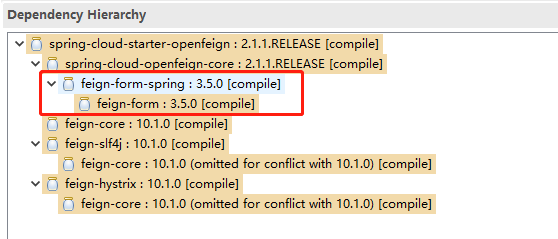
图中红色为form支持必须的jar。
2、添加自定义Encoder类:
import java.lang.reflect.Type;

import java.util.HashSet;

import java.util.Map;

import java.util.Set;

import org.springframework.web.multipart.MultipartFile;

import feign.RequestTemplate;

import feign.codec.EncodeException;

import feign.form.spring.SpringFormEncoder;

import lombok.val;

import sun.reflect.generics.reflectiveObjects.ParameterizedTypeImpl;

import static java.util.Collections.singletonMap;

/**

 * @author roger yang

 * @date 10/22/2019

 */

public class MultipartEncoder extends SpringFormEncoder {

    @SuppressWarnings("unchecked")

    @Override

    public void encode (Object object, Type bodyType, RequestTemplate template) throws EncodeException {

        if (bodyType.getClass().equals(ParameterizedTypeImpl.class) && ((ParameterizedTypeImpl) bodyType).getRawType().equals(Map.class)) {

            val data = (Map<String, Object>) object;

            Set<String> nullSet = new HashSet<>();

            for (Map.Entry<String, Object> entry : data.entrySet()) {

                if (entry.getValue() == null) {

                    nullSet.add(entry.getKey());

                }

            }

            for (String s : nullSet) {

                data.remove(s);

            }

            super.encode(data, MAP_STRING_WILDCARD, template);

            return;

        } else if (bodyType.equals(MultipartFile.class)) {

            val file = (MultipartFile) object;

            val data = singletonMap(file.getName(), object);

            super.encode(data, MAP_STRING_WILDCARD, template);

            return;

        } else if (bodyType.equals(MultipartFile[].class)) {

            val file = (MultipartFile[]) object;

            if (file != null) {

                val data = singletonMap(file.length == 0 ? "" : file[0].getName(), object);

                super.encode(data, MAP_STRING_WILDCARD, template);

                return;

            }

        }

        super.encode(object, bodyType, template);

    }

}
为什么要自定义呢?因为SpringFormEncoder这个类的源码里只对MultipartFile做了特殊处理,并未对MultipartFile[]数组进行处理,在传递多个文件时会报错。
  @Override

  public void encode (Object object, Type bodyType, RequestTemplate template) throws EncodeException {

    if (!bodyType.equals(MultipartFile.class)) {

      super.encode(object, bodyType, template);

      return;

    }

    val file = (MultipartFile) object;

    val data = singletonMap(file.getName(), object);

    super.encode(data, MAP_STRING_WILDCARD, template);

  }
另外,我们为了让文件和表单一起在http的body里一起传输,所有我们将他们都封装到map里统一处理。
3、feign接口类:
import java.util.Map;

import org.springframework.http.MediaType;

import org.springframework.web.bind.annotation.RequestMapping;

import org.springframework.web.bind.annotation.RequestMethod;

import com.longge.common.GlobalResponse;

/**

 * @author: yangzhilong

 * @description: Notification api

 * post with MULTIPART_FORM_DATA_VALUE

 * you client feign config:

 * -------------------------------------------------------------------

 *  import org.springframework.cloud.openfeign.FeignClient;

    import org.springframework.context.annotation.Bean;

    import com.longge.api.NotificationService;

    import feign.codec.Encoder;

    import com.longge.config.MultipartEncoder;

    @FeignClient(value = "notification-service", configuration = NotificationServiceFeign.FeignSimpleEncoderConfig.class)

    public interface NotificationServiceFeign extends NotificationMultipartService {

        class FeignSimpleEncoderConfig {

            @Bean

            public Encoder encoder(){

                return new MultipartEncoder();

            }

        }

    }

 * ---------------------------------------------------------------------

 * @date: 17:24 2019/7/3

 **/

@RequestMapping(value = "/v1/api")

public interface NotificationMultipartService {

    /**

     * common email channel ,use to send common email

     *

     * @param data

     *     map key have:

     *          attachfile       -->          MultipartFile[]

     *          com.longge.dto.EmailDto.FieldName --- >   value

     *

     * eg:

     *  Map<String, Object> data = new HashMap<>();

        data.put("attachfile", new MultipartFile[] {file});

        data.put("from", emailDto.getFrom());

        data.put("to", emailDto.getTo());

        data.put("bodyText", emailDto.getBodyText());

        data.put("subject", emailDto.getSubject());

     * @return GlobalResponse<Long>  email id

     */

    @RequestMapping(value = "/send_mail", method = RequestMethod.POST, produces = {MediaType.APPLICATION_JSON_UTF8_VALUE}, consumes = MediaType.MULTIPART_FORM_DATA_VALUE)

    GlobalResponse<String> sendMail(Map<String, Object> data);

}
其中为了支持 form请求,需要对此feign进行单独的配置:
import org.springframework.cloud.openfeign.FeignClient;

import org.springframework.context.annotation.Bean;

import com.longge.api.NotificationMultipartService;

import feign.codec.Encoder;

@FeignClient(value = "notification-service", configuration = NotificationServiceFeign.FeignSimpleEncoderConfig.class)

public interface NotificationServiceFeign extends NotificationMultipartService {

    class FeignSimpleEncoderConfig {

        @Bean

        public Encoder encoder() {

            return new MyEncoder();

        }

    }

}
4、服务实现类
@RequestMapping(value = "/v1/api/send_mail", method = RequestMethod.POST, consumes = MediaType.MULTIPART_FORM_DATA_VALUE, produces = {MediaType.APPLICATION_JSON_VALUE})

public GlobalResponse<String> sendMail(@RequestParam(value = "attachfile", required = false) MultipartFile[] attachfile, EmailDto emailDto) {

    // TODO

}
5、EmailDto属性
private String from;

private String to;

private String subject;

private String bodyText;

private String bodyHtml;
感谢:https://blog.csdn.net/ytzzh0726/article/details/79731343
Feign进行文件上传+表单调用的更多相关文章
- 【Flask】 结合wtforms的文件上传表单
表单中的文件上传 基本的表单渲染,表单类设置等等就不多说了,参看另一个文章即可.但是那篇文章里没有提到对于FileField,也就是上传文件的表单字段是如何处理,后端又是如何实现接受上传过来的文件的. ...
- 上传漏洞科普[1]-文件上传表单是Web安全主要威胁
为了让最终用户将文件上传到您的网站,就像是给危及您的服务器的恶意用户打开了另一扇门.即便如此,在今天的现代互联网的Web应用程序,它是一种 常见的要求,因为它有助于提高您的业务效率.在Facebook ...
- 原生js封装ajax:传json,str,excel文件上传表单提交
由于项目中需要在提交ajax前设置header信息,jquery的ajax实现不了,我们自己封装几个常用的ajax方法. jQuery的ajax普通封装 var ajaxFn = function(u ...
- Feign实现文件上传下载
Feign框架对于文件上传消息体格式并没有做原生支持,需要集成模块feign-form来实现. 独立使用Feign 添加模块依赖: <!-- Feign框架核心 --> <depen ...
- flask 文件上传(单文件上传、多文件上传)
文件上传 在HTML中,渲染一个文件上传字段只需要将<input>标签的type属性设为file,即<input type=”file”>. 这会在浏览器中渲染成一个文件上传字 ...
- ajax上传表单的俩种方式
1.用h5对象上传表单(图片) var formData = new FormData(); formData.append("authenticity_token", '1212 ...
- bootstrap上传表单的时候上传的数据默认是0 一定要小心
bootstrap上传表单的时候上传的数据默认是0 一定要小心
- spring boot:单文件上传/多文件上传/表单中多个文件域上传(spring boot 2.3.2)
一,表单中有多个文件域时如何实现说明和文件的对应? 1,说明和文件对应 文件上传页面中,如果有多个文件域又有多个相对应的文件说明时, 文件和说明如何对应? 我们在表单中给对应的file变量和text变 ...
- 使用ajax上传表单(带文件)
在使用form表单的时候上传文件+表单,会使得页面跳转,而在某些时候不希望跳转,只变化页面中的局部信息 通过查找资料,可以使用FormData进行ajax操作. FormData介绍:XMLHttpR ...
随机推荐
- echart绘制GDP数据
{% extends "base.html" %} {% block self_head_css_js %} {% endblock %} {% block main_conten ...
- idea搭建一个简单的springboot项目
1.file->new->project 2.选中Spring Initializr 3.填写项目信息: 4.选中Web -> Spring Web
- MySQL Execution Plan--将范围扫描转换为等值查询
将大于或小于的范围查询装换为等值查询 在生产环境,经常会遇到需要对Worker表进行多次尝试的业务,超过一定重试次数后抛弃或使用其他方式处理,在查找满足重试条件数据时,通常会使用“小于”运算符并伴随排 ...
- 让Windows中的文件名支持大小写
背景 最近在Linux官网下载了Linux内核,下载下来的是一个后缀为.tar.xz的压缩包,于是在毫不知情的情况下随随便便解压了,解压过程中出现了很多问题. 其中一个问题就是在Windows下,不区 ...
- PySpark DataFrame 添加自增 ID
PySpark DataFrame 添加自增 ID 本文原始地址:https://sitoi.cn/posts/62634.html 在用 Spark 处理数据的时候,经常需要给全量数据增加一列自增 ...
- 自动化渗透测试工具(Cobalt Strike)3.1 最新破解版
自动化渗透测试工具(Cobalt Strike)3.1 最新破解版[附使用教程] Cobalt Strike是一款专业的自动化渗透测试工具,它是图形化.可视化的,图形界面非常友好,一键傻瓜化使用MSF ...
- HTML通用模板
<!DOCTYPE html><html lang="en"><head> <meta charset="UTF-8" ...
- Jenkins中如何实现debug配置
java -jar -Xmx512m -Dfile.encoding=UTF-8 -server -XX:-OmitStackTraceInFastThrow -server -agentlib:jd ...
- Dapper use Table Value Parameter in C# (Sql Server 数组参数)
Dapper 也可以使用 数组参数 参考:Blog on Github Dapper 调用存储过程 :单个参数 static void Main(string[] args) { var connec ...
- 26、pathlib文件系统模块(了解)
一.pathlib库官方定义 pathlib 是Python内置库,Python 文档给它的定义是 Object-oriented filesystem paths(面向对象的文件系统路径).path ...