
Linux libcurl安装及注意事项
一、下载
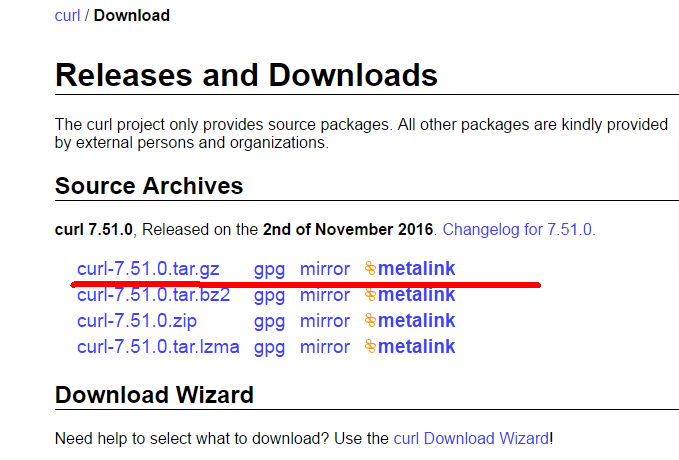
官网下载地址 : https://curl.haxx.se/download.html
选择最新的一个即可。
二、安装
1、解压
下载到的压缩包为curl-7.51.0.tar.gz,使用命令 tar -zxvf curl-7.51.0.tar.gz 解压。
2、进入解压出的目录curl-7.51.0,执行
(1)sudo ./configure
(2)sudo make
(3)sudo make install
安装完成,在命令行测试是否可用,直接输入curl,出现如下情况安装基本成功

如果提示该命令不存在。则执行以下命令:
export PATH=$PATH:/usr/local/curl/bin
检查/usr/include/里有没有crul没有的话,需要把解压出的include文件夹下的文件复制过去。
cp -r curl-7.51.0/include/curl/ /usr/include/
检查库和头文件
[root@localhost curl-7.51.0]# curl-config --cflags
-I/usr/local/include
[root@localhost curl-7.51.0]# curl-config --libs
-L/usr/local/lib -lcurl
以后使用gcc编译使用libcurl的c代码,都需加上-lcurl。
三、编译代码
使用libcurl官网的例子,只稍微修改。
- /***************************************************************************
- * _ _ ____ _
- * Project ___| | | | _ \| |
- * / __| | | | |_) | |
- * | (__| |_| | _ <| |___
- * \___|\___/|_| \_\_____|
- *
- * Copyright (C) 1998 - 2015, Daniel Stenberg, <daniel@haxx.se>, et al.
- *
- * This software is licensed as described in the file COPYING, which
- * you should have received as part of this distribution. The terms
- * are also available at https://curl.haxx.se/docs/copyright.html.
- *
- * You may opt to use, copy, modify, merge, publish, distribute and/or sell
- * copies of the Software, and permit persons to whom the Software is
- * furnished to do so, under the terms of the COPYING file.
- *
- * This software is distributed on an "AS IS" basis, WITHOUT WARRANTY OF ANY
- * KIND, either express or implied.
- *
- ***************************************************************************/
- #include <stdio.h>
- #include <curl/curl.h>
- /* <DESC>
- * Get a single file from an FTPS server.
- * </DESC>
- */
- struct FtpFile {
- const char *filename;
- FILE *stream;
- };
- static size_t my_fwrite(void *buffer, size_t size, size_t nmemb,
- void *stream)
- {
- struct FtpFile *out=(struct FtpFile *)stream;
- if(out && !out->stream) {
- /* open file for writing */
- out->stream=fopen(out->filename, "wb");
- if(!out->stream)
- return -1; /* failure, can't open file to write */
- }
- return fwrite(buffer, size, nmemb, out->stream);
- }
- int main(void)
- {
- CURL *curl;
- CURLcode res;
- struct FtpFile ftpfile={
- "yourfile.bin", /* name to store the file as if successful */
- NULL
- };
- printf("come in");
- return 0;
- curl_global_init(CURL_GLOBAL_DEFAULT);
- curl = curl_easy_init();
- if(curl) {
- /*
- * You better replace the URL with one that works! Note that we use an
- * FTP:// URL with standard explicit FTPS. You can also do FTPS:// URLs if
- * you want to do the rarer kind of transfers: implicit.
- */
- curl_easy_setopt(curl, CURLOPT_URL,
- "ftp://user@server/home/user/file.txt");
- /* Define our callback to get called when there's data to be written */
- curl_easy_setopt(curl, CURLOPT_WRITEFUNCTION, my_fwrite);
- /* Set a pointer to our struct to pass to the callback */
- curl_easy_setopt(curl, CURLOPT_WRITEDATA, &ftpfile);
- /* We activate SSL and we require it for both control and data */
- curl_easy_setopt(curl, CURLOPT_USE_SSL, CURLUSESSL_ALL);
- /* Switch on full protocol/debug output */
- curl_easy_setopt(curl, CURLOPT_VERBOSE, 1L);
- res = curl_easy_perform(curl);
- /* always cleanup */
- curl_easy_cleanup(curl);
- if(CURLE_OK != res) {
- /* we failed */
- fprintf(stderr, "curl told us %d\n", res);
- }
- }
- if(ftpfile.stream)
- fclose(ftpfile.stream); /* close the local file */
- curl_global_cleanup();
- return 0;
- }
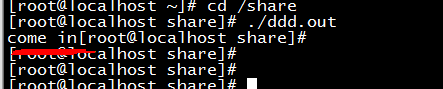
编译:gcc ftpsget.c -o ddd.out -lcurl
执行:
可能会出现的问题:error while loading shared libraries: libcurl.so.4: cannot open shared object file: No such file or directory
解决方法:
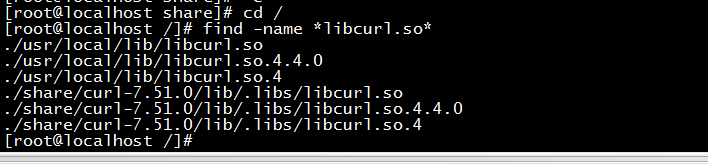
查找 libcurl所有相关的so库所在位置,在/etc/ld.so.conf中加入libcurl有关so库所在目录。
进入根目录/,执行find -name *libcurl.so*,就会发现所在目录。
在/etc/ld.so.conf中加入 /usr/local/lib 这一行,
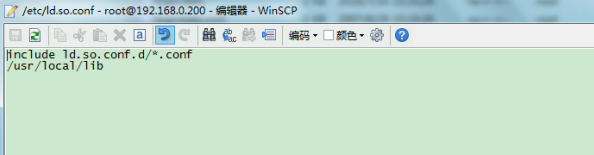
保存/etc/ld.so.conf
执行命令 /sbin/ldconfig -v 生效。
Linux libcurl安装及注意事项的更多相关文章
- Linux安装系统注意事项及系统初始化
Linux安装系统注意事项 1.分区 学习用途: /boot:200M /swap :内存的1到2倍 /:根据需要分配大小,比如虚拟机下总空间是15G,那么可以分配8——10G跟/分区,如果是生产 ...
- 安装基于 Linux 发行版的重要事项(流程指引)
安装基于 Linux 发行版的重要事项(Install important issues based on the Linux distribution. (Process guidance)) 1. ...
- windows下和linux下libcurl安装
下载源代码,在winbuild里面有个说明文件: Building with Visual C++, prerequisites==================================== ...
- Linux上安装Zookeeper以及一些注意事项
最近打算出一个系列,介绍Dubbo的使用. 分布式应用现在已经越来越广泛,Spring Could也是一个不错的一站式解决方案,不过据我了解国内目前貌似使用阿里Dubbo的公司比较多,一方面这个框架也 ...
- DBA_在Linux上安装Oracle Database11g数据库(案例)
2014-08-08 Created By BaoXinjian
- 记录Linux下安装elasticSearch时遇到的一些错误
记录Linux下安装elasticSearch时遇到的一些错误 http://blog.sina.com.cn/s/blog_c90ce4e001032f7w.html (2016-11-02 22: ...
- Nginx入门篇-基础知识与linux下安装操作
我们要深刻理解学习NG的原理与安装方法,要切合实际结合业务需求,应用场景进行灵活使用. 一.Nginx知识简述Nginx是一个高性能的HTTP服务器和反向代理服务器,也是一个 IMAP/POP3/SM ...
- 机器学习linux系统环境安装
机器学习linux系统环境安装 安装镜像下载 可以自己去ubuntu官方网站按照提示下载amd64的desktop版本 或者考虑到国内镜像站点下载,如tuna,163, ali等 课程使用最新的17. ...
- Linux基础学习(6)--Linux软件安装
第六章——Linux软件安装 一.软件包管理简介 1.软件包分类: (1)源码包:脚本安装包 (2)二进制包(RPM包.系统默认包) 2.源码包: (1)源码包的优点:开源,如果有足够的能力,可以修改 ...
随机推荐
- Centos7之搜索命令locate
locate命令[1] 1.#locate命令 所搜索的后台数据库 2.updatedb 更新数据库 3.操作 [root@localhost ~]# ls 222 anaconda-ks.cfg ...
- highcharts实现组织机构的点击选中和取消选中事件
代码 Highcharts.chart('container', { chart: { height: 600, inverted: true }, title: { text: 'Highsof ...
- JavaScript 一些实用技巧
快速创建从0到n的数字 let arr1 = [...(new Array(n)).keys()]; let arr2 = Array.from({length:n},(v, k) => k); ...
- 修改ssh服务器默认端口号
1.查看当前ssh服务器端口号 在修改ssh服务器的端口号之前,首先查看ssh服务器监听的端口号,使用netstat命令: $ sudo netstat -tunlp | grep "ssh ...
- AntDesign vue学习笔记(四)使用组件切换
同样实现上一篇功能, 改为使用组件切换,实现方法如下 1.修改MainFrm中的<router-view/>如下代码 2.注册局部组件 export default { name: 'Ma ...
- php filter_var()
定义和用法 filter_var() 函数通过指定的过滤器过滤变量. 如果成功,则返回已过滤的数据,如果失败,则返回 false. 语法 filter_var(variable, filter, op ...
- maven系列:deploy项目发布和上传repo仓库
在使用maven过程中,我们在开发阶段经常性的会有很多公共库处于不稳定状态,随时需要修改并发布,可能一天就要发布一次,遇到bug时,甚至一天要发布N次. 我们知道,maven的依赖管理是基于版本管理的 ...
- 【简记】修改Docker数据目录位置,包含镜像位置
为啥要改? Docker安装后默认下载的位置在/var/lib/docker ,如果/var分区没有独立分出来,Linux下默认是与/根分区在一起.一般我们装Linux系统的时候,除了做邮件服务器外, ...
- 【题解】Luogu P3349 [ZJOI2016]小星星
原题传送门 我们考虑设\(dp_{i,j}\)表示树上的点\(i\)在图上对应的点为\(j\)时\(i\)和子树对应在图上的方案数 \(dp_{u_i}=\prod_{v \in u.son} dp_ ...
- golang 学习笔记 --基本类型
字符串值表示了一个一个字符值的集合,在底层,一个字符串值即一个包含了若干字节的序列,长度为0的序列与一个空字符串对应.字符串的长度即底层字节列中字节的个数. 字符串值是不可变的,对字符串的操作只会返回 ...