
java之spring mvc之helloworld
这篇主要讲解springmvc的基本的使用,这里以helloworld项目为例。
目录结构:

1. 新建 web 项目 :springmvc_helloworld

2. 在 WebRoot\WEB-INF\lib 下,导入jar包
commons-logging-1.1.1.jar
spring-beans-4.1.6.RELEASE.jar
spring-context-4.1.6.RELEASE.jar
spring-core-4.1.6.RELEASE.jar
spring-expression-4.1.6.RELEASE.jar
spring-web-4.1.6.RELEASE.jar
spring-webmvc-4.1.6.RELEASE.jar
3. 在 WebContent\WEB-INF下,编写web.xml 文件
<?xml version="1.0" encoding="UTF-8"?>

<web-app xmlns:xsi="http://www.w3.org/2001/XMLSchema-instance" xmlns="http://java.sun.com/xml/ns/javaee" xsi:schemaLocation="http://java.sun.com/xml/ns/javaee http://java.sun.com/xml/ns/javaee/web-app_3_0.xsd" id="WebApp_ID" version="3.0">

  <display-name>01springmvc_helloworld</display-name>

  <servlet>

      <servlet-name>springmvc</servlet-name>

      <servlet-class>org.springframework.web.servlet.DispatcherServlet</servlet-class>

  </servlet>

  <servlet-mapping>

      <servlet-name>springmvc</servlet-name>

      <url-pattern>*.do</url-pattern>

  </servlet-mapping>

  <welcome-file-list>

    <welcome-file>index.html</welcome-file>

    <welcome-file>index.htm</welcome-file>

    <welcome-file>index.jsp</welcome-file>

    <welcome-file>default.html</welcome-file>

    <welcome-file>default.htm</welcome-file>

    <welcome-file>default.jsp</welcome-file>

  </welcome-file-list>

</web-app>
上面代码中标识的 springmvc 为前端控制器
4. 在 src 下编写 HelloController类
package cn.vincent.controller;

import javax.servlet.http.HttpServletRequest;

import javax.servlet.http.HttpServletResponse;

import org.springframework.web.servlet.ModelAndView;

import org.springframework.web.servlet.mvc.Controller;

/**

 * 实现Controller接口,默认处理方法是handleRequest

 *

 */

public class HelloController implements Controller{

    @Override

    public ModelAndView handleRequest(HttpServletRequest req,

            HttpServletResponse resp) throws Exception {

        // TODO Auto-generated method stub

        System.out.println("hello world 被执行");

        ModelAndView mv=new ModelAndView();

        mv.addObject("msg", "第一个springmvc应用程序");

        mv.setViewName("hello");

        return mv;

    }

}
5. 编写 spring mvc 配置文件,该配置文件默认放于 WEB-INF 下,并且文件名为 前端控制器名-servlet.xml
这里的名称为 springmvc-servlet.xml
<?xml version="1.0" encoding="UTF-8"?>

<beans xmlns="http://www.springframework.org/schema/beans"

    xmlns:xsi="http://www.w3.org/2001/XMLSchema-instance"

    xmlns:p="http://www.springframework.org/schema/p"

    xmlns:context="http://www.springframework.org/schema/context"

    xsi:schemaLocation="

        http://www.springframework.org/schema/beans

        http://www.springframework.org/schema/beans/spring-beans.xsd

        http://www.springframework.org/schema/context

        http://www.springframework.org/schema/context/spring-context.xsd">

  <!-- 配置handlerMapping -->

    <bean class="org.springframework.web.servlet.handler.BeanNameUrlHandlerMapping"/>

    <!-- 配置handlerAdapter -->

    <bean class="org.springframework.web.servlet.mvc.SimpleControllerHandlerAdapter"/>

    <!-- 配置Controller -->

    <bean name="/hello.do" class="cn.vincent.controller.HelloController"/>

    <!-- 配置视图解析器 -->

    <bean id="viewResolver"

        class="org.springframework.web.servlet.view.UrlBasedViewResolver">

        <property name="viewClass" value="org.springframework.web.servlet.view.JstlView"/>

           <!-- 为响应的视图名称加上前缀  -->

        <property name="prefix" value="/WEB-INF/jsp/"/>

        <!-- 为响应的视图名称加上后缀  -->

        <property name="suffix" value=".jsp"/>

    </bean>

</beans>
6. 编写 jsp
在 WebRoot/WEB-INF/jsp 文件夹下 添加 hello.jsp 文件
hello.jsp
<%@ page language="java" contentType="text/html; charset=utf-8"

    pageEncoding="utf-8"%>

<!DOCTYPE html PUBLIC "-//W3C//DTD HTML 4.01 Transitional//EN" "http://www.w3.org/TR/html4/loose.dtd">

<html>

<head>

<meta http-equiv="Content-Type" content="text/html; charset=utf-8">

<title>springmvc第一个程序</title>

</head>

<body>

    ${msg }

</body>

</html>
7.测试
这里可以直接这样输入:
http://localhost:8080/springmvc_helloworld/hello.do
也可以修改这样:
(1)在项目上右键,点击属性(Properties)

(2)修改 context-root
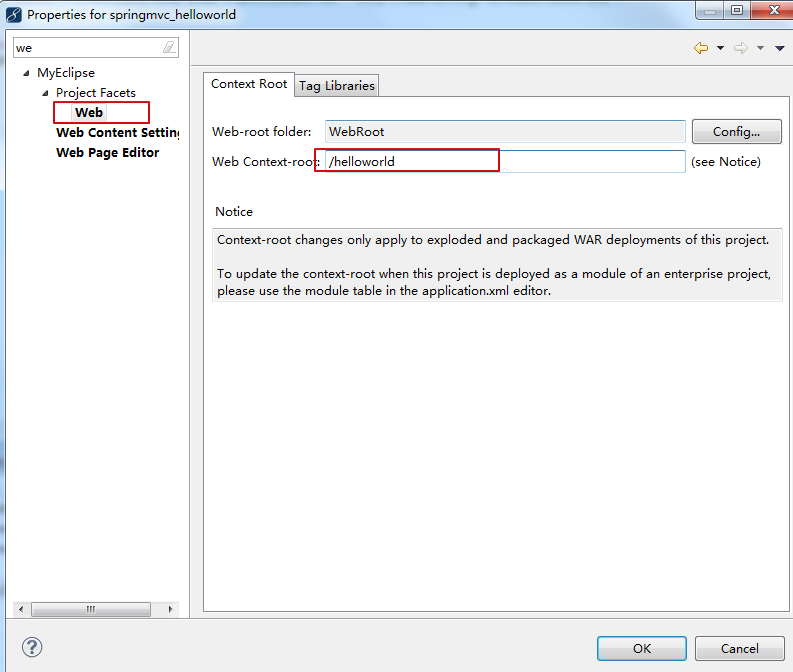
之后,重新部署,运行项目,输入地址
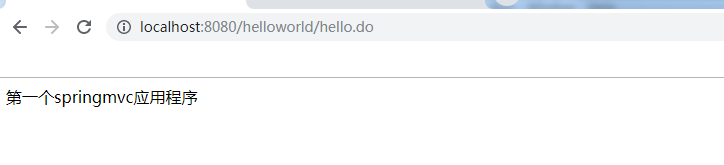
http://localhost:8080/helloworld/hello.do
8.效果如下
github地址:https://github.com/Vincent-yuan/springmvc_helloworld
java之spring mvc之helloworld的更多相关文章
- 框架-Java:Spring MVC
ylbtech-框架-Java:Spring MVC Spring MVC属于SpringFrameWork的后续产品,已经融合在Spring Web Flow里面.Spring 框架提供了构建 We ...
- 从零开始学 Java - 搭建 Spring MVC 框架
没有什么比一个时代的没落更令人伤感的了 整个社会和人都在追求创新.进步.成长,没有人愿意停步不前,一个个老事物慢慢从我们生活中消失掉真的令人那么伤感么?或者说被取代?我想有些是的,但有些东西其实并不是 ...
- Java框架-Spring MVC理解001
Spring MVC理解 1.servlet--Spring MVC的本质 2.Spring MVC其实是一个工具,具体的理解可以分为两步:第一步,了解这个工具是怎么创建出来的:第二步,了解这个工具是 ...
- Java之Spring mvc详解
文章大纲 一.Spring mvc介绍二.Spring mvc代码实战三.项目源码下载四.参考文章 一.Spring mvc介绍 1. 什么是springmvc springmvc是sprin ...
- 【Java】Spring MVC 扩展和SSM框架整合
开发web项目通常很多地方需要使用ajax请求来完成相应的功能,比如表单交互或者是复杂的UI设计中数据的传递等等.对于返回结果,我们一般使用JSON对象来表示,那么Spring MVC中如何处理JSO ...
- java之spring mvc之初始spring mvc
1. mvc : mvc框架是处理 http请求和响应的框架 2. mvc 做的事情有哪些: 将 url 映射到一个java的处理方法上 将表单数据提交到 java 类中 将后台 java 类处理的结 ...
- 利用maven构建一个spring mvc的helloworld实例
刚开始学习maven和spring mvc,学的云里雾里的 这里提供一个hello world实例,记录自己的学习之路 首先看maven官网的介绍 Apache Maven is a software ...
- 从零开始学 Java - 搭建 Spring MVC 记录云创的日子 第一章
2017年11月29日 来到新项目,需要用到Spring MVC ,那么我就开始记录我这次的学习. Spring MVC 框架是围绕一个 DispatcherServlet 来设计的,这个 Servl ...
- java idea spring mvc 入门 最起码 我8080跑起来了
IDEA建立Spring MVC Hello World 详细入门教程 https://www.cnblogs.com/wormday/p/8435617.html
随机推荐
- cocos Uniforms值的赋值
cocos Uniforms值的赋值 举个void Renderer::drawBatchedTriangles()的渲染: //Start drawing verties in batch for( ...
- sql注入用<>绕过被过滤的select ——百度杯9月第二场SQL
题目提示SQL注入,打开源代码发现<!--SELECT * FROM info WHERE id=1--> 尝试union select 1,2,3提示inj code! 经过多次尝试之后 ...
- 【转】Android Fastboot 与 Recovery 和刷机
1. 首先来看下Android系统的分区: Android系统的分区.jpg Android分区解释.png 安卓系统一般把rom芯片分成7个区,如果再加上内置sd卡这个分区,就是8个: hb ...
- Maven 项目中依赖的搜索顺序
Maven 项目中依赖的搜索顺序 http://www.manongjc.com/article/13422.html 执行过程中使用 -e -X 查看详细的搜索地址: 1,中央仓库,这是默认的仓库 ...
- JVM探究之 —— 垃圾回收(一)
垃圾收集(Garbage Collection,GC),大部分人都把这项技术当做Java语言的伴生产物.事实上,GC的历史比Java久远,1960年诞生于MIT的Lisp是第一门真正使用内存动态分配和 ...
- 【phpstudy2016】apache配置Tp5.0,获取表单数据总是多了一个路由变量,解决
1.用的apahce配置tp5.0的php环境 2.发现input()过来的数据,总是多了一个变量,那就是路由变量, 类似[array(2) { ["/index/index/form_su ...
- 【转】SQL2008 链接Oracle 调用存储过程
1. SQL链接ORACLE 都是可视化的操作 如下图: 红色框选的是oracle的数据驱动,如果没有这个驱动 那需要单独安装oracle的client端 装完以后就有了. 2.在创建之前,在SQLS ...
- NSIS安装或卸载时检查程序是否正在运行
转载:https://www.cnblogs.com/z5337/p/4766415.html 转载:https://www.gongzi.org/nsisbuildqqstop.html 转载:ht ...
- RockBrain USB Server外设虚拟化高可用解决方案(银企直联虚拟化解决方案)
技术指标: 单.双千兆网络界面(支持链路冗余与链路热备.支持双网口均衡负载) 原生USB2.0接口(USB2.0与USB3.0接口均对所有USB版本设备兼容,支持混插) 技术优势: RockBrain ...
- cisco 路由与ASA SSH 设置
转载于https://www.cnblogs.com/sun292393989/p/8980700.html 一 试验拓扑 二 Server配置 ①配置hostname和domain name 因为r ...