
DYNAMICS 365发布所有时候报错:appmodule With Id = a7a513b1-c87d-e911-a83a-000d3a375321 Does Not Exist
我是微软Dynamcis 365 & Power Platform方面的工程师罗勇,也是2015年7月到2018年6月连续三年Dynamics CRM/Business Solutions方面的微软最有价值专家(Microsoft MVP),欢迎关注我的微信公众号 MSFTDynamics365erLuoYong ,回复339或者20190525可方便获取本文,同时可以在第一间得到我发布的最新博文信息,follow me!
最近对我的Dynamics 365 Customer Engagement Online实例的解决方案点击 【Publish All Customizations】会报错,如下图:
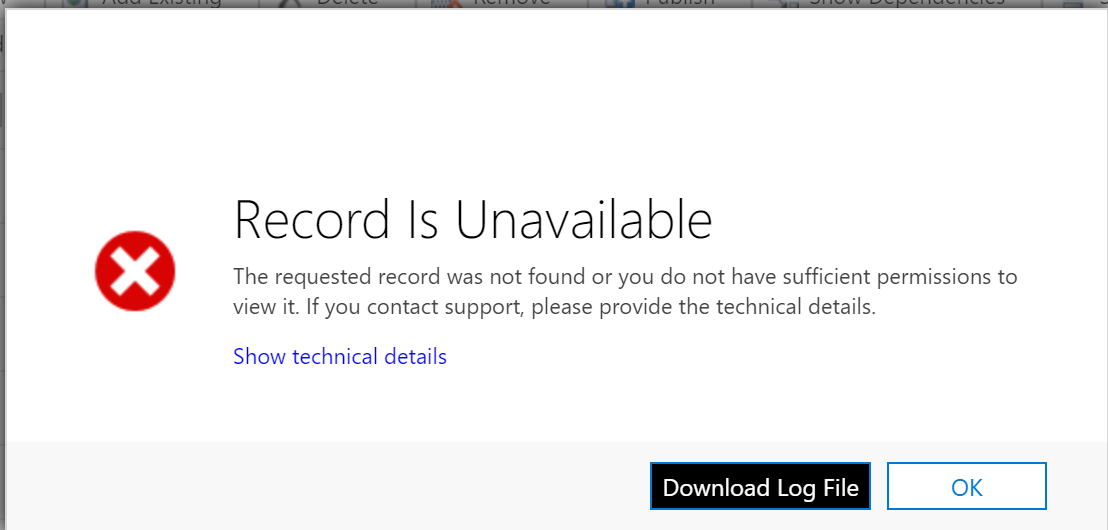
点击【Download Log File】后日志如下:
Unhandled exception:
Exception type: System.ServiceModel.FaultException`1[Microsoft.Xrm.Sdk.OrganizationServiceFault]
Message: appmodule With Id = a7a513b1-c87d-e911-a83a-000d3a375321 Does Not ExistDetail:
<OrganizationServiceFault xmlns:i="http://www.w3.org/2001/XMLSchema-instance" xmlns="http://schemas.microsoft.com/xrm/2011/Contracts">
<ActivityId>93b24a30-ed62-4b89-b4b2-5b3251b01b7e</ActivityId>
<ErrorCode>-2147220969</ErrorCode>
<ErrorDetails xmlns:d2p1="http://schemas.datacontract.org/2004/07/System.Collections.Generic">
<KeyValuePairOfstringanyType>
<d2p1:key>ApiExceptionSourceKey</d2p1:key>
<d2p1:value xmlns:d4p1="http://www.w3.org/2001/XMLSchema" i:type="d4p1:string">Step/Microsoft.Crm.Extensibility.ImageRetrievalStep</d2p1:value>
</KeyValuePairOfstringanyType>
<KeyValuePairOfstringanyType>
<d2p1:key>ApiOriginalExceptionKey</d2p1:key>
<d2p1:value xmlns:d4p1="http://www.w3.org/2001/XMLSchema" i:type="d4p1:string">Microsoft.Crm.BusinessEntities.CrmObjectNotFoundException: appmodule With Id = a7a513b1-c87d-e911-a83a-000d3a375321 Does Not Exist
at Microsoft.Crm.ObjectModel.AppModuleService.Retrieve(BusinessEntityMoniker moniker, EntityExpression entityExpression, ExecutionContext context)
at Microsoft.Crm.Extensibility.ImageRetrievalStep.RetrieveEntity(BusinessEntityMoniker moniker, EntityExpression entityExpression, PipelineExecutionContext context)
at Microsoft.Crm.Extensibility.ImageRetrievalStep.RetrieveEntityWithColumns(BusinessEntityMoniker businessEntityMoniker, List`1 columns, ContextEntityKey entityRequest, PipelineExecutionContext context)
at Microsoft.Crm.Extensibility.ImageRetrievalStep.Execute(PipelineExecutionContext context)
at Microsoft.Crm.Extensibility.PipelineInstrumentationHelper.Execute(Boolean instrumentationEnabled, String stopwatchName, ExecuteWithInstrumentation action, PipelineExecutionContext context)
at Microsoft.Crm.Extensibility.Pipeline.<>c__DisplayClass2_1.<Execute>b__0()</d2p1:value>
</KeyValuePairOfstringanyType>
<KeyValuePairOfstringanyType>
<d2p1:key>ApiStepKey</d2p1:key>
<d2p1:value xmlns:d4p1="http://www.w3.org/2001/XMLSchema" i:type="d4p1:string">84b9d1ca-3e30-11db-b951-000cf1fe02ff</d2p1:value>
</KeyValuePairOfstringanyType>
<KeyValuePairOfstringanyType>
<d2p1:key>ApiDepthKey</d2p1:key>
<d2p1:value xmlns:d4p1="http://www.w3.org/2001/XMLSchema" i:type="d4p1:string">1</d2p1:value>
</KeyValuePairOfstringanyType>
<KeyValuePairOfstringanyType>
<d2p1:key>ApiActivityIdKey</d2p1:key>
<d2p1:value xmlns:d4p1="http://www.w3.org/2001/XMLSchema" i:type="d4p1:string">93b24a30-ed62-4b89-b4b2-5b3251b01b7e</d2p1:value>
</KeyValuePairOfstringanyType>
<KeyValuePairOfstringanyType>
<d2p1:key>ApiPluginSolutionNameKey</d2p1:key>
<d2p1:value xmlns:d4p1="http://www.w3.org/2001/XMLSchema" i:type="d4p1:string">System</d2p1:value>
</KeyValuePairOfstringanyType>
<KeyValuePairOfstringanyType>
<d2p1:key>ApiStepSolutionNameKey</d2p1:key>
<d2p1:value xmlns:d4p1="http://www.w3.org/2001/XMLSchema" i:type="d4p1:string">System</d2p1:value>
</KeyValuePairOfstringanyType>
</ErrorDetails>
<Message>appmodule With Id = a7a513b1-c87d-e911-a83a-000d3a375321 Does Not Exist</Message>
<Timestamp>2019-05-25T02:25:26.6330477Z</Timestamp>
<ExceptionRetriable>false</ExceptionRetriable>
<ExceptionSource i:nil="true" />
<InnerFault i:nil="true" />
<OriginalException i:nil="true" />
<TraceText i:nil="true" />
</OrganizationServiceFault>
我用语句查了下这个appmodule,https://demo.crm.dynamics.com/api/data/v9.1/solutioncomponents?$filter=objectid eq a7a513b1-c87d-e911-a83a-000d3a375321
返回的内容类似如下,存在两个:
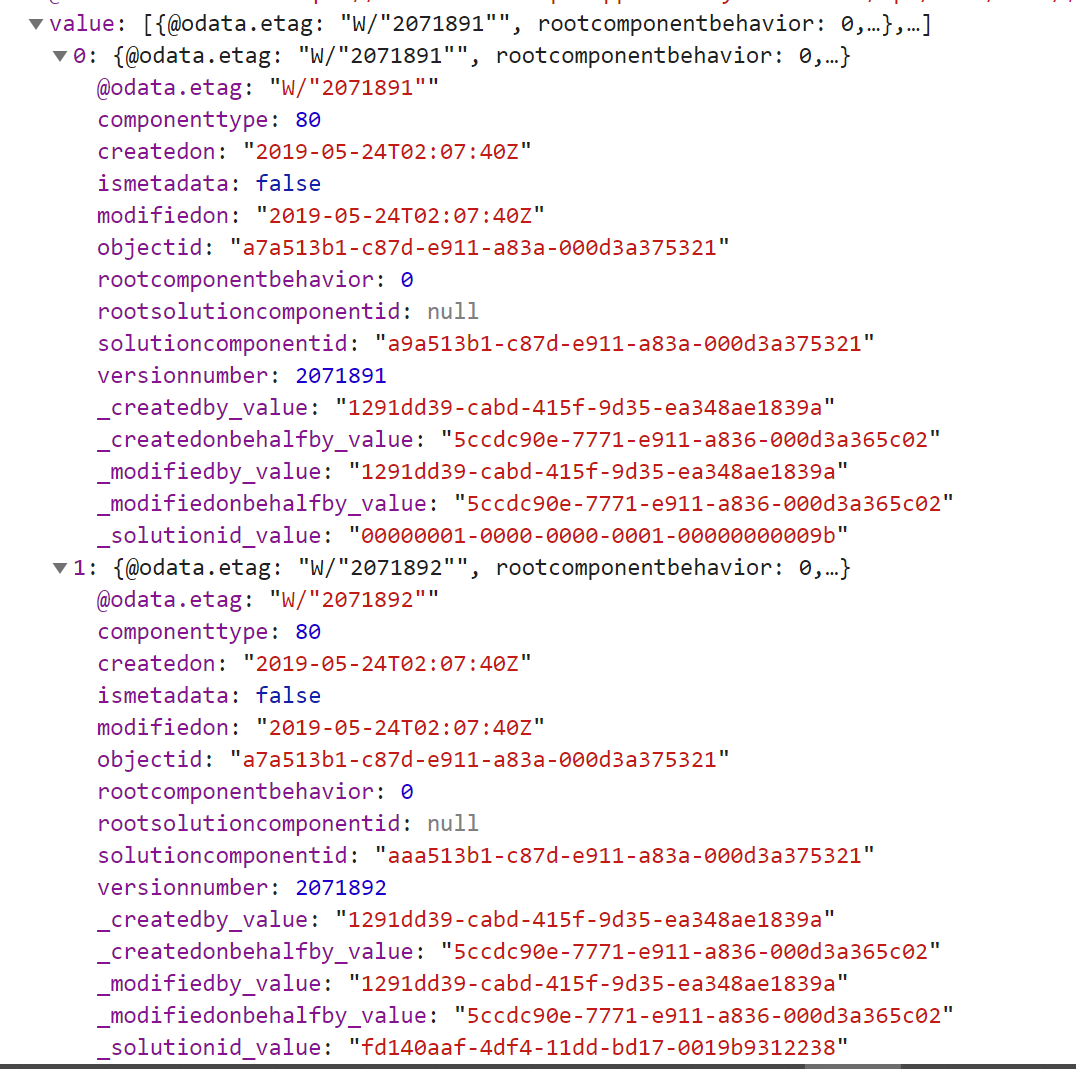
可以看到 Component Type的值是80,我查了下 SolutionComponent 实体的元素据,componenttype字段是个OptionSet类型,并没有看到值为 80 的选项。
我用返回的 _solutionid_value 分别查了下,https://demo.crm.dynamics.com/api/data/v9.1/solutions(00000001-0000-0000-0001-00000000009b)
返回的两个解决方案的名称分别是:Common Data Services Default Solution 和 Default Solution ,应该是默认解决方案。
这个可能是一个短时间出现的已知问题,已经解决。
若碰到类似问题开发人员解决不了,可以登录 https://admin.powerplatform.microsoft.com/ 创建Support Request,Microsoft Customer Service & Support 会积极回应您的支持请求的。
DYNAMICS 365发布所有时候报错:appmodule With Id = a7a513b1-c87d-e911-a83a-000d3a375321 Does Not Exist的更多相关文章
- maven发布到tomcat报错: Publishing failed Could not publish to the server. java.lang.IndexOutOfBoundsException
eclipse中将maven项目发布到tomcat报错时: Publishing failed Could not publish to the server. java.lang.IndexOutO ...
- 安装sql server managerment studio报错"The instance id is required but it is missing"
问题描述: 今天在安装sql server managerment studio的时候提示报错"The instance id is required but it is missing&q ...
- Visual Studio发布Web项目报错:Unable to add 'xxx' to the Web site. Unable to add file 'xxx'. The specified file could not be encrypted.
背景 Visual Studio下的Web项目 现象 发布时遇到Unable to add 'xxx' to the Web site. Unable to add file 'xxx'. The ...
- 为 VUE 项目添加 PWA 解决发布后刷新报错问题
为什么要给 VUE 项目添加 PWA 为什么要添加?因为不管是部署在 IIS,还是 nginx,每次应用部署后,再次访问因为旧的 js 已经不存在,所以页面访问的时候会整个报错,报错的结果就是一个白屏 ...
- 使用CXF发布的WebService报错:org.apache.cxf.interceptor.Fault: The given SOAPAction does not match an operation
场景:JAVA语言使用CXF搭建WebService发布报错 错误信息:org.apache.cxf.interceptor.Fault: The given SOAPAction does not ...
- 使用office 365打开excel文件报错,提示“向程序发送命令时出现问题”
我买了一套正版的office 365装在我的windows10 上.但是每次打开excel都会报错,如图一.求教了微软技术人员,他们给出了以下办法: 图一 方法一: 修复安装Office ====== ...
- swagger 集成后发布到服务器报错[Could not find file 'D:\\home\\site\\wwwroot\\bin\\WebAPI.XML]
webapi集成swagger后,在本地运行没有问题,但是发布到服务器上就有问题. 报错信息:Could not find file 'D:\\home\\site\\wwwroot\\bin\\We ...
- asp.net core 2.0发布到IIS报错解决方案
大体来说,是环境的问题. 第一个错误,如图: 1. 查了网上说是文件夹权限的问题,依次设置了Everyone权限和IIS_IUSER权限,能勾选的都勾选了,然而并没有什么用,看来不是这个问题导致的. ...
- 发布后台接口报错:could not load file or assembly 'mysql.data,' version=6.7.4.0, Culture=neutral, PublicKeyToken=c5687fc88969c44d
本地调试正常,但是服务器上面一直报错:could not load file or assembly 'mysql.data,' version=6.7.4.0, Culture=neutral, P ...
随机推荐
- PostgreSQL学习之路一
PostgreSQL的扩展PostGIS是最著名的开源GIS数据库. 安装PostgreSQL是第一步. 1.下载PostgreSQL的二进制安装文件 PostgreSQL官网–>Downloa ...
- 常用类-Excel-使用Aspose.Cells插件
using System; using System.Collections.Generic; using System.Linq; using System.Web; using System.Xm ...
- requeests模块请求常用参数的写法整理
主要是针对写法 一.requests.get requests.get是调用了requests.request('get', url, params=params, **kwargs) 1.url 协 ...
- 匿名函数,内置函数II,闭包
1. 匿名函数 匿名函数,顾名思义就是没有名字的函数,那么什么函数没有名字呢?这个就是我们以后面试或者工作中经常用匿名函数 lambda,也叫一句话函数. 现在有一个需求:你们写一个函数,此函数接收两 ...
- Javascript 的定时器 setInterval,setTimeout,clearInterval
今天开通博客.来1个.哇哈哈哈~~ 今天本来想复习BOM的看到定时器也算DOM一种 ?(是这样吗).分享一下 参考源于:八神吻你 http://www.cnblogs.com/lmfeng/archi ...
- JS基础语法---Date对象中常见的方法
创建实例对象 var dt = new Date(); //当前的时间---当前的服务器 console.log(dt); var dt = new Date("2017-08-12&quo ...
- 解决Xcode10 Library not loaded: /usr/lib/libstdc++.6造成的crash及报错
关键字1:dyld: Library not loaded: /usr/lib/libstdc++.6.dylib Referenced from: 关键字2:Reason: no suitabl ...
- iOS网络开发—POST请求和GET请求
创建GET请求: // 1.设置请求路径 NSString *urlStr=[NSString stringWithFormat:@"http://192.168.1.53:8080/MJS ...
- Android进阶之绘制-自定义View完全掌握(三)
自定义View系列的第三篇博客,我们来学习如何实现自定义下拉框. 今天的程序,我们来实现这样的一个效果. 布局非常简单,我们直接开始编码. 修改activity_main.xml文件的代码. < ...
- 监控redis命令 - monitor
有时候我们需要知道客户端对redis服务端做了哪些命令操作.我们可以试用monitor命令来查看.它能清楚的看到客户端在什么时间点执行了那些命令. MONITOR 是一个调试命令,每个命令流回来的re ...