
shiro-helloworld
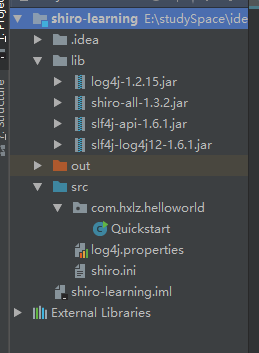
1.目录结构
2.log4j.properties
#

# Licensed to the Apache Software Foundation (ASF) under one

# or more contributor license agreements.  See the NOTICE file

# distributed with this work for additional information

# regarding copyright ownership.  The ASF licenses this file

# to you under the Apache License, Version 2.0 (the

# "License"); you may not use this file except in compliance

# with the License.  You may obtain a copy of the License at

#

#     http://www.apache.org/licenses/LICENSE-2.0

#

# Unless required by applicable law or agreed to in writing,

# software distributed under the License is distributed on an

# "AS IS" BASIS, WITHOUT WARRANTIES OR CONDITIONS OF ANY

# KIND, either express or implied.  See the License for the

# specific language governing permissions and limitations

# under the License.

#

log4j.rootLogger=INFO, stdout

log4j.appender.stdout=org.apache.log4j.ConsoleAppender

log4j.appender.stdout.layout=org.apache.log4j.PatternLayout

log4j.appender.stdout.layout.ConversionPattern=%d %p [%c] - %m %n

# General Apache libraries

log4j.logger.org.apache=WARN

# Spring

log4j.logger.org.springframework=WARN

# Default Shiro logging

log4j.logger.org.apache.shiro=TRACE

# Disable verbose logging

log4j.logger.org.apache.shiro.util.ThreadContext=WARN

log4j.logger.org.apache.shiro.cache.ehcache.EhCache=WARN
3.shiro.ini
#

# Licensed to the Apache Software Foundation (ASF) under one

# or more contributor license agreements.  See the NOTICE file

# distributed with this work for additional information

# regarding copyright ownership.  The ASF licenses this file

# to you under the Apache License, Version 2.0 (the

# "License"); you may not use this file except in compliance

# with the License.  You may obtain a copy of the License at

#

#     http://www.apache.org/licenses/LICENSE-2.0

#

# Unless required by applicable law or agreed to in writing,

# software distributed under the License is distributed on an

# "AS IS" BASIS, WITHOUT WARRANTIES OR CONDITIONS OF ANY

# KIND, either express or implied.  See the License for the

# specific language governing permissions and limitations

# under the License.

#

# =============================================================================

# Quickstart INI Realm configuration

#

# For those that might not understand the references in this file, the

# definitions are all based on the classic Mel Brooks' film "Spaceballs". ;)

# =============================================================================

# -----------------------------------------------------------------------------

# Users and their assigned roles

#

# Each line conforms to the format defined in the

# org.apache.shiro.realm.text.TextConfigurationRealm#setUserDefinitions JavaDoc

# -----------------------------------------------------------------------------

[users]

# user 'root' with password 'secret' and the 'admin' role

root = secret, admin

# user 'guest' with the password 'guest' and the 'guest' role

guest = guest, guest

# user 'presidentskroob' with password '' ("That's the same combination on

# my luggage!!!" ;)), and role 'president'

presidentskroob = , president

# user 'darkhelmet' with password 'ludicrousspeed' and roles 'darklord' and 'schwartz'

darkhelmet = ludicrousspeed, darklord, schwartz

# user 'lonestarr' with password 'vespa' and roles 'goodguy' and 'schwartz'

lonestarr = vespa, goodguy, schwartz

# -----------------------------------------------------------------------------

# Roles with assigned permissions

#

# Each line conforms to the format defined in the

# org.apache.shiro.realm.text.TextConfigurationRealm#setRoleDefinitions JavaDoc

# -----------------------------------------------------------------------------

[roles]

# 'admin' role has all permissions, indicated by the wildcard '*'

admin = *

# The 'schwartz' role can do anything (*) with any lightsaber:

schwartz = lightsaber:*

# The 'goodguy' role is allowed to 'delete' (action) the user (type) with

# license plate 'zhangsan' (instance specific id)

goodguy = user:delete:zhangsan
4.Quickstart.java
package com.hxlz.helloworld;

import org.apache.shiro.SecurityUtils;

import org.apache.shiro.authc.*;

import org.apache.shiro.config.IniSecurityManagerFactory;

import org.apache.shiro.mgt.SecurityManager;

import org.apache.shiro.session.Session;

import org.apache.shiro.subject.Subject;

import org.apache.shiro.util.Factory;

import org.slf4j.Logger;

import org.slf4j.LoggerFactory;

public class Quickstart {

    private static final transient Logger log = LoggerFactory.getLogger(Quickstart.class);

    public static void main(String[] args) {

        Factory<SecurityManager> factory = new IniSecurityManagerFactory("classpath:shiro.ini");

        SecurityManager securityManager = factory.getInstance();

        SecurityUtils.setSecurityManager(securityManager);

        // 获取当前的 Subject. 调用 SecurityUtils.getSubject();

        Subject currentUser = SecurityUtils.getSubject();

        // 测试使用 Session

        // 获取 Session: Subject#getSession()

        Session session = currentUser.getSession();

        session.setAttribute("someKey", "aValue");

        String value = (String) session.getAttribute("someKey");

        if (value.equals("aValue")) {

            log.info("---> Retrieved the correct value! [" + value + "]");

        }

        // 测试当前的用户是否已经被认证. 即是否已经登录.

        // 调动 Subject 的 isAuthenticated()

        if (!currentUser.isAuthenticated()) {

            // 把用户名和密码封装为 UsernamePasswordToken 对象

            UsernamePasswordToken token = new UsernamePasswordToken("lonestarr", "vespa");

            // rememberme

            token.setRememberMe(true);

            try {

                // 执行登录.

                currentUser.login(token);

                log.info("----> 该用户已登录!");

            }

            // 若没有指定的账户, 则 shiro 将会抛出 UnknownAccountException 异常.

            catch (UnknownAccountException uae) {

                log.info("----> There is no user with username of " + token.getPrincipal());

                return;

            }

            // 若账户存在, 但密码不匹配, 则 shiro 会抛出 IncorrectCredentialsException 异常。

            catch (IncorrectCredentialsException ice) {

                log.info("----> Password for account " + token.getPrincipal() + " was incorrect!");

                return;

            }

            // 用户被锁定的异常 LockedAccountException

            catch (LockedAccountException lae) {

                log.info("The account for username " + token.getPrincipal() + " is locked.  " +

                        "Please contact your administrator to unlock it.");

            }

            // 所有认证时异常的父类.

            catch (AuthenticationException ae) {

            }

        }

        //通过currentUser.getPrincipal()获取登录用户名

        log.info("----> User [" + currentUser.getPrincipal() + "] logged in successfully.");

        // 测试是否有某一个角色. 调用 Subject 的 hasRole 方法.

        if (currentUser.hasRole("schwartz")) {

            log.info("----> May the Schwartz be with you!");

        } else {

            log.info("----> Hello, mere mortal.");

            return;

        }

        //test a typed permission (not instance-level)

        // 测试用户是否具备某一个行为. 调用 Subject 的 isPermitted() 方法。

        if (currentUser.isPermitted("lightsaber:weild")) {

            log.info("----> You may use a lightsaber ring.  Use it wisely.");

        } else {

            log.info("Sorry, lightsaber rings are for schwartz masters only.");

        }

        //a (very powerful) Instance Level permission:

        // 测试用户是否具备某一个行为.

        if (currentUser.isPermitted("user:delete:zhangsan")) {

            log.info("----> You are permitted to 'drive' the winnebago with license plate (id) 'eagle5'.  " +

                    "Here are the keys - have fun!");

        } else {

            log.info("Sorry, you aren't allowed to drive the 'eagle5' winnebago!");

        }

        // 执行登出. 调用 Subject 的 Logout() 方法.

        System.out.println("---->" + currentUser.isAuthenticated());

        //登出

        currentUser.logout();

        System.out.println("---->" + currentUser.isAuthenticated());

        System.exit(0);

    }

}
shiro-helloworld的更多相关文章
- 第一节:Shiro HelloWorld 实现
1.新建maven工程,pom配置maven jar包 <dependency> <groupId>org.apache.shiro</groupId> <a ...
- Shiro学习
Shiro学习资源 Shiro官网,http://shiro.apache.org/index.html 学习网站链接,http://blog.java1234.com/blog/articles/4 ...
- shiro(安全框架)
shiro.apache.org JavaSE环境搭建Shiro框架 1/导入与 shiro相关的Jar包 所有集好的环境可以在如下目录查找 复制如上文件到工程中 2/配置文件:储存临时文件 shir ...
- Shiro-HelloWord
HelloWorld Shiro的HelloWorld不是我们写的,而是看Shiro给我们提供的一段代码.通过这段代码可以看到Shiro大致的使用方式. 1.找到Shiro的jar包 目前的最新稳定版 ...
- shiro-core包引用的版本问题
在做shiro学习时,遇到这样的问题: Exception in thread "main" java.lang.NoClassDefFoundError: org/apache/ ...
- Shrio第一天——入门与基本概述
一.Shiro是什么 Apache Shiro是Java的一个安全框架.(希罗:/笑哭) Shiro可以非常容易的开发出足够好的应用,其不仅可以用在JavaSE环境,也可以用在JavaEE环境. sh ...
- Shrio Demo
package com.atguigu.shiro.helloworld; import org.apache.shiro.SecurityUtils; import org.apache.shiro ...
- Shiro 的 HelloWorld
密码文件 [users] zhang=123 wang=123 测试 package org.zln.hello; import org.apache.log4j.LogManager; import ...
- shiro的Helloworld
package shiro; import org.apache.shiro.SecurityUtils; import org.apache.shiro.authc.UsernamePassword ...
- Shiro 加密helloWorld
承接第一章 初解加密 只贴更改的源码,其他看上一篇. ShiroRealm.java package com.lkk.shiro.realms; import org.apache.shiro.aut ...
随机推荐
- .Net上传文件处理三大范式,及开发注意事项
最近工作内容涉及到一点前端的内容,把学习到的内容记录下来,在今后的开发过程中,不要犯错.本篇只针对一些刚入职的小白及前端开发人员,大牛请绕道!~ 刚开始我们先不讲上传文件的防范问题,先通过一个例子,让 ...
- java基础第十三篇之Collection
常见的几种数据结构: * 1.堆栈:先进后出 * 2.队列:先进先出 * 3.数组:查找快,增删慢 * 4.链表:查找慢,增删快 import java.util.LinkedList; /* * ...
- 07 jQuery的位置信息
一.宽度和高度 获取宽度 .width() 描述:为匹配的元素集合中获取第一个元素的当前计算宽度值.这个方法不接受任何参数..css(width) 和 .width()之间的区别是后者返回一个没有单位 ...
- XTOJ 1267:Highway(树的直径)***
http://202.197.224.59/OnlineJudge2/index.php/Problem/read/id/1267 题意:给出一棵树,每条树边有权值,现在要修建n-1条边,边的权值为边 ...
- CentOS7 使用 kubeadm 搭建 k8s 集群
一 安装Docker-CE 前言 Docker 使用越来越多,安装也很简单,本次记录一下基本的步骤. Docker 目前支持 CentOS 7 及以后的版本,内核要求至少为 3.10. Docker ...
- Redis在.net 环境下的使用
Redis概念 Redis是一个开源的使用ANSI C语言编写.支持网络.可基于内存亦可持久化的日志型.Key-Value数据库,和Memcached类似,它支持存储的value类型相对更多,包括st ...
- HTTP、HTTPS常用的默认端口号
端口号标识了一个主机上进行通信的不同的应用程序. 1.HTTP协议代理服务器常用端口号:80/8080/3128/8081/9098 2.SOCKS代理协议服务器常用端口号:1080 3.FTP(文件 ...
- spring boot freemarker 导出word 带echarts图形报表
创建word文件内容如下 将word导出为xml格式 将文件后缀名改为 .ftl 在springboot项目中添加freemarker依赖 <!-- 导出word文档--> <dep ...
- .Net高级编程-自定义错误页 web.config中<customErrors>节点配置
错误页 1.当页面发生错误的时候,ASP.Net会将错误信息展示出来(Sqlconnection的错误就能暴露连接字符串),这样一来不好看,二来泄露网站的内部实现信息,给网站带来安全隐患,因此需要定制 ...
- MySql中的SHOW INDEX 查出的结果列代表的意义
MySQL SHOW INDEX语法的实际操作用法以及其实际查看索引状态(语法)的具体内容的描述,如果你对这一技术,心存好奇的话,以下的文章将会揭开它的神秘面纱. INDEX FROM tbl_nam ...