
springboot---发送邮件

1、pom.xml配置
 <dependencies>

        <dependency>

            <groupId>org.springframework.boot</groupId>

            <artifactId>spring-boot-starter-web</artifactId>

        </dependency>

        <dependency>

            <groupId>org.springframework.boot</groupId>

            <artifactId>spring-boot-starter-test</artifactId>

            <scope>test</scope>

        </dependency>

        <!-- SpringBoot 发送邮件 -->

        <dependency>

            <groupId>org.springframework.boot</groupId>

            <artifactId>spring-boot-starter-mail</artifactId>

        </dependency>

 </dependencies>
2、在application.properties中添加邮箱配置
spring.mail.default-encoding=UTF-8

spring.mail.host=smtp.qq.com

#发送者的邮箱密码

spring.mail.password=xxx

#端口

spring.mail.port=25

#协议

spring.mail.protocol=smtp

#发送者的邮箱账号

spring.mail.username=xxx@qq.com

server.port=8081
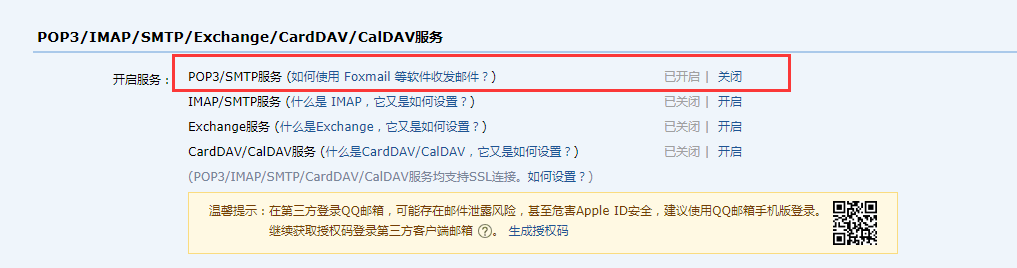
邮箱密码:
QQ邮箱 --> 邮箱设置 --> 账号
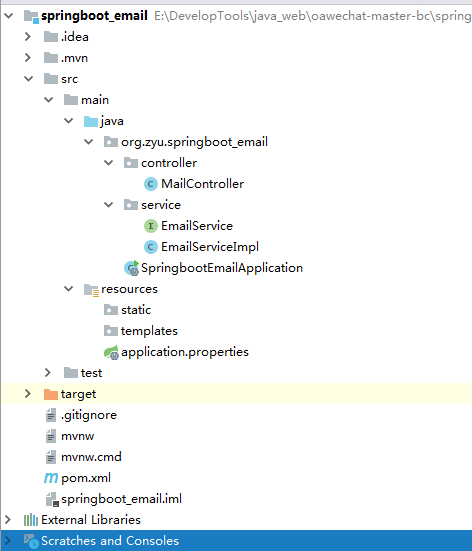
3、项目整体结构
4、业务层service接口
package org.zyu.springboot_email.service;

public interface EmailService {

    /**

     * 发送简单邮件

     * @param sendTo    接收人

     * @param title     邮件标题

     * @param content   邮件内容

     */

    void sendSimpleMail(String sendTo,String title,String content);

    /**

     * 发送带静态资源的邮件

     * @param sendTo    接收人

     * @param title     邮件标题

     * @param content   邮件内容

     * @param path      资源路径

     */

    void sendInlineMail(String sendTo,String title,String content,String path);

    /**

     * 发送带附件的邮件

     * @param sendTo    接收人

     * @param title     邮件标题

     * @param content   邮件内容

     * @param filePath  附件路径

     */

    void sendAttachmentsMail(String sendTo,String title,String content,String filePath);

}
5、serviceImpl实现service接口
package org.zyu.springboot_email.service;

import org.springframework.beans.factory.annotation.Autowired;

import org.springframework.beans.factory.annotation.Value;

import org.springframework.core.io.FileSystemResource;

import org.springframework.mail.SimpleMailMessage;

import org.springframework.mail.javamail.JavaMailSender;

import org.springframework.mail.javamail.MimeMessageHelper;

import org.springframework.stereotype.Service;

import javax.mail.internet.MimeMessage;

import java.io.File;

@Service

public class EmailServiceImpl implements EmailService {

    @Autowired

    JavaMailSender mailSender;

    //发送人

    @Value("${spring.mail.username}")

    private String sendFrom;

    @Override

    public void sendSimpleMail(String sendTo, String title, String content) {

        SimpleMailMessage mainMessage = new SimpleMailMessage();

        mainMessage.setFrom(sendFrom);

        //接收者

        mainMessage.setTo(sendTo);

        //发送的标题

        mainMessage.setSubject(title);

        //发送的内容

        mainMessage.setText(content);

        mailSender.send(mainMessage);

    }

    @Override

    public void sendInlineMail(String sendTo, String title, String content,String path) {

        MimeMessage mimeMessage = mailSender.createMimeMessage();

        try {

            FileSystemResource file = new FileSystemResource(new File(path));

            MimeMessageHelper helper = new MimeMessageHelper(mimeMessage, true);

            helper.setFrom(sendFrom);

            helper.setTo(sendTo);

            helper.setSubject(title);

            helper.setText(content, true);

            helper.addInline("weixin", file);

        } catch (Exception e) {

            System.out.println("发送带静态资源的邮件失败");

        }

        mailSender.send(mimeMessage);

    }

    @Override

    public void sendAttachmentsMail(String sendTo, String title, String content, String filePath) {

        MimeMessage message=mailSender.createMimeMessage();

        try {

            MimeMessageHelper helper=new MimeMessageHelper(message,true);

            helper.setFrom(sendFrom);

            helper.setTo(sendTo);

            helper.setSubject(title);

            helper.setText(content);

            FileSystemResource file=new FileSystemResource(new File(filePath));

            String fileName=filePath.substring(filePath.lastIndexOf(File.separator));

            //添加多个附件可以使用多条

            //helper.addAttachment(fileName,file);

            helper.addAttachment(fileName,file);

            mailSender.send(message);

            System.out.println("带附件的邮件发送成功");

        }catch (Exception e){

            e.printStackTrace();

            System.out.println("发送带附件的邮件失败");

        }

    }

}
5、业务层Controller
package org.zyu.springboot_email.controller;

import org.springframework.beans.factory.annotation.Autowired;

import org.springframework.mail.SimpleMailMessage;

import org.springframework.mail.javamail.JavaMailSender;

import org.springframework.stereotype.Controller;

import org.springframework.web.bind.annotation.GetMapping;

import org.springframework.web.bind.annotation.RequestMapping;

import org.springframework.web.bind.annotation.RestController;

import org.zyu.springboot_email.service.EmailService;

import java.nio.file.Path;

@RestController

public class MailController {

    @Autowired

    private EmailService emailService;

    /**

     * 简单发送邮件

     * @return

     */

    @GetMapping("/send")

    public String send(){

        emailService.sendSimpleMail( "393488908@qq.com", "测试标题", "hello world");

        return "发送成功";

    }

    /**

     * 发送静态资源邮件

     * @return

     */

    @GetMapping("/sendInlineMail")

    public String sendInlineMail(){

        emailService.sendInlineMail("393488908@qq.com", "主题:嵌入静态资源", "<html><body><img src=\"cid:weixin\" ></body></html>","C:\\Users\\Administrator\\Desktop\\timg.jpg");

        return "发送成功";

    }

    /**

     * 发送带附件的邮件

     * @return

     */

    @GetMapping("/sendAttachmentsMail")

    public String sendAttachmentsMail(){

        emailService.sendAttachmentsMail("393488908@qq.com", "主题:携带附件邮件", "hello world", "D:\\谷歌下载\\注册补贴明细列表.xlsx");

        return "发送成功";

    }

}
springboot---发送邮件的更多相关文章
- SpringBoot 发送邮件功能实现
背景 有个小伙伴问我你以前发邮件功能怎么弄的.然后我就给他找了个demo,正好在此也写一下,分享给大家. 理清痛点 发送邮件,大家可以想一下,坑的地方在哪? 我觉得是三个吧. 第一:邮件白名单问题. ...
- 记录一次简单的springboot发送邮件功能
场景:经常在我们系统中有通过邮件功能找回密码,或者发送生日祝福等功能,今天记录下springboot发送邮件的简单功能 1.引入maven <!-- 邮件开发--><dependen ...
- 1.使用javax.mail, spring的JavaMailSender,springboot发送邮件
一.java发邮件 电子邮件服务器:这些邮件服务器就类似于邮局,它主要负责接收用户投递过来的邮件,并把邮件投递到邮件接收者的电子邮箱中,按功能划分有两种类型 SMTP邮件服务器:用户替用户发送邮件和接 ...
- 3.4 SpringBoot发送邮件
spring官方提供了spring-boot-starter-mail来整合邮件发送功能,本质上还是利用了JavaMailSender类. 首先我们要在项目中引入相关依赖 <parent & ...
- (入门SpringBoot)SpringBoot发送邮件(十一)
SpringBoot配置邮件服务: 1.引入jar <!-- 邮件 --> <dependency> <groupId>org.springframework ...
- springboot发送邮件,以及携带邮件附件简单使用
可以通过springboot官方文档中Sending Email,找到类似如下java mail的使用文档 https://docs.spring.io/spring/docs/5.1.9.RELEA ...
- 【快学springboot】使用springboot发送邮件
前言 在实际项目中,经常需要用到邮件通知功能.比如,用户通过邮件注册,通过邮件找回密码等:又比如通过邮件发送系统情况,通过邮件发送报表信息等等,实际应用场景很多.这篇文章,就教大家通过springbo ...
- 使用 FreeMarker模板 Springboot 发送邮件
四.使用 FreeMarker模板 HTML 标签的字符串拼接是一件很棘手的事.因为在你的大脑中解析HTML标签并想象它在渲染时会是什么样子是挺困难的.而将HTML混合在Java代码中又会使得这个问题 ...
- 最简单的 springboot 发送邮件,使用thymeleaf模板
1,导入需要的包 <dependency> <groupId>org.springframework.boot</groupId> <artifactId&g ...
- springboot发送邮件
1.在发送端邮箱平台开通SMTP服务 1)以163邮箱为例: step 1: step 2: 2.编写代码: 1)添加发送邮箱maven依赖 <dependency> <groupI ...
随机推荐
- python使用代理ip
python使用代理的方法有两种 1. #先创建代理ip对象 proxy_support = urllib.request.ProxyHandler({'https':'117.64.149.137: ...
- SpringBoot2+Netty打造通俗简版RPC通信框架(升级版)
背景 上篇文章我简单的介绍了自己打造的通俗简版RPC通信框架,这篇是对简版的增强~ 如果大家对此项目还感兴趣的话,可到码云上瞄瞄:Netty-RPC 上 ...
- texlive支持中文的简单方法
1.确保tex文件的编码方式是UTF-8, 2.在文档开始处添加一行命令即可,即 \usepackage[UTF8]{ctex} , 如下所示: \documentclass{article} \us ...
- 关于ajax提交表单的一些实例及遇到的问题和解决办法
ajax提交的表单有两种情况: 第一种:input type类型没有file上传文件类型的表单 第二种:input type类型有file上传文件类型的表单 之所以分为两种:是因为原生ajax是不能提 ...
- SpringCloud教程二:Ribbon(Finchley版)
在上一篇文章,讲了服务的注册和发现.在微服务架构中,业务都会被拆分成一个独立的服务,服务与服务的通讯是基于http restful的.Spring cloud有两种服务调用方式,一种是ribbon+r ...
- 通过机器学习的线性回归算法预测股票走势(用Python实现)
在本人的新书里,将通过股票案例讲述Python知识点,让大家在学习Python的同时还能掌握相关的股票知识,所谓一举两得.这里给出以线性回归算法预测股票的案例,以此讲述通过Python的sklearn ...
- Qt5教程: (7) 模态/非模态对话框
模态对话框就是在其没有被关闭之前,用户不能与同一个应用程序的其他窗口进行交互,直到该对话框关闭. 非模态对话框就是在被打开时,用户既可选择和该对话框进行交互,也可以选择同应用程序的其他窗口交互. 1. ...
- Ubunut18 安装docker环境&&AWD攻防平台部署
docker:有两个版本:docker-ce(社区版)和docker-ee(企业版). 参考官网地址:https://docs.docker.com/engine/installation/linux ...
- 程序员成长的四个简单技巧,你 get 了吗?
最近拜读了"阿里工程师的自我修养"手册,12 位技术专家分享生涯感悟来帮助我们这些菜鸡更好的成长,度过中年危机,我收获颇多,其中有不少的方法技巧和我正在使用的,这让我觉得我做的这些 ...
- Linux的一些常用命令(一)
linux 快捷键1.ls 列出本地址上文件, -a 列出所有(包括隐藏文件) -l 按照列表方式显示 -t 按照时间方式排序 2.touch 创建文件 3. echo 'abc' > 文件名 ...