
微服务SpringCloud之配置中心和消息总线
在微服务SpringCloud之Spring Cloud Config配置中心SVN博客中每个client刷新配置信息时需要post请求/actuator/refresh,但客户端越来越多时,,需要每个客户端都执行一遍,这种方案就不太适合了。使用Spring Cloud Bus可以完美解决这一问题。
一、Spring Cloud Bus
Spring cloud bus通过轻量消息代理连接各个分布的节点。这会用在广播状态的变化(例如配置变化)或者其他的消息指令。Spring bus的一个核心思想是通过分布式的启动器对spring boot应用进行扩展,也可以用来建立一个多个应用之间的通信频道。目前唯一实现的方式是用AMQP消息代理作为通道,同样特性的设置(有些取决于通道的设置)在更多通道的文档中。
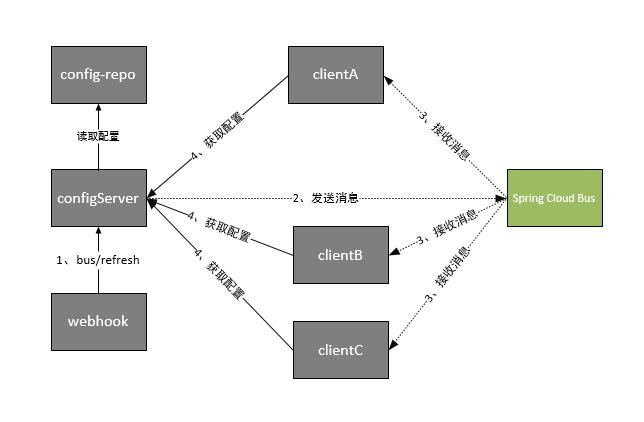
Spring cloud bus被国内很多都翻译为消息总线,也挺形象的。大家可以将它理解为管理和传播所有分布式项目中的消息既可,其实本质是利用了MQ的广播机制在分布式的系统中传播消息,目前常用的有Kafka和RabbitMQ。利用bus的机制可以做很多的事情,其中配置中心客户端刷新就是典型的应用场景之一,我们用一张图来描述bus在配置中心使用的机制。
二、启动RabbitMq
启动RabbitMq的具体方法之前博客已经写了,略过。
三、SpringCloud Config Server端
1.引入依赖
Demo是在上篇博客的基础上进行修改,主要增加引入spring-cloud-starter-bus-amqp。
<?xml version="1.0" encoding="UTF-8"?>

<project xmlns="http://maven.apache.org/POM/4.0.0" xmlns:xsi="http://www.w3.org/2001/XMLSchema-instance"

    xsi:schemaLocation="http://maven.apache.org/POM/4.0.0 http://maven.apache.org/xsd/maven-4.0.0.xsd">

    <modelVersion>4.0.0</modelVersion>

    <parent>

        <groupId>org.springframework.boot</groupId>

        <artifactId>spring-boot-starter-parent</artifactId>

        <version>2.1.6.RELEASE</version>

        <relativePath/> <!-- lookup parent from repository -->

    </parent>

    <groupId>com.example</groupId>

    <artifactId>SpringCloudConfigServer</artifactId>

    <version>0.0.1-SNAPSHOT</version>

    <packaging>war</packaging>

    <name>SpringCloudConfigServer</name>

    <description>Demo project for Spring Boot</description>

    <properties>

        <java.version>1.8</java.version>

        <spring-cloud.version>Greenwich.SR2</spring-cloud.version>

    </properties>

    <dependencies>

        <dependency>

            <groupId>org.springframework.boot</groupId>

            <artifactId>spring-boot-starter-web</artifactId>

        </dependency>

        <dependency>

            <groupId>org.springframework.cloud</groupId>

            <artifactId>spring-cloud-config-server</artifactId>

        </dependency>

<dependency>

    <groupId>org.springframework.cloud</groupId>

    <artifactId>spring-cloud-starter-netflix-eureka-client</artifactId>

</dependency>

        <dependency>

            <groupId>org.springframework.boot</groupId>

            <artifactId>spring-boot-starter-tomcat</artifactId>

            <scope>provided</scope>

        </dependency>

    <dependency>

        <groupId>org.springframework.cloud</groupId>

        <artifactId>spring-cloud-starter-bus-amqp</artifactId>

    </dependency>

        <dependency>

            <groupId>org.springframework.boot</groupId>

            <artifactId>spring-boot-starter-test</artifactId>

            <scope>test</scope>

        </dependency>

    </dependencies>

    <dependencyManagement>

        <dependencies>

            <dependency>

                <groupId>org.springframework.cloud</groupId>

                <artifactId>spring-cloud-dependencies</artifactId>

                <version>${spring-cloud.version}</version>

                <type>pom</type>

                <scope>import</scope>

            </dependency>

        </dependencies>

    </dependencyManagement>

    <build>

        <plugins>

            <plugin>

                <groupId>org.springframework.boot</groupId>

                <artifactId>spring-boot-maven-plugin</artifactId>

            </plugin>

        </plugins>

    </build>

</project>
2.新增RabbitMq配置信息
这里主要增加开启消息跟踪、配置rabbitmq相关信息。
spring.cloud.bus.trace.enabled=true

spring.rabbitmq.host=127.0.0.1

spring.rabbitmq.port=5672

spring.rabbitmq.username=guest

spring.rabbitmq.password=guest

management.endpoints.web.exposure.include=*
四、SpringCloud Config Client端
1.引入依赖
Client端和服务端有类似的配置,也是引入spring-cloud-starter-bus-amqp,增加rabbitmq相关配置。
<?xml version="1.0" encoding="UTF-8"?>

<project xmlns="http://maven.apache.org/POM/4.0.0" xmlns:xsi="http://www.w3.org/2001/XMLSchema-instance"

    xsi:schemaLocation="http://maven.apache.org/POM/4.0.0 http://maven.apache.org/xsd/maven-4.0.0.xsd">

    <modelVersion>4.0.0</modelVersion>

    <parent>

        <groupId>org.springframework.boot</groupId>

        <artifactId>spring-boot-starter-parent</artifactId>

        <version>2.1.6.RELEASE</version>

        <relativePath/> <!-- lookup parent from repository -->

    </parent>

    <groupId>com.example</groupId>

    <artifactId>SpringCloudConfigClient</artifactId>

    <version>0.0.1-SNAPSHOT</version>

    <packaging>war</packaging>

    <name>SpringCloudConfigClient</name>

    <description>Demo project for Spring Boot</description>

    <properties>

        <java.version>1.8</java.version>

        <spring-cloud.version>Greenwich.SR2</spring-cloud.version>

    </properties>

    <dependencies>

        <dependency>

            <groupId>org.springframework.boot</groupId>

            <artifactId>spring-boot-starter-web</artifactId>

        </dependency>

        <dependency>

            <groupId>org.springframework.cloud</groupId>

            <artifactId>spring-cloud-starter-config</artifactId>

        </dependency>

<dependency>

  <groupId>org.springframework.boot</groupId>

  <artifactId>spring-boot-starter-actuator</artifactId>

</dependency>

<dependency>

    <groupId>org.springframework.cloud</groupId>

    <artifactId>spring-cloud-starter-netflix-eureka-client</artifactId>

</dependency>

<dependency>

    <groupId>org.springframework.cloud</groupId>

    <artifactId>spring-cloud-starter-bus-amqp</artifactId>

</dependency>

        <dependency>

            <groupId>org.springframework.boot</groupId>

            <artifactId>spring-boot-starter-tomcat</artifactId>

            <scope>provided</scope>

        </dependency>

        <dependency>

            <groupId>org.springframework.boot</groupId>

            <artifactId>spring-boot-starter-test</artifactId>

            <scope>test</scope>

        </dependency>

    </dependencies>

    <dependencyManagement>

        <dependencies>

            <dependency>

                <groupId>org.springframework.cloud</groupId>

                <artifactId>spring-cloud-dependencies</artifactId>

                <version>${spring-cloud.version}</version>

                <type>pom</type>

                <scope>import</scope>

            </dependency>

        </dependencies>

    </dependencyManagement>

    <build>

        <plugins>

            <plugin>

                <groupId>org.springframework.boot</groupId>

                <artifactId>spring-boot-maven-plugin</artifactId>

            </plugin>

        </plugins>

    </build>

</project>
2.新增RabbitMq配置信息
management.endpoints.web.exposure.include=*

## 开启消息跟踪

spring.cloud.bus.trace.enabled=true

spring.rabbitmq.host=127.0.0.1

spring.rabbitmq.port=5672

spring.rabbitmq.username=guest

spring.rabbitmq.password=guest
五、测试
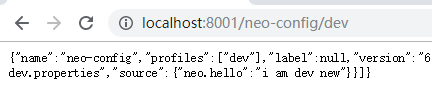
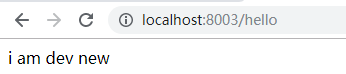
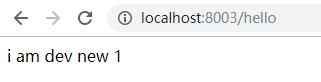
1.依次启动EurekaServer、SpringCloudConfigServer、SpringCloudConfigClient,输入http://localhost:8001/neo-config/dev、http://localhost:8003/hello。
2.修改配置信息
修改github上的配置信息,再次输入上面的url,在8003端口的是没有更新的,此时需要post请求http://localhost:8001/actuator/bus-refresh来刷新SpringCloudConfigServer。这里在post请求时可能会出现405、404的错误,需要设置management.endpoints.web.exposure.include=*,并且由于springcloud的版本不同,post请求的url也不同。
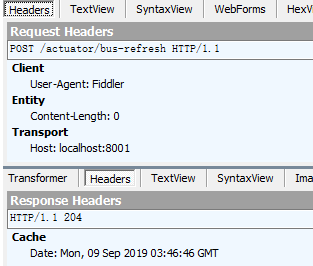
post请求之后返回204,然后刷新即可看到最新的配置信息。

参考:http://www.ityouknow.com/springcloud/2017/05/26/springcloud-config-eureka-bus.html
微服务SpringCloud之配置中心和消息总线的更多相关文章
- [转]springcloud(九):配置中心和消息总线(配置中心终结版)
https://www.cnblogs.com/ityouknow/p/6931958.html springcloud(九):配置中心和消息总线(配置中心终结版) 我们在springcloud(七) ...
- SpringCloud之Config配置中心+BUS消息总线原理及其配置
一.配置中心作用 在常规的开发中,每个微服务都包含代码和配置.其配置包含服务配置.各类开关和业务配置.如果系统结构中的微服务节点较少,那么常规的代码+配置的开发方式足以解决问题.当系统逐步迭代,其微服 ...
- spring cloud+dotnet core搭建微服务架构:配置中心续(五)
前言 上一章最后讲了,更新配置以后需要重启客户端才能生效,这在实际的场景中是不可取的.由于目前Steeltoe配置的重载只能由客户端发起,没有实现处理程序侦听服务器更改事件,所以还没办法实现彻底实现这 ...
- spring cloud+.net core搭建微服务架构:配置中心续(五)
前言 上一章最后讲了,更新配置以后需要重启客户端才能生效,这在实际的场景中是不可取的.由于目前Steeltoe配置的重载只能由客户端发起,没有实现处理程序侦听服务器更改事件,所以还没办法实现彻底实现这 ...
- spring cloud+dotnet core搭建微服务架构:配置中心(四)
前言 我们项目中有很多需要配置的地方,最常见的就是各种服务URL地址,这些地址针对不同的运行环境还不一样,不管和打包还是部署都麻烦,需要非常的小心.一般配置都是存储到配置文件里面,不管多小的配置变动, ...
- spring cloud+.net core搭建微服务架构:配置中心(四)
前言 我们项目中有很多需要配置的地方,最常见的就是各种服务URL地址,这些地址针对不同的运行环境还不一样,不管和打包还是部署都麻烦,需要非常的小心.一般配置都是存储到配置文件里面,不管多小的配置变动, ...
- Spring Cloud(九):配置中心(消息总线)【Finchley 版】
Spring Cloud(九):配置中心(消息总线)[Finchley 版] 发表于 2018-04-19 | 更新于 2018-05-07 | 我们在 Spring Cloud(七):配置中心 ...
- SpringCloud04 服务配置中心、消息总线、远程配置动态刷新
1 环境说明 JDK:1.8 MAVENT:3.5 SpringBoot:2.0.5.RELEASE SpringCloud:Finchley.SR1 2 创建服务注册中心(Eureka服务端) 说明 ...
- java微服务的统一配置中心
为了更好的管理应用的配置,也为了不用每次更改配置都重启应用,我们可以使用配置中心 关于eureka的服务注册和rabbitMQ的安装使用(自动更新配置需要用到rabbitMQ)这里不赘述,只关注配置中 ...
随机推荐
- Dubbo里面线程池的拒绝策略
Dubbo里面线程池的拒绝策略 public class AbortPolicyWithReport extends ThreadPoolExecutor.AbortPolicy { protecte ...
- HTML 第4章初始CSS3
什么是CSS? CSS全称为层叠样式表,通常又称为风格样式表. 引用CSS样式: 语法: <h1 styske="color:red;">style属性的应用</ ...
- 【作品】超实用C++分数类
引言 我们说,编程语言的精髓在于封装,而面向对象语言完胜面向过程语言的原因就是具有更好的可封装性,而C++就是这样的一种多范型语言,常用而复杂的工作完全不必在每一份源文件中重敲,就好像我们不需要自己手 ...
- mysql优化---订单查询优化(1):视图优化+索引创建
订单的表结构采用了垂直分表的策略,将订单相关的不同模块的字段维护在不同表中 在订单处理这个页面,需要查询各种维度, 因此为了方便查询创建了v_sale_order视图(老版本) drop view v ...
- javaWeb 中前端Form表单数据处理(手动拼json)
在前端我们会用到最多的就是form表单提交数据,在form表单中有很多都是自动将数据传到后台,然后通过实体来接受的,但是有的时候我们就是需要在前端就拿到这个Form表单的数据,这是我们就可以自己讲数据 ...
- Asp.Net Core WebAPI+PostgreSQL部署在Docker中
PostgreSQL是一个功能强大的开源数据库系统.它支持了大多数的SQL:2008标准的数据类型,包括整型.数值值.布尔型.字节型.字符型.日期型.时间间隔型和时间型,它也支持存储二进制的大对像, ...
- 普通Apache的安装与卸载
Apache安装与卸载ctrl+F快捷查找 1.下载apache 64位解压 官网:http://httpd.apache.org/ 文件使用记事本或者sublime2.修改 打开apache目录下的 ...
- I firmly believe
I firmly believe, what you plant now, you will harvest later.
- gRPC快速入门记录
为什么使用grpc 1.protocl buffer一种高效的序列化结构. 2.支持http 2.0标准化协议. http/2 1.http/2对每个源只需创建一个持久连接,在这一个连接内,可以并行的 ...
- python变量前的单下划线(私有变量)和双下划线()
1.单下划线 变量前的单下划线表示表面上私有 ,但是其实这样的实例变量外部是可以访问的,但是,按照约定俗成的规定,当你看到这样的变量时,意思就是,“虽然我可以被访问,但是,请把我视为私有变量,不要随意 ...