
Lab 11-1
Analyze the malware found in Lab11-01.exe.
Questions and Short Answers
What does the malware drop to disk?
A: The malware extracts and drops the file msgina32.dll onto disk from a resource section named TGAD.
How does the malware achieve persistence?
A: The malware installs msgina32.dll as a GINA DLL by adding it to the registry location
HKLM\SOFTWARE\Microsoft\Windows NT\CurrentVersion\Winlogon\GinaDLL, which causes the DLL to be loaded after system reboot.How does the malware steal user credentials?
A: The malware steals user credentials by performing GINA interception. The msgina32.dll file is able to intercept all user credentials submitted to the system for authentication.
What does the malware do with stolen credentials?
A: The malware logs stolen credentials to
%SystemRoot%\System32\msutil32.sys. The username, domain, and password are logged to the file with a timestamp.How can you use this malware to get user credentials from your test environment?
A: Once the malware is dropped and installed, there must be a system reboot for the GINA interception to begin. The malware logs credentials only when the user logs out, so log out and back in to see your credentials in the log file.
Detailed Analysis
Beginning with basic static analysis, we see the strings GinaDLL and SOFTWARE\Microsoft\Windows NT\CurrentVersion\Winlogon, which lead us to suspect that this might be GINA interception malware. Examining the imports, we see functions for manipulating the registry and extracting a resource section. Because we see resource extraction import functions, we examine the file structure by loading Lab11-01.exe into PEview, as shown in Figure 11-1L.
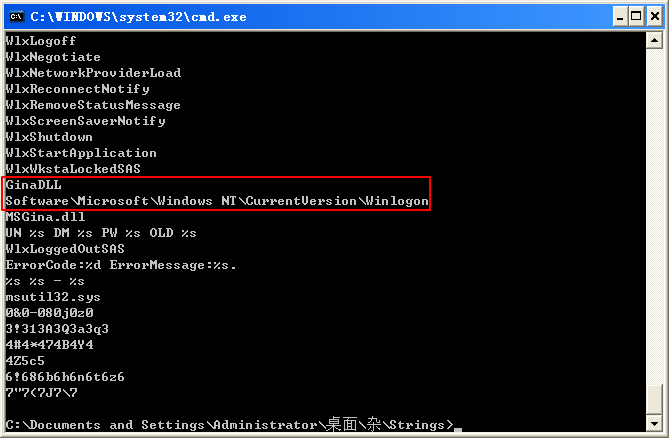
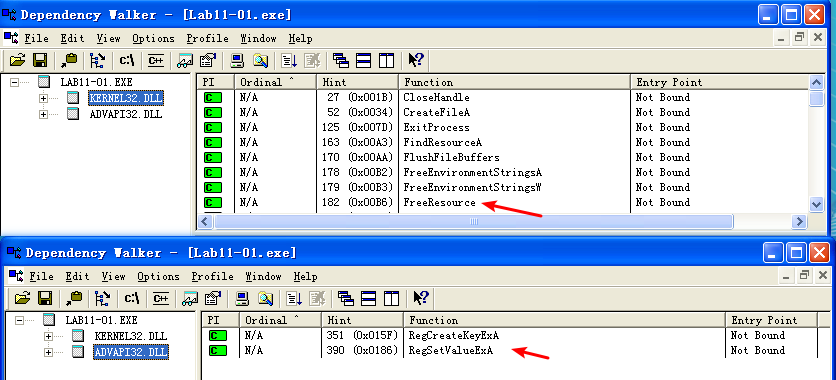
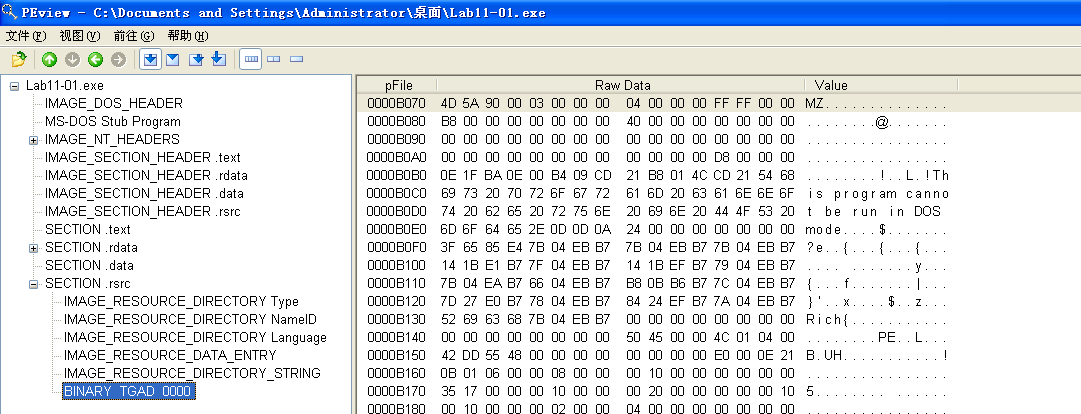
Figure 11-1L: Lab11-01.exe in PEview showing the TGAD resource section
Examining the PE file format, we see a resource section named TGAD. When we click that section in PEview, we see that TGAD contains an embedded PE file.
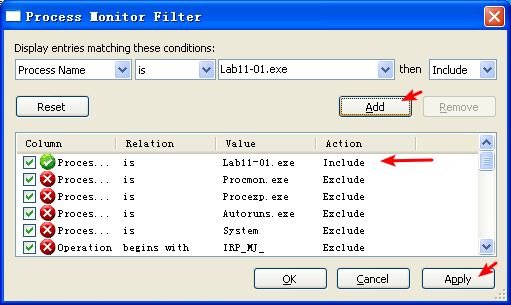
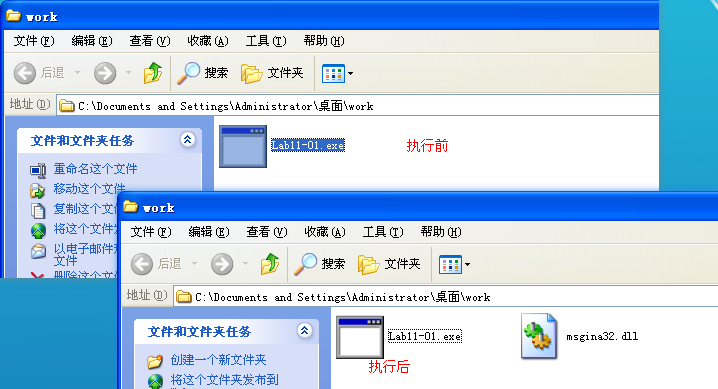
Next, we perform dynamic analysis and monitor the malware with procmon by setting a filter for Lab11-01.exe. When we launch the malware, we see that it creates a file named msgina32.dll on disk in the same directory from which the malware was launched. The malware inserts the path to msgina32.dll into the registry key HKLM\SOFTWARE\Microsoft\Windows NT\CurrentVersion\Winlogon\GinaDLL, so that the DLL will be loaded by Winlogon when the system reboots.
Lab11-01.exe 所在文件夹,在 Lab11-01.exe 执行前后对比:
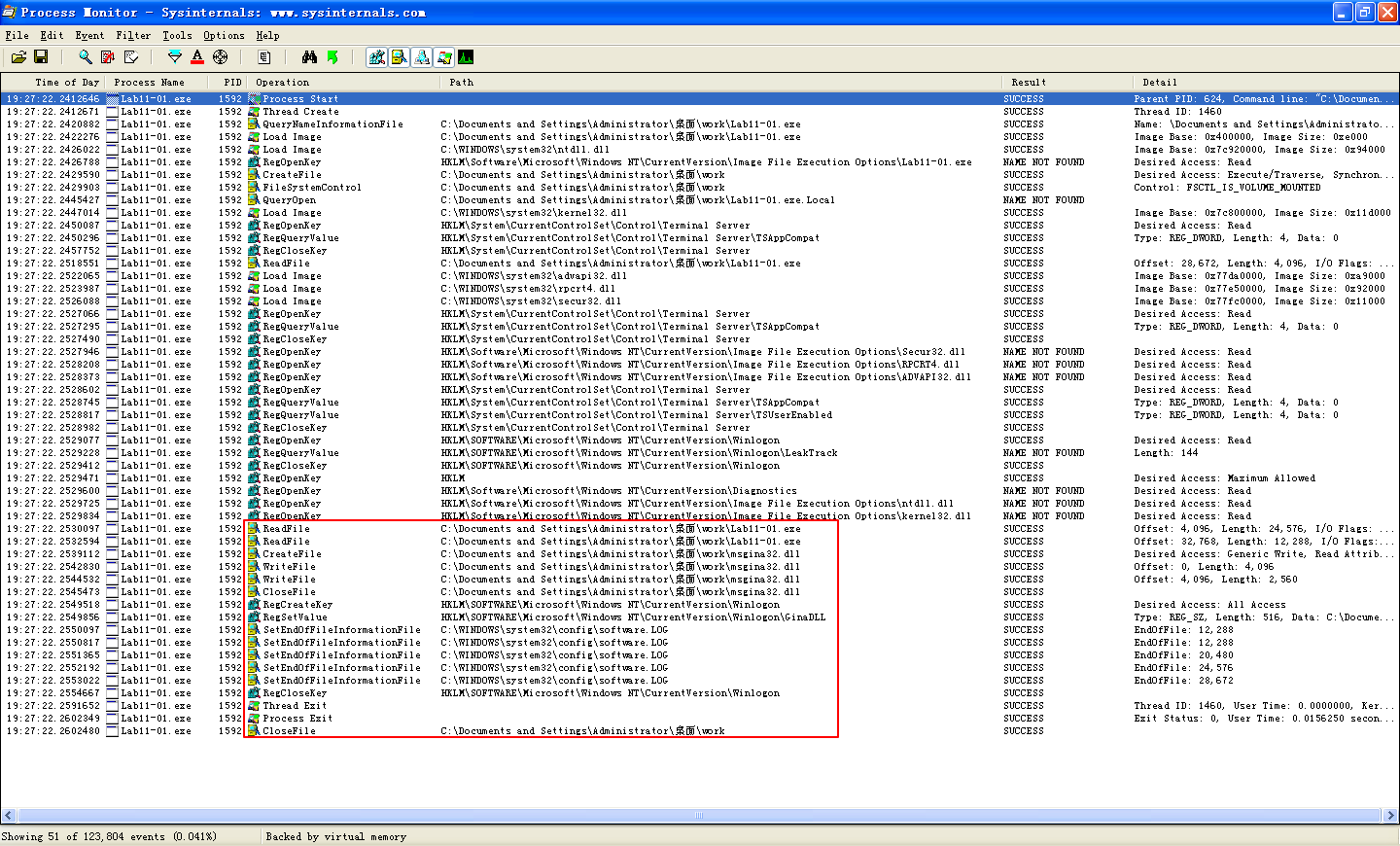

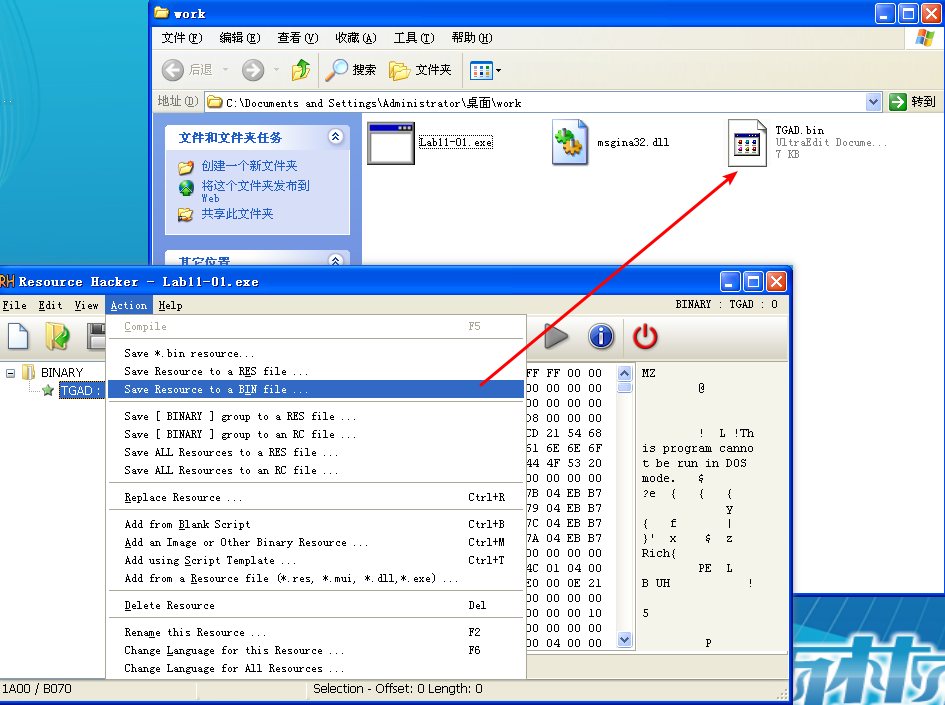
Extracting the TGAD resource section from Lab11-01.exe (using Resource Hacker) and comparing it to msgina32.dll, we find that the two are identical.
导出 Lab11-01.exe 中的 TGAD 资源节:
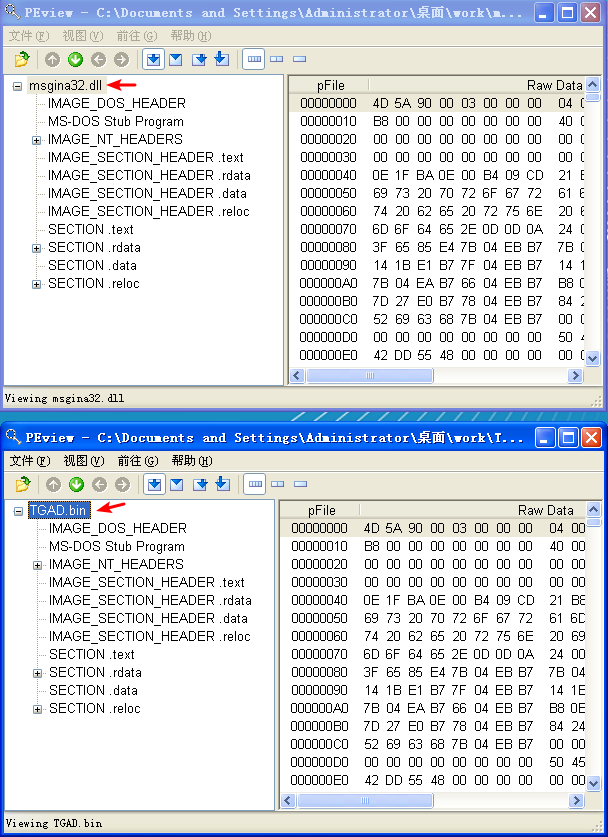
查 TGAD.bin 和 msgina32.dll 文件的 MD5:

它俩 MD5 相同,应该是同一文件。使用 PEview 查看也相同:
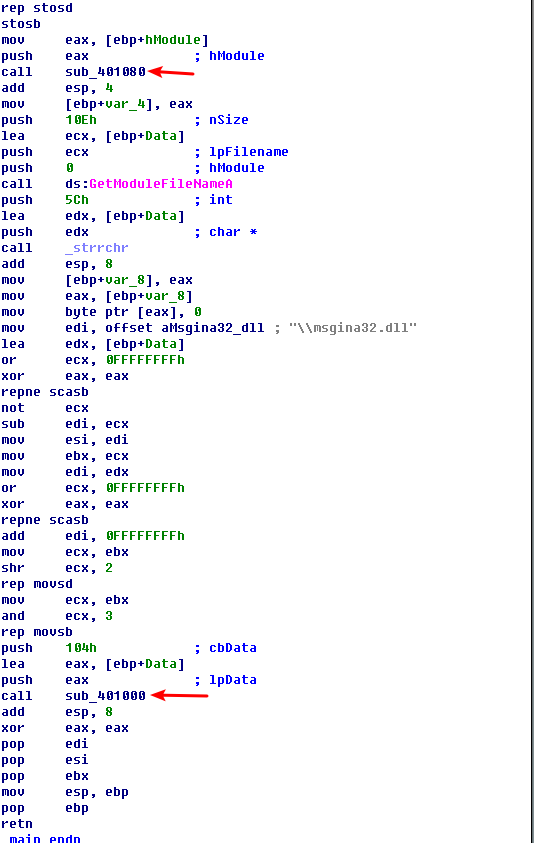
Next, we load Lab11-01.exe into IDA Pro to confirm our findings. We see that the main function calls two functions: sub_401080 (extracts the TGAD resource section to msgina32.dll) and sub_401000 (sets the GINA registry value). We conclude that Lab11-01.exe is an installer for msgina32.dll, which is loaded by Winlogon during system startup.
Analysis of msgina32.dll
We’ll begin our analysis of msgina32.dll by looking at the Strings output, as shown in Listing 11-1L.

Listing 11-1L: Strings output of msgina32.dll
The strings in this listing contain what appears to be a log message at \({\color{red}1}\), which could be used to log user credentials if this is GINA interception malware. The string msutil32.sys is interesting, and we will determine its significance later in the lab.
Examining msgina32.dll’s exports, we see many functions that begin with the prefix Wlx. Recall from Chapter 11 that GINA interception malware must contain all of these DLL exports because they are required by GINA. We’ll analyze each of these functions in IDA Pro.
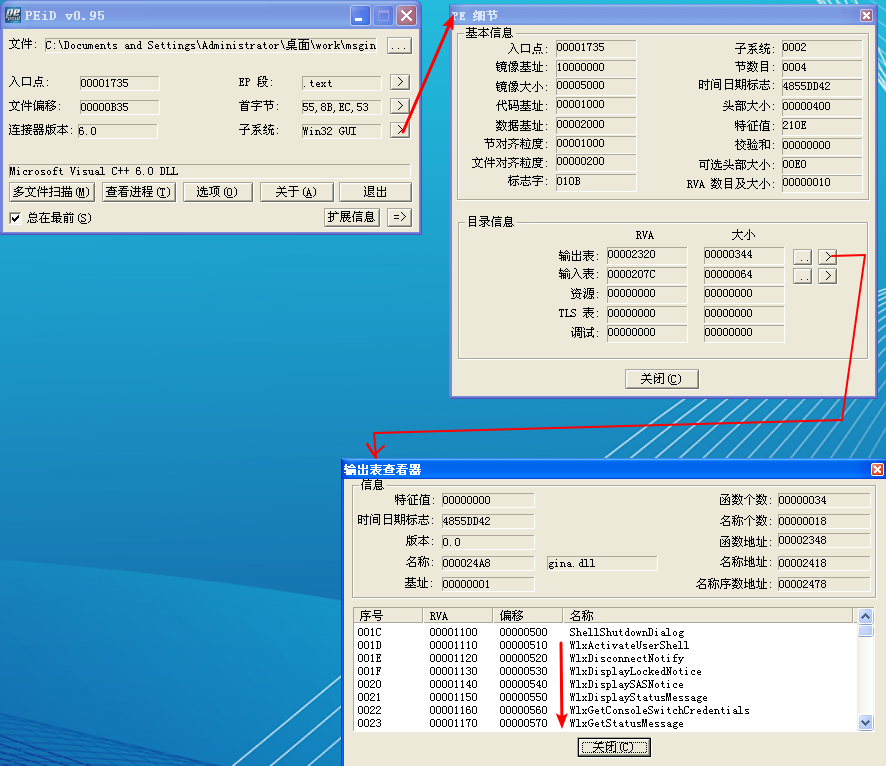
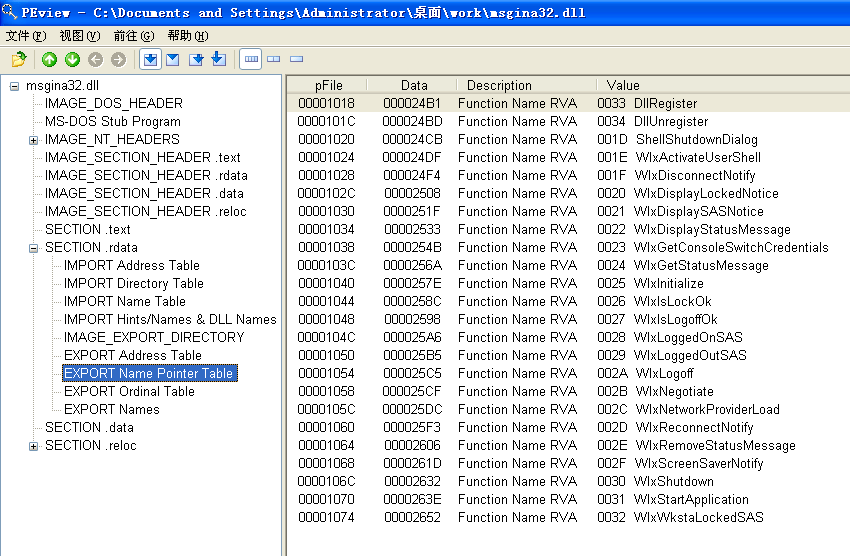
We begin by loading the malware into IDA Pro and analyzing DllMain, as shown in Listing 11-2L.

Listing 11-2L: DllMain of msgina32.dll getting a handle to msgina.dll
As shown in the Listing 11-2L, DllMain first checks the fdwReason argument at \({\color{red}1}\). This is an argument passed in to indicate why the DLL entry-point function is being called. The malware checks for DLL_PROCESS_ATTACH, which is called when a process is starting up or when LoadLibrary is used to load the DLL. If this particular DllMain is called during a DLL_PROCESS_ATTACH, the code beginning at \({\color{red}2}\) is called. This code gets a handle to msgina.dll in the Windows system directory via the call to LoadLibraryW at \({\color{red}3}\).
NOTE
msgina.dll is the Windows DLL that implements GINA, whereas msgina32.dll is the malware author’s GINA interception DLL. The name msgina32 is designed to deceive.
The malware saves the handle in a global variable that IDA Pro has named hModule at \({\color{red}4}\). The use of this variable allows the DLL’s exports to properly call functions in the msgina.dll Windows DLL. Since msgina32.dll is intercepting communication between Winlogon and msgina.dll, it must properly call the functions in msgina.dll so that the system will continue to operate normally.
Next, we analyze each export function. We begin with WlxLoggedOnSAS, as shown in Listing 11-3L.

Listing 11-3L: WlxLoggedOnSAS export just passing through to msgina.dll
The WlxLoggedOnSAS export is short and simply passes through to the true WlxLoggedOnSAS contained in msgina.dll. There are now two WlxLoggedOnSAS functions: the version in Listing 11-3L in msgina32.dll and the original in msgina.dll. The function in Listing 11-3L begins by passing the string WlxLoggedOnSAS to sub_10001000 and then jumps to the result. The sub_10001000 function uses the hModule handle (to msgina.dll) and the string passed in (in this case, WlxLoggedOnSAS) to use GetProcAddress to resolve a function in msgina.dll. The malware doesn’t call the function; it simply resolves the address of WlxLoggedOnSAS in msgina.dll and jumps to the function, as seen at \({\color{red}1}\). By jumping and not calling WlxLoggedOnSAS, this code will not set up a stack frame or push a return address onto the stack. When WlxLoggedOnSAS in msgina.dll is called, it will return execution directly to Winlogon because the return address on the stack is the same as what was on the stack when the code in Listing 11-3L is called.
If we continue analyzing the other exports, we see that most operate like WlxLoggedOnSAS (they are pass-through functions), except for WlxLoggedOutSAS, which contains some extra code. (WlxLoggedOutSAS is called when the user logs out of the system.)
The export begins by resolving WlxLoggedOutSAS within msgina.dll using GetProcAddress and then calling it. The export also contains the code shown in Listing 11-4L.

Listing 11-4L: WlxLoggedOutSAS calling the credential logging function sub_10001570
The code in Listing 11-4L passes a bunch of arguments and a format string at \({\color{red}1}\). This string is passed to sub_10001570, which is called at \({\color{red}2}\).
It seems like sub_10001570 may be the logging function for stolen credentials, so let’s examine it to see what it does. Listing 11-5L shows the logging code contained in sub_10001570.
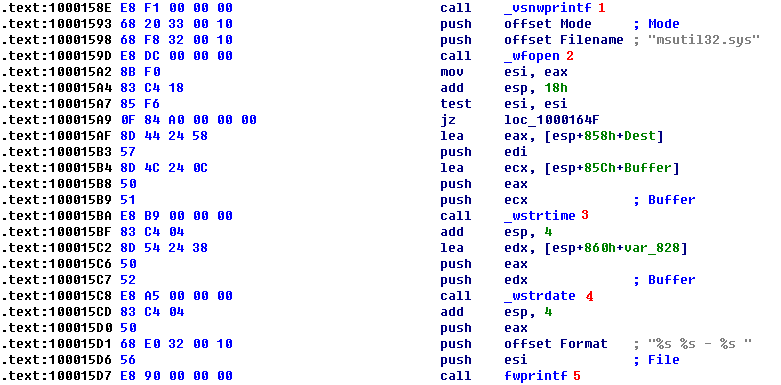
Listing 11-5L: The credential-logging function logging to msutil32.sys
The call to vsnwprintf at \({\color{red}1}\) fills in the format string passed in by the WlxLoggedOutSAS export. Next, the malware opens the file msutil32.sys at \({\color{red}2}\), which is created inside C:\Windows\System32\ since that is where Winlogon resides (and msgina32.dll is running in the Winlogon process). At \({\color{red}3}\) and \({\color{red}4}\), the date and time are recorded, and the information is logged at \({\color{red}5}\). You should now realize that msutil32.sys is used to store logged credentials and that it is not a driver, although its name suggests that it is.
We force the malware to log credentials by running Lab11-01.exe, rebooting the machine, and then logging in and out of the system. The following is an example of the data contained in a log file created by this malware:
重启刚刚运行过 Lab11-1.exe 的主机,再注销用户,再登录,在 C:\Windows\System32\ 目录下,查看 msutil32.sys 文件内容:
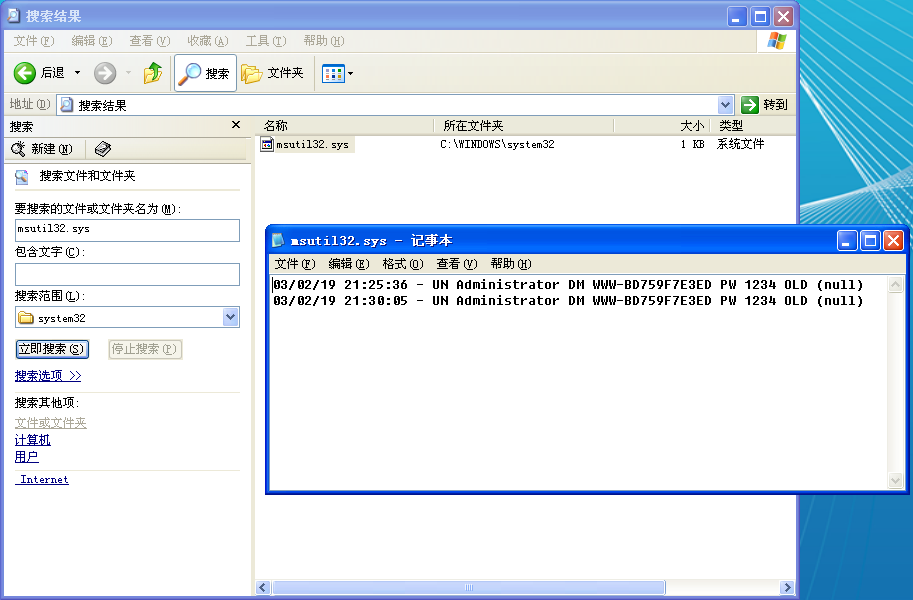
The usernames are Administrator, it password is 1234, and the domain is WWW-BD759F7E3ED.
Summary
Lab 11-1 is a GINA interceptor installer. The malware drops a DLL on the system and installs it to steal user credentials, beginning after system reboot. Once the GINA interceptor DLL is installed and running, it logs credentials to msutil32.sys when a user logs out of the system.
Preference
PRACTICAL MALWARE ANALYSIS: MALWARE BEHAVIOR(LAB 11-01)
Lab 11-1的更多相关文章
- RH033读书笔记(10)-Lab 11 Process Control
Lab 11 Process Control Sequence 1: Job Control 1. [student@stationX ~]$ su - 2. Begin some jobs in t ...
- RH133读书笔记(11)-Lab 11 System Rescue and Troubleshooting
Lab 11 System Rescue and Troubleshooting Goal: To build skills in system rescue procedures. Estimate ...
- Lab 1-1
LABS The purpose of the labs is to give you an opportunity to practice the skills taught in the chap ...
- 第一章 Lab
关于Lab 教材恶意代码分析实战 课后练习恶意代码样本https://practicalmalwareanalysis.com或https://nostarch.com/malware.htm 以下是 ...
- 7 天玩转 ASP.NET MVC — 第 3 天
目录 第 1 天 第 2 天 第 3 天 第 4 天 第 5 天 第 6 天 第 7 天 0. 前言 我们假定你在开始学习时已经阅读了前两天的学习内容.在第 2 天我们完成了关于显示 Employee ...
- RAC之常用方法-----新手入门
年后换工作新入职,公司开发在使用RAC,之前居然一直没有了解过,独立开发的弊端,信息闭塞,而且自己也懒,这几天看了下RAC,确实很强大有木有. 什么是ARC 简单的说,RAC就是一个第三方库,他可以大 ...
- vmware目录2
http://www.globalknowledge.com/training/course.asp?pageid=9&courseid=17880&country=United+St ...
- 很好的vmware目录
http://www.globalknowledge.com/training/course.asp?pageid=9&courseid=18023&country=United+St ...
- 【转】Automated Testing Detail Test Plan
Automated Testing Detail Test PlanAutomated Testing DTP Overview This Automated Testing Detail Test ...
- Cygwin Run in the Windows(Simulation of UNIX)
Preface Environment Cygwin Run in the Windows(Simulation of UNIX) Resource Cygwin Install:http://cyg ...
随机推荐
- python编写接口初识一
python编写接口这里用到的是他一个比较轻量级的框架 flask #!/usr/bin/python # -*- coding: UTF-8 -*- import flask,json server ...
- [小程序] 微信小程序 picker 中range-key中必须带单引号
原文地址:http://blog.csdn.net/u012329294/article/details/74906504 <view class="section"> ...
- 寻找U2OS中表达的基因及其promoter并用于后续annotation
方法1.RNA-seq得到不同表达程度基因 方法2. 直接download U2OS_gene.csv https://cancer.sanger.ac.uk/cell_lines/download ...
- localStorage,sessionStorage和cookie的区别
sessionStorage 和 localStorage 是HTML5 Web Storage API 提供的,可以方便的在web请求之间保存数据.有了本地数据,就可以避免数据在浏览器和服务器间不必 ...
- Asp.Net Core WebApi 和Asp.Net WebApi上传文件
public class UpLoadController : ControllerBase { private readonly IHostingEnvironment _hostingEnviro ...
- 教你如何修改运行中的docker容器的端口映射
在docker run创建并运行容器的时候,可以通过-p指定端口映射规则.但是,我们经常会遇到刚开始忘记设置端口映射或者设置错了需要修改.当docker start运行容器后并没有提供一个-p选项或设 ...
- spring mvc get请求中文乱码问题
使用Spring MVC进行get请求时发现get请求带上中文参数,后台收到的是乱码,即使加了encoding filter也没用. 原因是,encoding filter 是针对post请求的,to ...
- Linux 下 ls -l 命令执行显示结果的每一列含义【转载】
转自:zhuoya_的博客 原文地址>>https://blog.csdn.net/zhuoya_/article/details/77418413
- js 手动插入meta标签和script标签
// 插入 meta 标签 var oMeta = document.createElement('meta'); oMeta.content = 'width=device-width, initi ...
- 1.3:Render Pipeline and GPU Pipeline
文章著作权归作者所有.转载请联系作者,并在文中注明出处,给出原文链接. 本系列原更新于作者的github博客,这里给出链接. 在学习SubShader之前,我们有必要对 Render Pipeline ...