
Shiro-HelloWord
HelloWorld
Shiro的HelloWorld不是我们写的,而是看Shiro给我们提供的一段代码。通过这段代码可以看到Shiro大致的使用方式。
1.找到Shiro的jar包
目前的最新稳定版本是1.3.2
需要的4个jar包:
- log4j-1.2.15.jar
- shiro-all-1.3.2.jar
- slf4j-api-1.6.1.jar
- slf4j-log4j12-1.6.1.jar
2.创建一个java工程 ,导入jar包,及从shiro-root-1.3.2-source-release\shiro-root-1.3.2\samples\quickstart\src\main 中拷贝resources下的配置文件及 Quickstart.java
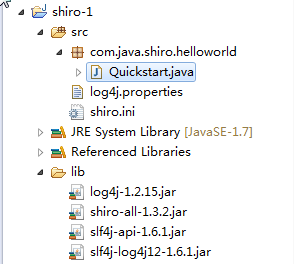
3.对重要的代码做出中文注释
package com.java.shiro.helloworld;

import org.apache.shiro.SecurityUtils;

import org.apache.shiro.authc.*;

import org.apache.shiro.config.IniSecurityManagerFactory;

import org.apache.shiro.mgt.SecurityManager;

import org.apache.shiro.session.Session;

import org.apache.shiro.subject.Subject;

import org.apache.shiro.util.Factory;

import org.slf4j.Logger;

import org.slf4j.LoggerFactory;

/**

 * Simple Quickstart application showing how to use Shiro's API.

 *

 * @since 0.9 RC2

 */

public class Quickstart {

    private static final transient Logger log = LoggerFactory.getLogger(Quickstart.class);

    public static void main(String[] args) {

        // The easiest way to create a Shiro SecurityManager with configured

        // realms, users, roles and permissions is to use the simple INI config.

        // We'll do that by using a factory that can ingest a .ini file and

        // return a SecurityManager instance:

        // Use the shiro.ini file at the root of the classpath

        // (file: and url: prefixes load from files and urls respectively):

        Factory<SecurityManager> factory = new IniSecurityManagerFactory("classpath:shiro.ini");

        SecurityManager securityManager = factory.getInstance();

        // for this simple example quickstart, make the SecurityManager

        // accessible as a JVM singleton.  Most applications wouldn't do this

        // and instead rely on their container configuration or web.xml for

        // webapps.  That is outside the scope of this simple quickstart, so

        // we'll just do the bare minimum so you can continue to get a feel

        // for things.

        SecurityUtils.setSecurityManager(securityManager);

        // Now that a simple Shiro environment is set up, let's see what you can do:

        // get the currently executing user:

        //获取当前的Subject. 调用SecurityUtils.getSubject();

        Subject currentUser = SecurityUtils.getSubject();

        // Do some stuff with a Session (no need for a web or EJB container!!!)

        //测试使用Session

        //获取Session:Subejct#getSession()

        Session session = currentUser.getSession();

        session.setAttribute("someKey", "aValue");

        String value = (String) session.getAttribute("someKey");

        if (value.equals("aValue")) {

            log.info("----->Retrieved the correct value! [" + value + "]");

        }

        // let's login the current user so we can check against roles and permissions:

        //测试当前的用户是否已经被认证,即是否已经登录 调用Subject的isAuthenticated()

        if (!currentUser.isAuthenticated()) {

            //把用户名和密码封装为 UsernamePasswordToken 对象

            UsernamePasswordToken token = new UsernamePasswordToken("lonestarr", "vespa");

            //remeberme

            token.setRememberMe(true);

            try {

                //执行登录

                currentUser.login(token);

            }

            //若没有指定的账户,则shiro抛出UnknownAccountException

            catch (UnknownAccountException uae) {

                log.info("There is no user with username of " + token.getPrincipal());

            }

            //若账户存在,密码不匹配 IncorrectCredentialsException

            catch (IncorrectCredentialsException ice) {

                log.info("Password for account " + token.getPrincipal() + " was incorrect!");

            }

            //用户被锁定的异常

            catch (LockedAccountException lae) {

                log.info("The account for username " + token.getPrincipal() + " is locked.  " +

                        "Please contact your administrator to unlock it.");

            }

            // ... catch more exceptions here (maybe custom ones specific to your application?

            //所有认证时异常的父类

            catch (AuthenticationException ae) {

                //unexpected condition?  error?

            }

        }

        //say who they are:

        //print their identifying principal (in this case, a username):

        log.info("User [" + currentUser.getPrincipal() + "] logged in successfully.");

        //test a role:

        //测试是否有某一个角色 调用Subject的hasRole()

        if (currentUser.hasRole("schwartz")) {

            log.info("May the Schwartz be with you!");

        } else {

            log.info("Hello, mere mortal.");

        }

        //test a typed permission (not instance-level)

        //测试用户是否具备某一个行为 调用Subject的isPermitted()

        if (currentUser.isPermitted("lightsaber:weild")) {

            log.info("You may use a lightsaber ring.  Use it wisely.");

        } else {

            log.info("Sorry, lightsaber rings are for schwartz masters only.");

        }

        //a (very powerful) Instance Level permission:

        //测试用户是否具备某一个行为,比上边那个更具体 :用户user可以对zhangsan进行delete操作

        if (currentUser.isPermitted("user:delete:zhangsan")) {

            log.info("------>You are permitted to 'drive' the winnebago with license plate (id) 'eagle5'.  " +

                    "Here are the keys - have fun!");

        } else {

            log.info("Sorry, you aren't allowed to drive the 'eagle5' winnebago!");

        }

        //all done - log out!

        //执行登出 Subject的logout()

        currentUser.logout();

        System.exit(0);

    }

}
通常在项目中不会使用硬编码的方式,会使用注解的方式来进行配置。
Shiro-HelloWord的更多相关文章
- Shiro进行简单的身份验证(二)
一个Realm数据源: shiro.ini: [users] wp=123456 main方法执行认证: package com.wp.shiro; import org.apache.shiro.S ...
- shiro简单入门介绍
shiro是apache的一个java安全框架 可以完成认证,授权,加密,会话管理,基于web继承,缓存等 功能简介: 从外部来看: shiro架构 Subject:主体,代表了当前“用户”,这个用 ...
- shiro权限管理框架与springmvc整合
shiro是apache下的一个项目,和spring security类似,用于用户权限的管理‘ 但从易用性和学习成本上考虑,shiro更具优势,同时shiro支持和很多接口集成 用户及权限管理是众多 ...
- springmvc 多数据源 SSM java redis shiro ehcache 头像裁剪
获取下载地址 QQ 313596790 A 调用摄像头拍照,自定义裁剪编辑头像 B 集成代码生成器 [正反双向](单表.主表.明细表.树形表,开发利器)+快速构建表单; 技术:31359679 ...
- java springMVC SSM 操作日志 4级别联动 文件管理 头像编辑 shiro redis
A 调用摄像头拍照,自定义裁剪编辑头像 B 集成代码生成器 [正反双向](单表.主表.明细表.树形表,开发利器)+快速构建表单; 技术:313596790freemaker模版技术 ,0个代码不用写 ...
- springmvc SSM shiro redis 后台框架 多数据源 代码生成器
A集成代码生成器 [正反双向(单表.主表.明细表.树形表,开发利器)+快速构建表单 下载地址 ; freemaker模版技术 ,0个代码不用写,生成完整的一个模块,带页面.建表sql脚本,处理类 ...
- springmvc SSM 多数据源 shiro redis 后台框架 整合
A集成代码生成器 [正反双向(单表.主表.明细表.树形表,开发利器)+快速构建表单 下载地址 ; freemaker模版技术 ,0个代码不用写,生成完整的一个模块,带页面.建表sql脚本,处理类 ...
- SpringMVC+Shiro权限管理【转】
1.权限的简单描述 2.实例表结构及内容及POJO 3.Shiro-pom.xml 4.Shiro-web.xml 5.Shiro-MyShiro-权限认证,登录认证层 6.Shiro-applica ...
- shiro的使用2 灵活使用shiro的密码服务模块
shiro最闪亮的四大特征是认证,授权,加密,会话管理. 上一篇已经演示了如何使用shiro的授权模块,有了shiro这个利器,可以以统一的编码方式对用户的登入,登出,认证进行管理,相当的优雅. 为了 ...
- shiro的使用1 简单的认证
最近在重构,有空学了一个简单的安全框架shiro,资料比较少,在百度和google上能搜到的中文我看过了,剩下的时间有空会研究下官网的文章和查看下源码, 简单的分享一些学习过程: 1,简单的一些概念上 ...
随机推荐
- 来玩Play框架02 响应
作者:Vamei 出处:http://www.cnblogs.com/vamei 欢迎转载,也请保留这段声明.谢谢! 我上一章总结了Play框架的基本使用.这一章里,我将修改和增加响应. HTTP协议 ...
- FastDFS 安装及使用
FastDFS 安装及使用 2012-11-17 13:10:31| 分类: Linux|举报|字号 订阅 Google了一下,流行的开源分布式文件系统有很多,介绍如下: mogileF ...
- Java操作wkhtmltopdf实现Html转PDF
做java开发的都知道,java生成pdf大部分都是用itext,itext的确是java开源组件的第一选择.不过itext也有局限,就是要自己写模版,系统中的表单数量有好几百个,为每个表单做一个导出 ...
- 【干货分享】前端面试知识点锦集03(JavaScript篇)——附答案
三.JavaScript部分 1.谈谈你对Ajax的理解?(概念.特点.作用) AJAX全称为“Asynchronous JavaScript And XML”(异步JavaScript和XML) 是 ...
- H5 WebSocket 如何和C#进行通信
HTML5作为下一代的 Web 标准, 拥有许多引人注目的新特性,如 Canvas.本地存储.多媒体编程接口.WebSocket 等.WebSocket 在浏览器和服务器之间提供了一个基于 TCP 连 ...
- 仿QQ空间根据位置弹出PopupWindow显示更多操作效果
我们打开QQ空间的时候有个箭头按钮点击之后弹出PopupWindow会根据位置的变化显示在箭头的上方还是下方,比普通的PopupWindow弹在屏幕中间显示好看的多. 先看QQ空间效果图: ...
- html5 canvas 详细使用教程
转载自 http://www.cnblogs.com/tim-li/archive/2012/08/06/2580252.html 前言 基本知识 绘制矩形 清除矩形区域 圆弧 路径 绘制线段 绘制贝 ...
- Android Stuido 常用快捷键
Android Stuido 常用快捷键 Ctrl + Z : 撤消 Ctrl + G : 定位行 Ctrl + / : 单行注释 Ctrl + Shift + Z : 恢复 Ctrl + J : 快 ...
- 0039 Java学习笔记-多线程-线程控制、线程组
join线程 假如A线程要B线程去完成一项任务,在B线程完成返回之前,不进行下一步执行,那么就可以调用B线程的join()方法 join()方法的重载: join():等待不限时间 join(long ...
- BZOJ 2154: Crash的数字表格 [莫比乌斯反演]
2154: Crash的数字表格 Time Limit: 20 Sec Memory Limit: 259 MBSubmit: 2924 Solved: 1091[Submit][Status][ ...