
Multi-Projector Based Display Code ------- Home
Overview
This project provides you with the tools and techniques you need to create your own large-area multi-projector display that is both affordable and flexible. It covers the procedure you need to take and the issues you need to consider for achieving geometric alignment and color seamlessness, and an image rendering system using PC clusters. It also provides the necessary codes of a simple distributed calibration and image/3D-model rendering display system.
Who should use this code
- Novice who would like to build their own camera-projector display system can use this code as a start point
- Researchers who are interested in camera-projector display system can use this code as a reference
System Architecture
With the recent popularization of low-cost commodity graphics cards, it is possible to build a distributed rendering system with a cluster of PCs. The following figure shows the architecture of our PC-cluster based multi-projector display:
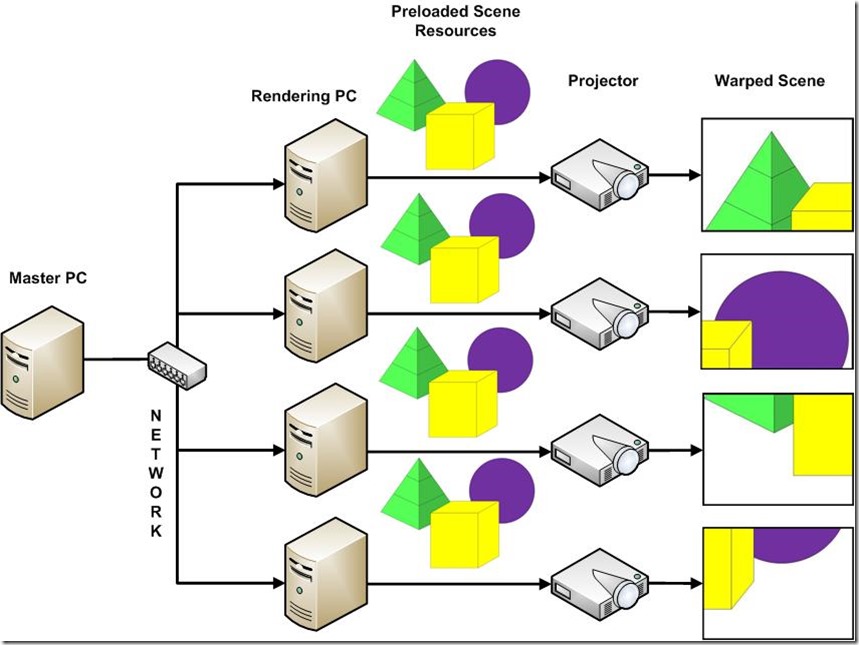
Figure 1. The system architecture of our PC-Cluster based multi-projector display
As you can see from the above picture, the system consist of one master PC and a few rendering PCs. Each rendering PC is connected to one projector. All the PCs are connected via a local network. The master PC controls the rendering procedure of the system, and the rendering PCs do the actual rendering work and output through the projectors. The overall goal is to make the casually placed projectors behave like a large integrated display when showing images and other scenes.
The scene resources are preloaded to the rendering PCs and each PC will only show its own portion according to prior calibration, as shown in the figure. Because the projectors are casually placed, the scene from different projectors may not be well aligned, and the overlapped area of two or more projectors may looks brighter than other area. So the rendering PCs need to warp the scene to achieve geometry alignment and color seamlessness. The basic procedure of the PC-Cluster based display system involves two steps: the camera-based calibration step and the scene warping step. During the calibration step, special featured images are projected and corresponding camera images are grabbed. After analysis of the grabbed images, geometry information about how to warp the scene and alpha mask about how to achieve photometric alignment will be atomatically generate. During the scene warping step, each projector will warp the scene resources according to the calibration result.
You can find more information about geometry alignment from Chapter 3 of reference [1], about color seamlessness from Chapter 4 of reference [1], about PC-Cluster rendering from Chapter 5 of reference [1]. You are strongly recommended to read the book thoroughly before starting to set up your own multi-projector display.
Hardware and Software Requirements
In order to use the codes provided, you need to meet the following hardware and software requirements:
Hardware requirements:
- One PC with monitors, as master PC;
- Two or more PCs with dedicated graphic cards (we use NVIDIA GeForce 8800GTS), as rendering PC;
- Two or more projectors (one for each rendering PC);
- One hub or router and network cables;
- One OpenCV-compatible camera with proper lens (see FAQ for more information about how to select camera and lens);
Software requirements:
- Windows XP installed on all PCs;
(Below are the additional software you need to install if you want to compile the source codes yourself)
- Microsoft Visual Studio 2005 or above;
- OpenCV library 1.0 (from reference [2]) installed;
- GLUT library 3.7 (from reference [3]) installed;
- FreeImage Algorithms (from reference [4]) installed;
[1] "Practical Multi-Projector Display Design", Majumder/Brown, AK Peters, USA, 2007
[2] Open Computer Vision Library, 1.0:http://sourceforge.net/projects/opencvlibrary/
[3] GLUT - The OpenGL Utility Toolkit, 3.7: http://www.opengl.org/resources/libraries/glut/
[4] FreeImage Algorithms Library: https://code.launchpad.net/~glennpierce/+junk/main
View this page in Romanian courtesy ofazoft
Multi-Projector Based Display Code ------- Home的更多相关文章
- Multi-Projector Based Display Code ---- ImageViewer
Overview Image viewer is a typical application for large display. It makes use of the high-resolutio ...
- Multi-Projector Based Display Code ---- FAQ
Frequently Asked Question How do I know that my camera has a proper lens? Answer: If you can see exa ...
- Multi-Projector Based Display Code ---- Calibration
Overview As mentioned previously, there are two main steps in generating a seamless display. The fir ...
- Multi-Projector Based Display Code ---- ModelViewer
Overview Model viewer is another application we provided for large display. It is designed for viewi ...
- Multi-Projector Based Display Code ---- Download
The code providing are for your reference. Please download the code according to your hareware confi ...
- Peer Code Reviews Made Easy with Eclipse Plug-In
欢迎关注我的社交账号: 博客园地址: http://www.cnblogs.com/jiangxinnju/p/4781259.html GitHub地址: https://github.com/ji ...
- Code Pages
https://docs.microsoft.com/en-us/windows/desktop/intl/code-pages Most applications written today han ...
- 设备管理 USB ID
发现个USB ID站点,对于做设备管理识别的小伙伴特别实用 http://www.linux-usb.org/usb.ids 附录: # # List of USB ID's # # Maintain ...
- Oracle Database 11g express edition
commands : show sys connect sys as sysdba or connect system as sysdba logout or disc clear screen or ...
随机推荐
- android TabLayout设置选中标签字体加粗功能
实现 TabLayout 选中tab标签字体加粗功能如下: xml文件中定义: <android.support.design.widget.TabLayout android:id=" ...
- Dilated Convolution
各种各样的卷积方式, 详细见 各种卷积的 gif 图 Convolution animations  Padding, strides Transposed convolution animatio ...
- python结合pyvmomi批量关闭vmware虚拟机
#!/usr/bin/env python #参考https://github.com/vmware/pyvmomi/blob/master/sample/poweronvm.py "&qu ...
- python 打印Linux中文编码字符
2018-10-12 12:02:15 星期五 python -c "print '\346\234\215\345\212\241\345\231\250\346\217\220\344\ ...
- upgrade openssl
01 OpenSSL version wiki:https://en.wikipedia.org/wiki/OpenSSL 02 Using TLS1.3 With OpenSSL https:// ...
- POJ1321 棋盘问题(简单搜索)
题意: 在一个给定形状的棋盘(形状可能是不规则的)上面摆放棋子,棋子没有区别.要求摆放时任意的两个棋子不能放在棋盘中的同一行或者同一列,请编程求解对于给定形状和大小的棋盘,摆放k个棋子的所有可行的摆放 ...
- 普通用户登陆系统显示 -bash-4.1$
如题,今天上午用户登陆系统之后显示-bash-4.1$ 造成这样的原因: 与这个用户有关环境变量没了,有关的文件被删除.也就是用户的家目录下面 .bash_profile .bashrc 被删除. 解 ...
- 20172328 2018-2019《Java软件结构与数据结构》第八周学习总结
20172328 2018-2019<Java软件结构与数据结构>第八周学习总结 概述 Generalization 本周学习了二叉树的另一种有序扩展?是什么呢?你猜对了!ヾ(◍°∇°◍) ...
- 自定义PlantUML和C4 Model样式
什么是PlantUml PlantUml是一个支持快速绘制的开源项目.其定义了一套完整的语言用于实现UML关系图的描述.并基于强大的graphviz图形渲染库进行UML图的生成.绘制的UML图还可以导 ...
- js事件循环机制 (Event Loop)
一.JavaScript是单线程单并发语言 什么是单线程 主程序只有一个线程,即同一时间片断内其只能执行单个任务. 为什么选择单线程? JavaScript的主要用途是与用户互动,以及操作DOM.这决 ...