
iOS开发基础-Plist实现嵌套模型
一、plist文件结构图
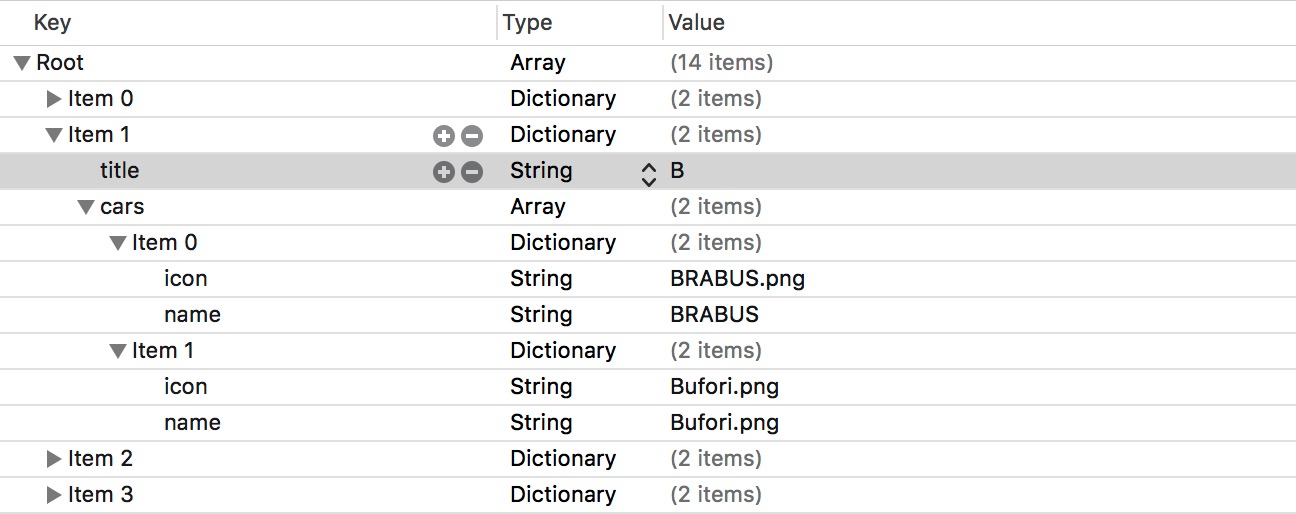
说明: title 属性表示该 item 下汽车名字的首字母, cars 属性存放首字母为 title 的汽车, icon 属性存放图片的名称, name 属性存放汽车的名字。
二、代码实例
新建一个继承自 NSObject 的类,命名为 WJQCars ,该类用于存放首字母相同的汽车。
 //  WJQCars.h

 @interface WJQCars : NSObject

 @property (nonatomic, copy) NSString *name;

 @property (nonatomic, copy) NSString *icon;

 - (instancetype)initWithDict:(NSDictionary *)dict;

 + (instancetype)carsWithDict:(NSDictionary *)dict;

 @end
 //  WJQCars.m

 @implementation WJQCars

 - (instancetype)initWithDict:(NSDictionary *)dict {

     self = [super init];

     if (self) {

         self.name = dict[@"name"];

         self.icon = dict[@"icon"];

     }

     return self;

 }

 + (instancetype)carsWithDict:(NSDictionary *)dict {

     return [[self alloc] initWithDict:dict];

 }
新建一个继承自 NSObject 的类,并命名为 WJQCarsGroup ,该类用于存放不同的 WJQCars 。
 //  WJQCarsGroup.h

 @interface WJQCarsGroup : NSObject

 @property (nonatomic, copy) NSString *title;

 @property (nonatomic, strong) NSArray *cars;

 - (instancetype)initWithDict:(NSDictionary *)dict;

 + (instancetype)carsGroupWithDict:(NSDictionary *)dict;

 @end
在 WJQCarsGroup.m 中导入 WJQCars.h ,实现文件代码如下:
 //  WJQCarsGroup.m

 - (instancetype)initWithDict:(NSDictionary *)dict {

     self = [super init];

     if (self) {

         self.title = dict[@"title"];

         NSArray *dictCars = dict[@"cars"];

         // 有助于提高性能

         NSMutableArray *arrayM = [NSMutableArray arrayWithCapacity:dictCars.count];

         for (NSDictionary *dict in dictCars) {

             WJQCars *wcars = [[WJQCars alloc] initWithDict:dict];

             [arrayM addObject:wcars];

         }

         self.cars = arrayM;

     }

     return self;

 }

 + (instancetype)carsGroupWithDict:(NSDictionary *)dict {

     return [[self alloc]initWithDict:dict];

 }
在 ViewController.m 中导入 WJQCarsGroup.h、WJQCars.h 。
 //  ViewController.m

 @interface ViewController () <UITableViewDataSource>

 @property (nonatomic, strong) IBOutlet UITableView *tableView;

 @property (nonatomic, strong) NSArray *car;

 @end
将 tableView 属性与 Main.storyboard 中拖入的 Table View 视图建立连接。并让 ViewController 遵守 UITableViewDataSource 协议。
 //  ViewController.m

 - (void)viewDidLoad {

     [super viewDidLoad];

     self.tableView.rowHeight = ;

     self.tableView.dataSource = self;

     NSLog(@"self.car.count = %d", self.car.count);

 }

 // 从包中读取数据,实现字典转模型

 - (NSArray *)car {

     if (_car == nil) {

         NSString *fullPath = [[NSBundle mainBundle] pathForResource:@"cars_total.plist" ofType:nil];

         NSArray *arrayM = [NSArray arrayWithContentsOfFile:fullPath];

         NSMutableArray *carsArray = [NSMutableArray array];

         for (NSDictionary *dict in arrayM) {

             WJQCarsGroup *carsGroup = [WJQCarsGroup carsGroupWithDict:dict];

             [carsArray addObject:carsGroup];

         }

         _car = [carsArray copy];

     }

     return _car;

 }

 #pragma mark - UITableViewDataSource

 - (NSInteger)numberOfSectionsInTableView:(UITableView *)tableView {

     return self.car.count;

 }

 - (NSInteger)tableView:(UITableView *)tableView numberOfRowsInSection:(NSInteger)section {

     WJQCarsGroup *carsGroup = self.car[section];

     return carsGroup.cars.count;

 }

 - (UITableViewCell *)tableView:(UITableView *)tableView cellForRowAtIndexPath:(NSIndexPath *)indexPath {

     static NSString *identifier = @"car";

     UITableViewCell *cell = [tableView dequeueReusableCellWithIdentifier:identifier];

     if (cell == nil) {

         cell = [[UITableViewCell alloc] initWithStyle:UITableViewCellStyleDefault reuseIdentifier:identifier];

     }

     WJQCarsGroup *carsGroup = self.car[indexPath.section];

     WJQCars *cars = carsGroup.cars[indexPath.row];

     cell.imageView.image = [UIImage imageNamed:cars.icon];

     cell.textLabel.text = cars.name;

     return cell;

 }

 // 设置每组的标题

 - (NSString *)tableView:(UITableView *)tableView titleForHeaderInSection:(NSInteger)section {

     WJQCarsGroup *carsGroup = self.car[section];

     return carsGroup.title;

 }

 // 设置首字母索引

 - (NSArray *)sectionIndexTitlesForTableView:(UITableView *)tableView {

     NSArray *title = [self.car valueForKeyPath:@"title"];  // 使用KVC机制

     return title;

 }
参考博客:iOS开发UI篇—使用嵌套模型完成的一个简单汽车图标展示程序
实例代码:http://vdisk.weibo.com/s/DiY98QyXChyWt
iOS开发基础-Plist实现嵌套模型的更多相关文章
- iOS开发UI篇—使用嵌套模型完成的一个简单汽车图标展示程序
iOS开发UI篇—使用嵌套模型完成的一个简单汽车图标展示程序 一.plist文件和项目结构图 说明:这是一个嵌套模型的示例 二.代码示例: YYcarsgroup.h文件代码: // // YYcar ...
- iOS开发基础-九宫格坐标(2)之模型
在iOS开发基础-九宫格(1)中,属性变量 apps 是从plist文件中加载数据的,在 viewDidLoad 方法中的第20行.26行中,直接通过字典的键名来获取相应的信息,使得 ViewCont ...
- iOS开发基础-九宫格坐标(6)
继续对iOS开发基础-九宫格坐标(5)中的代码进行优化. 优化思路:把字典转模型部分的数据处理操作也拿到模型类中去实现,即将 ViewController 类实现中 apps 方法搬到 WJQAppI ...
- IOS开发基础知识碎片-导航
1:IOS开发基础知识--碎片1 a:NSString与NSInteger的互换 b:Objective-c中集合里面不能存放基础类型,比如int string float等,只能把它们转化成对象才可 ...
- iOS开发UI篇—字典转模型
iOS开发UI篇—字典转模型 一.能完成功能的“问题代码” 1.从plist中加载的数据 2.实现的代码 // // LFViewController.m // 03-应用管理 // // Creat ...
- iOS开发基础-图片切换(3)之属性列表
延续:iOS开发基础-图片切换(2),对(2)里面的代码用属性列表plist进行改善. 新建 Property List 命名为 Data 获得一个后缀为 .plist 的文件. 按如图修改刚创建的文 ...
- iOS开发——总结篇&IOS开发基础知识
IOS开发基础知识 1:Objective-C语法之动态类型(isKindOfClass, isMemberOfClass,id) 对象在运行时获取其类型的能力称为内省.内省可以有多种方法实现. 判断 ...
- IOS开发基础环境搭建
一.目的 本文的目的是windows下IOS开发基础环境搭建做了对应的介绍,大家可根据文档步骤进行mac环境部署: 二.安装虚拟机 下载虚拟机安装文件绿色版,点击如下文件安装 获取安装包: ...
- iOS开发基础-九宫格坐标(5)
继续在iOS开发基础-九宫格坐标(4)的基础上进行优化. 一.改进思路 1)iOS开发基础-九宫格坐标(4)中 viewDidLoad 方法中的第21.22行对控件属性的设置能否拿到视图类 WJQAp ...
随机推荐
- 解决端口冲突问题(查询端口占用进程并kill)
1. 查看端口占用 在windows命令行窗口下执行: netstat -aon|findstr "8080" TCP 127.0.0.1:80 0.0.0.0:0 LISTENI ...
- DSAPI多功能组件编程应用-网络相关(中)
[DSAPI.DLL下载地址] 在中篇,我将演示比上篇稍微复杂点的功能.如HTTP监听和局域网广播. 有时,我们会有这样的需求:用户通过浏览器来访问获取数据,我们的程序需要监听指定端口,根据不同的请求 ...
- Tomcat配置文件Executor元素属性介绍
该元素可用于Tomcat 6.0.11以及更高版本. 允许您为一个Service的所有Connector配置一个共享线程池.在运行多个Connector的状况下,这样处理非常有用,而且每个Connec ...
- C# 如何在Excel表格中插入、编辑和删除批注
概述 为文档添加必要的批注可以给文档使用者提供重要的提示信息,下面的示例中,将介绍通过C#编程语言来给Excel表格中的指定单元格内容添加批注,此外,对于已有的批注,如果需要修改,我们也可以进行编辑或 ...
- WEB前端 HTML
目录 WEB前端 HTML WEB前端 HTML TOC 什么是html? html的固有结构 注释 什么是标签? 标签分类 什么是标签属性? 适用于大多数HTML标签的属性 常用标签 常用引用标签 ...
- Canvas:时钟
这个时钟是将钟盘的圆心点移到了 canvas 画布中心点.以方便后面的方位计算 ctx.translate(width/2,height/2); 现定义一个圆盘来显出这个时钟的基本位置 ctx.sav ...
- Dynamics 365使用Execute Multiple Request删除系统作业实体记录
摘要: 本人微信公众号:微软动态CRM专家罗勇 ,回复295或者20190112可方便获取本文,同时可以在第一间得到我发布的最新博文信息,follow me!我的网站是 www.luoyong.me ...
- 关于Windows系统不会变慢的设想
记录软件安装的过程,比如创建了哪些服务,哪些计划任务以及启动项等等. 然后软件安装完成后把关于软件的进程,服务,计划任务等都删掉. 然后手动创建一个脚本,用脚本代替软件的启动.比如,如果要启动sqls ...
- Bitmap上下合成图片
合成两张图片,上下叠加的效果: /** * 把两个位图覆盖合成为一个位图,以底层位图的长宽为基准 * * @param backBitmap 在底部的位图 * @param frontBitmap 盖 ...
- Git:七、标签(tag)
1.创建标签:切换到需要打标签的分支 1)直接打在最新commit的版本上 git tag <tagname> 2)找到commit id git tag <tagname> ...