
python 特征选择 绘图 + mine
demo代码:
# _*_coding:UTF-8_*_

import numpy as np

import sys

import pandas as pd

from pandas import Series,DataFrame

import numpy as np

import sys

from sklearn import preprocessing

from sklearn.ensemble import ExtraTreesClassifier

import os

from minepy import MINE

def iterbrowse(path):

    for home, dirs, files in os.walk(path):

        for filename in files:

            yield os.path.join(home, filename)

def get_data(filename):

    white_verify = []

    with open(filename) as f:

        lines = f.readlines()

        data = {}

        for line in lines:

            a = line.split("\t")

            if len(a) != 78:

                print(line)

                raise Exception("fuck")

            white_verify.append([float(n) for n in a[3:]])

    return white_verify

if __name__ == '__main__':

    # pdb.set_trace()

    neg_file = "cc_data/black_all.txt"

    pos_file = "cc_data/white_all.txt"

    X = []

    y = []

    if os.path.isfile(pos_file):

        if pos_file.endswith('.txt'):

            pos_set = np.genfromtxt(pos_file)

        elif pos_file.endswith('.npy'):

            pos_set = np.load(pos_file)

        X.extend(pos_set)

        y += [0] * len(pos_set)

    if os.path.isfile(neg_file):

        if neg_file.endswith('.txt'):

            neg_set = np.genfromtxt(neg_file)

        elif neg_file.endswith('.npy'):

            neg_set = np.load(neg_file)

        '''

        X.extend(list(neg_set) * 5)

        y += [1] * (5 * len(neg_set))

        '''

        X.extend(neg_set)

        y += [1] * len(neg_set)

    print("len of X:", len(X))

    print("X sample:", X[:3])

    print("len of y:", len(y))

    print("y sample:", y[:3])

    X = [x[3:] for x in X]

    print("filtered X sample:", X[:3])

    cols = [str(i + 6) for i in range(len(X[0]))]

    clf = ExtraTreesClassifier()

    clf.fit(X, y)

    print (clf.feature_importances_)

    print "Features sorted by their score:"

    print sorted(zip(clf.feature_importances_, cols), reverse=True)

    black_verify = []

    for f in iterbrowse("todo/top"):

        print(f)

        black_verify += get_data(f)

    # ValueError: operands could not be broadcast together with shapes (1,74) (75,) (1,74)

    print(black_verify)

    black_verify_labels = [3] * len(black_verify)

    white_verify = get_data("todo/white_verify.txt")

    print(white_verify)

    white_verify_labels = [2] * len(white_verify)

    unknown_verify = get_data("todo/pek_feature74.txt")

    print(unknown_verify)

    # extend data

    X = np.concatenate((X, black_verify))

    y += black_verify_labels

    X = np.concatenate((X, white_verify))

    y += white_verify_labels

    #################################### plot ####################################

    data_train = pd.DataFrame(X)

    # cols = [str(i) for i in range(6, 81)]

    data_train.columns = cols

    # add label column

    # data_train = data_train.assign(label=pd.Series(y))

    data_train["label"] = pd.Series(y)

    print(data_train.info())

    print(data_train.columns)

    import matplotlib.pyplot as plt

    for col in cols:

        fig = plt.figure(figsize=(20, 16), dpi=8)

        fig.set(alpha=0.2)

        plt.figure()

        data_train[data_train.label == 0.0][col].plot()

        data_train[data_train.label == 1.0][col].plot()

        data_train[data_train.label == 2.0][col].plot()

        data_train[data_train.label == 3.0][col].plot()

        plt.xlabel(u"sample data id")

        plt.ylabel(u"value")

        plt.title(col)

        plt.legend((u'white', u'black', u"white-todo", u"black-todo"), loc='best')

        plt.show()

    print "calculate MINE mic value:"

    for col in cols:

        print col,

        mine = MINE(alpha=0.6, c=15,

                    est="mic_approx")  # http://minepy.readthedocs.io/en/latest/python.html#second-example

        mine.compute_score(data_train[col], y)

        print "MIC=", mine.mic()

    sys.exit(-1)
extend data 表示待预测的数据
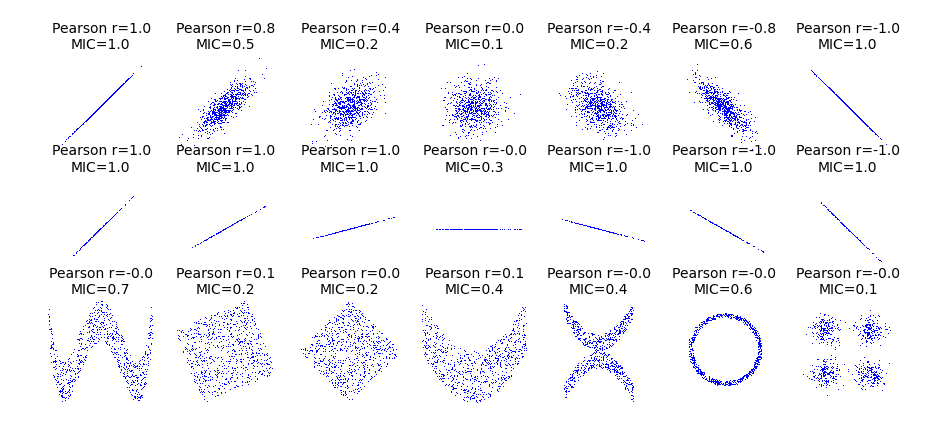
关于mic:
from __future__ import division

import numpy as np

import matplotlib.pyplot as plt

from minepy import MINE

rs = np.random.RandomState(seed=0)

def mysubplot(x, y, numRows, numCols, plotNum,

              xlim=(-4, 4), ylim=(-4, 4)):

    r = np.around(np.corrcoef(x, y)[0, 1], 1)

    mine = MINE(alpha=0.6, c=15, est="mic_approx")

    mine.compute_score(x, y)

    mic = np.around(mine.mic(), 1)

    ax = plt.subplot(numRows, numCols, plotNum,

                     xlim=xlim, ylim=ylim)

    ax.set_title('Pearson r=%.1f\nMIC=%.1f' % (r, mic),fontsize=10)

    ax.set_frame_on(False)

    ax.axes.get_xaxis().set_visible(False)

    ax.axes.get_yaxis().set_visible(False)

    ax.plot(x, y, ',')

    ax.set_xticks([])

    ax.set_yticks([])

    return ax

def rotation(xy, t):

    return np.dot(xy, [[np.cos(t), -np.sin(t)], [np.sin(t), np.cos(t)]])

def mvnormal(n=1000):

    cors = [1.0, 0.8, 0.4, 0.0, -0.4, -0.8, -1.0]

    for i, cor in enumerate(cors):

        cov = [[1, cor],[cor, 1]]

        xy = rs.multivariate_normal([0, 0], cov, n)

        mysubplot(xy[:, 0], xy[:, 1], 3, 7, i+1)

def rotnormal(n=1000):

    ts = [0, np.pi/12, np.pi/6, np.pi/4, np.pi/2-np.pi/6,

          np.pi/2-np.pi/12, np.pi/2]

    cov = [[1, 1],[1, 1]]

    xy = rs.multivariate_normal([0, 0], cov, n)

    for i, t in enumerate(ts):

        xy_r = rotation(xy, t)

        mysubplot(xy_r[:, 0], xy_r[:, 1], 3, 7, i+8)

def others(n=1000):

    x = rs.uniform(-1, 1, n)

    y = 4*(x**2-0.5)**2 + rs.uniform(-1, 1, n)/3

    mysubplot(x, y, 3, 7, 15, (-1, 1), (-1/3, 1+1/3))

    y = rs.uniform(-1, 1, n)

    xy = np.concatenate((x.reshape(-1, 1), y.reshape(-1, 1)), axis=1)

    xy = rotation(xy, -np.pi/8)

    lim = np.sqrt(2+np.sqrt(2)) / np.sqrt(2)

    mysubplot(xy[:, 0], xy[:, 1], 3, 7, 16, (-lim, lim), (-lim, lim))

    xy = rotation(xy, -np.pi/8)

    lim = np.sqrt(2)

    mysubplot(xy[:, 0], xy[:, 1], 3, 7, 17, (-lim, lim), (-lim, lim))

    y = 2*x**2 + rs.uniform(-1, 1, n)

    mysubplot(x, y, 3, 7, 18, (-1, 1), (-1, 3))

    y = (x**2 + rs.uniform(0, 0.5, n)) * \

        np.array([-1, 1])[rs.random_integers(0, 1, size=n)]

    mysubplot(x, y, 3, 7, 19, (-1.5, 1.5), (-1.5, 1.5))

    y = np.cos(x * np.pi) + rs.uniform(0, 1/8, n)

    x = np.sin(x * np.pi) + rs.uniform(0, 1/8, n)

    mysubplot(x, y, 3, 7, 20, (-1.5, 1.5), (-1.5, 1.5))

    xy1 = np.random.multivariate_normal([3, 3], [[1, 0], [0, 1]], int(n/4))

    xy2 = np.random.multivariate_normal([-3, 3], [[1, 0], [0, 1]], int(n/4))

    xy3 = np.random.multivariate_normal([-3, -3], [[1, 0], [0, 1]], int(n/4))

    xy4 = np.random.multivariate_normal([3, -3], [[1, 0], [0, 1]], int(n/4))

    xy = np.concatenate((xy1, xy2, xy3, xy4), axis=0)

    mysubplot(xy[:, 0], xy[:, 1], 3, 7, 21, (-7, 7), (-7, 7))

plt.figure(facecolor='white')

mvnormal(n=800)

rotnormal(n=200)

others(n=800)

plt.tight_layout()

plt.show()
python 特征选择 绘图 + mine的更多相关文章
- python常用绘图软件包记录
在没有使用python之前,觉得matlab的绘图功能还算可以~但现在发现python的绘图包真的好强大,绘制出的图像非常专业漂亮,但具体使用还有待学习,这里记录学习过程中遇到的python绘图包,以 ...
- Python之绘图和可视化
Python之绘图和可视化 1. 启用matplotlib 最常用的Pylab模式的IPython(IPython --pylab) 2. matplotlib的图像都位于Figure对象中. 可以使 ...
- 10分钟轻松学会python turtle绘图
 1. 画布(canvas) 1.1 相关函数: 2. 画笔 2.1 画笔的状态 2.2 画笔的属性 2.3 绘图命令 3. 命令详解 4. 绘图举例 4.1 太阳花 4.2 绘制小蟒蛇 4.3 绘 ...
- python matplotlib 绘图基础
在利用Python做数据分析时,探索数据以及结果展现上图表的应用是不可或缺的. 在Python中通常情况下都是用matplotlib模块进行图表制作. 先理下,matplotlib的结构原理: mat ...
- 10分钟轻松学会 Python turtle 绘图
python2.6版本中后引入的一个简单的绘图工具,叫做海龟绘图(Turtle Graphics),turtle库是python的内部库,使用导入即可 import turtle 先说明一下turtl ...
- Python函数绘图
最近看数学,发现有时候画个图还真管用,对理解和展示效果都不错.尤其是三维空间和一些复杂函数,相当直观,也有助于解题.本来想用mathlab,下载安装都太费事,杀鸡不用牛刀,Python基本就能实现.下 ...
- 【Matplotlib】利用Python进行绘图
[Matplotlib] 教程:https://morvanzhou.github.io/tutorials/data-manipulation/plt/ 官方文档:https://matplotli ...
- python海龟绘图
最近学了python,看了几本书之后,才明白python的强大,python是一种解释型的语言,即每写一行程序就执行一行. 而且在科学计算方面,处理的能力特别的方便. 比如python中的字典dict ...
- 【震惊】手把手教你用python做绘图工具(一)
在这篇博客里将为你介绍如何通过numpy和cv2进行结和去创建画布,包括空白画布.白色画布和彩色画布.创建画布是制作绘图工具的前提,有了画布我们就可以在画布上尽情的挥洒自己的艺术细胞. 还在为如何去绘 ...
随机推荐
- 如何落地全球最大 Kubernetes 生产集群
鲍永成 京东基础架构部技术总监, DevOps 标准核心编写专家 前言 JDOS 就是京东数据中心操作系统,随着数据中心规模不断的扩大,我们需要对数据中心做综合的考虑.所以一开 ...
- iOS中 HTTP/Socket/TCP/IP通信协议具体解释 韩俊强的博客
简介: // OSI(开放式系统互联), 由ISO(国际化标准组织)制定 // 1. 应用层 // 2. 表示层 // 3. 会话层 // 4. 传输层 // 5. 网络层 // 6. 数据链接层 / ...
- 【Atheros】Ath9k速率调整算法源码走读
上一篇文章介绍了驱动中minstrel_ht速率调整算法,atheros中提供了可选的的两种速率调整算法,分别是ath9k和minstrel,这两个算法分别位于: drivers\net\wirele ...
- ASP.NET动态网站制作(20)-- C#(3)
前言:C#的第三节课,继续上次课的内容,依旧围绕基础的只是讲解. 内容: 1.StringBuilder类:由于string类一旦创建,则不能更改.如果做字符串拼凑的话,将会非常耗费空间,如: str ...
- 安装android Studio和运行react native项目(跳坑篇)
1.需配环境变量,值为sdk的地址. ANDROID_HOME 值:E:\Users\HP\AppData\Local\Android\sdk 2.下载gradle-2.14.1-all.zip 包 ...
- maven assembly 配置详解
Maven Assembly插件介绍 博客分类: 项目构建 你是否想要创建一个包含脚本.配置文件以及所有运行时所依赖的元素(jar)Assembly插件能帮你构建一个完整的发布包. Assembl ...
- Arrays数组工具类中存在的坑!
以下是一个坑: 看到使用asList时候,可以返回一个集合,当然集合拥有CRUD的特性: 代码中使用 了add和remove时候均报错:Exception in thread "main&q ...
- 智能家居DIY-空气质量检测篇-获取空气污染指数
前言 话说楼主终于升级当爸了,宝宝现在5个月了,宝宝出生的时候是冬天,正是魔都空气污染严重的时候,当时就想搞个自动开启空气净化器,由于种种原因一直没有时间搞,最近终于闲下来了这个事情终于提上议程了,现 ...
- Django 之Ajax&Json&CORS&同源策略&Jsonp用法
什么是Json 定义: JSON(JavaScript Object Notation, JS 对象标记) 是一种轻量级的数据交换格式.它基于 ECMAScript (w3c制定的js规范)的一个子集 ...
- socket编程python+c
python版: server: def socket_loop_server_function(): HOST = '192.168.56.1' PORT = 21567 sk = socket.s ...