
c# networkcomms 3.0实现模拟登陆总结 转载https://www.cnblogs.com/zuochanzi/p/7039636.html
最近项目需要做一个客户查询状态系统,当前上位机缺少服务功能,于是找到了networkcomms 开源框架,作为项目使用.
最新版networkcomms 下载地址:https://github.com/MarcFletcher/NetworkComms.Net
下载直接vs打开
新建服务器端
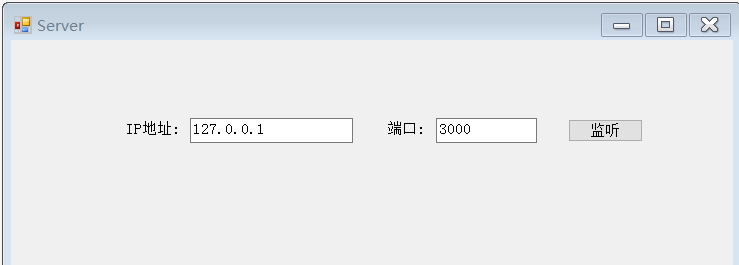

using MessageContract;

using NetworkCommsDotNet;

using NetworkCommsDotNet.Connections;

using NetworkCommsDotNet.Connections.TCP;

using NetworkCommsDotNet.DPSBase;

using System;

using System.Collections.Generic;

using System.ComponentModel;

using System.Data;

using System.Drawing;

using System.Linq;

using System.Net;

using System.Text;

using System.Windows.Forms;

namespace AppServer

{

    public partial class MaiForm : Form

    {

        public MaiForm()

        {

            InitializeComponent();

        }

        SendReceiveOptions aboveOptions = new SendReceiveOptions(DPSManager.GetDataSerializer<ProtobufSerializer>(), null, null);

        private void button1_Click(object sender, EventArgs e)

        {

            //服务器开始监听客户端的请求

            Connection.StartListening(ConnectionType.TCP, new IPEndPoint(IPAddress.Parse(txtIP.Text), int.Parse(txtPort.Text)));

            //服务器开始监听客户端的请求

            //IPEndPoint thePoint = new IPEndPoint(IPAddress.Parse(txtIP.Text), int.Parse(txtPort.Text));

            //TCPConnection.StartListening(thePoint, false);

            button1.Text = "监听中";

            button1.Enabled = false;

            //button1.Text = "监听中";

            //button1.Enabled = false;

            //此方法中包含服务器具体的处理方法。

            StartListening();

        }

        private void StartListening()

        {

            //开启日志记录

            //配置日志记录器

            //ILogger logger = new LiteLogger(LiteLogger.LogMode.ConsoleAndLogFile, "ServerLogFile_" + NetworkComms.NetworkIdentifier + ".txt");

            //NetworkComms.EnableLogging(logger);

            //禁用日志记录  服务器端正式使用时,赢禁用日志记录

            NetworkComms.DisableLogging();

            //服务器端处理收到的消息

            //为简单起见,此示例中我们只处理字符类型的信息,也返回字符类型的信息。

            //处理的信息可以使自定义类,具体见下一个Demo

            NetworkComms.AppendGlobalIncomingPacketHandler<LoginContract>("ReqLogin", IncomingLoginRequest);

        }

        //处理某个具体的请求

        private void IncomingLoginRequest(PacketHeader header, Connection connection, LoginContract loginContract)

        {

            try

            {

                string resMsg = "";

                //为了简单,这里不调用数据库,而是模拟一下登录

                if (loginContract.UserID == "1000" && loginContract.PassWord == "123")

                    resMsg = "登录成功";

                else

                    resMsg = "用户名密码错误";

                //把返回结果写入到契约类中,后面返回给客户端

                //ResMsgContract contract = new ResMsgContract();

                //contract.Message = resMsg;

                //connection.SendObject<ResMsgContract>("ResLogin", contract);

                ResMsgContract contract = new ResMsgContract();

                contract.Message = resMsg;

                connection.SendObject("ResLogin", contract);

            }

            catch (Exception ex)

            {

                // LogTools.LogException(ex, "IncomingMsgHandle");

            }

        }

    }

}
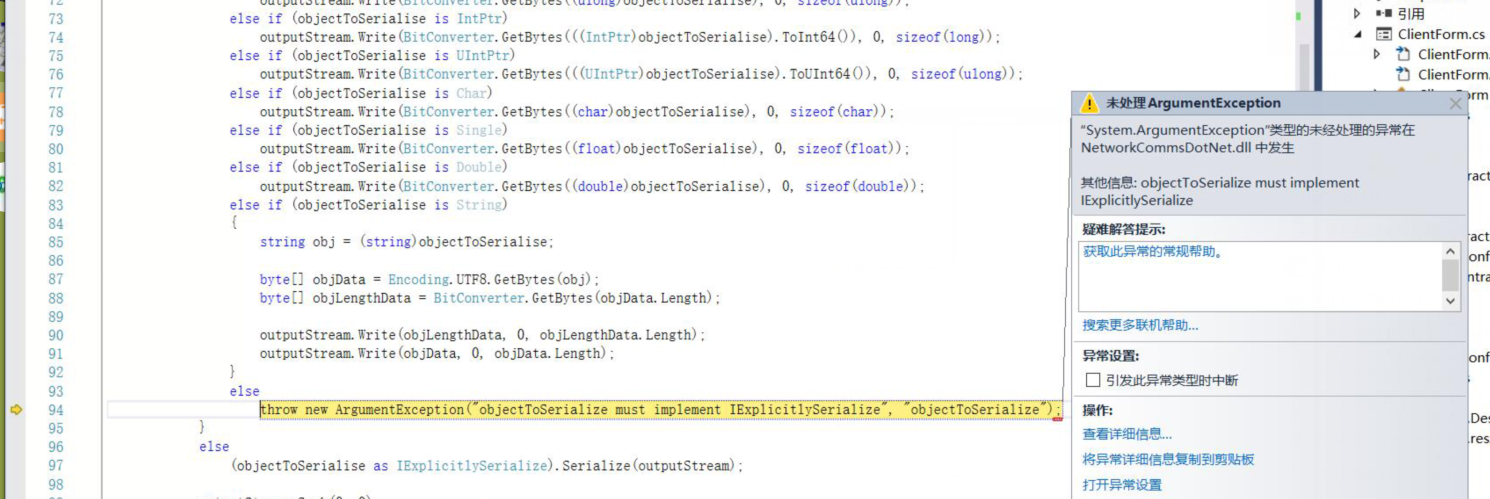
在别的帮助中往往少了这行:导致出现客户端发送时,类型打包出现问题. 这行代码是客户端服务器两端都要加上的,是指定传输方式
SendReceiveOptions aboveOptions = new SendReceiveOptions(DPSManager.GetDataSerializer<ProtobufSerializer>(), null, null);
就是这个报错了
一下是客户端
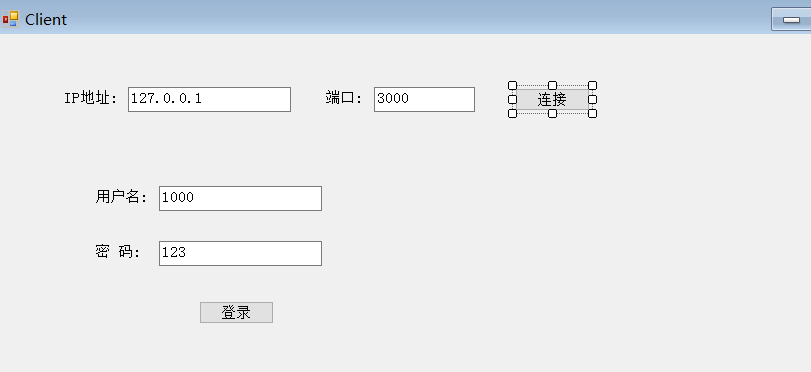
using MessageContract;

using NetworkCommsDotNet;

using NetworkCommsDotNet.Connections;

using NetworkCommsDotNet.Connections.TCP;

using NetworkCommsDotNet.DPSBase;

using System;

using System.Collections.Generic;

using System.ComponentModel;

using System.Data;

using System.Drawing;

using System.Linq;

using System.Text;

using System.Windows.Forms;

namespace AppClient

{

    public partial class MainForm : Form

    {

        public MainForm()

        {

            InitializeComponent();

        }

        //连接信息对象

        public ConnectionInfo connInfo = null;

        //连接对象

        Connection newTcpConnection;

        SendReceiveOptions aboveOptions = new SendReceiveOptions(DPSManager.GetDataSerializer<ProtobufSerializer>(), null, null);

        private void button1_Click(object sender, EventArgs e)

        {

            //给连接信息对象赋值

            connInfo = new ConnectionInfo(txtIP.Text, int.Parse(txtPort.Text));

            //如果不成功,会弹出异常信息

            newTcpConnection = TCPConnection.GetConnection(connInfo);

            button1.Enabled = false;

            button1.Text = "连接成功";

        }

        private void btnlogin_Click(object sender, EventArgs e)

        {

            //给契约类赋值

            LoginContract contract = new LoginContract(txtUserName.Text, txtPassword.Text);

            //contract.UserID = txtUserName.Text;

            //contract.PassWord = txtPassword.Text;

            //向服务器发送登录信息并获取登录结果

              ResMsgContract resMsg = newTcpConnection.SendReceiveObject<LoginContract, ResMsgContract>("ReqLogin", "ResLogin", 5000, contract);

            //向服务器发送登录信息并获取登录结果

           // ResMsgContract resMsg = newTcpConnection.SendReceiveObject<ResMsgContract>("ReqLogin", "ResLogin", 5000, contract);

            if (resMsg.Message == "登录成功")

            {

                MessageBox.Show("登录成功");

            }

            else

            {

                MessageBox.Show("用户名密码错误");

            }

        }

    }

}
契约类
using System;

using System.Collections.Generic;

using System.Linq;

using System.Text;

namespace MessageContract

{

    [ProtoContract]

    public class LoginContract

    {

        [ProtoMember(1)]

        public string UserID { get; set; }

        [ProtoMember(2)]

        public string PassWord { get; set; }

        public LoginContract() { }

        public LoginContract(string userID, string passWord)

        {

            this.UserID = userID;

            this.PassWord = passWord;

        }

    }

}
using ProtoBuf;

using System;

using System.Collections.Generic;

using System.Linq;

using System.Text;

namespace MessageContract

{

    [ProtoContract]

    public  class ResMsgContract

    {

        [ProtoMember(1)]

        public string Message;

        public ResMsgContract() { }

        public ResMsgContract(string message)

        {

            this.Message = message;

        }

    }

}
注意:
使用这个框架要配合谷歌的protobuf 要选好版本.本人没重复测试最高版本,因为在调试登录过程中出现别的问题过程中,也顺改了protobuf 的版本,至今未测试最高版本是否存在兼容问题.本人成功的使用的是2.0.0.668
protobuf简介protobuf是google提供的一个开源序列化框架,类似于XML,JSON这样的数据表示语言,其最大的特点是基于二进制,因此比传统的XML表示高效短小
vs nuget添加方式
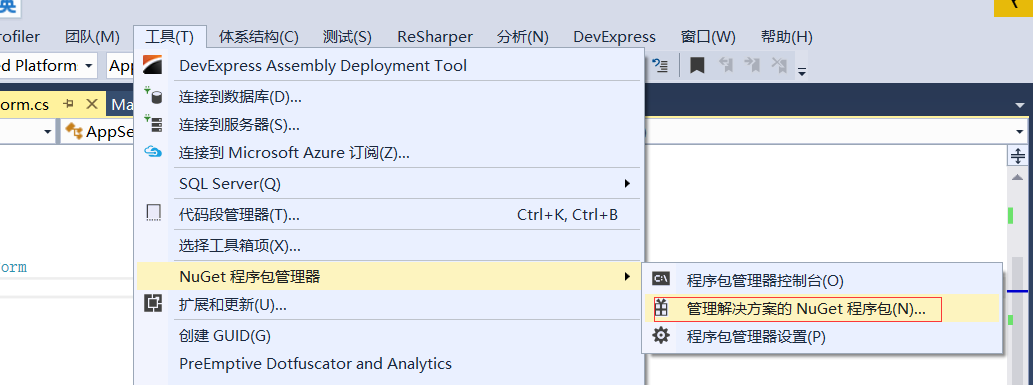
输入
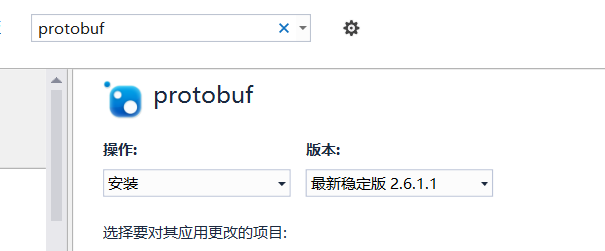
版本选择自己指定一下,加大项目的契约类里边.这是自己定义传输对象的方式.

结果:

c# networkcomms 3.0实现模拟登陆总结 转载https://www.cnblogs.com/zuochanzi/p/7039636.html的更多相关文章
- c# networkcomms 3.0实现模拟登陆总结
最近项目需要做一个客户查询状态系统,当前上位机缺少服务功能,于是找到了networkcomms 开源框架,作为项目使用. 最新版networkcomms 下载地址:https://github.com ...
- Java模拟登陆【转载】
import java.io.BufferedReader; import java.io.IOException; import java.io.InputStream; import java.i ...
- 转载 精进不休 .NET 4.0 (5) - C# 4.0 新特性之并行运算(Parallel) https://www.cnblogs.com/webabcd/archive/2010/06/03/1750449.html
精进不休 .NET 4.0 (5) - C# 4.0 新特性之并行运算(Parallel) 介绍C# 4.0 的新特性之并行运算 Parallel.For - for 循环的并行运算 Parall ...
- SignalR 2.0 入门与提高 转载https://www.cnblogs.com/vance/p/SignalR.html
SignalR 2.0 最近整理了SignalR2.0 部分知识点,原文翻译,由于自己是土鳖,翻译得不好的地方,欢迎指正!仅供各位初学者学习! 第一节. 入门ASP.NET SignalR2.0 1. ...
- NetworkComms V3 模拟登陆
演示NetworkComms V3的用法 例子很简单 界面如下: 服务器端代码: 开始监听: //服务器开始监听客户端的请求 Connection.StartListening(ConnectionT ...
- Python 爬虫模拟登陆知乎
在之前写过一篇使用python爬虫爬取电影天堂资源的博客,重点是如何解析页面和提高爬虫的效率.由于电影天堂上的资源获取权限是所有人都一样的,所以不需要进行登录验证操作,写完那篇文章后又花了些时间研究了 ...
- Python模拟登陆新浪微博
上篇介绍了新浪微博的登陆过程,这节使用Python编写一个模拟登陆的程序.讲解与程序如下: 1.主函数(WeiboMain.py): import urllib2 import cookielib i ...
- PHP 之 CURL 模拟登陆并获取数据
1.CURL模拟登陆的流程和步骤 2.tempnam 创建一个临时文件 3.使用CURL模拟登陆到PHP100论坛 <?php $cookie_file = tempnam('./temp',' ...
- pytho简单爬虫_模拟登陆西电流量查询_实现一键查询自己的校园网流量
闲来无事,由于校园内网络是限流量的,查询流量很是频繁,于是萌生了写一个本地脚本进行一键查询自己的剩余流量. 整个部分可以分为三个过程进行: 对登陆时http协议进行分析 利用python进行相关的模拟 ...
随机推荐
- 120、TensorFlow创建计算图(二)
#创建一个计算流图 #大多数tensorflow程序开始于dataflow graph 的构造函数 #在这个命令中你执行了tensorflow api的函数 #创建了新的操作tf.Operation ...
- MSDN上关于WinDbg的手册
参考:http://msdn.microsoft.com/en-us/library/windows/hardware/ff540507(v=vs.85).aspx 这是最靠谱的参考了,比.hh要直观 ...
- HDU3449_Consumer
这个是一个背包的变形题,很值得仔细体味 大致题意: 这个比普通背包多一个限制:再选每一类物品之前必须要先购买一个篮子来装,篮子有一定的价格,其他就和背包是一样的了 思路: 为了能够体现篮子的价值,我们 ...
- mac bash上显示git分支与状态
主要实现 显示当前路径 显示当前所在分支 显示当前修改状态 = 表示一个干净的分支 ~ 表示文件有改动 # 表示已commit 但未 push 通过网上搜索和自己根据实际需要修改的代码如下: .bas ...
- 下载Excel文件功能通过火狐浏览器下载没有后缀名
最近遇到一个问题,用导出Excelwe文件使用Chrome浏览器是没有问题的,但是用火狐浏览器会出现下载的Excel文件没有后缀名.检查了很多东西都没找到原因.最后和之前的下载功能做对比发现,Exce ...
- matploylib之热力图
刚学我也不熟,做个笔记吧 # coding:utf-8 import numpy as np import matplotlib.pyplot as plt dx = 0.01 dy = 0.01 # ...
- vuex存取数据展示在table里-----第一次实现
之前也看了vuex的文档,对它的原理只是了解,看代码(仅自己复习.做笔记) 流程是在组件的created中提交dispatch,然后通过action调用一个封装好的axios然后再触发mutation ...
- SQL数据库—<6-001> 常用系统存储过程大全 --摘录网
-- 来源于网络 -- 更详细的介结参考联机帮助文档 xp_cmdshell --*执行DOS各种命令,结果以文本行返回. xp_fixeddrives --*查询各磁盘/分区可用空间 xp_logi ...
- spring整合mybatis后,mybatis一级缓存失效的原因
一般来说,可以在5个方面进行缓存的设计: 最底层可以配置的是数据库自带的query cache, mybatis的一级缓存,默认情况下都处于开启状态,只能使用自带的PerpetualCache,无法配 ...
- setmetamode - define the keyboard meta key handling
总览 setmetamode [ meta|bit|metabit | esc|prefix|escprefix ] 描述 没有参数时, setmetamode 将打印当前 Meta 键模式; 有参数 ...