
Android实现三角形气泡效果方式汇总
在开发过程中,我们可能会经常遇到这样的需求样式:
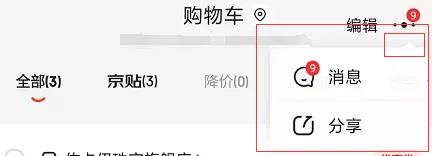
这张图是截取京东消息通知的弹出框,我们可以看到右上方有个三角形的气泡效果,这只是其中一种,三角形的方向还可以是上、下、左、右。
通过截图可以发现,气泡由正三角形和圆角长方形组成,于是可以通过组合来形成三角形气泡的效果,下面我们通过三种方式进行实现。
实现方式:
1、通过.9图进行实现;
2、通过shape方式实现;
3、通过自定义view的方式实现;
实现逻辑:
1、通过.9图进行实现
这种方式就不用说了吧,找你们UI小姐姐切一个.9图,使用即可,不过这种方式的图片需要占一定体积哦。
2、通过shape方式实现
- 正三角形
<?xml version="1.0" encoding="utf-8"?>

<layer-list xmlns:android="http://schemas.android.com/apk/res/android">

    <item>

        <rotate

            android:fromDegrees="45"

            android:pivotX="-40%"

            android:pivotY="80%">

            <shape android:shape="rectangle">

                <size

                    android:width="15dp"

                    android:height="15dp" />

                <solid android:color="#ffffff" />

            </shape>

        </rotate>

    </item>

</layer-list>
- 倒三角形
<?xml version="1.0" encoding="utf-8"?>

<layer-list xmlns:android="http://schemas.android.com/apk/res/android">

     <item>

        <rotate

            android:fromDegrees="45"

            android:pivotX="135%"

            android:pivotY="15%">

            <shape android:shape="rectangle">

                <size

                    android:width="15dp"

                    android:height="15dp" />

                <solid android:color="#ffffff" />

            </shape>

        </rotate>

    </item>

</layer-list>
- 左三角形
<?xml version="1.0" encoding="utf-8"?>

<layer-list xmlns:android="http://schemas.android.com/apk/res/android">

    <item>

        <rotate

            android:fromDegrees="-45"

            android:pivotX="85%"

            android:pivotY="-35%">>

            <shape android:shape="rectangle">

                <size

                    android:width="15dp"

                    android:height="15dp" />

                <solid android:color="#ffffff" />

            </shape>

        </rotate>

    </item>

</layer-list>
- 右三角形
<?xml version="1.0" encoding="utf-8"?>

<layer-list xmlns:android="http://schemas.android.com/apk/res/android">

    <item>

        <rotate

            android:fromDegrees="-45"

            android:pivotX="15%"

            android:pivotY="135%">>

            <shape android:shape="rectangle">

                <size

                    android:width="15dp"

                    android:height="15dp" />

                <solid android:color="#ffffff" />

            </shape>

        </rotate>

    </item>

</layer-list>
上面就是通过shape方式实现各个方向的代码,这种方式缺点比较明显,如果要变化不同的角的位置需要再写不同的布局。
3、通过自定义view的方式实现
由于是比较简单这里就不讲解每个怎么搞了,可以复制过去直接用
- 添加自定义属性
<declare-styleable name="TriangleView">

        <attr name="trv_color" format="color" />

        <attr name="trv_direction">

            <enum name="top" value="0" />

            <enum name="bottom" value="1" />

            <enum name="right" value="2" />

            <enum name="left" value="3" />

        </attr>

 </declare-styleable>
- 自定义代码文件
public class TriangleView extends View {

    private static final int TOP = 0;

    private static final int BOTTOM = 1;

    private static final int RIGHT = 2;

    private static final int LEFT = 3;

    private static final int DEFUALT_WIDTH = 10;

    private static final int DEFUALT_HEIGHT = 6;

    private static final int DEFUALT_COLOR = R.color.FFF;

    private Paint mPaint;

    private int mColor;

    private int mWidth;

    private int mHeight;

    private int mDirection;

    private Path mPath;

    public TriangleView(final Context context) {

        this(context, null);

    }

    public TriangleView(Context context, @Nullable AttributeSet attrs) {

        this(context, attrs, 0);

    }

    public TriangleView(final Context context, final AttributeSet attrs, final int defStyleAttr) {

        super(context, attrs, defStyleAttr);

        init();

        TypedArray typedArray = context.getTheme().obtainStyledAttributes(attrs, R.styleable.TriangleView, 0, 0);

        mColor = typedArray.getColor(R.styleable.TriangleView_trv_color, ContextCompat.getColor(getContext(), DEFUALT_COLOR));

        mDirection = typedArray.getInt(R.styleable.TriangleView_trv_direction, mDirection);

        typedArray.recycle();

        mPaint.setColor(mColor);

    }

    private void init() {

        mPaint = new Paint();

        mPaint.setAntiAlias(true);

        mPaint.setStyle(Paint.Style.FILL);

        mPath = new Path();

        mDirection = TOP;

    }

    @Override

    protected void onMeasure(int widthMeasureSpec, int heightMeasureSpec) {

        super.onMeasure(widthMeasureSpec, heightMeasureSpec);

        mWidth = MeasureSpec.getSize(widthMeasureSpec);

        mHeight = MeasureSpec.getSize(heightMeasureSpec);

        final int widthMode = MeasureSpec.getMode(widthMeasureSpec);

        final int heightMode = MeasureSpec.getMode(heightMeasureSpec);

        if (mWidth == 0 || widthMode != MeasureSpec.EXACTLY) {

            mWidth = (int) PixelUtil.dp2px(DEFUALT_WIDTH);

        }

        if (mHeight == 0 || heightMode != MeasureSpec.EXACTLY) {

            mHeight = (int) PixelUtil.dp2px(DEFUALT_HEIGHT);

        }

        setMeasuredDimension(mWidth, mHeight);

    }

    @Override

    protected void onDraw(Canvas canvas) {

        super.onDraw(canvas);

        switch (mDirection) {

            case TOP:

                mPath.moveTo(0, mHeight);

                mPath.lineTo(mWidth, mHeight);

                mPath.lineTo(mWidth / 2, 0);

                break;

            case BOTTOM:

                mPath.moveTo(0, 0);

                mPath.lineTo(mWidth / 2, mHeight);

                mPath.lineTo(mWidth, 0);

                break;

            case RIGHT:

                mPath.moveTo(0, 0);

                mPath.lineTo(0, mHeight);

                mPath.lineTo(mWidth, mHeight / 2);

                break;

            case LEFT:

                mPath.moveTo(0, mHeight / 2);

                mPath.lineTo(mWidth, mHeight);

                mPath.lineTo(mWidth, 0);

                break;

            default:

                break;

        }

        mPath.close();

        canvas.drawPath(mPath, mPaint);

    }

}
- 布局文件添加
<com.sjl.keeplive.triange.TriangleView

        android:layout_width="10dp"

        android:layout_height="6dp"

        app:trv_color="@color/FFF"

        app:trv_direction="top" />
通过自定义的方式可以搞定四个方向,而且在代码中也可以使用,动态添加,动态改变颜色,还是比较好的方式。
到这里就完成啦.
Android实现三角形气泡效果方式汇总的更多相关文章
- Android超简单气泡效果
阿里P7移动互联网架构师进阶视频(每日更新中)免费学习请点击:https://space.bilibili.com/474380680最近有用到水下气泡上升效果,因此在网上查了一下资料,结果还真找到了 ...
- Android中三种超实用的滑屏方式汇总(转载)
Android中三种超实用的滑屏方式汇总 现如今主流的Android应用中,都少不了左右滑动滚屏这项功能,(貌似现在好多人使用智能机都习惯性的有事没事的左右滑屏,也不知道在干什么...嘿嘿),由于 ...
- 【转】(转)【Android】Paint的效果研究
转自:http://wpf814533631.iteye.com/blog/1847661 (转)[Android]Paint的效果研究 博客分类: android 在Paint中有很多的属性可以 ...
- Android 反射-换一种方式编程
Android 反射-换一种方式编程 转载请标明出处:http://blog.csdn.net/zhaoyanjun6/article/details/59109933 本文出自[赵彦军的博客] 上一 ...
- Android视频播放的两种方式介绍
1.在Android 中播放视频的方式有两种: 第一种方式是使用MediaPlayer 结合SurfaceView 来播放,通过MediaPlayer来控制视频的播放.暂停.进度等: 通过Surfac ...
- 两行代码搞定Android视图扩散切换效果
用最简单的方式来实现Android视图扩散切换效果. 一.概述 这两天时间动手撸了个视图扩散切换效果的控制器,API兼容至Android4.0,更方便我们在视图切换过程中有炫酷的过渡效果.本来是想实现 ...
- 理解使用before,after伪类实现小三角形气泡框
先来理解before和after伪类的用法吧,before从字面上的意思可以理解为前面的意思,它一般和content属性一起使用,把内容插入在其他元素的前面,同理after的含义就是把内容插入到其他元 ...
- android的左右滑动效果实现-ViewFlipper
说到android的左右滑动效果我们可以说是在每个应用上面都可以看到这样的效果,不管是微博,还是QQ等.实现左右滑动的方式很多,有ViewPaer(不过这个和需要android-support-v4. ...
- 开发常用镜像资源替换为国内开源镜像(yum,compose,maven,docker,android sdk,npm,国内开源镜像汇总)
一.国内开源镜像站点汇总 阿里云开源镜像站 (http://mirrors.aliyun.com/)网易开源镜像站 (http://mirrors.163.com/)中国科学技术大学开源镜像站 (ht ...
随机推荐
- cmd控制台Windows服务相关
1.创建服务 sc create ServerName binpath= "E:\MySql5.5\bin\mysqld.exe" 2.启动服务 sc start ServerNa ...
- python访问Oracle数据库相关操作
环境: Python版本:3.6.6 win系统:64位 Linux系统:64位 首先安装配置时,版本必须一致!包括:系统版本,python版本,oracle客户端的版本,cx_Oracle的版本! ...
- docthis & VS code
docthis & VS code JSDoc 3 http://usejsdoc.org/ http://usejsdoc.org/about-getting-started.html ht ...
- Online analog video interview
Online analog video interview 在线模拟视频面试 English 口语 https://www.pramp.com/#/ https://www.pramp.com/faq ...
- 来必力 & Disqus
来必力 & Disqus 正在载入来必力 https://livere.com 个人博客-双评论系统(来必力与Disqus) https://tianbozhang.coding.me/com ...
- TypeScript 如何编写类库声明文件 .d.ts
TypeScript 如何编写类库声明文件 .d.ts how to write a d.ts file declaration-files/ https://www.typescriptlang.o ...
- git merge & git rebase
git merge & git rebase bug error: You have not concluded your merge (MERGE_HEAD exists). hint: P ...
- js 创建简单的表单同步验证器
SyncValidate declare const uni: any; export interface SyncValidateOpt { [key: string]: SyncValidateF ...
- 「NGK每日快讯」2021.2.11日NGK公链第100期官方快讯!
- django学习-15.ORM查询方法汇总
1.前言 django的ORM框架提供的查询数据库表数据的方法很多,不同的方法返回的结果也不太一样,不同方法都有各自对应的使用场景. 主要常用的查询方法个数是13个,按照特点分为这4类: 方法返回值是 ...