
前端问题整理 Vite+Vue3+Ts 创建项目及配置 持续更新
前端问题整理 持续更新
- 前端问题整理 持续更新
- 前端 Vue 篇
- @项目配置
- 1.node 版本过高问题 安装nvm 管理node版本
- 2.镜像证书无效问题
- 3.npm 版本问题
- 4.npm install 证书过期问题
- 5.yarn 命令无法使用问题
- 6.Vite Vue 项目搭建 npm run dev 错误 node 版本不一致
- 7.解决vite项目启动报错: Cannot find module @rollup/rollup-darwin-arm64
- 8.Vue + Ts 模块 ““vue-router““ 没有导出的成员 “createRouter“
- 9.useRoute useRouter 问题
- 10.cypress ES6 Moudle 问题
- 11.node 版本不契合yarn问题
- 12. 命令窗口安装完成yarn 后 使用 yarn 报错问题
- 13.无法找到模块“vuex”的声明文件
- 安装mock 插件时出现错误
- 前端 GO 篇
- 前端 Vue 篇
前端 Vue 篇
@项目配置
项目依赖
注意:没有安装vue-cli脚手架和vite的请提前安装, 该演示项目为vite 创建vue
3项目,有错误可在上方问题目录寻找
-----------------【创建vite+Vu3+Ts项目 CMD】-------------------

|-CMD 窗口初始化vite创建vue3项目

npm init vite@latest

-------------------------------------------------------------

|-填写项目名  xxx cd 到项目文件夹下

-------------------------------------------------------------

npm install

-------------------------------------------------------------

npm run dev

-------------------------------------------------------------

|-全局安装 pnpm

npm install -g  pnpm

-------------------------------------------------------------

|-安装 yarn 可指定版本号 @1.22.22 --save

npm install yarn 若npm安装速度慢可用 yarn add +项目资源

#############################################################

|-项目内部安装依赖和开发所需要的包

|-需要安装nvm下面第一个问题最后有链接----

|-在vue2中,要用vuex的3版本 在vue3中,要用vuex的4版本

#############################################################

|-npm#

npm install vuex@3 --save

|-Yarn#

yarn add vuex@3 --save

-------------------------------------------------------------

|-安装Vue3版本的vuex和vue-router

npm install vuex@4 --save

npm install vue-router@4 --save

-------------------------------------------------------------

|-安装 element-plus 可指定版本号 @2.3.6 --save

npm install element-plus

-------------------------------------------------------------

|-安装 axios

npm install axios @types/axios --save

-------------------------------------------------------------

|-安装 typescript 【此项目已默认安装】

npm install -g typescript

-------------------------------------------------------------

|-安装 cypress 测试工具

npm install cypress --save-dev

#############################################################

|-配置 package.json

{

"scripts": {

 "cypress:open": "cypress open"

}

}

|-使用 执行 以下任何一个命令都可以执行

npx cypress open

npm run cypress:open

yarn cypress open

pnpm cypress open

#############################################################

-------------------------------------------------------------

|-安装 vite 【此项目已安装】

npm install vite -D

-------------------------------------------------------------

|-安装 babel 在vue中使用jsx 配置完成可以把vue文件改为.js文件来编写

|-组件 【把 HTML 组件当做 JavaScript/TypeScript 代码片段处理】

|-Babel可以把使用ES6/ES7等“高级”语法编写的Javascript代码转换为

|-ES5/ES3的“通俗”语法(也可以把JSX语法转为Javascript)。

|-用于jsx向后兼容浏览器环境

npm install @vue/babel-plugin-jsx -D

|-安装vitejs的vue-jsx

npm i @vitejs/plugin-vue-jsx -D

-------------------------------------------------------------

#############################################################

|-在 vite.config.ts 文件中挂载

注意不要引用错了变成babel的jsx了@vue/babel-plugin-jsx

-------------------------------------------------------------

import vueJsx from '@vitejs/plugin-vue-jsx'

export default defineConfig({

plugins: [ vueJsx()]

})

-------------------------------------------------------------

|-在 tsconfig.json 中配置:

{

// include 需要包含tsx

"include": ["src/*", "src/**/*.vue", "src/**/*.tsx", "src/**/*.jsx", "src/**/*.ts", "src/**/*.js"],

"compilerOptions": {

 // 在.tsx文件里支持JSX

 "jsx": "preserve",

}

}

-------------------------------------------------------------

|-安装了babel 所以配置 新建.babelrc文件 加入

{

 "presets": ["@vue/babel-preset-app"],

 "plugins": ["@vue/babel-plugin-jsx"]

}

文章答疑:blog.csdn.net/algor1234567/article/details/101921994

-------------------------------------------------------------

|-使用 在script标签上加lang='tsx'

import { defineComponent } from 'vue';

export default defineComponent({

setup(props){

 return ()=>(

   <div>

   Hello,World

   </div>

 )

}

})

|-或者

export default {

render() {

 return (

   <div>

     <h1>Hello, JSX in Vue 3!</h1>

   </div>

 );

},

};

#############################################################

-------------------------------------------------------------

|-安装 mockjs

yarn add mockjs -S

-------------------------------------------------------------

|-安装 mock插件

npm i vite-plugin-mock -D

|-在vite.config.ts进行个人配置

-------------------------------------------------------------

#############################################################

import { viteMockServe } from 'vite-plugin-mock'

export default defineConfig({

plugins: [

 viteMockServe({

   mockPath: "./src/mock/source", // 解析刚刚user.ts的位置

   localEnabled: true // 是否开启开发环境

 })

]

})

#############################################################

-------------------------------------------------------------

|-安装 types/node 获取正确的代码提示和类型检查。

npm install @types/node --save-dev

#############################################################

|-根目录下 vite.config.ts 文件中配置路径别名

import { resolve } from 'path';

|-在plugins下

resolve: {

// 设置文件./src路径为 @

alias: [

 {

   find: '@',

   replacement: resolve(__dirname, './src')

 }

]

}

-------------------------------------------------------------

|-根目录下 tsconfig.json 文件中配置 在compilerOptions中

//配置 @

"baseUrl": ".",

"paths": {

	"@/*": ["src/*"]

}

#############################################################

-------------------------------------------------------------

|-安装ViteCDN插件加速优化项目体积

npm install vite-plugin-cdn-import --save-dev

#############################################################

|-配置vite.config.ts

-------------------------------------------------------------
1.node 版本过高问题 安装nvm 管理node版本
环境 Win11 , Vue3 项目
npm ERR! code EPERM

npm ERR! syscall open

npm ERR! path P:\download\nodejs\node_cache\_cacache\tmp\3f8845b0

npm ERR! errno -4048

npm ERR! Error: EPERM: operation not permitted, open 'P:\download\nodejs\node_cache\_cacache\tmp\3f8845b0'

npm ERR!  [Error: EPERM: operation not permitted, open 'P:\download\nodejs\node_cache\_cacache\tmp\3f8845b0'] {

npm ERR!   errno: -4048,

npm ERR!   code: 'EPERM',

npm ERR!   syscall: 'open',

npm ERR!   path: 'P:\\download\\nodejs\\node_cache\\_cacache\\tmp\\3f8845b0'

npm ERR! }

npm ERR!

npm ERR! The operation was rejected by your operating system.

npm ERR! It's possible that the file was already in use (by a text editor or antivirus),

npm ERR! or that you lack permissions to access it.

npm ERR!

npm ERR! If you believe this might be a permissions issue, please double-check the

npm ERR! permissions of the file and its containing directories, or try running

npm ERR! the command again as root/Administrator.

npm ERR! Log files were not written due to an error writing to the directory: P:\download\nodejs\node_cache\_logs

npm ERR! You can rerun the command with `--loglevel=verbose` to see the logs in your terminal
解决方案
1:对node进行环境变量配置会生成一个文件
在C盘>用户>你的用户名>一个隐藏文件 .npmrc
.node_repl_history 删除
2:然后重新下个低版本的node就可以了使用命令
Linux rm -rf /Users/用户名/.npmrc
Linux rm -rf node 文件地址
Windows del /Users/用户名/.npmrc
Windows rd node文件地址
3: 下载nvm node版本管理工具 对node 进行管理 ---在此前先卸载掉当前node 及环境变量配置 相关文件
2.镜像证书无效问题
Get "https://npm.taobao.org/mirrors/node/index.json": tls: failed to verify certificate: x509: certificate has expired or is not yet valid:
解决方案
找到nvm安装目录,找到setting.txt,将镜像源改成:
node_mirror: https://npm.taobao.org/mirrors/node/

npm_mirror: https://npm.taobao.org/mirrors/npm/

//如果镜像过期 使用新的mirror镜像

node_mirror: https://npmmirror.com/mirrors/node/

npm_mirror: https://registry.npmmirror.com/mirrors/npm/
nvm install <version>        //安装指定版本的 Node.js。

#例如,nvm install 16.20.0 将安装 Node.js 的 16.20.0 版本。

nvm use <version>            //切换使用指定版本的 Node.js。

#例如,nvm use 16.20.0 将设置当前会话中使用 Node.js 的 16.20.0 版本。

nvm list                     //列出已安装的所有 Node.js 版本。

#例如,nvm list 它将显示已安装的版本列表,并在当前使用的版本旁边加上一个箭头标记。

nvm alias <name> <version>   //创建一个别名以便更方便地引用特定的 Node.js 版本。

#例如,nvm alias default 16.20.0 将创建一个名为 "default" 的别名,指向 Node.js 的 16.20.0 版本。

nvm uninstall <version>      //卸载指定的 Node.js 版本。

#例如,nvm uninstall 16.20.0 将卸载 Node.js 的 16.20.0 版本。

nvm current                  //显示当前正在使用的 Node.js 版本。

#例如,nvm current 将显示正使用的V16.20.0 版本

nvm use default              //切换到默认的 Node.js 版本(由 nvm alias 命令设置的别名)。

#例如,nvm use default 将切换到刚刚设置default别名的16.20.0版本

nvm exec <version> <command> //在指定版本的 Node.js 环境中执行特定的命令。

#例如,nvm exec 16.20.0 node app.js 将使用 Node.js 的 16.20.0 版本来运行 app.js 文件。
3.npm 版本问题
npm ERR! code CERT_HAS_EXPIRED

npm ERR! errno CERT_HAS_EXPIRED

npm ERR! request to https://registry.npm.taobao.org/postcss-modules-values/download/postcss-modules-values-4.0.0.tgz failed, reason: certificate has expired

npm ERR! A complete log of this run can be found in:

npm ERR!     C:\Users\Honke\AppData\Local\npm-cache\_logs\2024-03-27T10_57_16_465Z-debug-0.log

PS F:\individual\Agoprojects\My-Project\.NET_Projects\OnlineLearning-project\OnlineLearning_UI\learning\src> npm update

npm ERR! code ERESOLVE

npm ERR! ERESOLVE unable to resolve dependency tree

npm ERR!

npm ERR! While resolving: learning@0.1.0

npm ERR! Found: vue@3.4.21

npm ERR! node_modules/vue

npm ERR!   vue@"^3.0.0" from the root project

npm ERR!

npm ERR! Could not resolve dependency:

npm ERR! peer vue@"^2.6.4" from vuetify@2.7.2

npm ERR! node_modules/vuetify

npm ERR!   vuetify@"^2.5.8" from the root project

npm ERR!

npm ERR! Fix the upstream dependency conflict, or retry

npm ERR! this command with --force, or --legacy-peer-deps

npm ERR! to accept an incorrect (and potentially broken) dependency resolution.

npm ERR!

npm ERR! See C:\Users\Honke\AppData\Local\npm-cache\eresolve-report.txt for a full report.

npm ERR! A complete log of this run can be found in:

npm ERR!     C:\Users\Honke\AppData\Local\npm-cache\_logs\2024-03-27T10_59_26_498Z-debug-0.log
解决方案
在终端输入
npm install --legacy-peer-deps
4.npm install 证书过期问题
npm ERR! code CERT_HAS_EXPIRED

npm ERR! errno CERT_HAS_EXPIRED

npm ERR! request to https://registry.npm.taobao.org/postcss-modules-values/download/postcss-modules-values-4.0.0.tgz failed, reason: certificate has expired

npm ERR! A complete log of this run can be found in:

npm ERR!     C:\Users\Honke\AppData\Local\npm-cache\_logs\2024-03-27T11_02_02_406Z-debug-0.log
解决方案
查看自己的下载源
npm config get registry
发现我们之前配置了下载镜像源为https开头的,
https://registry.npm.taobao.org/
执行命令清除npm缓存
npm cache clean --force
执行命令取消ssl验证
npm config set strict-ssl false
再次执行npm install ***,还不行可以尝试设置你的npm镜像源为http开头的,不使用https
npm config set registry http://registry.npm.taobao.org
npm config list

清空缓存:npm cache clean --force

!!!注意:此处修改的镜像用的是npm本身,一般国内用户还是建议使用淘宝镜像,所以推荐还是设置成用淘宝镜像,执行:npm config set registry https://registry.npmmirror.com 【推荐】
5.yarn 命令无法使用问题
yarn : 无法加载文件 P:\download\nodejs\yarn.ps1,因为在此系统上禁止运行脚本。有关详细信息,请参阅 https:/go.microsoft.com/fwlink/?LinkID=135170 中的 about_Execution_Pol

icies。

所在位置 行:1 字符: 1

+ yarn -v

+ ~~~~

    + CategoryInfo          : SecurityError: (:) [],PSSecurityException

    + FullyQualifiedErrorId : UnauthorizedAccess
解决方案
1.首先在windows搜索windows PowerSell,然后以管理员身份运行ISE
2.执行命令:
set-ExecutionPolicy RemoteSigned,没有报错就说明ok了,3.记得添加本地项目node_moudles下的yarn/bin路径为环境变量
6.Vite Vue 项目搭建 npm run dev 错误 node 版本不一致
  Cannot find module @rollup/rollup-win32-x64-msvc. npm has a bug related to optional dependencies (https://github.com/npm/cli/issues/4828). Please try `npm i` again after

 removing both package-lock.json and node_modules directory.
解决方案
安装 pnpm
npm install -g pnpm
再执行
npm install
然后执行
npm run dev
若不行的话应该就是版本问题
vite+vue项目 要求
node -v v19.19 官网下载
npm -v v8.17
pnpm -v v8.11
使用nvm 下载 node 契合的版本然后切换node 版本
nvm install 19.9.0
7.解决vite项目启动报错: Cannot find module @rollup/rollup-darwin-arm64
环境 Win11 ,Vite+ Vue3 项目
解决方案
报错信息:Error: Cannot find module @rollup/rollup-darwin-arm64. npm has a bug related to optional dependencies (https://github.com/npm/cli/issues/4828). Please try npm i again after removing both package-lock.json and node_modules directory.

---------------------------------------------------------------------
或者是这样
throw new Error(

Error: Cannot find module @rollup/rollup-win32-x64-msvc. npm has a bug related to optional dependencies (https://github.com/npm/cli/issues/4828). Please try `npm i` again after removing both package-lock.json and node_modules directory.

 at requireWithFriendlyError (F:\work\myvitepro\node_modules\rollup\dist\native.js:88:9)

 at Object.<anonymous> (F:\work\myvitepro\node_modules\rollup\dist\native.js:97:76)

 ... 3 lines matching cause stack trace ...

 at Function.Module._load (node:internal/modules/cjs/loader:909:12)

 at ModuleWrap.<anonymous> (node:internal/modules/esm/translators:169:29)

 at ModuleJob.run (node:internal/modules/esm/module_job:193:25)

 at async Promise.all (index 0)

 at async ESMLoader.import (node:internal/modules/esm/loader:530:24) {

[cause]: Error: Cannot find module '@rollup/rollup-win32-x64-msvc'

Require stack:

  - F:\work\myvitepro\node_modules\rollup\dist\native.js

      at Function.Module._resolveFilename (node:internal/modules/cjs/loader:1026:15)

      at Function.Module._load (node:internal/modules/cjs/loader:871:27)

      at Module.require (node:internal/modules/cjs/loader:1098:19)

      at require (node:internal/modules/cjs/helpers:108:18)

      at requireWithFriendlyError (F:\work\myvitepro\node_modules\rollup\dist\native.js:70:10)

      at Object.<anonymous> (F:\work\myvitepro\node_modules\rollup\dist\native.js:97:76)

      at Module._compile (node:internal/modules/cjs/loader:1196:14)

      at Object.Module._extensions..js (node:internal/modules/cjs/loader:1250:10)

      at Module.load (node:internal/modules/cjs/loader:1074:32)

      at Function.Module._load (node:internal/modules/cjs/loader:909:12) {

    code: 'MODULE_NOT_FOUND',

    requireStack: [ 'F:\\work\\myvitepro\\node_modules\\rollup\\dist\\native.js' ]

  }

}
这是个老问题了,报错里已经给出了提示,原因是package-lock.json这个文件里面出现了错误的module。
只需要删除掉package-lock.json然后重新执行npm i就可以了
也有可能是vite版本不兼容导致的 可以安装指定vite版本 npm i @vite4.4.0
若执行过程中报错 code EUNSUPPORTEDPROTOCOL
则执行npm update 更新npm 匹配与node版本一致的npm版本
8.Vue + Ts 模块 ““vue-router““ 没有导出的成员 “createRouter“
解决方案
然后尝试卸载vue-router
npm uninstall vue-router
重新安装 vue-router 4.x的版本
npm install vue-router@next -S
9.useRoute useRouter 问题
解决方案
在配置路由时 注意这两个对象的书写 useRouter是路由配置 useRoute是路由对象
10.cypress ES6 Moudle 问题
解决方案
把cypress.config.js 改为 cypress.config.cjs
cypress.config.cjs
const { defineConfig } = require('cypress')

module.exports = defineConfig({

e2e: {

 // setupNodeEvents(on, config) {

 //   // implement node event listeners here

 // }

   //服务地址

 baseUrl: 'http://127.0.0.1:5173/'

}

})
运行结果
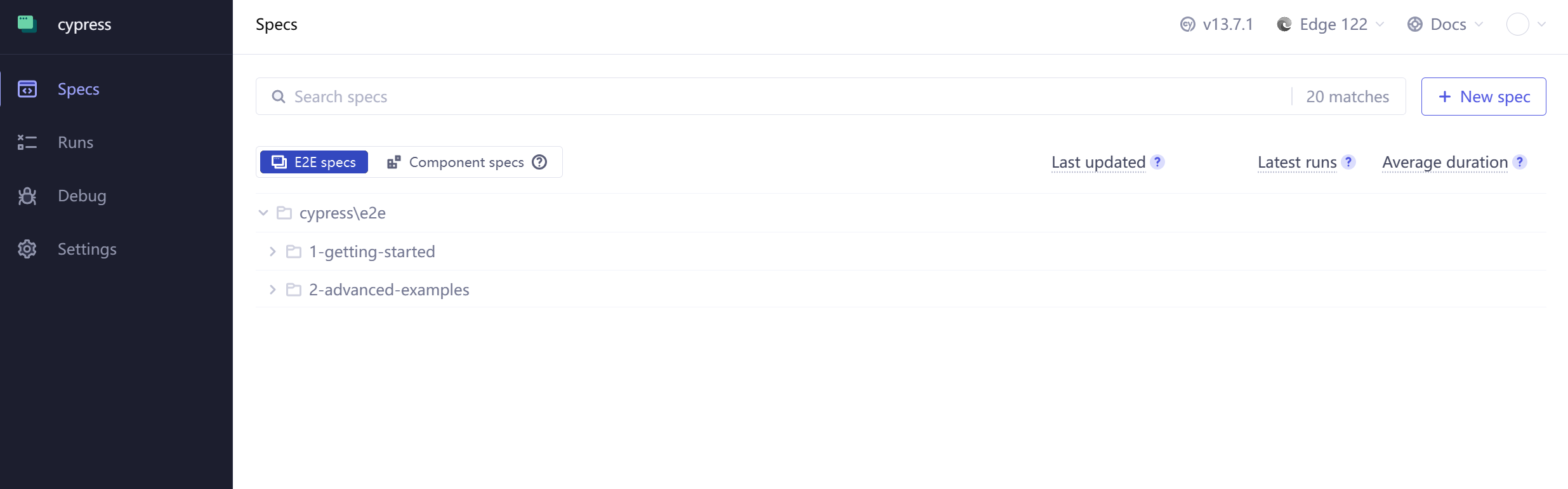
11.node 版本不契合yarn问题
error commander@12.0.0: The engine "node" is incompatible with this module. Expected version ">=18". Got "14.21.3" error Found incompatible module.

————————————————
解决方案
安装 nvm 使用 nvm use node版本号切换node版本
12. 命令窗口安装完成yarn 后 使用 yarn 报错问题
error Couldn't find package "@vue/runtime-dom@3.4.21" required by "vue@^3.4.21" on the "npm" registry.
解决方案
1.此问题前置内容:已经成功切换yarn 对应要求的node版本
2.再次使用yarn 命令时出现的错误
3.采用清空缓存的方式进行解决
npm cache clean --force
13.无法找到模块“vuex”的声明文件
解决方案
在vite-env.s.ts中加入以下配置
declare module "vuex" {

 export * from "vuex/types/index.d.ts";

 export * from "vuex/types/helpers.d.ts";

 export * from "vuex/types/logger.d.ts";

 export * from "vuex/types/vue.d.ts";

}
安装mock 插件时出现错误
解决方案
1.npm audit fix 报错
npm audit fix

mockjs  *

Severity: high

mockjs vulnerable to Prototype Pollution via the Util.extend function - https://github.com/advisories/GHSA-mh8j-9jvh-gjf6

No fix available

node_modules/mockjs

vite-plugin-mock  *

Depends on vulnerable versions of mockjs

node_modules/vite-plugin-mock

2 high severity vulnerabilities
依次执行
npm install -g nrm
nrm ls
nrm use npm
npm audit fix
6.或者删除node_moudles 重新下载
前端 GO 篇
1.go : 无法将“go”项识别为 cmdlet、函数、脚本文件或可运行程序的名称
解决方案
在VS Code终端(PowerShell实例)中运行以下命令,使当前的PowerShell实例从计算机加载最新的路径变量。
$env:Path = [System.Environment]::GetEnvironmentVariable("Path","Machine")
前端问题整理 Vite+Vue3+Ts 创建项目及配置 持续更新的更多相关文章
- Umi 小白纪实(一)—— 创建项目&常用配置
umi 是一个企业级 react 应用框架,也是蚂蚁金服的底层前端框架 <蚂蚁金服的前端框架和工程化实践> 一.安装脚手架 在创建项目之前,需要保证有 node 8.10 以上的环境 可以 ...
- Android 自己收集的开源项目集合(持续更新 2018.2.5)
2017.12.21 1.仿QQ说说发图片选择框架 https://github.com/yaozs/ImageShowPicker 2.炫酷开屏动画框架 https://github.com/Jos ...
- Android项目实战之高仿网易云音乐创建项目和配置
这一节我们来讲解创建项目:说道大家可能就会说了,创建项目还有谁不会啊,还需要讲吗,别急听我慢慢到来,肯定有你不知道的. 使用项目Android Studio创建项目我们这里就不讲解了,主要是讲解如何配 ...
- vue3.0创建项目和基本配置
借鉴博客:https://www.jianshu.com/p/6307c568832d/ https://www.cnblogs.com/KenFine/p/10850386.html 项目创建好后, ...
- vue-3.0创建项目
.npm install --global @vue/cli .npm install -g @vue/cli-init .vue init webpack my-project
- web前端笔记整理,从入门到上天,周周更新
由于大前端知识点太多,所以一一做了分类整理,详情可见本人博客 http://www.cnblogs.com/luxiaoyao/ 一.HTML 1.注释 格式:<!-- 注释内容 --> ...
- Jenkins服务器上创建项目和配置
大体步骤:General(基础配置)-->源码管理-->构建触发器-->构建环境-->构建-->构建后操作 1.创建一个工程 2.General(基础配置) 仅需填写标准 ...
- ASP.NET Core 项目实战(持续更新~~~)
一.前言 准备写这个系列文章的设想开始于今年9月,毫无意外,期间又又又又拖了很长时间,文章主要是为了记录自己学习使用 ASP.NET Core Web API 与 Vue 创建一个前后端分离的项目的整 ...
- 转发 ----> 2018年阿里巴巴重要开源项目汇总(持续更新中)
转发自segmentfault https://segmentfault.com/a/1190000017346799 前端 1.数据驱动的高交互可视化图形语法 AntV - G2 G2 是一套基于 ...
- angular+ionic+cordova(实战项目开发中,持续更新自己学到的和遇到的)
最近公司开始准备做app了,大佬选择了angular+ionic+corvoda的开发结构,但是对于刚刚才开始对angular才有一点点感觉的我,就像是被一击闷棍敲了,半天没反应过来,emmm,怎么办 ...
随机推荐
- Direct2D CreateBitmap的使用
当需要设置位图的混合模式时,应该使用ID2D1DeviceContext而不是ID2D1RenderTarget. 代码如下: #define WIN32_LEAN_AND_MEAN #include ...
- 麒麟系统开发笔记(六):安装QtCreator开发IDE中的中文输入环境Fcitx输入法
前言 中文输入法,QtCreator中无法输入中文也是ubuntu中一个常规问题,在麒麟系统中也此问题,要解决此问题,主要是安装和使用Fcitx输入法. 本文章最终结果是失败的,但是读者的系统未 ...
- 异步aioredis连接时报错TypeError: duplicate base class TimeoutError问题
版本 python3.11版本,aioredis 2.0.1版本,redis 7.x版本 redis.conf配置文件 daemonize yes bind 0.0.0.0 port 6379 pro ...
- 在 C++ 项目中,通过源码使用 PaddlePaddle 实现 OCR 功能
My-PaddleOCR 介绍 如何在 C++ 项目中,通过源码使用 PaddlePaddle 实现 OCR 功能. 本项目的所有源码:gitee: paddleocr 目前,官方提供使用 Paddl ...
- 李宏毅2022机器学习HW4 Speaker Identification上(Dataset &Self-Attention)
Homework4 Dataset介绍及处理 Dataset introduction 训练数据集metadata.json包括speakers和n_mels,前者表示每个speaker所包含的多条语 ...
- 3.1蓝桥杯每日知识点,全排列permutation
next_permutation()函数 适用于生成当前序列的下一个排列 如果存在下一个排列,则将当前序列更改为下一个排列,并返回true 如果当前序列已经是最后一个排列,则将序列更改为第一个排列,并 ...
- GO 语言的并发编程相关知识点简介与测试【GO 基础】
〇.什么是协程 Coroutines ? 进程和线程太常见,本文就不再赘述了,直接一起看下什么是协程.如下图,先看下协程的定位: 关于用户空间和内核空间:进程运行起来就涉及到对内存资源的管理,然而内存 ...
- k8s如何对外访问service
在Kubernetes(K8s)中,可以通过以下几种方式对外访问Service: 1.NodePort: 这是最常见的对外访问Service的方式.通过将Service的类型设置为NodePort,K ...
- Windows10 Linux 子系统的骚操作之 Ctrl+Alt+T shell启动终端
巨硬的 WSL(Windows Subsystem for Linux)是真的好用 但是,由于本人比较喜欢按快捷键.所以一直想着找到Windows上安装的ubuntu.exe文件,搞个快捷方式,然后再 ...
- 基于Linux的DockerFile添加中文字体
FROM openjdk:8u332-oraclelinux7 #RUN sed -i 's/dl-cdn.alpinelinux.org/mirrors.aliyun.com/g' /etc/apk ...