
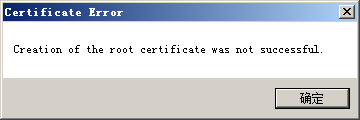
fiddler报错:creation of the root certificate was not successful 证书安装不成功
fiddler提示:creation of the root certificate was not successful 证书安装不成功
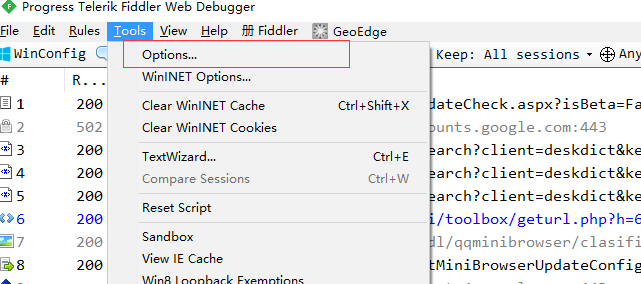
首先 找到Tools——>Options
在弹出的菜单中 选择https项 勾选捕捉https
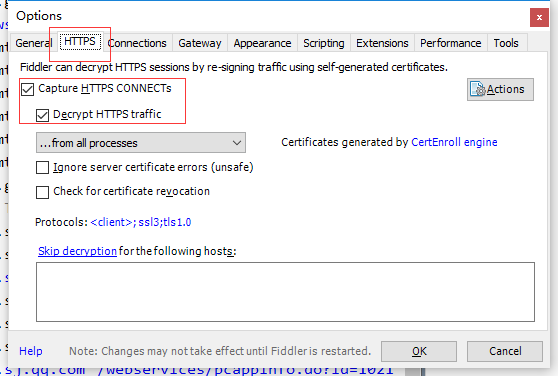
这样配置完OK之后 一般会弹窗提示安装证书,点击安装,然后重启Fiddler即可。
但有时候没有弹窗安装证书或根本就没有提示,这种情况一般在Win7中较多出现,Win7的系统https方面 在.net Framework4.0上有bug
网上搜罗一番之后解决方案是
1.cmd 命令行 找到fiddler的安装目录 如:
cd C:\Users\JayshSoft\AppData\Local\Programs\Fiddler
然后执行以下命令
makecert.exe -r -ss my -n "CN=DO_NOT_TRUST_FiddlerRoot, O=DO_NOT_TRUST, OU=Created by http://www.fiddler2.com" -sky signature -eku 1.3.6.1.5.5.7.3.1 -h 1 -cy authority -a sha1 -m 120 -b 09/11/2018
注意:这个命令最后的日期 09/11/2018 一定要大于现在的日期 否则创建证书是过期的
这样执行完之后 再去重新配置一次 就可以正确安装证书了。

选择yes.

fiddler报错:creation of the root certificate was not successful 证书安装不成功的更多相关文章
- Fiddler 抓包https配置 提示:creation of the root certificate was not successful 证书安装不成功
window7 提示:creation of the root certificate was not successful 证书安装不成功 1.cmd 命令行 找到fiddler的安装目录 如 ...
- Fiddler(三)Fiddler 报错creation of the root certificate was not successful
打开CMD,找到Fiddler所在目录,我这里是把汉化版的解压在了桌面,所以通过CMD进入桌面下的Fiddler文件夹. 执行命令 makecert.exe -r -ss my -n -h -cy a ...
- Fiddler 抓包https配置 提示creation of the root certificate was not successful 证书安装不成功
在使用Fiddler抓包时,我们有时需要抓https协议的包,这种需要配置一下 开启监控https才可以 首先 找到Tools——>Options 在弹出的菜单中 选择https项 勾选捕捉h ...
- 【fiddler安装】解决“Creation of the root certificate was not successful.”的问题
问题:在安装过fiddler后,会出现“Creation of the root certificate was not successful.”的问题,这个是说证书安装不成功. 原因:在使用Fidd ...
- win7 fiddler报“Creation of the root certificate was not successful”的问题
cd "C:\Program Files (x86)\Fiddler2" makecert.exe -r -ss my -n "CN=DO_NOT_TRUST_Fiddl ...
- 解决Fiddler出现无线弹框 "creation of the root certificate was not successful”的问题
打开Fiddler 访问:http://localhost:8888/ 安装证书,如果提示没有证书(8888是你在Tool->Fiddler Option->Connections设置的F ...
- fiddler抓包出现错误 creation of the root certificate was not successful
fiddler安装完要配置才可以抓取HTTP 1.首先 找到Tools——>Options,在弹出的菜单中 选择https项 勾选捕捉https,这样配置完OK之后 一般会弹窗提示安装证书,点击 ...
- Fiddler问题 - creation of the root certificate was not successful
打开cmd执行命令. d: cd D:\soft\Fiddler2 makecert.exe -r -ss my -n "CN=DO_NOT_TRUST_FiddlerRoot, O=DO_ ...
- Fiddler证书安装不成功
Fiddler 抓包https配置 提示creation of the root certificate was not successful 证书安装不成功 原文链接 在使用Fiddler抓包时,我 ...
随机推荐
- 消息中间件kafka学习记录
目录 1. 概述 2. 环境准备 3. 命令行常用命令 4. java api实现 1. 概述 Apache Kafka是一个分布式消息系统,凭借其优异的特性而被广泛使用. 高性能:O(1)复杂度消息 ...
- svn更新的时候断电,下次在更新出现svn: sqlite: database disk image is malformed
svn更新的时候断电,下次在更新出现svn: sqlite: database disk image is malformed 这种悲催的事情竟然发生了 解决办法:
- 文本数据增量导入到mysql
实现思路: 实现Java读取TXT文件中的内容并存到内存,将内存中的数据和mysql 数据库里面某张表数据的字段做一个比较,如果比较内存中的数据在mysql 里存在则不做处理,如果不存在则 ...
- webpack3
6月20号webpack推出了3.0版本,官方也发布了公告.根据公告介绍,webpack团队将未来版本的改动聚焦在社区提出的功能需求,同时将保持一个快速.稳定的发布节奏.本文主要依据公告内容,简单介绍 ...
- 使用idea从svn检出项目
1.创建空的工程 2. 3. 编辑项目进行提交svn服务器进行自动整合
- iOS开发系列-Foundation与CoreFoundation内存管理
概述 对于初学者来说,可能仅只能将ARC用在objective-c对象上(也即继承自NSObject的对象),但是如果涉及到较为底层的东西,比如Core Foundation中的malloc()或者f ...
- 既然 start() 方法会调用 run() 方法,为什么我们调用 start() 方法,而不直接调用 run() 方法?
当你调用 start() 方法时,它会新建一个线程然后执行 run() 方法中的代码.如果直接调用 run() 方法,并不会创建新线程,方法中的代码会在当前调用者的线程中执行
- Java 几种队列区别的简单说明
前言 队列,字面意思就可以明白. 是一种线性的数据暂存与管理工具. 也可以让各种业务功能进行逐个的队列运行. 此篇博客只说明一下Java有几种队列 未阻塞和阻塞队列的区别 未阻塞: 1.未阻塞的队列在 ...
- Postgraduate
https://account.chsi.com.cn/passport/login?entrytype=yzgr&service=https%3A%2F%2Fyz.chsi.com.cn%2 ...
- Json数据交换一Jackson
依赖 <dependency> <groupId>com.fasterxml.jackson.core</groupId> <artifactId>ja ...