
ArcMap 发布地图服务,提示发布工具没有启动
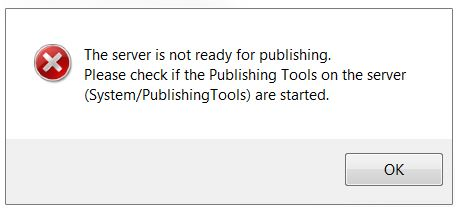
Error: The server is not ready for publishing. Please check if the Publishing Tools on the server are started。
Cause
There are several potential causes for this error:
- The Publishing Tools service on ArcGIS for Server is not started or is in a stopped state.
- The connection between the local machine and ArcGIS for Server is unstable or intermittent. This causes ArcGIS for Server to be unable to establish communication with other machines and returns the error.
- Processing and memory limitations of the server may return the error. The server crashes or becomes unresponsive when overloaded with requests or is unable to process the large amount of data.
Solution or Workaround
The following workarounds can be applied depending on the cause:
Publishing Tools service is not started or in a stopped state
Ensure the Publishing tool service is started. For more information, refer to ArcGIS Help: Starting and stopping services.
Unstable or intermittent connection
If the connection is unstable or intermittent, save a service definition (.sd) file using ArcMap and publish the .sd file directly from ArcGIS Server Manager.
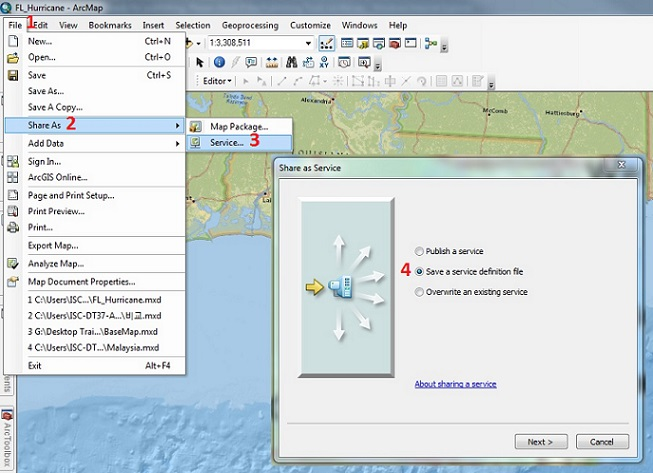
- In ArcMap, navigate to File > Share As > Service. When prompted, select Save a service definition file and click Next.
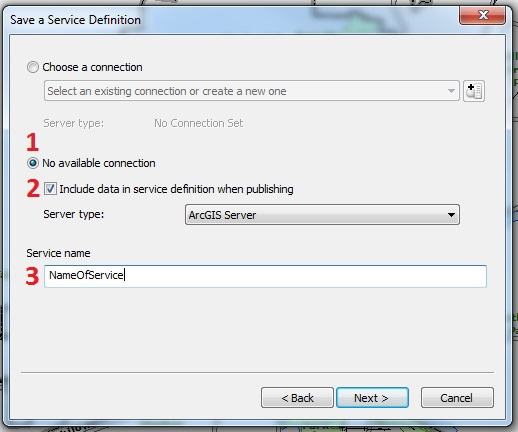
- In the Save a Service Definition window, select No available connection, check Include data in service definition when publishing, and provide a name for the service.
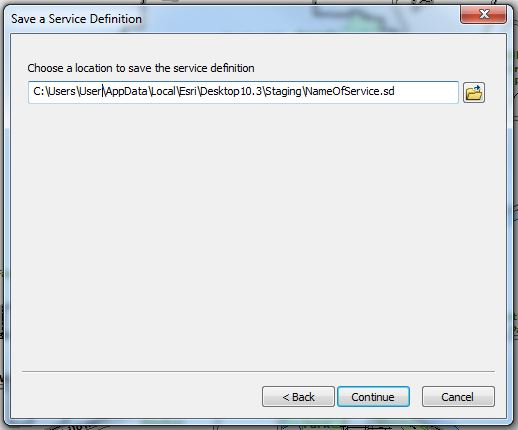
- When prompted, select a location to save the service definition and click Continue
- In the Service Editor dialog box, make the necessary changes to the properties where needed, and click Analyze.
Note:

When publishing from ArcGIS for Desktop, select Feature Access > Service Editor > Capabilities > Feature Access. This creates a URL to access the feature service over the web.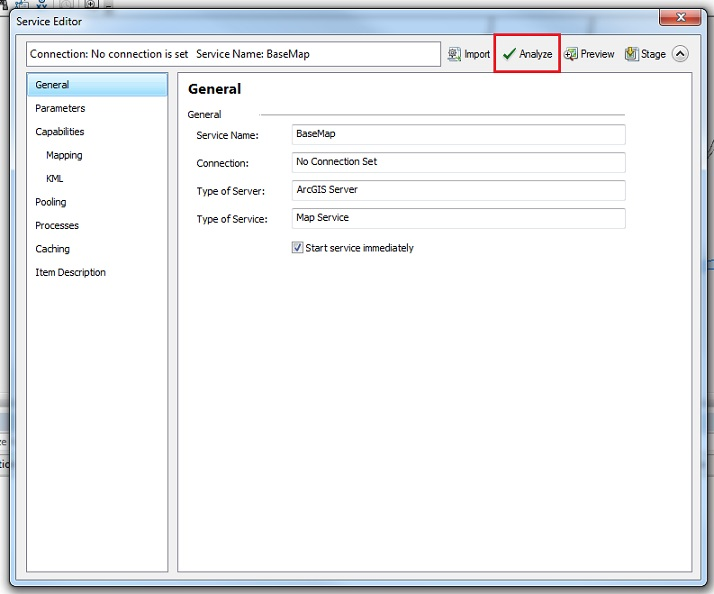
- To complete the process, on the top right of the Service Editor window, click Stage.
Note:

The Analyze function checks if there are any potential performance issues before publishing a GIS resource as a service. The Stage function compiles a service definition file with all the relevant information needed to publish a GIS service, including data that must be copied to the server because it does not appear in the server's data store. - Publish the service definition file in ArcGIS Server Manager. To do so, refer to ArcGIS Help: Publish a service definition in ArcGIS Server Manager.
Restart ArcMap and republish the MXD.
ArcMap 发布地图服务,提示发布工具没有启动的更多相关文章
- JavaWeb和WebGIS学习笔记(六)——使用ArcGIS for Server发布地图服务
系列链接: Java web与web gis学习笔记(一)--Tomcat环境搭建 Java web与web gis学习笔记(二)--百度地图API调用 JavaWeb和WebGIS学习笔记(三)-- ...
- 手把手教你怎么用ArcgisOnline发布地图服务
Arcgis推出了Arcgis Online,但是大家都不知道这是个什么东西,怎么用这个东西,今天这篇文章手把手的教你如何使用Arcgisonline发布地图服务. 一.ArcgisOnline简介 ...
- ArcGIS发布地图服务
一般做完矢量图绘制工作后,生成的.mxd文件只能在ArcMap中查看,为了方便用户进行浏览,我们需要发布地图服务. 目前为止最常用的就是在ArcGIS中发布地图服务. 今天也算是在做“发布地图服务”的 ...
- ArcGIS 10.2之地图服务的发布、使用
2.发布地图服务 2.1 地图服务器的建立 打开ArcCatalog,在左侧的GIS Servers下,双击Add ArcGIS Server, 弹出添加界面,选择,Administer GIS服务项 ...
- 利用 PortableBasemapServer 发布地图服务
前段时间需要给自己的C/S系统加一个地图,但是没有数据,于是就想到了使用网上的切片地图,但是C/S系统又不能联网,于是就想本地发布切片服务来使用. 本来想用ArcGIS Server来发布从网上下载的 ...
- 动态创建地图文档MXD并发布地图服务
原文:动态创建地图文档MXD并发布地图服务 1.动态创建MXD private bool CreateMxd(string MxdPath, string MxdName) { IMapDocumen ...
- geoserver 通过代码实现发布地图服务
GeoServer:代码实现批量发布地图服务 利用GeoServer发布WCS服务,那么如果我有很多数据需要进行发布,这样利用GeoServer提供的UI界面进行操作显然很不显示.那能不能利用GeoS ...
- 基于GeoServer切片地图服务的发布
接着上一篇文章,如何将JPG格式的图片转化为带地理坐标的TIFF格式里提及的最近的一个项目,数据源是一张高分辨率的2.5维图片,现在已经成功转化成了带有地理坐标的TIFF格式.下面将介绍借助GeoSe ...
- GeoServer自动发布地图服务
1 NetCDF气象文件自动发布案例 GeoServer是一个地理服务器,提供了管理页面进行服务发布,样式,切片,图层预览等一系列操作,但是手动进行页面配置有时并不满足业务需求,所以GeoServer ...
- arcgis server10.2发布地图服务报错
发布地图服务时,读取了本机电脑中的切片方案.发布服务,报打包成功,但发布失败错误. 解决办法:给arcgis账户,赋予读写权限即可.重复发布服务,成功发布.
随机推荐
- MFC对话框和控件
对话框和控件 对话框是Windows应用程序中一种常用的资源,其主要功能是输出信息和接收用户的输入数据.控件是嵌入在对话框中或其它父窗口中的一个特殊的小窗口,它用于完成不同的输入.输出功能.对话框与控 ...
- C指针右左法则
摘录的别人的: C语言所有复杂的指针声明,都是由各种声明嵌套构成的.如何解读复杂指针声明呢?右左法则是一个既著名又常用的方法.不过,右左法则其实并不是C标准里面的内容,它是从C标准的声明规定中归纳出 ...
- A simple way to monitor SQL server SQL performance.
This is all begins from a mail. ... Dear sir: This is liulei. Thanks for your help about last PM for ...
- Go语言实现:【剑指offer】数组中出现次数超过一半的数字
该题目来源于牛客网<剑指offer>专题. 数组中有一个数字出现的次数超过数组长度的一半,请找出这个数字.例如输入一个长度为9的数组{1,2,3,2,2,2,5,4,2}.由于数字2在数组 ...
- 全网最全小白搭建Hexo+Gitee/Coding
全网最全小白搭建Hexo+Gitee/Coding 本站内容已全部转移到https://www.myyuns.ltd,具体请移步到www.myyuns.ltd查看
- Spring整合EasyExcel【基础设计】
前言 Java解析.生成Excel比较有名的框架有Apache poi.jxl.但他们都存在一个严重的问题就是非常的耗内存,poi有一套SAX模式的API可以一定程度的解决一些内存溢出的问题,但POI ...
- C语言基础五 数组
数组跟变量的区别? 数组是可以在内存中连续存储多个元素的结构,所有元素必须属于相同类型. 格式:元素类型 数组名[元素个数]: 数组的特点: 只能存放单一元素的数据,里面存放的数据成为元素. 数组的声 ...
- 服务器字体导致NPE
服务器字体问题 服务器在windows下运行正常. 搬到Linux之后,注册页有个404??? HTTP Status 500 – Internal Server Error Type 异常报告 消息 ...
- 关于OFFICE 文件在线编辑dsoframer
下载dsoframer.ocx 系统为32位时:拷贝 dsoframer.ocx 到c:\windows\system32\dsoframer.ocx打开cmd命令行注册 regsvr32.exe ...
- StarUML之六、StarUML规则与快捷键
本章内容参考官网即可,不做详细说明,实践出真知! starUMl规则主要是在模型设计的约束条件 https://docs.staruml.io/user-guide/validation-rules ...