
软件架构期末复习(Struts2+Spring+Hibernate)
Struts2+Spring+Hibernate
- The Model-ViewController pattern in Struts2 is implemented with the following core component.
- Structure
- Interceptors
- Array
- Database
- Create configuration files to couple the Action, View and Controllers. These files are_______.
- Struts.xml, web.xml, struts.properties.
- Class.xml, web.xml, Struct2.html
- Class.xml, web.xml, struts.xml
- struts.xml, Class.xml,, struts.properties.
- How to enable Detailed Log.
- creating logging.properties
- creating logging.xml
- creating logging.html
- None of the above.
- Struct act much more friendly for developer if we set.
- Structs.devmode= Null;
- Structs.devmode= Auto;
- Structs.devmode= True;
- Structs.devmode= False;
- Here any line starting with hash (#) will be assumed as a ____ .
- Instruction
- Execution line
- Address
- Comments
- What are the Struts2 configuration properties that control file uploading process?
- struts.multipart.maxSize
- struts.multipart.parser
- struts.multipart.saveDir
- All of the above.
- Can you override the default error message that can come during file uploading process?
- Yes
- No
- The following code refer to.
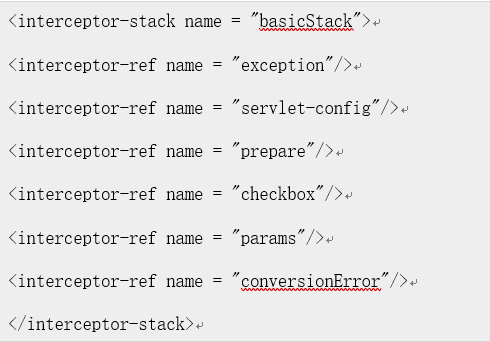
- Stacking Multiple Interceptors
- Configuration Interceptor
- Action Interceptor
- Interceptor Attribute
9.You can call same interceptor with the different actions.
- True
- False
10. These objects include #application, #session, #request, #attr and #parameters and refer to the corresponding servlet scopes.
- True
- False
11. Object peek() Get the object on the top of the stack and changing the stack.
- True
- False
12. Which of the following sentence is the true for the ONGL
- The Object-Graph Navigation Language (OGNL) is a powerful expression language that is used to reference and manipulate data on the ValueStack.
- OGNL also helps in data transfer and type conversion.
- The OGNL is very similar to the JSP Expression Language.
- All of the above
13. If you have an attribute in session called "login" you can retrieve it as follows _______.
- <s:property value=”#session.login”/>
- <s:property value=”@session.login”>
- <s:property value=”session.login”/s>
- <s:property name=”@session.login”>
14. struts.multipart.saveDir The location to store the temporary file. By default is______.
- javax.servlet.context.Userdirectory
- javax.servlet.path.tempdir.
- javax.servlet.context.tempdir.
- javax.servlet.path.Userdirectory.
15. struts.messages.error.uploading
- A general error that occurs when the file could not be open.
- A general error that occurs when the file could not be uploaded.
- A general error that occurs when the file could not be match the name.
- A general error that occurs when the file could not be Downloaded.
16. The simplest naming format for a resource file is ______.
- Bundlename_language_country.propertiers
- Recourse_language_country.propertiers
- Bundlename_language_country.recourse
- None of the above
17. By default, English (United States) will be applied
- global_us.properties
- global_en.properties
- global.properties
- global.properties_us
18. the following instruction show the Customized them.
- Struts.ui.theme=mytheme
- Struts.ui.templateDir=template
- Struts.ui.templateSuffix= ftl
- Struts.ui.theme= Custom_theme
19. To start using annotations in your project, make sure you have included the following jar files in your _______.
- WebContent/WEB-INF/elb
- WebContent/WEB-INF/lib
- WebContent/Localhost:8080/lib
- Localhost:8080/WEB-INF/lib
20. Following is the iterator tag.
- <s:param_iterate value=”interate”>
- <s:param.iterate value=”interate”>
- < iterate value=” iterate”>
- <s:iterate value=”data”/>
21. In the following which sentence Define the Action.
- Create interceptors if required, or use existing interceptors. This is part of Controller.
- Create a class which will contain complete business logic and control the interaction between the user, the model, and the view.
- Create a JSPs to interact with the user to take input and to present the final messages.
- Create files to couple the Action, View and Controllers. These files are struts.xml, web.xml, struts.properties.
22. Following is the example to create _____ page.
- <%@ page contentType = "text/html; charset = UTF-8" %>
- <%@ taglib prefix = "s" uri = "/struts-tags" %>
- <html>
- <head>
- <title>Hello World</title>
- </head>
- <body>
- Hello World, <s:property value = "name"/>
- </body>
- </html>
- Main Page
- Action Page
- View
- File configuration
23. The Model-ViewController pattern in Struts2 is implemented with the _ core ___ components.
- Two
- Three
- Seven
- Five
- Actions
- Interceptors
- Value Stack / OGNL
- Results / Result types
- View technologies
24. Which of the following tag is used to get the property of a value, which will default to the top of the stack if none is specified?
- date tag
- Param tag
- Property tag
- Push tag
25. The following code refer to Interceptor Property
<interceptor-stack name = "basicStack">
<interceptor-ref name = "exception"/>
<interceptor-ref name = "servlet-config"/>
<interceptor-ref name = "prepare"/>
<interceptor-ref name = "checkbox"/>
<interceptor-ref name = "params"/>
<interceptor-ref name = "conversionError"/>
</interceptor-stack>
- True
- False
26. The Below file is a template where name is a parameter which will be passed from outside using the defined action.
- Hello world ${name}
- Hello World(Name)
- Helloworld(#name)
- Hello world {$name}
27. The Struts 2 framework provides built-in support for processing file upload using "Form-based File Upload in HTML".
- False
- True
28. The following chunk of code we use in _____.
import java.io.File;
import org.apache.commons.io.FileUtils;
import java.io.IOException;
- View Class
- Main Class
- Action Class
- Option (A) and (C)
29. struts.multipart.maxSize The maximum size (in bytes) of a file to be accepted as a file upload. Default is______.
- 300M
- 150M
- 250M
- 500M
30. Following is the append tag.
- <s:param_append value=”interate”>
- <s:param.append value=”interate”>
- < append value=” iterate”>
- <s:append value=”data”/>
31. struts.multipart.saveDir The location to store the temporary file. By default is javax.servlet.context.Userdirectory.
- True
- False
32. You can call same interceptor with the different actions.
- True
- False
33. Object peek() Get the object on the top of the stack and changing the stack.
- True
- False
34. What are the Struts2 configuration properties that control file uploading process?
- struts.multipart.maxSize
- struts.multipart.parser
- struts.multipart.saveDir
- All of the above
35. If you have an attribute in session called "login" you can retrieve it as follows___.
- <s:property value=”#session.login”/>
- <s:property value=”@session.login”>
- <s:property value=”session.login”/s>
- <s:property name=”@session.login”>
36. int size() Get the number of objects in the stack.
- True
- False
37. The simplest naming format for a resource file is ______.
- Bundlename_language_country.propertiers
- Recourse_language_country.propertiers
- Bundlename_language_country.recourse
- None of the above
38. In addition to the above, we have to copy the following jar files from the struts2 download in your WEB-INF/lib.
- commons-beanutils-x.y.zjar
- commons-digester-x.y.jar
- struts2-tiles-plugin-x.y.z.jar
39. The configLocation parameter specifies the name and location of the Spring configuration file, such as "applicationContext. xml".
- configLocation
- #config_Location
- configLocation_Path
- #Path_configLocation
40. commons-fileupload-x.y.z.jar, commons-io-x.y.z.jar, commons-lang-x.y.jar, commons-logging-x.y.z.jar, commons-logging-api-x.y.jar,freemarker-x.y.z.jar etc. filse are used to creat.
- Action page
- Static Project
- Dynamic Project
41. The redirect result type calls the standard ____ method, causing the browser to create a new request to the given location.
- response.sendRedirect()
- response.Redirect()
- location.sendRedirect()
- location.Redirect(path)
42. int size() Get the number of objects in the stack.
- True
- False
43. Following is the Generator tag.
- <s:param_Generator value=” Generator”>
- <s:param. Generator value=” Generate”>
- < Generator value=” iterate”>
- <s: Generator value=”data”/>
44. The configLocation parameter specifies the name and location of the Spring configuration file, such as "applicationContext. xml".
- configLocation
- #config_Location
- configLocation_Path
- #Path_configLocation
45. Which class of struts is responsible to converts data types from string?
- StrutsTypeConverter
- StringTypeConverter
- Both of the above.
- None of the above.
46. In the following which sentence Define the Configuration Files.
- Create interceptors if required, or use existing interceptors. This is part of Controller.
- Create a class which will contain complete business logic and control the interaction between the user, the model, and the view.
- Create a JSPs to interact with the user to take input and to present the final messages.
- Create files to couple the Action, View and Controllers. These files are struts.xml, web.xml, struts.properties.
47. commons-fileupload-x.y.z.jar, commons-io-x.y.z.jar, commons-lang-x.y.jar, commons-logging-x.y.z.jar, commons-logging-api-x.y.jar,freemarker-x.y.z.jar etc. filse are used to creat.
- Action page
- Static Project
- Dynamic Project
- None of the above
48. It should be noted that you can register more than one interceptors inside <package> tag and same time you can call more than one interceptors inside the <action> tag.
- True
- False
49. struts.multipart.maxSize The maximum size (in bytes) of a file to be accepted as a file upload. Default is 100M.
- True
- False
50. In addition to the above, we have to copy the following jar files from the struts2 download in your WEB-INF/lib.
- commons-beanutils-x.y.zjar
- commons-digester-x.y.jar
- struts2-tiles-plugin-x.y.z.jar
- All of the above
51. Following is the iterator tag.
- <s:param_iterate value=”interate”>
- <s:param.iterate value=”interate”>
- < iterate value=” iterate”>
- <s:iterate value=”data”/>
52. By default, English (United States) will be applied
- global_us.properties
- global_en.properties
- global.properties
- global.properties_us
53. struts.messages.error.uploading
- A general error that occurs when the file could not be open.
- A general error that occurs when the file could not be uploaded.
- A general error that occurs when the file could not be match the name.
- A general error that occurs when the file could not be Downloaded.
54. Which of the following sentence is the true for the ONGL
- The Object-Graph Navigation Language (OGNL) is a powerful expression language that is used to reference and manipulate data on the ValueStack.
- OGNL also helps in data transfer and type conversion.
- The OGNL is very similar to the JSP Expression Language.
- All of the above
55. These objects include #application, #session, #request, #attr and #parameters and refer to the corresponding servlet scopes.
- True
- False
PART B
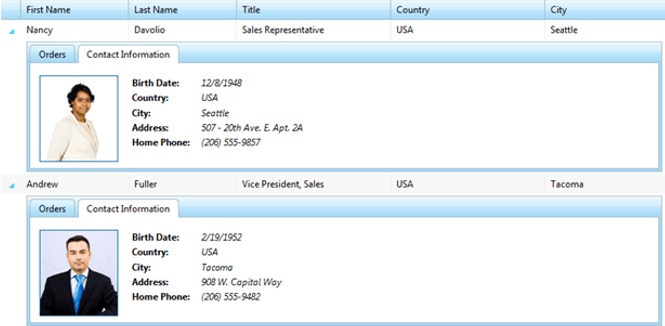
Question #2: Write a program to show the following data grid using jQuery.
编写一个程序,使用jQuery显示以下数据网格。
1、前端文件
 <table id="dg">

     <div class="easyui-tabs" data-options="url:tab_data.json,tabWidth:112" style="width:700px;height:250px">

         <div title="Order" style="padding:10px"></div>

         <div title="Contact Inofmation" style="padding:10px"></div>

     </div>

 </table>

 <script >

     $('#dg').datagrid({

         url:'datagrid_data.json',

         columns:[[

             {field: 'First Name',title:'First Name'  ,width:100},

             {field: 'Last Name' ,title:'Last Name'  ,width:100},

             {field: 'Title'           ,title:'Title'            ,width:100},

                     {field: 'Country'     ,title:'Country'       ,width:100},

                    {field: 'City'           ,title:'City'             ,width:100}

         ]]

     });

 </script>
Question#3: Spring MVC File Upload example. (write controller class)
Spring MVC文件上传示例
 @requestMapping(value = "/upload")

 public String upload(@RequestParam(value="file",required=false)

 MultipartFile file, HttpServaletRequest request, ModelMap model){

     String path = request.getSession().getServletContext().getRealPath("upload");

     String fileName = file.getOriginalFilename();

     File targetFile = new File(path, fileName);

     if(!targetFile.exists()){

         targetFile.mkdirs();

     }

     try{

         file.transferTo(targetFile);

     }

     catch(Exception e){

         e.printStackTrace();

     }

     model.put("fileUrl",request.getContextPath()+"/upload/"+fileName);

     return "success";

 }
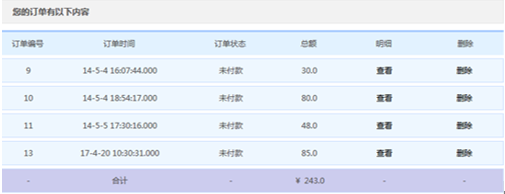
Question#4: Create the action class for the following view My Order.
为以下视图My Order创建action类。
 public String toMyOrders() throws Exception {

         int curPage = 1;

         if (pager != null)

             curPage = pager.getCurPage();

         Users user = (Users) session.get("user");

         Orders condition = new Orders();

         condition.setUsers(user);

         List myOrdersList = ordersService.getOrdersByUserIdForPager(

                 user.getId(), curPage);

         request.put("myOrdersList", myOrdersList);

         pager = ordersService.getPagerOfMyOrders(user.getId());

         pager.setCurPage(curPage);

         return "myorders";

     }
Question#5: write a code to Create Multiple View Page in Spring MVC with example. (at least 3 pages).
编写代码在Spring MVC中创建多个视图页面的例子。(最少3页)
 <context:component-scan

      base-package="com.spring.action"/>

         <bean class="org.springframework.web.servlet.view.ResourceBundleViewResolver">

         <property name="basename" value="views">

           </bean>

     <bean id="freemarkerConfig"

      class="org.springframework.web.servlet.view.freemarker.FreeMarkerConfigurer">

     <bean id="velocityConfig"  class="org.springframework.web.servlet.view.velocity.VelocityConfigurer">

      </bean>

     <bean id="viewResolver"

      class="com.spring.action.MultiViewResover">

         <property name="resolvers">

             <map>

                 <entry key="jsp">

                     <bean

                      class="org.springframework.web.servlet.view.InternalResourceViewResolver">

                         <property name="viewClass"

                          value="org.springframework.web.servlet.view.JstlView"/>

                         <property name="prefix" value="/WEB-INF/jsp/"/>

                         <property name="suffix" value=".jsp"/>

                     </bean>

                 </entry>

                 </map>

         </property>

     </bean>

 </beans>

 第二步:解析多视图请求类

 public class MultiViewResover implements ViewResolver {

     private Map<String, ViewResolver> resolvers;

     @Override

     public View resolveViewName(String viewName, Locale locale)

             throws Exception {

         int n = viewName.lastIndexOf("_");

         if (n == (-1))

             return null;

         String suffix = viewName.substring(n + 1);

         ViewResolver resolver = resolvers.get(suffix);

 hello_jsp

         viewName = viewName.substring(0, n);

         if (resolver != null)

             return resolver.resolveViewName(viewName, locale);

         return null;

     }

     public Map<String, ViewResolver> getResolvers() {

         return resolvers;

     }

     public void setResolvers(Map<String, ViewResolver> resolvers) {

         this.resolvers = resolvers;

     }

 }

 第三步: action class

 @Controller

 public class HelloWorldAction {

     @RequestMapping(value = "/helloworld.do")

     public ModelAndView hello() {

         ModelAndView modelAndView = new ModelAndView();

         modelAndView.setViewName("hello_jsp");

         modelAndView.addObject("message", "Hello,SpringMvc");

         return modelAndView;

     }
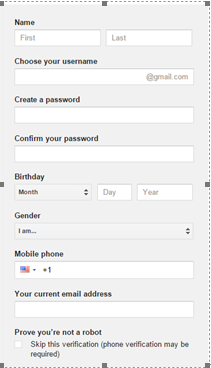
Question#6: write validation code for the following form using strut 2.
使用strut 2为下面的表单编写验证代码。
 public class RegisterAction extends ActionSupport {

     private Users user;

     private String repassword;

     public Users getUser() {

         return user;

     }

     public void setUser(Users user) {

         this.user = user;

     }

     public String getRepassword() {

         return repassword;

     }

     public void setRepassword(String repassword) {

         this.repassword = repassword;

     }

     @Override

     public String execute() throws Exception {

         UserDAO userDAO=new UserDAOImpl();

         int result=0;

         if (user.getLoginName()!=null && user.getLoginPwd()!=null && user.getLoginPwd().equals(repassword)) {

             result=userDAO.addUsers(user);

         }

         String back;

         if (result!=0) {

             back="success";

         }else{

             back="input";

         }

         return back;

     }

     @Override

     public void validate() {

         if (user.getLoginName()==null || "".equals(user.getLoginName().trim())) {

             this.addFieldError("loginName", "用户名不能为空!");

         }

         if (user.getLoginPwd()==null || "".equals(user.getLoginPwd().trim())) {

             this.addFieldError("loginPwd", "密码不能为空!");

         }

         if (!user.getLoginPwd().equals(repassword)) {

             this.addFieldError("repassword", "密码和确认密码不一致!");

         }

     }

 }
Question#7: write a program using jQuery to create dynamic tree for the following data. Consider Checkbox selection.
使用jQuery编写一个程序,为以下数据创建动态树。考虑复选框的选择。
|
Country Name |
Capital Name |
Provinces name |
Capital of Provinces |
|
China |
Beijing |
Anhui (安徽) |
Hefei (合肥) |
|
|
Fujian (福建) |
Fuzhou (福州) |
|
|
|
Gansu (甘肃) |
Lanzhou (兰州) |
|
|
|
Guangdong (广东) |
Guangzhou(广州) |
|
|
|
Jiangxi (江西 |
Nanchang (南昌) |
 <body>

     <!-- 定义ul -->

     <ul id="tt"></ul>

     <script type="text/javascript">

         $('#tt').tree({

             url : 'tree_data.json',

             checkbox:true

         });

     </script>

 </body>

 tree_data.json

 [

     {

         "id": 1,

         "text": "Country Name",

         "fid": 0,

         "children": [

             {

                "id":11,

                "text":"china",

                "fid":0

             }

         ]

     },

     {

         "id":2,

         "text":"Capital Name",

         "fid":0,

         "children":[

             {

                 "id":21,

                 "text":"Beijing",

                 "fid":0

             }

         ]

     },

     {

         "id":3,

         "text":"Provinces name",

         "fid":0,

         "children":[

             {

                 "id":31,

                 "text":"Anhui",

                 "fid":0

             },

             {

                 "id":32,

                 "text":"Fujian",

                 "fid":0

             },

             {

                 "id":33,

                 "text":"Gansu",

                 "fid":0

             },

             {

                 "id":34,

                 "text":"Guangdong",

                 "fid":0

             },

             {

                 "id":35,

                 "text":"jiangxi",

                 "fid":0

             }

         ]

     },

     {

         "id":4,

         "text":"Catital of Province",

         "fid":0,

         "children":[

             {

                 "id":41,

                 "text":"hefei",

                 "fid":0

             },

             {

                 "id":42,

                 "text":"Fuzhou",

                 "fid":0

             },

             {

                 "id":43,

                 "text":"Lanzhou",

                 "fid":0

             },

             {

                 "id":44,

                 "text":"Guangzhou",

                 "fid":0

             },

             {

                 "id":45,

                 "text":"Nanchang",

                 "fid":0

             }

         ]

     }

 ]
Question#8: Write a program using Struts to complete the process of registration of employee. Create UI also. Note: (Include Name, Phone #, Gender, Address and Nationality information.)
UI代码:
注册代码如下:
 <body>

         <h3><font color="blue">填写注册信息</font></h3>

         <font color="red" size="3px"> <s:fielderror /> </font>

         <s:form name="form1" action="register" method="post">

             <s:textfield name="user.loginName" label="登录名称"></s:textfield>

             <s:password name="user.loginPwd" label="登录密码"/>

             <s:password name="repassword" label="确认密码"/>

             <s:textfield name="user.trueName" label="真实姓名"/>

             <s:textfield name="user.email" label="电子邮件" />

             <s:textfield name="user.phone" label="联系电话" />

             <s:textfield name="user.address" label="联系地址" />

             <s:submit value="注册"></s:submit>

         </s:form>

   </body>
注册成功代码如下:
 <body>

       <h3><font color="blue">用户注册的详细信息</font></h3>

         登录名称:<s:property value="user.loginName"/><br>

         登录密码:<s:property value="user.loginPwd"/><br>

         真实姓名:<s:property value="user.trueName"/><br>

         电子邮件:<s:property value="user.email"/><br>

         联系电话:<s:property value="user.phone"/><br>

         联系地址:<s:property value="user.address"/><br>

   </body>
数据库插入代码如下:
 public class UserDAOImpl extends BaseDAO implements UserDAO {

     Connection conn=null;

     PreparedStatement pstmt=null;

     ResultSet rs=null;

     @Override

     public int addUsers(Users user) {

         int result=0;

         String sql="insert into users(loginName,loginPwd,trueName,email,phone,address,status) values(?,?,?,?,?,?,?)";

         try {

             conn=this.getConnection();

             pstmt=conn.prepareStatement(sql);

             pstmt.setString(1, user.getLoginName());

             pstmt.setString(2, user.getLoginPwd());

             pstmt.setString(3, user.getTrueName());

             pstmt.setString(4, user.getEmail());

             pstmt.setString(5, user.getPhone());

             pstmt.setString(6, user.getAddress());

             pstmt.setInt(7, 1);

             result=pstmt.executeUpdate();

         } catch (Exception e) {

             e.printStackTrace();

         }finally{

             this.closeAll(conn, pstmt, rs);

         }

         return result;

     }

 }
控制层Action代码如下:
 public class RegisterAction extends ActionSupport {

     private Users user;

     private String repassword;

     public Users getUser() {

         return user;

     }

     public void setUser(Users user) {

         this.user = user;

     }

     public String getRepassword() {

         return repassword;

     }

     public void setRepassword(String repassword) {

         this.repassword = repassword;

     }

     @Override

     public String execute() throws Exception {

         UserDAO userDAO=new UserDAOImpl();

         int result=0;

         if (user.getLoginName()!=null && user.getLoginPwd()!=null && user.getLoginPwd().equals(repassword)) {

             result=userDAO.addUsers(user);

         }

         String back;

         if (result!=0) {

             back="success";

         }else{

             back="input";

         }

         return back;

     }

     @Override

     public void validate() {

         if (user.getLoginName()==null || "".equals(user.getLoginName().trim())) {

             this.addFieldError("loginName", "用户名不能为空!");

         }

         if (user.getLoginPwd()==null || "".equals(user.getLoginPwd().trim())) {

             this.addFieldError("loginPwd", "密码不能为空!");

         }

         if (!user.getLoginPwd().equals(repassword)) {

             this.addFieldError("repassword", "密码和确认密码不一致!");

         }

     }

 }
Question#9: write the chunk of code to Perform Struts 2 Database Access. Consider Login process.
视图层代码如下:
<body>
<h3>用户登录</h3>
<form name="form1" method="post" action="login">
用户名:<input type="text" name="user.loginName"> <br>
密 码:<input type="password" name="user.loginPwd"> <br>
<input type="submit" value="登录">
<input type="reset" value="取消">
</form>
</body>
控制层Action代码如下:
 package com.restaurant.action;

 import *;

 public class LoginAction extends ActionSupport {

     private Users user;

     public Users getUser() {

         return user;

     }

     public void setUser(Users user) {

         this.user = user;

     }

     @Override

     public String execute() throws Exception {

         if ("admin".equals(user.getLoginName()) && "123".equals(user.getLoginPwd())) {

             return SUCCESS;      //SUCCESS 代表的就是“success”字符串

         }else{

             return "input";

         }

     }

 }
配置Struts 2代码如下:
 <?xml version="1.0" encoding="UTF-8"?>

 <web-app xmlns:xsi="http://www.w3.org/2001/XMLSchema-instance" xmlns="http://xmlns.jcp.org/xml/ns/javaee"

 xsi:schemaLocation="http://xmlns.jcp.org/xml/ns/javaee

 http://xmlns.jcp.org/xml/ns/javaee/web-app_3_1.xsd" id="WebApp_ID" version="3.1">

   <display-name>restaurant</display-name>

   <filter>

       <filter-name>Struts2</filter-name>

       <filter-class>org.apache.struts2.dispatcher.filter.StrutsPrepareAndExecuteFilter</filter-class>

   </filter>

   <filter-mapping>

       <filter-name>Struts2</filter-name>

       <url-pattern>/*</url-pattern>

   </filter-mapping>

 </web-app>
Question#10: write a chunk of program to View meal details.
前端页面,代码如下:
 <div class="main mt10">

     <div class="mleft fl ah">

         <div class="show_a fl">

             <div class="img fl">

                 <img width="353" height="348"

                 src="mealimages/${requestScope.aMeal.mealImage}" />

             </div>

         <div class="canshu fl">

             <p></p>

             <p>编号:${requestScope.aMeal.mealId}</p>

             <p>餐名:${requestScope.aMeal.mealName }</p>

             <p>菜系:${requestScope.aMeal.mealseries.seriesName }</p>

             <p> <font color="red">价格:${requestScope.aMeal.mealPrice }</font> </p>

         </div>

     </div>

     <div class="show_b fl">

         <a href="addtoshopcart?mealId=${requestScope.aMeal.mealId } ">

 <img src="data:images/d010.jpg" /></a>

     </div>

         <div class="show_c fl">餐品详情</div>

         <div class="show_d fl ah">

         餐品名称:<br /> ${requestScope.aMeal.mealName }<br /> 餐品简介:<br />

         ${requestScope.aMeal.mealSummarize }<br /> 餐品描述:<br />

         ${requestScope.aMeal.mealDescription }

         </div>

     </div>

     <%@ include file="common/rankinglist.jsp"%>

 </div>
Question # 11: Create the action class for the following view.

Action代码如下:
 public class RegisterAction extends ActionSupport {

     private Users user;

     private String repassword;

     public Users getUser() {

         return user;

     }

     public void setUser(Users user) {

         this.user = user;

     }

     public String getRepassword() {

         return repassword;

     }

     public void setRepassword(String repassword) {

         this.repassword = repassword;

     }

     @Override

     public String execute() throws Exception {

         UserDAO userDAO=new UserDAOImpl();

         int result=0;

         if (user.getLoginName()!=null && user.getLoginPwd()!=null && user.getLoginPwd().equals(repassword)) {

             result=userDAO.addUsers(user);

         }

         String back;

         if (result!=0) {

             back="success";

         }else{

             back="input";

         }

         return back;

     }

     @Override

     public void validate() {

         if (user.getLoginName()==null || "".equals(user.getLoginName().trim())) {

             this.addFieldError("loginName", "用户名不能为空!");

         }

         if (user.getLoginPwd()==null || "".equals(user.getLoginPwd().trim())) {

             this.addFieldError("loginPwd", "密码不能为空!");

         }

         if (!user.getLoginPwd().equals(repassword)) {

             this.addFieldError("repassword", "密码和确认密码不一致!");

         }

     }

 }
UserDao代码如下:
 public class UserDAOImpl extends BaseDAO implements UserDAO {

     Connection conn=null;

     PreparedStatement pstmt=null;

     ResultSet rs=null;

     @Override

     public int addUsers(Users user) {

         int result=0;

         String sql="insert into users(loginName,loginPwd,email,status) values(?,?,?,?,?,?,?)";

         try {

             conn=this.getConnection();

             pstmt=conn.prepareStatement(sql);

             pstmt.setString(1, user.getLoginName());

             pstmt.setString(2, user.getLoginPwd());

             pstmt.setString(3, user.getEmail());

             pstmt.setInt(7, 1);

             result=pstmt.executeUpdate();

         } catch (Exception e) {

             e.printStackTrace();

         }finally{

             this.closeAll(conn, pstmt, rs);

         }

         return result;

     }

 }
Question # 12: write the chunk of code for the Shopping cart function. (Action Class)
 public class CartAction extends ActionSupport implements SessionAware {

     private Integer mealId;

     public void setMealId(Integer mealId) {

         this.mealId = mealId;

     }

     public Integer getMealId() {

         return mealId;

     }

     int quantity;

     public int getQuantity() {

         return quantity;

     }

     public void setQuantity(int quantity) {

         this.quantity = quantity;

     }

     MealService mealService;

     public void setMealService(MealService mealService) {

         this.mealService = mealService;

     }

     Map<String, Object> session;

     @Override

     public void setSession(Map<String, Object> session) {

         this.session = session;

     }

     public String addtoshopcart() throws Exception {

         Map cart = (Map) session.get("cart");

         Meal meal = mealService.getMealByMealId(mealId);

         if (cart == null) {

             cart = new HashMap();

             session.put("cart", cart);

         }

         CartItemBean cartItem = (CartItemBean) cart.get(meal.getMealId());

         if (cartItem != null) {

             cartItem.setQuantity(cartItem.getQuantity() + 1);

         } else {

             cart.put(meal.getMealId(), new CartItemBean(meal, 1));

         }

         return "shopCart";

     }

     public String updateSelectedQuantity() throws Exception {

         Map cart = (Map) session.get("cart");

         CartItemBean cartItem = (CartItemBean) cart.get(mealId);

         cartItem.setQuantity(quantity);

         return "shopCart";

     }

     public String deleteSelectedMeal() throws Exception {

         Map cart = (Map) session.get("cart");

         cart.remove(mealId);

         return "shopCart";

     }

     public String clearCart() throws Exception {

         Map cart = (Map) session.get("cart");

         cart.clear();

         return "shopCart";

     }

 }
Question#13: write complete package for View meal details process: Marks (12)
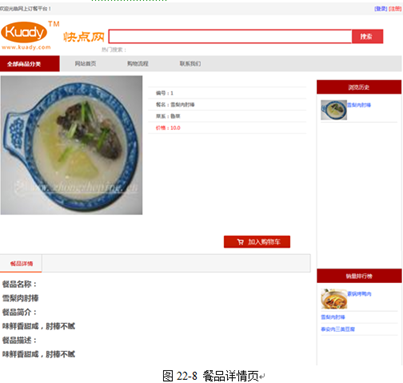
前端页面,代码如下:
 <div class="main mt10">

     <div class="mleft fl ah">

         <div class="show_a fl">

             <div class="img fl">

                 <img width="353" height="348"

                 src="mealimages/${requestScope.aMeal.mealImage}" />

             </div>

         <div class="canshu fl">

             <p></p>

             <p>编号:${requestScope.aMeal.mealId}</p>

             <p>餐名:${requestScope.aMeal.mealName }</p>

             <p>菜系:${requestScope.aMeal.mealseries.seriesName }</p>

             <p> <font color="red">价格:${requestScope.aMeal.mealPrice }</font> </p>

         </div>

     </div>

     <div class="show_b fl">

         <a href="addtoshopcart?mealId=${requestScope.aMeal.mealId } ">

 <img src="data:images/d010.jpg" /></a>

     </div>

         <div class="show_c fl">餐品详情</div>

         <div class="show_d fl ah">

         餐品名称:<br /> ${requestScope.aMeal.mealName }<br /> 餐品简介:<br />

         ${requestScope.aMeal.mealSummarize }<br /> 餐品描述:<br />

         ${requestScope.aMeal.mealDescription }

         </div>

     </div>

     <%@ include file="common/rankinglist.jsp"%>

 </div>
Question#14: Write a program for log in using interceptor.
编写AuthorityInterceptor拦截器,代码如下:
 package com.restaurant.interceptor;

 import java.util.Map;

 import com.opensymphony.xwork2.ActionInvocation;

 import com.opensymphony.xwork2.interceptor.AbstractInterceptor;

 import com.restaurant.entity.Users;

 public class AuthorityInterceptor extends AbstractInterceptor {

     @Override

     public String intercept(ActionInvocation invocation) throws Exception {

         Map session=invocation.getInvocationContext().getSession();

         if (session==null) {

             return "login";

         }

         else{

             Users user=(Users)session.get("user");

             if(user==null){

                 return "login";

             }else{

                 return invocation.invoke();

             }

         }

     }

 }
配置拦截器代码如下:
 <package name="restaurant" namespace="/" extends="struts-default">

 </interceptors>

     <interceptor name="myAuthorization" class="com.restaurant.interceptor.AuthorityInterceptor"/>

         <interceptor-stack name="myStack">

             <interceptor-ref name="myAuthorization"></interceptor-ref>

             <interceptor-ref name="defaultStack" />

         </interceptor-stack>

     </interceptors>

     //蓝色部分可省略

     <action name="logAction" class="com.restaurant.action.LogAction">

         <result name="success">/ch10/main.jsp</result>

         <result name="login">/ch10/login.jsp</result>

     </action>

     <action name="show" class="com.restaurant.action.ShowAction">

         <result name="success">/ch10/main.jsp</result>

 <result name="login">/ch10/login.jsp</result>

           <interceptor-ref name="myStack"></interceptor-ref>

     </action>

 </package>
Question#15: Write a program for insert the student detail using hibernate.
编写映射文件,代码如下:
 //蓝色部分可省略

 <?xml version="1.0" encoding="UTF-8"?>

 <!DOCTYPE hibernate-mapping PUBLIC

     "-//Hibernate/Hibernate Mapping DTD 3.0//EN"

     "http://www.hibernate.org/dtd/hibernate-mapping-3.0.dtd">

 <hibernate-mapping package="com.hibernate.entity">

     <class name="User" table="users" catalog="restrant">

         <id name="id" type="java.lang.Integer">

             <column name="Id"></column>

             <generator class="native"></generator>

         </id>

         <property name="loginName" type="java.lang.String">

             <column name="LoginName" length="20" not-null="true"></column>

         </property>

         <property name="loginPwd" type="java.lang.String">

             <column name="LoginPwd"  length="20" not-null="true"/>

         </property>

         <property name="trueName" type="java.lang.String">

             <column name="TrueName"  length="20" not-null="true"/>

         </property>

     </class>

 </hibernate-mapping>
编写Hibernate配置文件,代码如下:
 <!DOCTYPE hibernate-configuration PUBLIC

     "-//Hibernate/Hibernate Configuration DTD 3.0//EN"

     "http://www.hibernate.org/dtd/hibernate-configuration-3.0.dtd">

 <hibernate-configuration>

     <session-factory>

         <property name="connection.username">root</property>

         <property name="connection.password">123456</property>

         <property name="connection.driver_class">com.mysql.jdbc.Driver</property>

         <property name="connection.url">jdbc:mysql:///restrant</property>

         <property name="dialect">org.hibernate.dialect.MySQLInnoDBDialect</property>

         <property name="show_sql">true</property>

         <mapping resource="com/hibernate/entity/User.hbm.xml"/>

     </session-factory>

 </hibernate-configuration>

 编写测试类,代码如下:

 public class HibernateTest {

     private SessionFactory sessionFactory;

     private Session session;

     private Transaction transaction;

     public void init(){

         final StandardServiceRegistry registry=new StandardServiceRegistryBuilder().configure().build();

         try {

             sessionFactory=new MetadataSources(registry).buildMetadata().buildSessionFactory();

             session=sessionFactory.openSession();

             transaction=session.beginTransaction();

         } catch (Exception e) {

             StandardServiceRegistryBuilder.destroy(registry);

         }

     }

     @Test

     public void testSaveUser(){

         User user=new User("hiberUser1","123456","用户1");

         session.save(user);

     }

     @After

     public void destroy(){

         transaction.commit();  //提交事务

         session.close();        //关闭session

         sessionFactory.close();    //关闭sessionFactory

     }

 }
软件架构期末复习(Struts2+Spring+Hibernate)的更多相关文章
- SSH面试题(struts2+Spring+hibernate)
struts2 + Spring +hibernate Hibernate工作原理及为什么要用? 原理: 1.读取并解析配置文件 2.读取并解析映射信息,创建SessionFactory ...
- SSH(Struts2+Spring+Hibernate)框架搭建流程<注解的方式创建Bean>
此篇讲的是MyEclipse9工具提供的支持搭建自加包有代码也是相同:用户登录与注册的例子,表字段只有name,password. SSH,xml方式搭建文章链接地址:http://www.cnblo ...
- struts2+spring+hibernate(SSH)框架的搭建和总结
SSH框架:struts2+spring+hibernate,是目前较流行的一种Web应用程序开源集成框架,用于构建灵活.易于扩展的多层Web应用程序. struts2+spring+hibernat ...
- SSH框架简化(struts2+spring+hibernate)
目的: 通过对ssh框架有了基础性的学习,本文主要是使用注解的方式来简化ssh框架的代码编写. 注意事项: 1.运行环境:Windows 8-64位,Eclipse(开发工具),jdk1.8.0_91 ...
- Struts2 + Spring + Hibernate
Struts2 + Spring + Hibernate整合. 使用的是无配置方法进行SSH的整合,struts-convertion plugin + spring annotation + hib ...
- Struts2 + Spring + Hibernate 通用 Service 和 DAO
我在 Struts2 + Spring + Hibernate 项目开发中总结出了一个Service 和 DAO ,可以用于处理任何的pojo(bean).使用这两个Service 和 DAO 可以 ...
- Struts2+Spring+Hibernate 三大框架的合并集成
这次来看看Struts2+Spring+Hibernate三大框架的整合应用,主要是Spring和Hibernate框架的整合,因为前边已经将Strtus2+Spring整合过了基本一样. 首先看一 ...
- Spring、Struts2+Spring+Hibernate整合步骤
所使用的Jar包: Hibernate: Spring(使用MyEclipse自动导入框架功能) Struts2: 注解包和MySql驱动包: 1.配置Hibernate和Spring: <be ...
- Maven搭建struts2+spring+hibernate环境
Maven搭建struts2+spring+hibernate环境(一) 本文简单的使用STS的自带的maven插件工具搭建ssh(struts2+spring+hibernate)开发环境,图文并茂 ...
随机推荐
- toj 4353 Estimation(树状数组+二分查找)
Estimation 时间限制(普通/Java):5000MS/15000MS 运行内存限制:65536KByte总提交: 6 测试通过: 1 描述 “There are ...
- 11种常用css样式之background学习
background如何简写?如何在背景图像不变的情况下,依旧实现页面文字滚动,为之奈何?别担心,快用background-attachment: fixed;/*固定定位*/常用的backgroun ...
- opencv —— minEnclosingCircle、fitEllipse 寻找包裹轮廓的最小圆、点集拟合椭圆
寻找包裹轮廓的最小圆:minEnclosingCircle 函数 返回圆应满足:① 轮廓上的点均在圆形空间内.② 没有面积更小的满足条件的圆. void minEnclosingCircle(Inpu ...
- RadioButton改写的开关按钮
先上效果图: 这个控件其实是俩个RadioButton,通过样式就可以实现. 样式资源: <Style x:Key="Tong_Yong_RadioButtonStyle" ...
- 《自拍教程21》mediainfo_多媒体文件查看工具
mediainfo命令介绍 mediainfo.exe(Linux/iMac下是未带后缀的mediainfo), 是一款音视频图片文件的信息查询工具, 常用于查看多媒体文件的视频流信息,音频流信息,字 ...
- 《手把手教你构建自己的 Linux 系统》学习笔记(7)
目录 tee 命令的缺陷是什么?如何解决这个缺陷? /etc/ld.so.conf 文件的作用是什么? 动态链接和静态链接有什么不同? 动态编译 静态编译 共享库为什么会有版本?共享库的版本升级原理是 ...
- 整理了Linux常用命令变量
查看信息命令 ls 查看当前目录下面的所有文件 -a 显示所有文件(包括隐藏文件) -l 显示所有文件(包括文件的详细信息) 格式: ls 参数 目录路径(绝对/相对) cd 切换目录 格式: cd ...
- 《Adaptive Density Map Generation for Crowd Counting》密集人群检测论文笔记
背景 密度图\(D_g\)的生成对于最终网络预测结果\(D_e\)至关重要,但是密度图\(D_g\)生成的过程中,高斯核的大小常常是手动设定的,并且对于不同的数据集,核大小和形状通常不一样.这些手动选 ...
- #6499. 「雅礼集训 2018 Day2」颜色 [分块,倍增,bitset]
bitset压位,因为是颜色数,直接倍增,重合部分不管,没了. // powered by c++11 // by Isaunoya #include <bits/stdc++.h> #d ...
- Wannafly Winter Camp 2020 Day 6I 变大! - dp
给定一个序列,可以执行 \(k\) 次操作,每次选择连续的三个位置,将他们都变成他们的最大值,最大化 \(\sum a_i\) 需要对每一个 \(k=i\) 输出答案 \(n \leq 50, a_i ...