
RadioButton改写的开关按钮
先上效果图:
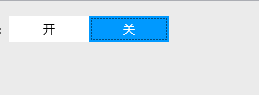
这个控件其实是俩个RadioButton,通过样式就可以实现。
样式资源:
 <Style x:Key="Tong_Yong_RadioButtonStyle" TargetType="{x:Type RadioButton}">

                 <Setter Property="Foreground" Value="{DynamicResource {x:Static SystemColors.ControlTextBrushKey}}" />

                 <Setter Property="Background" Value="White" />

                 <Setter Property="BorderThickness" Value="" />

                 <Setter Property="HorizontalContentAlignment" Value="Center" />

                 <Setter Property="VerticalContentAlignment" Value="Center" />

                 <Setter Property="Padding" Value="" />

                 <Setter Property="Margin" Value="10,10,0,0" />

                 <Setter Property="Cursor" Value="Hand" />

                 <Setter Property="Height" Value="{Binding Height}" />

                 <Setter Property="Width" Value="{Binding Width}" />

                 <Setter Property="Cursor" Value="Hand" />

                 <Setter Property="Template">

                 <Setter.Value>

                         <ControlTemplate TargetType="{x:Type RadioButton}">

                             <Grid>

                                 <!--  选中或者鼠标移入颜色  -->

                                 <Grid

                                     x:Name="B"

                                     Background="#0099ff"

                                     Visibility="Collapsed" />

                                 <!--  默认颜色  -->

                                 <Grid x:Name="A" Background="{TemplateBinding Background}" />

                                 <ContentPresenter

                                     x:Name="b"

                                     HorizontalAlignment="Center"

                                     VerticalAlignment="Center"

                                     TextBlock.Foreground="White" />

                                 <ContentPresenter

                                     x:Name="a"

                                     HorizontalAlignment="Center"

                                     VerticalAlignment="Center"

                                     TextBlock.Foreground="Black" />

                             </Grid>

                  <ControlTemplate.Triggers>

                                 <Trigger Property="IsChecked" Value="True">

                                     <Setter TargetName="A" Property="Visibility" Value="Collapsed" />

                                     <Setter TargetName="B" Property="Visibility" Value="Visible" />

                                     <Setter TargetName="a" Property="Visibility" Value="Collapsed" />

                                     <Setter TargetName="b" Property="Visibility" Value="Visible" />

                                 </Trigger>

                             </ControlTemplate.Triggers>

                         </ControlTemplate>

                     </Setter.Value>

                 </Setter>

             </Style>
2.引用样式
 <RadioButton

                                Width=""

                                Margin=""

                                Content="开"

                                Foreground="Black"

                                Style="{DynamicResource Tong_Yong_RadioButtonStyle}" />

                            <RadioButton

                                Width=""

                                Margin=""

                                Content="关"

                                Foreground="Black"

                                IsChecked="True"

                                Style="{DynamicResource Tong_Yong_RadioButtonStyle}" />
RadioButton改写的开关按钮的更多相关文章
- SwitchButton 开关按钮 的多种实现方式
刚开始接触开关样式的按钮是在IOS系统上面,它的切换以及滑动十分帅气,深入人心. 所谓的开关按钮,就是只有2个状态:on和off,下图就是系统IOS 7上开关按钮效果. 起初我在android上我只会 ...
- 【Android自定义控件】支持多层嵌套RadioButton的RadioGroup
前言 非常喜欢用RadioButton+RadioGroup做Tabs,能自动处理选中等效果,但是自带的RadioGroup不支持嵌套RadioButton(从源码可看出仅仅是判断子控件是不是Radi ...
- Android——复选按钮和开关按钮
复选按钮和开关按钮代码如下: <LinearLayout android:layout_width="match_parent" android:layout_height= ...
- 单选按钮(RadioButton)与复选框(CheckBox)的功能与用法
单选按钮(RadioButton)和复选框(CheckBox).状态开关按钮(ToggleButton)与开关(Switch)是用户界面中最普通的UI组件,他们都继承了Button类,因此都可直接使用 ...
- SwitchButton 开关按钮 的多种实现方式 (附源码DEMO)
http://blog.csdn.net/vipzjyno1/article/details/23707149 Switch开关android源码SwitchButton 刚开始接触开关样式的按钮是在 ...
- 通过改写 原始对象的paint 方法,来设置对象的border颜色
解决方案: //通过改写 原始对象的paint 方法,来设置对象的border颜色 1. package test1;import java.awt.Color;import java.awt.Gra ...
- 为Xamarin更好的开发而改写的库
欢迎大家加入以下开源社区 Xamarin-Cn:https://github.com/Xamarin-Cn Mvvmcross-Cn:https://github.com/Mvvmcross-Cn ...
- Android动画:模拟开关按钮点击打开动画(属性动画之平移动画)
在Android里面,一些炫酷的动画确实是很吸引人的地方,让然看了就赏心悦目,一个好看的动画可能会提高用户对软件的使用率.另外说到动画,在Android里面支持3种动画: 逐帧动画(Frame Ani ...
- RadioButton与CheckBox
笔者长期从事于数据库的开发,算了,不提当年了,因为一直用的是小语种(PowerBuilder),还是来说说这两个最常见的控件吧! RadioButton(单选)和CheckBox(多选) 先来看看继承 ...
随机推荐
- vijos 分梨子
点击打开题目 很有(wei)趣(suo)的一道题 暴力解法也不难,枚举大小下限与甜度下限,在一个一个地试 显然 O(n^3) 炸掉 但如何将其缩短,只好从那个式子来入手了: C1⋅(ai−a0)+C2 ...
- springIOC源码接口分析(二):ConfigurableBeanFactory
一 继承功能 1 SingletonBeanRegistry接口 此接口是针对Spring中的单例Bean设计的.提供了统一访问单例Bean的功能,类中定义了以下方法: 2 HierarchicalB ...
- springmvc html与jsp解析器
1. 配置多个视图解析器 InternalResourceViewResolver内置了jsp解析器,用于解析jsp页面 此处我们使用了InternalResourceViewResolver,其有一 ...
- 练习2-13 求N分之一序列前N项和 (15 分)
练习2-13 求N分之一序列前N项和 (15 分) 输入在一行中给出一个正整数N. 输出格式: 在一行中按照“sum = S”的格式输出部分和的值S,精确到小数点后6位.题目保证计算结果不超过双精度范 ...
- 变量引用的错误:UnboundLocalError: local variable 'range' referenced before assignment
class Battery(): """一次模拟电瓶汽车的简单尝试""" def __init__(self,battery_size = ...
- python学习记录(四)
0828--https://www.cnblogs.com/fnng/archive/2013/04/18/3029807.html 0828--https://www.cnblogs.com/fnn ...
- RocketChat:开源聊天软件部署
1. 简介 RocketChat是一款优秀的开源聊天软件.支持各种平台,IOS.Android.Web.Mac.Windows以及Linux,安装部署简单,功能简单易用,目前部分功能还在完善当中,特别 ...
- kendo ui 实现MVVM
MVVM model----view model----model 实现页面和model之间的动态绑定 grid 支持 events source visib ...
- PyTorch可视化——tensorboard、visdom
一.pytorch与tensorboard结合使用 Tensorboard Tensorboard一般都是作为tf的可视化工具,与tf深度集成,它能够展现tf的网络计算图,绘制图像生成的定量指标图以及 ...
- RTEMS进程同步机制
互斥量 好像没有互斥量,信号量接收那儿有个图,互斥量似乎术语一类特殊的信号量. 信号量 12. Semaphore Manager 12.1. Introduction The semaphore m ...