
leyou_06_图片上传至FastDFS
1.推荐一个开源的FastDFS客户端,支持最新的SpringBoot2.0。配置使用极为简单,支持连接池,支持自动生成缩略图
1.1 在文件上传的微服务中 引入依赖
<dependency>

    <groupId>com.github.tobato</groupId>

    <artifactId>fastdfs-client</artifactId>

    <version>1.26.</version>

</dependency>
1.2引入配置启动类
@Configuration

@Import(FdfsClientConfig.class)

// 解决jmx重复注册bean的问题

@EnableMBeanExport(registration = RegistrationPolicy.IGNORE_EXISTING)

public class FastClientImporter {

}
1.3配置Fast的属性
fdfs:

  so-timeout: 1501

  connect-timeout: 601

  thumb-image: # 缩略图

    width: 60

    height: 60

  tracker-list: # tracker地址

    - 192.168.56.101:22122
1.4测试(测试的包名要和java中的包名一致哦)
@RunWith(SpringRunner.class)

@SpringBootTest

public class FdfsTest {

    @Autowired

    private FastFileStorageClient storageClient;

    @Autowired

    private ThumbImageConfig thumbImageConfig;

    @Test

    public void testUpload() throws FileNotFoundException {

        File file = new File("D:\\test\\baby.png");

        // 上传并且生成缩略图

        StorePath storePath = this.storageClient.uploadFile(

                new FileInputStream(file), file.length(), "png", null);

        // 带分组的路径

        System.out.println(storePath.getFullPath());

        // 不带分组的路径

        System.out.println(storePath.getPath());

    }

    @Test

    public void testUploadAndCreateThumb() throws FileNotFoundException {

        File file = new File("D:\\test\\baby.png");

        // 上传并且生成缩略图

        StorePath storePath = this.storageClient.uploadImageAndCrtThumbImage(

                new FileInputStream(file), file.length(), "png", null);

        // 带分组的路径

        System.out.println(storePath.getFullPath());

        // 不带分组的路径

        System.out.println(storePath.getPath());

        // 获取缩略图路径

        String path = thumbImageConfig.getThumbImagePath(storePath.getPath());

        System.out.println(path);

    }

}
配置上传文件大小的限制
#配置最大上传图片大小

    client_max_body_size 10m;

1.5测试成功
group1/M00/00/00/wKg4ZVro5eCAZEMVABfYcN8vzII630.png

M00/00/00/wKg4ZVro5eCAZEMVABfYcN8vzII630.png

M00/00/00/wKg4ZVro5eCAZEMVABfYcN8vzII630_60x60.png
2.修改文件上传Service
@Service

@Slf4j
//获得配置文件类

@EnableConfigurationProperties(UploadProperties.class)

public class UploadService {

    @Autowired

    private UploadProperties properties;

    @Autowired

    private FastFileStorageClient storageClient;

    //private static  final List<String> ALLOW_TYPES= Arrays.asList("image/jpeg","image/png");

    public String uploadImg(MultipartFile file) {

        try {

            //检验文件的类型 防止恶意文件

            String contentType = file.getContentType();

            if (!properties.getAllowTypes().contains(contentType)){

                throw  new LyException(ExceptionEnum.INVALID_FILE_TYPE);

            };

            //校验文件的内容

            BufferedImage image = ImageIO.read(file.getInputStream());

            if (image==null){

                throw  new LyException(ExceptionEnum.INVALID_FILE_TYPE);

            }

            //保存文件到本地

            //File local = new File("F:\\javaee\\IdeaResource\\uploadImg\\",file.getOriginalFilename());

            // file.transferTo(local);

            String suffix= StringUtils.substringAfterLast(file.getOriginalFilename(),".");

            StorePath storePath = storageClient.uploadFile(file.getInputStream(), file.getSize(), suffix, null);

            //返回文件地址

            return properties.getBaseUrl()+storePath.getFullPath();

        } catch (IOException e) {

            log.error("[文件上传] 上传文件失败",e);

            throw  new LyException(ExceptionEnum.UPLOAD_FILE_ERROR);

        }

    }

}
2.1配置文件类从 application.yaml中读取参数
@Data
//加载带有ly.upload前缀的配置文件属性

@ConfigurationProperties(prefix = "ly.upload")

public class UploadProperties {

    private  String baseUrl;

    private List<String> allowTypes;

}
2.2配置文件application.yaml
server:

  port: 8082

  servlet:

    session:

      cookie:

        http-only:

spring:

  application:

    name: upload-service

  servlet:

    multipart:

    #最大上传文件

      max-file-size: 5MB

    #每次请求上传文件总和最大限制

      max-request-size: 10MB

eureka:

  client:

    service-url:

      defaultZone: http://127.0.0.1:10086/eureka

  instance:

    ip-address: 127.0.0.1

    prefer-ip-address: true

fdfs:

  so-timeout: 2500

  connect-timeout: 600

  thumb-image: # 缩略图

    width: 60

    height: 60

  tracker-list: # tracker地址

     - 192.168.98.128:22122

ly:

  upload:

    baseUrl: http://image.leyou.com/

    allowTypes:

      - image/jpeg

      - image/png

      - image/bmp
2.3会被读取到配置文件类中去
ly:

  upload:

    baseUrl: http://image.leyou.com/

    allowTypes:

      - image/jpeg

      - image/png

      - image/bmp
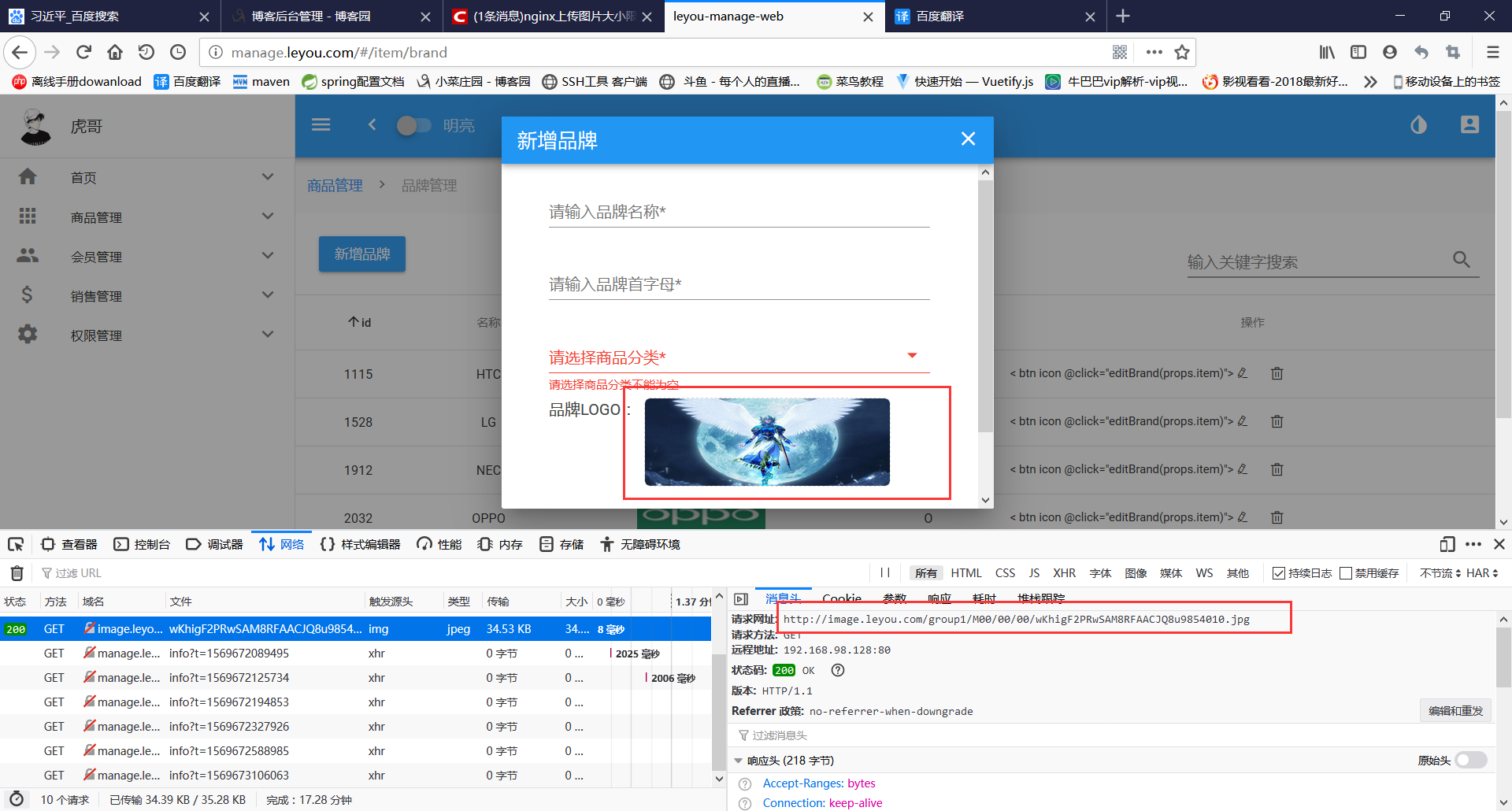
测试成功
leyou_06_图片上传至FastDFS的更多相关文章
- ajax图片上传及FastDFS入门案例.
今天来开始写图片上传的功能, 现在的图片上传都讲求 上传完成后立刻回显且页面不刷新, 这里到底是怎么做的呢? 当然是借助于ajax了, 但是ajax又不能提交表单, 这里我们还要借助一个插件: jqu ...
- 使用KindEditor完成图片上传(springmvc&fastdfs/springmvc&ftp)
前端使用KindEditor,后台使用Springmvc 1 拷贝KindEditor相关文件到项目中 拷贝KindEditor相关文件到项目中 2 准备一个jsp页面 页面中我准备了一个超链接,点击 ...
- 潭州课堂25班:Ph201805201 django 项目 第三十九课 后台 文章发布,图片上传到 FastDFS后端实现 七牛云讲解(课堂笔记)
文章发布: # 1,从前台获取参数# 2,校验参数# 3,把数据保存到数据库# 4,返回执行结果到前台,(创建成功或失败) 自定义 froms.py 校验参数 上传图片到七牛云 注册 https:// ...
- 【转载】【JAVA秒会技术之图片上传】基于Nginx及FastDFS,完成图片的上传及展示
基于Nginx及FastDFS,完成商品图片的上传及展示 一.传统图片存储及展示方式 存在问题: 1)大并发量上传访问图片时,需要对web应用做负载均衡,但是会存在图片共享问题 2)web应用服务器的 ...
- SpringBoot整合Fastdfs,实现图片上传(IDEA)
我们部署Fastdfs,就是为了实现文件的上传. 现在使用idea整合Fastdfs,实现图片上传 部署环境:Centos7部署分布式文件存储(Fastdfs) 利用Java客户端调用FastDFS ...
- 使用百度UMeditor富文本编辑器,修改自定义图片上传,修改源码
富文本编辑器,不多说了,这个大家应该都用到过,至于用到的什么版本,那就分很多种 CKEditor:很早以前叫FCK,那个时候也用过,现在改名了,比较流行的一个插件,国外很多公司在用 UEDITOR:百 ...
- 图片上传5-多个图片上传,独立项目Demo和源码
图片上传,一次性可以上传多个图片,每个图片可以有名字.URL.排序.备注等字段.这是区别于使用百度WebUploader等多图上传工具的地方. 项目相关图片 Jar包管理:Maven用到的框架:Spr ...
- Asp.Net Mvc 使用WebUploader 多图片上传
来博客园有一个月了,哈哈.在这里学到了很多东西.今天也来试着分享一下学到的东西.希望能和大家做朋友共同进步. 最近由于项目需要上传多张图片,对于我这只菜鸟来说,以前上传图片都是直接拖得控件啊,而且还是 ...
- 06.LoT.UI 前后台通用框架分解系列之——浮夸的图片上传
LOT.UI分解系列汇总:http://www.cnblogs.com/dunitian/p/4822808.html#lotui LoT.UI开源地址如下:https://github.com/du ...
随机推荐
- thinkphp 分布式数据库支持
ThinkPHP内置了分布式数据库的支持,包括主从式数据库的读写分离,但是分布式数据库必须是相同的数据库类型. 配置DB_DEPLOY_TYPE 为1 可以采用分布式数据库支持.如果采用分布式数据库, ...
- 无法启动此程序,因此计算机中丢失VCRUNTIME140.dll。
在mysql-8.0.12-winx64创建data文件夹 在cmd终端 初始化 MYSQL: mysqld --initialize-insecure MySQL加入Windows服务:mysqld ...
- 第三周——重新clone项目、配置并编译
重新clone项目的原因 因为实习尚未有公司邮箱,使用qq邮箱没有权限提交代码,因此使用晶哥的账号和gitlab, 但是git clone项目默认会关联账号(可能有某些配置项,但是找不到), idea ...
- Hive学习笔记简版
一.概述 1. Hive是Apache提供的基于Hadoop的数据仓库管理工具2. Hive提供了类SQL语言来操作Hadoop,底层会将SQL转化为MapReduce来执行,所以效率会比较低3. H ...
- 初学Servlet在IDEA中遇到的错误码问题
1.跳转页面出现500状态码 调试时出现如图所示报错: 需要进入Project Structure中进行如下操作: 点击Apply后导入,解决500问题 2.出现404状态码 一般是路径有错误或拼写错 ...
- 初识OpenCV-Python - 010: 精致边缘探测
本节主要介绍使用Canny函数达到边缘探测的结果. Code: import cv2from matplotlib import pyplot as plt img = cv2.imread('bal ...
- virtualbox虚拟机下的cdlinux找不到无线网卡的解决方法
virtualbox虚拟机下的cdlinux找不到无线网卡的解决方法 自己解决了,记录一下. cdlinux 带reaver1.4的版本 http://pan.baidu.com/share/link ...
- software database is broken解决办法
ubuntu切换中文时报software database is broken错误. 网上的办法千篇一律,还都没有用.都是去应用中心删除thundbird之类的,啊....... 在终端下执行 sud ...
- Invalid prop: type check failed for prop "maxlength". Expected Number, got String.
1.项目中,使用element-ui的input表单的maxlength属性报错 2.使用场景: <el-input v-model="fname" maxle ...
- 安装tomcat8.5
1.去官网下载安装文件 网址:https://tomcat.apache.org/download-80.cgi 2.在安装目录的bin中运行startup.bat即可启动 3.启动好tomcat后, ...