
《DSP using MATLAB》Problem 8.41
代码:
%% ------------------------------------------------------------------------

%%            Output Info about this m-file

fprintf('\n***********************************************************\n');

fprintf('        <DSP using MATLAB> Problem 8.41.2 \n\n');

banner();

%% ------------------------------------------------------------------------

% Digital lowpass Filter Specifications:

wplp = 0.4*pi;                 % digital passband freq in rad

wslp = 0.5*pi;                 % digital stopband freq in rad

Rp = 1.0;                       % passband ripple in dB

As = 50.0;                        % stopband attenuation in dB

Ripple = 10 ^ (-Rp/20)           % passband ripple in absolute

Attn = 10 ^ (-As/20)             % stopband attenuation in absolute

fprintf('\n*******Digital lowpass, Coefficients of DIRECT-form***********\n');

[blp, alp] = cheb2lpf(wplp, wslp, Rp, As);

[C, B, A] = dir2cas(blp, alp)

% Calculation of Frequency Response:

[dblp, maglp, phalp, grdlp, wwlp] = freqz_m(blp, alp);

% ---------------------------------------------------------------

%    find Actual Passband Ripple and Min Stopband attenuation

% ---------------------------------------------------------------

delta_w = 2*pi/1000;

Rp_lp = -(min(dblp(1:1:ceil(wplp/delta_w)+1)));                            % Actual Passband Ripple

fprintf('\nActual Passband Ripple is %.4f dB.\n', Rp_lp);

As_lp = -round(max(dblp( ceil(wslp/delta_w)+1:1:501 )));                    % Min Stopband attenuation

fprintf('\nMin Stopband attenuation is %.4f dB.\n\n', As_lp);

%% -----------------------------------------------------------------

%%                             Plot

%% -----------------------------------------------------------------

figure('NumberTitle', 'off', 'Name', 'Problem 8.41.1 Chebyshev-2 lowpass by cheb2lpf function')

set(gcf,'Color','white');

M = 2;                          % Omega max

subplot(2,2,1); plot(wwlp/pi, maglp); axis([0, M, 0, 1.2]); grid on;

xlabel('Digital frequency in \pi units'); ylabel('|H|'); title('Lowpass Filter Magnitude Response');

set(gca, 'XTickMode', 'manual', 'XTick', [0, 0.4, 0.5, M]);

set(gca, 'YTickMode', 'manual', 'YTick', [0, 0.8913, 1]);

subplot(2,2,2); plot(wwlp/pi, dblp); axis([0, M, -100, 2]); grid on;

xlabel('Digital frequency in \pi units'); ylabel('Decibels'); title('Lowpass Filter Magnitude in dB');

set(gca, 'XTickMode', 'manual', 'XTick', [0, 0.4, 0.5, M]);

set(gca, 'YTickMode', 'manual', 'YTick', [-80, -60, -50, -1, 0]);

set(gca,'YTickLabelMode','manual','YTickLabel',['80'; '60'; '50';'1 ';' 0']);

subplot(2,2,3); plot(wwlp/pi, phalp/pi); axis([0, M, -1.1, 1.1]); grid on;

xlabel('Digital frequency in \pi nuits'); ylabel('radians in \pi units'); title('Lowpass Filter Phase Response');

set(gca, 'XTickMode', 'manual', 'XTick', [0, 0.4, 0.5, M]);

set(gca, 'YTickMode', 'manual', 'YTick', [-1:1:1]);

subplot(2,2,4); plot(wwlp/pi, grdlp); axis([0, M, 0, 50]); grid on;

xlabel('Digital frequency in \pi units'); ylabel('Samples'); title('Lowpass Filter Group Delay');

set(gca, 'XTickMode', 'manual', 'XTick', [0, 0.4, 0.5, M]);

set(gca, 'YTickMode', 'manual', 'YTick', [0:20:50]);

% ------------------------------------------------------------

%                 PART 2   A/D and Reconstruction

% ------------------------------------------------------------

% Discrete time signal, Samples of analog signal xa(t)

Ts = 0.01;                       % sample intevel, second

Fs = 1/Ts;                       % sample frequency, Hz

n1_start = 0; n1_end = 500;

      n1 = [n1_start:1:n1_end];

     nTs = n1 * Ts;                   % [0, 5]s

xn1 = 3 * sin(40*pi*nTs) + 3 * cos(50*pi*nTs);    % digital signal

figure('NumberTitle', 'off', 'Name', 'Problem 8.41 xn1')

set(gcf,'Color','white');

subplot(2,1,1); stem(n1, xn1);

xlabel('n'); ylabel('x(n)');

title('xn sequence');  grid on;

% ----------------------------

%       DTFT of xn1

% ----------------------------

M = 500;

[X1, w] = dtft1(xn1, n1, M);

magX1  = abs(X1);  angX1  = angle(X1);  realX1  = real(X1);  imagX1  = imag(X1);

%% --------------------------------------------------------------------

%%              START X(w)'s  mag ang real imag

%% --------------------------------------------------------------------

figure('NumberTitle', 'off', 'Name', 'Problem 8.41 X1 DTFT');

set(gcf,'Color','white');

subplot(2,1,1); plot(w/pi,magX1); grid on;  %axis([-1,1,0,1.05]);

title('Magnitude Response');

xlabel('digital frequency in \pi units'); ylabel('Magnitude  |H|');

subplot(2,1,2); plot(w/pi, angX1/pi); grid on;  %axis([-1,1,-1.05,1.05]);

title('Phase Response');

xlabel('digital frequency in \pi units'); ylabel('Radians/\pi');

figure('NumberTitle', 'off', 'Name', 'Problem 8.41 X1 DTFT');

set(gcf,'Color','white');

subplot(2,1,1); plot(w/pi, realX1); grid on;

title('Real Part');

xlabel('digital frequency in \pi units'); ylabel('Real');

subplot(2,1,2); plot(w/pi, imagX1); grid on;

title('Imaginary Part');

xlabel('digital frequency in \pi units'); ylabel('Imaginary');

%% -------------------------------------------------------------------

%%             END X's  mag ang real imag

%% -------------------------------------------------------------------

% -----------------------------------------

%       Reconstruction

%       methods: ZOH FOH spline  sinc

% -----------------------------------------

figure('NumberTitle', 'off', 'Name', 'Problem 8.41.2 Reconstruction xa(t) by ZOH');

set(gcf,'Color','white');

subplot(1,1,1); stairs(nTs*100, xn1); grid on;  %axis([0,1,0,1.5]);

title('Reconstructed Signal from x1(n) using Zero-Order-Hold function');

xlabel('t in msec units.'); ylabel('xa(n)'); hold on;

stem(nTs*100, xn1); gtext('Ts = 0.01 sec'); hold off;

figure('NumberTitle', 'off', 'Name', 'Problem 8.41.2 Reconstruction xa(t) by FOH');

set(gcf,'Color','white');

subplot(1,1,1); plot(nTs*100, xn1); grid on;  %axis([0,1,0,1.5]);

title('Reconstructed Signal from x1(n) using First-Order-Hold');

xlabel('t in msec units.'); ylabel('xa(n)'); hold on;

stem(nTs*100, xn1); gtext('Ts = 0.01 sec'); hold off;

% Reconstruction by spline function

Dt = 0.005; t = 0:Dt:5; xa = spline(nTs, xn1, t);

figure('NumberTitle', 'off', 'Name', sprintf('Problem 8.41.2 Reconstruction xa(t) by spline, Ts = %.4fs', Ts));

set(gcf,'Color','white');

%subplot(2,1,1);

plot(100*t, xa); xlabel('t in ms units'); ylabel('x');

title(sprintf('Reconstructed Signal from x1(n) using spline function')); grid on; hold on;

stem(100*nTs, xn1); gtext('spline');

%% --------------------------------------------------------------------

%%         Analog Signal reconstructed by sinc(x) function

%% --------------------------------------------------------------------

Dt = 0.005; t = 0:Dt:5;

xa = xn1 * sinc(Fs*(ones(length(n1),1)*t - nTs'*ones(1,length(t)))) ;

figure('NumberTitle', 'off', 'Name', 'Problem 8.41.2 Reconstruction by sinc function');

set(gcf,'Color','white');

subplot(1,1,1); plot(t*100, xa, 'r'); grid on;  %axis([0,1,0,1.5]);

title('Reconstructed Signal from x1(n) using sinc function');

xlabel('t in msec units.'); ylabel('xa(n)'); hold on;

stem(nTs*100, xn1, 'b', 'filled'); gtext('Ts=0.01 msec'); hold off;

% --------------------------------------------

%             PART 3:  Filter and D/A

% --------------------------------------------

yn1 = filter(blp, alp, xn1);

% ----------------------------

%       DTFT of yn1

% ----------------------------

M = 500;

[Y1, w] = dtft1(yn1, n1, M);

magY1  = abs(Y1);  angY1  = angle(Y1);  realY1  = real(Y1);  imagY1  = imag(Y1);

%% --------------------------------------------------------------------

%%              START Y1(w)'s  mag ang real imag

%% --------------------------------------------------------------------

figure('NumberTitle', 'off', 'Name', 'Problem 8.41 Y1 DTFT');

set(gcf,'Color','white');

subplot(2,1,1); plot(w/pi,magY1); grid on;  %axis([-1,1,0,1.05]);

title('Magnitude Response');

xlabel('digital frequency in \pi units'); ylabel('Magnitude  |H|');

subplot(2,1,2); plot(w/pi, angY1/pi); grid on;  %axis([-1,1,-1.05,1.05]);

title('Phase Response');

xlabel('digital frequency in \pi units'); ylabel('Radians/\pi');

figure('NumberTitle', 'off', 'Name', 'Problem 8.41 Y1 DTFT');

set(gcf,'Color','white');

subplot(2,1,1); plot(w/pi, realY1); grid on;

title('Real Part');

xlabel('digital frequency in \pi units'); ylabel('Real');

subplot(2,1,2); plot(w/pi, imagY1); grid on;

title('Imaginary Part');

xlabel('digital frequency in \pi units'); ylabel('Imaginary');

%% -------------------------------------------------------------------

%%             END Y1's  mag ang real imag

%% -------------------------------------------------------------------

% -----------------------------------------

%       Reconstruction

%       methods: ZOH FOH spline  sinc

% -----------------------------------------

figure('NumberTitle', 'off', 'Name', 'Problem 8.41.2 Reconstruction ya(t) by ZOH');

set(gcf,'Color','white');

subplot(1,1,1); stairs(nTs*100, yn1); grid on;  %axis([0,1,0,1.5]);

title('Reconstructed Signal from y1(n) using Zero-Order-Hold function');

xlabel('t in msec units.'); ylabel('ya(n)'); hold on;

stem(nTs*100, yn1); gtext('Ts = 0.01 sec'); hold off;

figure('NumberTitle', 'off', 'Name', 'Problem 8.41.2 Reconstruction ya(t) by FOH');

set(gcf,'Color','white');

subplot(1,1,1); plot(nTs*100, yn1); grid on;  %axis([0,1,0,1.5]);

title('Reconstructed Signal from y1(n) using First-Order-Hold');

xlabel('t in msec units.'); ylabel('ya(n)'); hold on;

stem(nTs*100, yn1); gtext('Ts = 0.01 sec'); hold off;

% Reconstruction by spline function

Dt = 0.005; t = 0:Dt:5; ya = spline(nTs, yn1, t);

figure('NumberTitle', 'off', 'Name', sprintf('Problem 8.41.2 Reconstruction ya(t) by spline, Ts = %.4fs', Ts));

set(gcf,'Color','white');

%subplot(2,1,1);

plot(100*t, ya); xlabel('t in ms units'); ylabel('ya');

title(sprintf('Reconstructed Signal from y1(n) using spline function')); grid on; hold on;

stem(100*nTs, yn1); gtext('spline');

%% --------------------------------------------------------------------

%%         Analog Signal reconstructed by sinc(x) function

%% --------------------------------------------------------------------

Dt = 0.005; t = 0:Dt:5;

ya = yn1 * sinc(Fs*(ones(length(n1),1)*t - nTs'*ones(1,length(t)))) ;

figure('NumberTitle', 'off', 'Name', 'Problem 8.41.2 Reconstruction by sinc function');

set(gcf,'Color','white');

subplot(1,1,1); plot(t*100, ya, 'r'); grid on;  %axis([0,1,0,1.5]);

title('Reconstructed Signal from y1(n) using sinc function');

xlabel('t in msec units.'); ylabel('ya(n)'); hold on;

stem(nTs*100, yn1, 'b', 'filled'); gtext('Ts=0.01 msec'); hold off;
运行结果:
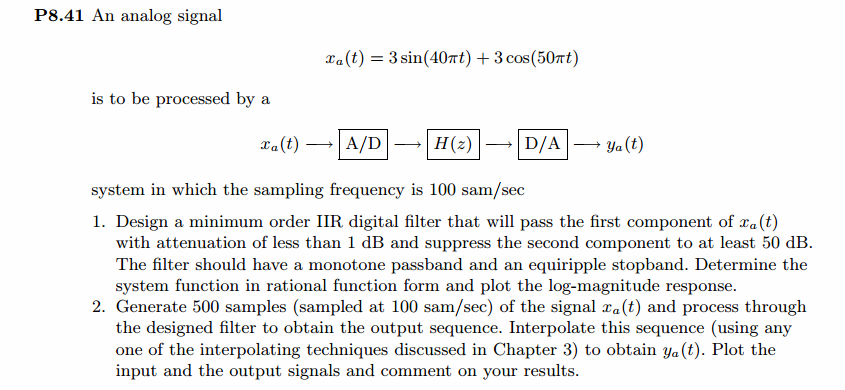
通带、阻带指标,绝对值单位
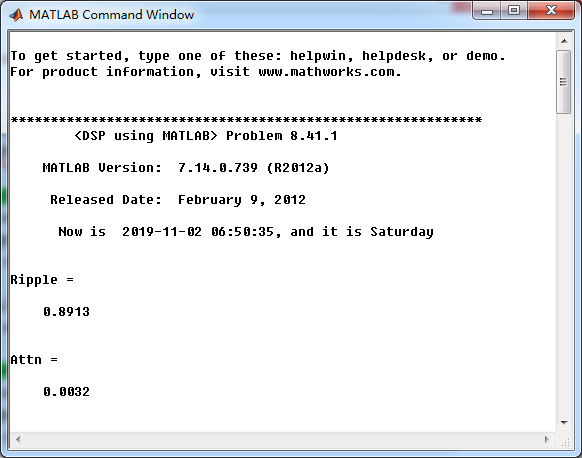
采用cheb2lpf函数,设计的Chebyshev-2型数字低通,系统函数串联形式系数
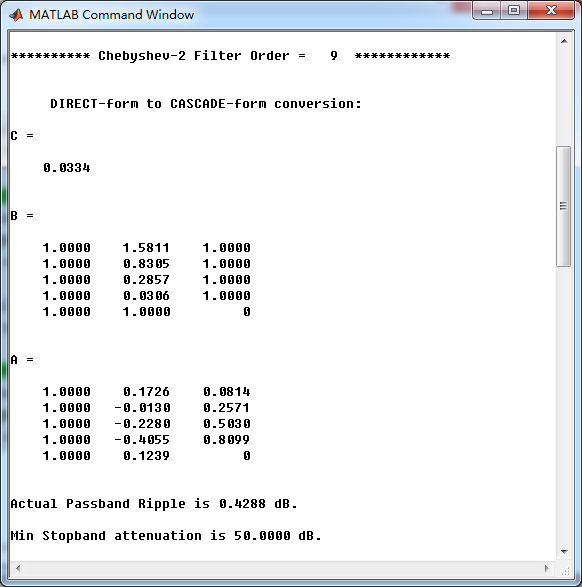
低通,幅度谱、相位谱和群延迟响应
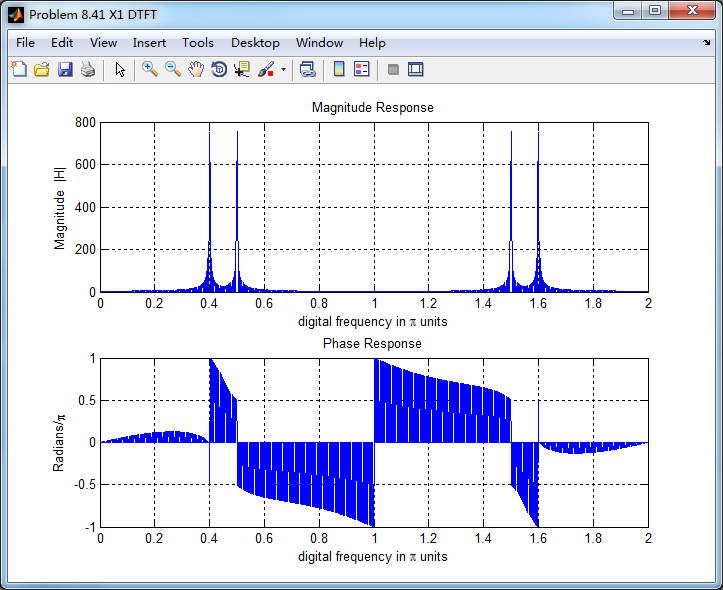
采样信号的谱(DTFT变换),可看出,有两个数字频率分量,0.4π和0.5π
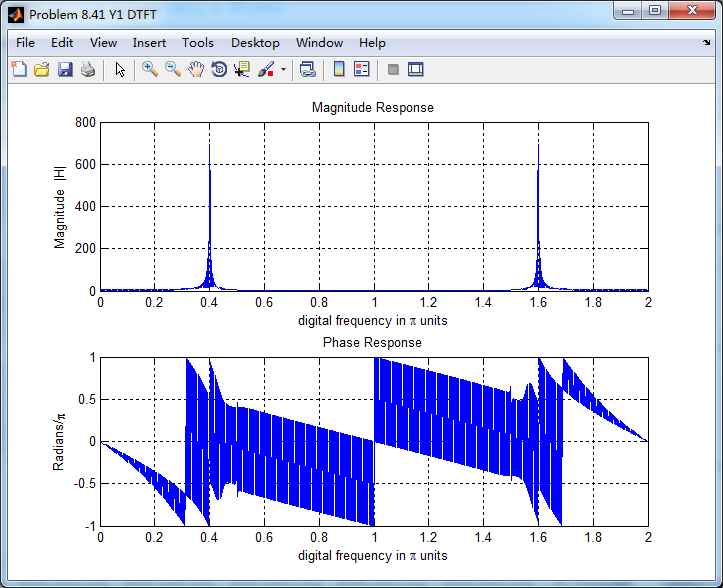
将采样信号通过设计的Chebyshev-2数字低通,得到输出y(n),其频谱如下,可看出,滤除了0.5π分量,仅保留0.4π分量
对离散信号y(n)采用sinc(插值函数)重建连续信号,如下图

《DSP using MATLAB》Problem 8.41的更多相关文章
- 《DSP using MATLAB》Problem 8.45
代码: %% ------------------------------------------------------------------------ %% Output Info about ...
- 《DSP using MATLAB》Problem 8.44
代码: %% ------------------------------------------------------------------------ %% Output Info about ...
- 《DSP using MATLAB》Problem 7.36
代码: %% ++++++++++++++++++++++++++++++++++++++++++++++++++++++++++++++++++++++++++++++++ %% Output In ...
- 《DSP using MATLAB》Problem 7.27
代码: %% ++++++++++++++++++++++++++++++++++++++++++++++++++++++++++++++++++++++++++++++++ %% Output In ...
- 《DSP using MATLAB》Problem 7.26
注意:高通的线性相位FIR滤波器,不能是第2类,所以其长度必须为奇数.这里取M=31,过渡带里采样值抄书上的. 代码: %% +++++++++++++++++++++++++++++++++++++ ...
- 《DSP using MATLAB》Problem 7.25
代码: %% ++++++++++++++++++++++++++++++++++++++++++++++++++++++++++++++++++++++++++++++++ %% Output In ...
- 《DSP using MATLAB》Problem 7.24
又到清明时节,…… 注意:带阻滤波器不能用第2类线性相位滤波器实现,我们采用第1类,长度为基数,选M=61 代码: %% +++++++++++++++++++++++++++++++++++++++ ...
- 《DSP using MATLAB》Problem 7.23
%% ++++++++++++++++++++++++++++++++++++++++++++++++++++++++++++++++++++++++++++++++ %% Output Info a ...
- 《DSP using MATLAB》Problem 7.16
使用一种固定窗函数法设计带通滤波器. 代码: %% ++++++++++++++++++++++++++++++++++++++++++++++++++++++++++++++++++++++++++ ...
随机推荐
- delphi JPG转为BMP存入数据库
delphi JPG转为BMP存入数据库 必须在uses中引用JPEG procedure TForm1.BitBtn3Click(Sender: TObject);varjpg:TJPEGim ...
- SCOI 2014 new :未来展望
后期计划(可能延续到noip) 后期计划这种东西..唉...经历了三周的停课生涯,我似乎已经找到了一种状态,就是我一直期盼的状态,然后为了不落泪退役,具体是这样的: 由于现在的学习任务不太紧张了,所以 ...
- How to SSH Into Your iPhone
First, I will explain what SSH is and why we do it. SSH (Secure Shell) allows you to exchange data b ...
- python virtual env 使用 jupyter ipython notebook,舒服了, 工作效率翻倍
话不多说,尊重原作者 知乎链接
- How to Add Swap on CentOS
About Linux Swapping Linux RAM is composed of chunks of memory called pages. To free up pages of RAM ...
- BBB 常用指令
source .bashrc root@beaglebone:~# route add default gw 192.168.7.1 echo BB-SPIDEV0 > /sys/devices ...
- Android Telephony分析(四) ---- TelephonyManager详解
前言 TelephonyManager主要提供Telephony相关信息的查询/修改功能,以及Phone状态监听功能,封装的方法主要是提供给APP上层使用.TelephonyManager.java ...
- Xpath-Extraction 关联
//*[local-name()="qqCheckOnlineResult"] //开头 *代表的是任意的标签 local-name():寻找标签名
- gulp 压缩 uglify报错GulpUglifyError: unable to minify JavaScript
引:https://www.cnblogs.com/vellemo/p/6898125.html 在压缩的时候报错:GulpUglifyError: unable to minify JavaScri ...
- 找到你的位置(JS在页面中的位置)最常用的方式是在页面中head部分放置<script>元素,浏览器解析head部分就会执行这个代码,然后才解析页面的其余部分
找到你的位置(JS在页面中的位置) 我们可以将JavaScript代码放在html文件中任何位置,但是我们一般放在网页的head或者body部分. 放在<head>部分 最常用的方式是在页 ...