
sql学习~pivot和unpivot用法
pivot
可以把列值转换为输出中的多个列。
pivot 可以在其他剩余的列的值上执行聚合函数。
unpivot
将列转换为列值
语法
SELECT <non-pivoted column>,

    [first pivoted column] AS <column name>,

    [second pivoted column] AS <column name>,

    ...

    [last pivoted column] AS <column name>

FROM

    (<SELECT query that produces the data>)

    AS <alias for the source query>

PIVOT

(

    <aggregation function>(<column being aggregated>)

FOR

[<column that contains the values that will become column headers>]

    IN ( [first pivoted column], [second pivoted column],

    ... [last pivoted column])

) AS <alias for the pivot table>

<optional ORDER BY clause>;
示例1:pivot
1.数据准备
create table student_score

(

    studentId varchar(50),

    subjectName varchar(50),

    score decimal(18)

)

insert into student_score values

('','语文',80),('','数学',70),('','英语',90),

('','语文',80),('','数学',83),('','英语',60),

('','语文',50),('','数学',90),('','英语',60),

('','语文',90),('','数学',80)
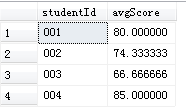
按学生id分组查看平均成绩
select studentId,AVG(score) avgScore from student_score

group by studentId
初始效果
2.使用pivot
select 'averagescore' as avgScore_by_studentId,

[],[],[],[]

from

(

select studentId,score

    from student_score

) as sourceTable

pivot

(

AVG(score) for studentId in ([],[],[],[])

) as pivotTable
3.效果

示例2:unpivot
1.数据准备
-- Create the table and insert values as portrayed in the previous example.

CREATE TABLE pvt (VendorID int, Emp1 int, Emp2 int,

    Emp3 int, Emp4 int, Emp5 int);

GO

INSERT INTO pvt VALUES (1,4,3,5,4,4);

INSERT INTO pvt VALUES (2,4,1,5,5,5);

INSERT INTO pvt VALUES (3,4,3,5,4,4);

INSERT INTO pvt VALUES (4,4,2,5,5,4);

INSERT INTO pvt VALUES (5,5,1,5,5,5);

GO
初始效果
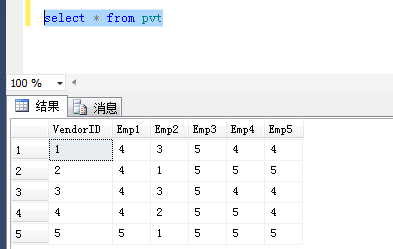
表示供应商(vendorID)在用户1(Emp1)中的订单数量,其他类比即可。
2.使用示例
-- Unpivot the table.

SELECT VendorID, Employee, Orders

FROM

   (SELECT VendorID, Emp1, Emp2, Emp3, Emp4, Emp5

   FROM pvt) p

UNPIVOT

   (Orders FOR Employee IN

      (Emp1, Emp2, Emp3, Emp4, Emp5)

)AS unpvt;
3.效果

sql学习~pivot和unpivot用法的更多相关文章
- 通过sql做数据透视表,数据库表行列转换(pivot和Unpivot用法)(一)
在mssql中大家都知道可以使用pivot来统计数据,实现像excel的透视表功能 一.MSsqlserver中我们通常的用法 1.Sqlserver数据库测试 ---创建测试表 Create tab ...
- [转]Oracle SQL函数pivot、unpivot转置函数实现行转列、列转行
原文地址:http://blog.csdn.net/seandba/article/details/72730657 函数PIVOT.UNPIVOT转置函数实现行转列.列转行,效果如下图所示: 1.P ...
- SQL学习:查询的用法(1)
在SQL servre的使用中,查询的用法是最多的.最重要的,也是最难学习的,因此掌握查询的用法很重要. 先将表的示例上图 员工表: 部门表: ...
- SQL中PIVOT和UNPIVOT行列转换
DECLARE @sql_col VARCHAR(8000); DECLARE @sql_str VARCHAR(8000); DECLARE @sql_ VARCHAR(MAX); SELECT @ ...
- sql pivot、unpivot和partition by用法
原文:sql pivot.unpivot和partition by用法 演示脚本 from sys.sysobjects where name = 'Student' AND type = 'U') ...
- SQL(横表和纵表)行列转换,PIVOT与UNPIVOT的区别和使用方法举例,合并列的例子
使用过SQL Server 2000的人都知道,要想实现行列转换,必须综合利用聚合函数和动态SQL,具体实现起来需要一定的技巧,而在SQL Server 2005中,使用新引进的关键字PIVOT/UN ...
- SQL Server 行列相互转换命令:PIVOT和UNPIVOT使用详解
一.使用PIVOT和UNPIVOT命令的SQL Server版本要求 1.数据库的最低版本要求为SQL Server 2005 或更高. 2.必须将数据库的兼容级别设置为90 或更高. 3.查看我的数 ...
- PIVOT 和 UNPIVOT 命令的SQL Server版本
I:使用 PIVOT 和 UNPIVOT 命令的SQL Server版本要求 1.数据库的最低版本要求为 SQL Server 2005 或 更高 2.必须将数据库的兼容级别设置为 90 或 更高 3 ...
- Oracle 行列转换函数pivot、unpivot的使用(二)
一.行转列pivot 关键函数pivot,其用法如下 pivot(聚合函数 for 列名 in(类型)) select * from table_name pivot(max(column_name) ...
随机推荐
- 微软亚洲研究院研究员获选IEEE Fellow 和ACM Distinguished Member
年末将至,微软亚洲研究院喜讯连连.近日,IEEE(国际电气电子工程师学会)和ACM(美国计算机协会)先后公布了2017年度的院士名单(IEEE Fellow)和2016年度杰出会员名单(ACM D ...
- Nginx之负载节点状态监测
前言 nginx做负载均衡性能很好,但是负载中的节点有异常怎么处理呢? 当然是nginx发现某一个节点为异常节点后自动将请求转移至其他节点直至转移到一个正常节点. 为了实现这一步有如下两个解决方案可供 ...
- 使用HBuilder开发移动APP:开发环境准备(转)
一直想开发个APP玩玩的,但是作为一个PHP码农,需要新学习JAVA或者Object C,这也是一直没能实现这个目标的原因.但是现在HTML5+.APPCAN.apicloud很多工具利用前端技术就能 ...
- 利用 Rize 来进行 UI 测试或 E2E 测试
之前我曾经在<Rize - 一个可以让你简单.优雅地使用 puppeteer 的 Node.js 库>一文简单介绍过 Rize 这个库.当时仅仅是介绍这个库本身,关于如何使用,我没有给太多 ...
- 一步步去阅读koa源码,整体架构分析
阅读好的框架的源码有很多好处,从大神的视角去理解整个框架的设计思想.大到架构设计,小到可取的命名风格,还有设计模式.实现某类功能使用到的数据结构和算法等等. 使用koa 其实某个框架阅读源码的时候,首 ...
- 微信小程序接入百度OCR(身份证识别)
微信小程序接入百度OCR(身份证识别) 1.接口描述 支持对二代居民身份证正反面所有8个字段进行结构化识别,包括姓名.性别.民族.出生日期.住址.身份证号.签发机关.有效期限,识别准确率超过99%:同 ...
- js中的预编译
预编译 js执行顺序: 词法/语法分析 预编译 解释执行 js中存在预编译 function demo() { console.log('I am demo'); } demo(); //I am d ...
- disruptor 入门 一
一.disruptor基本概念 https://www.cnblogs.com/haiq/p/4112689.html 二.disruptor入门程序 导入disruptor包 <depende ...
- Linux安装Elasticsearch7.x
Elasticsearch下载地址: https://artifacts.elastic.co/downloads/elasticsearch/elasticsearch-7.1.1-linux-x8 ...
- inspect的使用安卓动态分析工具
一.安装步骤 1.安装xposed 2.安装inspect 二.inspect 一个基于Xposed 开发的应用动态分析工具 github已开源 内置web页面 体验度很不错 ‘ 核心功能 监控Sha ...