
html5 window.postMessage 传递数据的使用
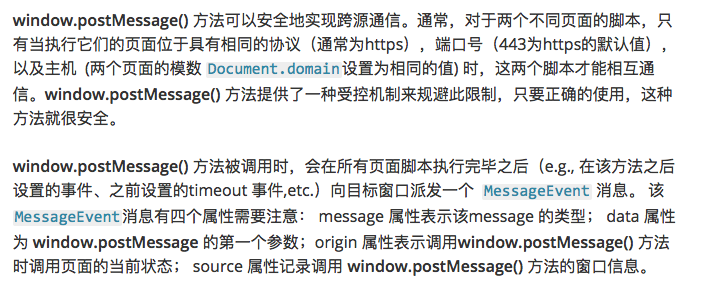
window.postMessage(图片介绍):
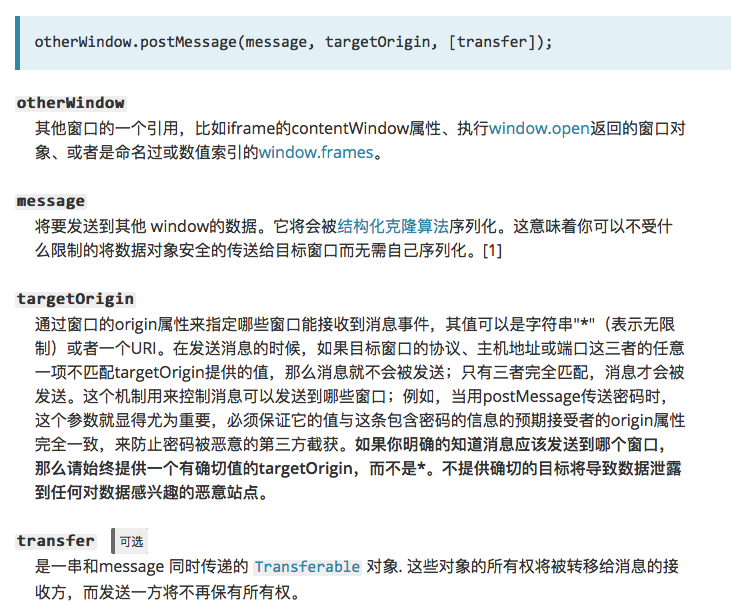
发送方(图片介绍):
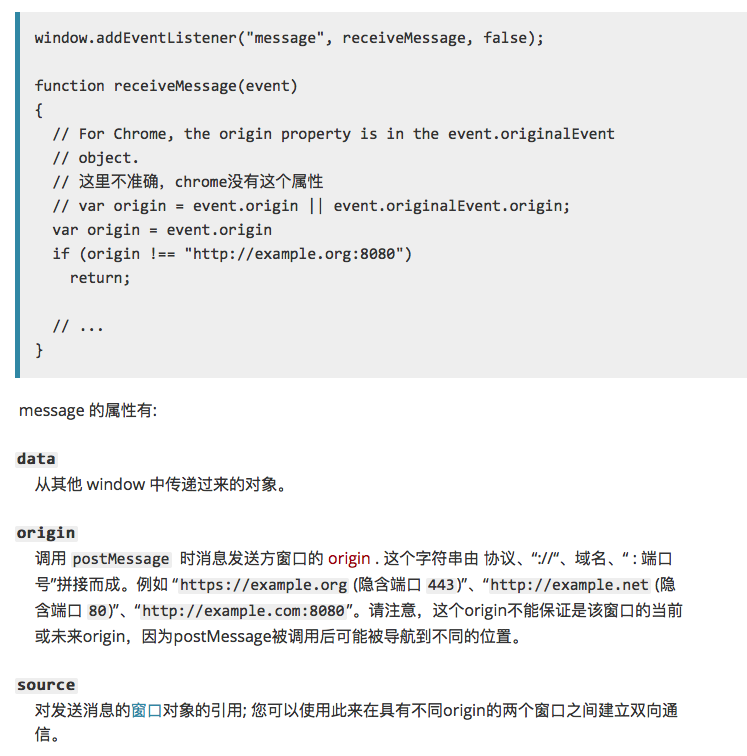
接收方(图片介绍):
个人测试一(iframe):
发送方,地址为:http://localhost:63342/HelloHBuilder/html2/postmessage.html?_ijt=cdirh338ca9a8sbhrjg5ti9odk ,页面内容如下:
<!DOCTYPE html>

<html lang="en">

<head>

    <meta charset="UTF-8">

    <title>postmessage</title>

</head>

<body>

<h1>iframe:</h1>

<iframe id="iframe" src="http://localhost:63342/HelloHBuilder/html2/onmessage.html" style="width: 100%; height: 300px;"></iframe>

 <input id="msg" type="text" placeholder="请输入要发送的消息">

 <button id="send">发送</button>

<script>

    window.onload =function() {

        document.getElementById('send').onclick = function() {

            var msg = document.getElementById('msg').value;

            var iframeWindow = document.getElementById('iframe').contentWindow;

            iframeWindow.postMessage(msg, "http://localhost:63342/HelloHBuilder/html2/onmessage.html");

        }

    }

</script>

</body>

</html>
接收方:地址为:http://localhost:63342/HelloHBuilder/html2/onmessage.html?_ijt=bis6jq7vbn70k1vfeoeqbbb83n,代码如下:
<!DOCTYPE html>

<html lang="en">

<head>

    <meta charset="UTF-8">

    <title>onmessage</title>

</head>

<body>

<div>

    <h2>target.html,以下是接收到的消息:</h2>

         <p id="msg"></p>

     </div>

    <script>

        window.onload = function() {

            if(window.addEventListener){

                window.addEventListener("message", handleMessage, false);

            }

            else{

                window.attachEvent("onmessage", handleMessage);

            }

            function handleMessage(event) {

                event = event || window.event;

                if (event.origin === 'http://localhost:63342') {

                    document.getElementById('msg').innerHTML = event.data;

                }

            }

        }

    </script>

</body>

</html>
实验结果,在页面发送message后,内嵌的iframe可以接收到参数。当发送方和接收方在浏览器的不同Tab标签页时,接收方无法接收message.
个人测试二(window.open):
<!DOCTYPE html>

<html lang="en">

<head>

    <meta charset="UTF-8">

    <title>postMessage</title>

</head>

<body>

<script>

    window.onload = function () {

        var popup = window.open('http://localhost:63342/HelloHBuilder/html2/postMessage(window_open)/onMessage.html?_ijt=s34sf7dgctrlurfdubbn9i3ibg');

        popup.onload = function () {  //必须要有onload

            // 假设当前页面没有改变location,这条语句会成功添加message到发送队列中去(targetOrigin设置对了)

            popup.postMessage("hello there!", "http://localhost:63342/HelloHBuilder/html2/postMessage(window_open)/onMessage.html?_ijt=s34sf7dgctrlurfdubbn9i3ibg");

            function receiveMessage(event) {

                if (event.origin !== "http://localhost:63342") {

                    return;

                }

                console.log(event.data);

            }

            window.addEventListener("message", receiveMessage, false);

        }

    };

</script>

</body>

</html>
<!DOCTYPE html>

<html lang="en">

<head>

    <meta charset="UTF-8">

    <title>on message</title>

</head>

<body>

<h1>this is a new tab, crate by <code>window.open()</code></h1>

<script>

    document.onreadystatechange = function(e) {

        if (document.readyState === 'complete') {

            window.addEventListener('message', receiveMessage, false);

        }

    };

    function receiveMessage(event) {

        if (event.origin !== "http://localhost:63342") {

            return;

        }

        console.log('message', event.data);

        console.log('origin', event.source);

        document.write(event.data);

        // 假设你已经验证了所受到信息的origin (任何时候你都应该这样做), 一个很方便的方式就是把enent.source

        // 作为回信的对象,并且把event.origin作为targetOrigin

        event.source.postMessage("hi there yourself!  the secret response " + "is: rheeeeet!", event.origin);

    }

</script>

</body>

</html>
注:子视窗必须要在父窗口的onload事件执行之前添加message事件监听。
参考:https://www.cnblogs.com/milo-xie/p/6569017.html https://developer.mozilla.org/zh-CN/docs/Web/API/Window/postMessage https://www.cnblogs.com/MarcoHan/p/5245519.html
html5 window.postMessage 传递数据的使用的更多相关文章
- H5中用postMessage传递数据,解决localStorage不能跨域问题
localStorage不能跨域,所以在A域名下用localStorage.YourKey方式存储的值,在B域名下是不能取到的. 所以需要转变思路,目前主要使用的两种方式: 一种方式:在A.B两个页面 ...
- HTML5中window.postMessage,在两个页面之间的数据传递
HTML5中window.postMessage,在两个页面之间的数据传递 2015年11月3日 8536次浏览 关于postMessage window.postMessage虽然说是html5的功 ...
- 用HTML5里的window.postMessage在两个网页间传递数据
说明 window.postMessage()方法可以安全地实现Window对象之间的跨域通信.例如,在一个页面和它生成的弹出窗口之间,或者是页面和嵌入其中的iframe之间. 通常情况下,不同页面上 ...
- HTML5 window/iframe跨域传递消息 API
原文地址:HTML5′s window.postMessage API 在线示例:Using HTML5's window.postMessage(请打开控制台看日志) 原文日期: 2010年09月0 ...
- HTML5之worker开启JS多线程模式及window.postMessage跨域
worker概述 worker基本使用 window下的postMessage worker多线程的应用 一.worker概述 web worker实际上是开启js异步执行的一种方式.在html5之前 ...
- 利用HTML5的window.postMessage实现跨域通信
详见: http://blog.yemou.net/article/query/info/tytfjhfascvhzxcytp77 HTML5的window.postMessage简述 postM ...
- HTML5可预览多图片ajax上传(使用formData传递数据)
HTML5可预览多图片ajax上传(使用formData传递数据) 在介绍上传图片之前,我们简单的来了解下FormData的基本使用:介绍完成后这些基本知识后,我们会在文章最后提供一个demo,就是a ...
- 使用window.name 进行数据跨域传递
其中要点, Stpe1,浏览器在Iframe中加载一个异域的页面,这个页面返回 <script>window.name="任何数据"</script>,这时 ...
- HTML5的postMessage使用记要
HTML5提出了一个新的用来跨域传值的方法,即postMessage(这个名字太通俗了所以你最好看看是不是自己写过一个同名的把它覆盖了).幸运的是IE8就开始支持了. 我们假设有两个网站,1.com与 ...
随机推荐
- gitlab配置邮箱
邮件测试Notify.test_email('xx@qq.com', 'Message Subject', 'Message Body').deliver_now 参考 https://www.cen ...
- 成为数据专家,你只差一个Quick Insights的距离
身处如今的大数据时代,你真的知道如何处理数据和分析数据吗?或许那些被你忽视的数据背后就暗藏着重要的商业灵感.并非人人都是数据专家,有时候你需要一些专业的软件来帮你处理数据.那么如何能快速.准确地从数据 ...
- C#中使用 正则表达式 替换img中src路径但保留图片名
text = Regex.Replace(text, @"(?i)(?<=<img\b[^>]*?src=\s*(['""]?))([^'"& ...
- SpringBoot开始多线程
增加配置类 package com.springbootdemo.demo.config; import org.springframework.context.annotation.Bean; im ...
- 算法入门——二分查找,旅行商问题,大O表示法
一. 算法入门 博主在市面上发现了很多,很多有关书算法的书籍,但是真正能够让初学者易懂的算法书籍,只是一点点,以下我讲以 Aditya Bhargava写的一本关于算法的入门书籍,为参考,这本书非常的 ...
- 【技巧】歪脑筋优化flexbox瀑布流布局方案
效果先行 需求 在大量"不定宽"元素并排的布局模式下,上图是我们想要的最佳布局但是FlexBox布局虽然枪弹但并不能完全呈现以上布局,于是我们需要结合FlexBox作下小的改动即可 ...
- 课题:html5图像羽化(不规则区域羽化,feather,html5羽化)
下午搜索了一堆相关文章,没有找到符合要求的. 对一张图片应用不规则区域的羽化,该怎么做呢? 首先去查了下 羽化的原理,然而没有什么用, 然后就开始从表现层去研究怎么模拟? idea 1: blur滤镜 ...
- .Net 特性分析与妙用
一.特性是什么 1.想象很多小伙伴们都看过在一个类上方.或者在控制器见过类似的东东,加上之后就可以标识这个类或者方法就具备了某些特点 ,那我们就进入它的内心一探究竟吧. 2.我们进入某个特性之后,可以 ...
- Codeforces Round #295 (Div. 2) B. Two Buttons 520B
B. Two Buttons time limit per test 2 seconds memory limit per test 256 megabytes input standard inpu ...
- Yuchuan_Linux_C 编程之四动态库(共享库)制作
一.整体大纲 二.共享库的制作 1. 命名规则: lib + 名字 + .so 2. 制作步骤: 1) 生成与位置无关的代码 (生成与位置无关的.o) 2) 将.o打包成共享库(动态库) 3. ...