
iOS开发UI篇—使用picker View控件完成一个简单的选餐应用
iOS开发UI篇—使用picker View控件完成一个简单的选餐应用
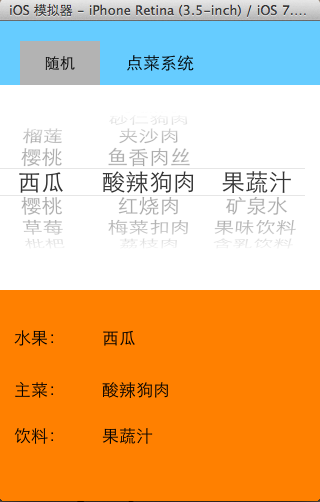
一、实现效果
说明:点击随机按钮,能够自动选取,下方数据自动刷新。
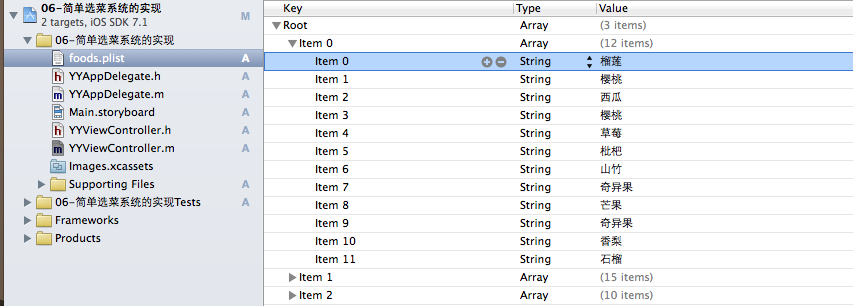
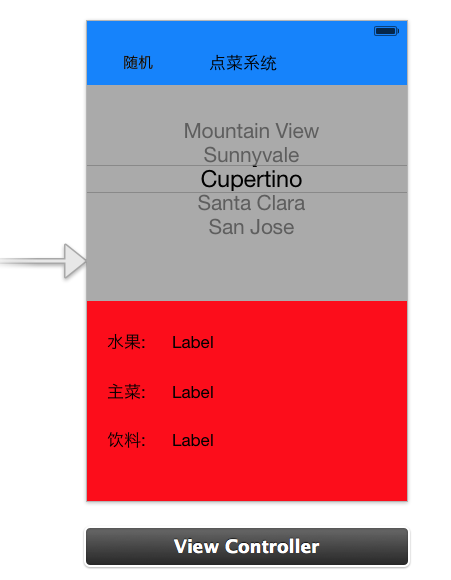
二、实现思路
 //

 //  YYViewController.m

 //  06-简单选菜系统的实现

 //

 //  Created by apple on 14-6-5.

 //  Copyright (c) 2014年 itcase. All rights reserved.

 //

 #import "YYViewController.h"

 //遵守数据源和代理协议

 @interface YYViewController ()<UIPickerViewDataSource,UIPickerViewDelegate>

 /**

  *  水果

  */

 @property (strong, nonatomic) IBOutlet UILabel *fruitLab;

 /**

  *  主菜

  */

 @property (strong, nonatomic) IBOutlet UILabel *stapleLab;

 /**

  *  饮料

  */

 @property (strong, nonatomic) IBOutlet UILabel *drinkLab;

 /**

  *  保存所有的数据

  */

 @property(nonatomic,strong)NSArray *foods;

 @property (weak, nonatomic) IBOutlet UIPickerView *pickerView;

 - (IBAction)randomFood:(id)sender;

 @end

 @implementation YYViewController

 - (void)viewDidLoad

 {

     [super viewDidLoad];

     //在这里设置下方数据刷新部分的初始显示

     for (int component = ; component<self.foods.count; component++) {

         [self pickerView:nil didSelectRow: inComponent:component];

     }

 }

 #pragma mark-使用懒加载,把数据信息加载进来

 -(NSArray *)foods

 {

     if (_foods==nil) {

         NSString *fullpath=[[NSBundle mainBundle]pathForResource:@"foods.plist" ofType:nil];

         NSArray *arrayM=[NSArray arrayWithContentsOfFile:fullpath];

         _foods=arrayM;

     }

     return _foods;

 }

 #pragma mark-处理随机按钮的点击事件

 - (IBAction)randomFood:(id)sender {

     // 让pickerView主动选中某一行

     // 让pickerView选中inComponent列的Row行

     //    [self.pickerView selectRow:1 inComponent:0 animated:YES];

     /*

      [self.pickerView selectRow: arc4random() % 12 inComponent:0 animated:YES];

      [self.pickerView selectRow: arc4random() % 15 inComponent:1 animated:YES];

      [self.pickerView selectRow: arc4random() % 10 inComponent:2 animated:YES];

      */

     //    [self.foods objectAtIndex:0]; == self.foods[0];

     //    [self.foods[0] count];

     /*

      // 根据每一列的元素个数生成随机值

      [self.pickerView selectRow: arc4random() % [self.foods[0] count] inComponent:0 animated:YES];

      [self.pickerView selectRow: arc4random() % [self.foods[1] count] inComponent:1 animated:YES];

      [self.pickerView selectRow: arc4random() % [self.foods[2] count] inComponent:2 animated:YES];

      */

     //设置一个随机数

     for (int component=; component<self.foods.count; component++) {

         //获取当前列对应的数据元素的个数

         int total=[self.foods[component] count];

         //根据每一列的总数生成随机数(当前生成的随机数)

         int randomNumber=arc4random()%total;

         //获取当前选中的行(上一次随机后移动到的行)

         int oldRow=[self.pickerView selectedRowInComponent:];

         //比较上一次的行号和当前生成的随机数是否相同,如果相同的话则重新生成

         while (oldRow==randomNumber) {

                 randomNumber=arc4random()%total;

         }

         //让pickerview滚动到指定的某一行

         [self.pickerView selectRow:randomNumber inComponent:component animated:YES];

         //模拟,通过代码选中某一行

         [self pickerView:nil didSelectRow:randomNumber inComponent:component];

     }

 }

 #pragma mark- 设置数据

 //一共多少列

 -(NSInteger)numberOfComponentsInPickerView:(UIPickerView *)pickerView

 {

     return self.foods.count;

 }

 //每列对应多少行

 -(NSInteger)pickerView:(UIPickerView *)pickerView numberOfRowsInComponent:(NSInteger)component

 {

     //1.获取当前的列

     NSArray *arayM= self.foods[component];

     //2.返回当前列对应的行数

     return arayM.count;

 }

 //每列每行对应显示的数据是什么

 -(NSString *)pickerView:(UIPickerView *)pickerView titleForRow:(NSInteger)row forComponent:(NSInteger)component

 {

     //1.获取当前的列

     NSArray *arayM= self.foods[component];

     //2.获取当前列对应的行的数据

     NSString *name=arayM[row];

     return name;

 }

 #pragma mark-设置下方的数据刷新

 // 当选中了pickerView的某一行的时候调用

 // 会将选中的列号和行号作为参数传入

 // 只有通过手指选中某一行的时候才会调用

 -(void)pickerView:(UIPickerView *)pickerView didSelectRow:(NSInteger)row inComponent:(NSInteger)component

 {

     //获取对应列,对应行的数据

     NSString *name=self.foods[component][row];

     //赋值

     if (==component) {

         self.fruitLab.text=name;

     }else if(==component)

     {

         self.stapleLab.text=name;

     }else

         self.drinkLab.text=name;

 }

 #pragma mark-隐藏状态栏

 -(BOOL)prefersStatusBarHidden

 {

     return YES;

 }

 @end
四、重要补充
请注意在代码实现中为什么使用 [self.foods[0] count]; 而不是直接使用点语法self.foods[0].count取值。
[self.foods objectAtIndex:0]; == self.foods[0];//这两句的效果等价,而self调用objectAtIndex:0这个方法,返回的是一个id类型的万能指针,它的真实类型要到实际运行的时候才能检测得到,因此不能直接使用self.foods[0].count。
iOS开发UI篇—使用picker View控件完成一个简单的选餐应用的更多相关文章
- iOS开发UI篇—Quartz2D(自定义UIImageView控件)
iOS开发UI篇—Quartz2D(自定义UIImageView控件) 一.实现思路 Quartz2D最大的用途在于自定义View(自定义UI控件),当系统的View不能满足我们使用需求的时候,自定义 ...
- ios开发UI篇—使用纯代码自定义UItableviewcell实现一个简单的微博界面布局
本文转自 :http://www.cnblogs.com/wendingding/p/3761730.html ios开发UI篇—使用纯代码自定义UItableviewcell实现一个简单的微博界面布 ...
- iOS开发UI篇—Date Picker和UITool Bar控件简单介绍
iOS开发UI篇—Date Picker和UITool Bar控件简单介绍 一.Date Picker控件 1.简单介绍: Date Picker显示时间的控件 有默认宽高,不用设置数据源和代理 如何 ...
- iOS开发UI篇—控制器的View的创建
iOS开发UI篇—控制器的View的创建 一.6种创建控制器View的方式 #import "NJAppDelegate.h" #import "NJViewContro ...
- 【转】 iOS开发UI篇—控制器的View的创建
最近对view的周期等还不是非常清楚,就找到顶哥的文章,非常不错,就搬运过来了. 原文: http://www.cnblogs.com/wendingding/p/3770760.html 一.6种创 ...
- iOS开发UI篇—CAlayer(创建图层)
iOS开发UI篇—CAlayer(创建图层) 一.添加一个图层 添加图层的步骤: 1.创建layer 2.设置layer的属性(设置了颜色,bounds才能显示出来) 3.将layer添加到界面上(控 ...
- iOS开发UI篇—UIScrollView控件实现图片缩放功能
iOS开发UI篇—UIScrollView控件实现图片缩放功能 一.缩放 1.简单说明: 有些时候,我们可能要对某些内容进行手势缩放,如下图所示 UIScrollView不仅能滚动显示大量内容,还能对 ...
- iOS开发UI篇—UIScrollView控件介绍
iOS开发UI篇—UIScrollView控件介绍 一.知识点简单介绍 1.UIScrollView控件是什么? (1)移动设备的屏幕⼤大⼩小是极其有限的,因此直接展⽰示在⽤用户眼前的内容也相当有限 ...
- iOS开发UI篇—UITableview控件基本使用
iOS开发UI篇—UITableview控件基本使用 一.一个简单的英雄展示程序 NJHero.h文件代码(字典转模型) #import <Foundation/Foundation.h> ...
随机推荐
- C++之路进阶——bzoj3876(支线剧情)
F.A.Qs Home Discuss ProblemSet Status Ranklist Contest ModifyUser hyxzc Logout 捐赠本站 Notice:由于本OJ建立在 ...
- 利用Java进行MySql数据库的导入和导出
利用Java来进行Mysql数据库的导入和导出的总体思想是通过Java来调用命令窗口执行相应的命令. MySql导出数据库的命令如下: mysqldump -uusername -ppassword ...
- 夺命雷公狗-----React---1--页面的渲染
<!DOCTYPE html> <html lang="en"> <head> <meta charset="UTF-8&quo ...
- JetBrains WebStorm 安装破解问题
1.选择用户名验证码注册,进入地址:http://15.idea.lanyus.com/ 然后输入用户名,提交便会生成验证码,注册成功, 2.选择License server,输入以下地址: http ...
- 《zw版·Halcon-delphi系列原创教程》 Halcon分类函数006, image,影像处理(像素图)
<zw版·Halcon-delphi系列原创教程> Halcon分类函数006, image,影像处理(像素图) 为方便阅读,在不影响说明的前提下,笔者对函数进行了简化: :: 用符号“* ...
- s3c2440 移值u-boot-2016.03 第1篇 新建单板
目前除RC版外,最新的就是 u-boot-2016.03.tar.bz2 ,大概看了几个年份的u-boot 发现,现在 更像是 linux kernel .有 menuconfig . 对比2012年 ...
- Dynamics AX 2012 R2 创建一个带有负载均衡的服务器集群
安装额外AOS的主要目的,是将它添加到集群,或用于创建批处理服务器. 1.创建集群服务器 这里,Reinhard使用上节Install An Additional AOS 中创建的AOS,来创建集群. ...
- JSON-SCHEMA
这几天在写代码,和开发那边规范统一后,注释的JOSN需要写清楚schema, 于是学习了一下,国内的东西确实很少,看官网的英文文档也很蛋疼. 就把自己和看到的总结一下: http://json-sch ...
- Http 状态码对照表
1xx 消息 1. 100 Continue 2. 101 Switching Protocol 3. 102 Processing 2xx 成功 1. 200 OK ...
- C++11中对类(class)新增的特性
C++11中对类(class)新增的特性 default/delete 控制默认函数 在我们没有显式定义类的复制构造函数和赋值操作符的情况下,编译器会为我们生成默认的这两个函数: 默认的赋值函数以内存 ...