
C#操作XML方法集合
一 前言
先来了解下操作XML所涉及到的几个类及之间的关系 如果大家发现少写了一些常用的方法,麻烦在评论中指出,我一定会补上的!谢谢大家
* 1 XMLElement 主要是针对节点的一些属性进行操作
* 2 XMLDocument 主要是针对节点的CUID操作
* 3 XMLNode 为抽象类,做为以上两类的基类,提供一些操作节点的方法
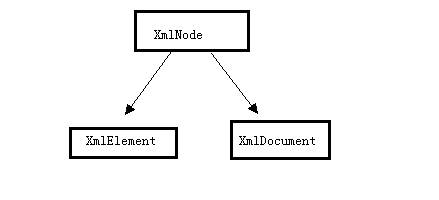
清楚了以上的关系在操作XML时会更清晰一点
二 具体操作(C#)
以下会对Xml的结点与属性做增 删 改 查的操作也满足了实际工作中的大部分情况
先构造一棵XML树如下,其中也涉及到了写入xml文档的操作
         public void CreatXmlTree(string xmlPath)

         {

             XElement xElement = new XElement(

                 new XElement("BookStore",

                     new XElement("Book",

                         new XElement("Name", "C#入门", new XAttribute("BookName", "C#")),

                         new XElement("Author", "Martin", new XAttribute("Name", "Martin")),

                         new XElement("Adress", "上海"),

                         new XElement("Date", DateTime.Now.ToString("yyyy-MM-dd"))

                         ),

                     new XElement("Book",

                         new XElement("Name", "WCF入门", new XAttribute("BookName", "WCF")),

                         new XElement("Author", "Mary", new XAttribute("Name", "Mary")),

                         new XElement("Adress", "北京"),

                         new XElement("Date", DateTime.Now.ToString("yyyy-MM-dd"))

                         )

                         )

                 );

             //需要指定编码格式,否则在读取时会抛:根级别上的数据无效。 第 1 行 位置 1异常

             XmlWriterSettings settings = new XmlWriterSettings();

             settings.Encoding = new UTF8Encoding(false);

             settings.Indent = true;

             XmlWriter xw = XmlWriter.Create(xmlPath,settings);

             xElement.Save(xw);

             //写入文件

             xw.Flush();

             xw.Close();

         }
然后得到如下的XML树
 <?xml version="1.0" encoding="utf-8"?>

 <BookStore>

     <Book>

         <Name BookName="C#">C#入门</Name>

         <Author Name="Martin">Martin</Author>

         <Date>2013-10-11</Date>

         <Adress>上海</Adress>

         <Date>2013-10-11</Date>

     </Book>

     <Book>

         <Name BookName="WCF">WCF入门</Name>

         <Author Name="Mary">Mary</Author>

         <Adress>北京</Adress>

         <Date>2013-10-11</Date>

     </Book>

 </BookStore>
以下操作都是对生成的XML树进行操作
2.1 新增节点与属性
新增节点NewBook并增加属性Name="WPF"
         public void Create(string xmlPath)

         {

             XmlDocument xmlDoc = new XmlDocument();

             xmlDoc.Load(xmlPath);

             var root = xmlDoc.DocumentElement;//取到根结点

             XmlNode newNode = xmlDoc.CreateNode("element", "NewBook", "");

             newNode.InnerText = "WPF";

             //添加为根元素的第一层子结点

             root.AppendChild(newNode);

             xmlDoc.Save(xmlPath);

         }
开篇有写操作xml节点属性主要用XmlElement对象所以取到结点后要转类型
         //属性

         public void CreateAttribute(string xmlPath)

         {

             XmlDocument xmlDoc = new XmlDocument();

             xmlDoc.Load(xmlPath);

             var root = xmlDoc.DocumentElement;//取到根结点

             XmlElement node = (XmlElement)xmlDoc.SelectSingleNode("BookStore/NewBook");

             node.SetAttribute("Name", "WPF");

             xmlDoc.Save(xmlPath);

         }
效果如下

2.2 删除节点与属性
         public void Delete(string xmlPath)

         {

             XmlDocument xmlDoc = new XmlDocument();

             xmlDoc.Load(xmlPath);

             var root = xmlDoc.DocumentElement;//取到根结点

             var element = xmlDoc.SelectSingleNode("BookStore/NewBook");

             root.RemoveChild(element);

             xmlDoc.Save(xmlPath);

         }
删除属性
         public void DeleteAttribute(string xmlPath)

         {

             XmlDocument xmlDoc = new XmlDocument();

             xmlDoc.Load(xmlPath);

             XmlElement node = (XmlElement)xmlDoc.SelectSingleNode("BookStore/NewBook");

             //移除指定属性

             node.RemoveAttribute("Name");

             //移除当前节点所有属性,不包括默认属性

             //node.RemoveAllAttributes();

             xmlDoc.Save(xmlPath);

         }
2.3 修改节点与属性
xml的节点默认是不允许修改的,本文也就不做处理了
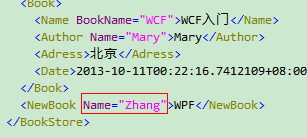
修改属性代码如下
         public void ModifyAttribute(string xmlPath)

         {

             XmlDocument xmlDoc = new XmlDocument();

             xmlDoc.Load(xmlPath);

             XmlElement element = (XmlElement)xmlDoc.SelectSingleNode("BookStore/NewBook");

             element.SetAttribute("Name", "Zhang");

             xmlDoc.Save(xmlPath);

         }
效果如下
2.4 获取节点与属性
         public void Select(string xmlPath)

         {

             XmlDocument xmlDoc = new XmlDocument();

             xmlDoc.Load(xmlPath);

             //取根结点

             var root = xmlDoc.DocumentElement;//取到根结点

             //取指定的单个结点

             XmlNode oldChild = xmlDoc.SelectSingleNode("BookStore/NewBook");

             //取指定的结点的集合

             XmlNodeList nodes = xmlDoc.SelectNodes("BookStore/NewBook");

             //取到所有的xml结点

             XmlNodeList nodelist = xmlDoc.GetElementsByTagName("*");

         }
属性
         public void SelectAttribute(string xmlPath)

         {

             XmlDocument xmlDoc = new XmlDocument();

             xmlDoc.Load(xmlPath);

             XmlElement element = (XmlElement)xmlDoc.SelectSingleNode("BookStore/NewBook");

             string name = element.GetAttribute("Name");

             Console.WriteLine(name);

         }
三 具体操作 (linq to XML)
Linq to Xml 也没什么变化只操作对象改变了主要涉及的几个对象如下 注:我并没有用linq的语法去操作元素。
XDocument:用于创建一个XML实例文档
XElement:用于一些节点与节点属性的基本操作
以下是对Xml的 一些简单的操作
3.1 新增节点与属性
         public void Create(string xmlPath)

         {

             XDocument xDoc = XDocument.Load(xmlPath);

             XElement xElement = xDoc.Element("BookStore");

             xElement.Add(new XElement("Test", new XAttribute("Name", "Zery")));

             xDoc.Save(xmlPath);

         }
属性
         public void CreateAttribute(string xmlPath)

         {

             XDocument xDoc = XDocument.Load(xmlPath);

             IEnumerable<XElement> xElement = xDoc.Element("BookStore").Elements("Book");

             foreach (var element in xElement)

             {

                 element.SetAttributeValue("Name", "Zery");

             }

             xDoc.Save(xmlPath);

         }
3.2 删除节点与属性
         public void Delete(string xmlPath)

         {

             XDocument xDoc = XDocument.Load(xmlPath);

             XElement element = (XElement)xDoc.Element("BookStore").Element("Book");

             element.Remove();

             xDoc.Save(xmlPath);

         }
属性
         public void DeleteAttribute(string xmlPath)

         {

             XDocument xDoc = XDocument.Load(xmlPath);

             //不能跨级取节点

             XElement element = xDoc.Element("BookStore").Element("Book").Element("Name");

             element.Attribute("BookName").Remove();

             xDoc.Save(xmlPath);

         }
3.3 修改节点属性
节点.net没提供修改的方法本文也不做处理
修改属性与新增实质是同一个方法
         public void ModifyAttribute(string xmlPath)

         {

             XDocument xDoc = XDocument.Load(xmlPath);

             XElement element = xDoc.Element("BookStore").Element("Book");

             element.SetAttributeValue("BookName","ZeryTest");

             xDoc.Save(xmlPath);

         }
四 总结
把文章写完时,又扫去了自己的一个盲区,虽然都是些简单的操作,但在实际的开中,又何尝不是由简单到复杂呢。我觉得身为程序员就应该遇到自己的盲区时,立马花时间去了解,不说要了解多深入,但至少基本的还是要知道,等到工作中真需时,只要稍微花点时间就可以了。
如果觉得文章对你有点帮助,不妨点下推荐,你的推荐让我对写文章能有更多的激情!
成长在于积累!
Demo 源码
using System;

using System.Collections.Generic;

using System.IO;

using System.Linq;

using System.Text;

using System.Threading.Tasks;

using System.Xml;

using System.Web;

using System.Xml.Linq;

namespace XMLOperation

{

    class Program

    {

        static void Main(string[] args)

        {

            /*=============Linq 读写XML==================*/

            string wxmlPath = @"F:\XmlTest\test.xml";

            XmlWriteReadLinqOperation writeReadLinq = new XmlWriteReadLinqOperation();

            // writeReadLinq.WriteXml(wxmlPath);

            writeReadLinq.CreatXmlTree(wxmlPath);

            //string xmlPath = @"F:\XML.xml";

            string xmlPath = @"C:\Users\zery.zhang\Desktop\ProjectDemo\XML.xml";

            /*

             * 1 三者之间的关系用图画出

             * 2 XMLElement 主要是针对节点的一些属性进行操作

             * 3 XMLDocument 主要是针对节点的CUID操作

             * 4 XMLNode 为抽象类,做为以上两类的基类,提供一些操作节点的方法

             */

            //===========C# to Xml==========//

            XmlOperation xmlOperation = new XmlOperation();

            //xmlOperation.Create(xmlPath);

            //xmlOperation.CreateAttribute(xmlPath);

            //xmlOperation.Delete(xmlPath);

            //xmlOperation.DeleteAttribute(xmlPath);

            //xmlOperation.Modify(xmlPath);

            //xmlOperation.ModifyAttribute(xmlPath);

            //xmlOperation.Select(xmlPath);

            //xmlOperation.SelectAttribute(xmlPath);

            /*=============Linq to Xml===========*/

            XmlOperationToLinq xOperation = new XmlOperationToLinq();

            // xOperation.Create(xmlPath);

            /*

             *1 给指定的XML节点的所有子节点增加一个节点,并增加属性

             *2 删除指定节点的子节点的指定属性

             *3

             */

            string lxmlPath = @"F:\XmlTest\test.xml";

            xOperation.Create(lxmlPath);

            xOperation.CreateAttribute(lxmlPath);

            //xperation.Delete(lxmlPath);

            //xOperation.DeleteAttribute(lxmlPath);

           // xOperation.ModifyAttribute(lxmlPath);

            /*=============C# 读写XML===============*/

            XmlWriteReadOperation writeRead = new XmlWriteReadOperation();

            Console.Read();

        }

    }

    class XmlOperation

    {

        public void Create(string xmlPath)

        {

            XmlDocument xmlDoc = new XmlDocument();

            xmlDoc.Load(xmlPath);

            var root = xmlDoc.DocumentElement;//取到根结点

            XmlNode newNode = xmlDoc.CreateNode("element", "Name", "");

            newNode.InnerText = "Zery";

            //添加为根元素的第一层子结点

            root.AppendChild(newNode);

            xmlDoc.Save(xmlPath);

        }

        //属性

        public void CreateAttribute(string xmlPath)

        {

            XmlDocument xmlDoc = new XmlDocument();

            xmlDoc.Load(xmlPath);

            XmlElement node = (XmlElement)xmlDoc.SelectSingleNode("Collection/Book");

            node.SetAttribute("Name", "C#");

            xmlDoc.Save(xmlPath);

        }

        public void Delete(string xmlPath)

        {

            XmlDocument xmlDoc = new XmlDocument();

            xmlDoc.Load(xmlPath);

            var root = xmlDoc.DocumentElement;//取到根结点

            var element = xmlDoc.SelectSingleNode("Collection/Name");

            root.RemoveChild(element);

            xmlDoc.Save(xmlPath);

        }

        public void DeleteAttribute(string xmlPath)

        {

            XmlDocument xmlDoc = new XmlDocument();

            xmlDoc.Load(xmlPath);

            XmlElement node = (XmlElement)xmlDoc.SelectSingleNode("Collection/Book");

            //移除指定属性

            node.RemoveAttribute("Name");

            //移除当前节点所有属性,不包括默认属性

            node.RemoveAllAttributes();

            xmlDoc.Save(xmlPath);

        }

        public void Modify(string xmlPath)

        {

            XmlDocument xmlDoc = new XmlDocument();

            xmlDoc.Load(xmlPath);

            var root = xmlDoc.DocumentElement;//取到根结点

            XmlNodeList nodeList = xmlDoc.SelectNodes("/Collection/Book");

            //xml不能直接更改结点名称,只能复制然后替换,再删除原来的结点

            foreach (XmlNode node in nodeList)

            {

                var xmlNode = (XmlElement)node;

                xmlNode.SetAttribute("ISBN", "Zery");

            }

            xmlDoc.Save(xmlPath);

        }

        public void ModifyAttribute(string xmlPath)

        {

            XmlDocument xmlDoc = new XmlDocument();

            xmlDoc.Load(xmlPath);

            XmlElement element = (XmlElement)xmlDoc.SelectSingleNode("Collection/Book");

            element.SetAttribute("Name", "Zhang");

            xmlDoc.Save(xmlPath);

        }

        public void Select(string xmlPath)

        {

            XmlDocument xmlDoc = new XmlDocument();

            xmlDoc.Load(xmlPath);

            //取根结点

            var root = xmlDoc.DocumentElement;//取到根结点

            //取指定的单个结点

            XmlNode singleNode = xmlDoc.SelectSingleNode("Collection/Book");

            //取指定的结点的集合

            XmlNodeList nodes = xmlDoc.SelectNodes("Collection/Book");

            //取到所有的xml结点

            XmlNodeList nodelist = xmlDoc.GetElementsByTagName("*");

        }

        public void SelectAttribute(string xmlPath)

        {

            XmlDocument xmlDoc = new XmlDocument();

            xmlDoc.Load(xmlPath);

            XmlElement element = (XmlElement)xmlDoc.SelectSingleNode("Collection/Book");

            string name = element.GetAttribute("Name");

        }

    }

    class XmlOperationToLinq

    {

        //其它操作

        public void OtherOperaton()

        {

            //加文件头

        }

        public void Create(string xmlPath)

        {

            XDocument xDoc = XDocument.Load(xmlPath);

            XElement xElement = xDoc.Element("BookStore");

            xElement.Add(new XElement("Test", new XAttribute("Name", "Zery")));

            xDoc.Save(xmlPath);

        }

        public void CreateAttribute(string xmlPath)

        {

            XDocument xDoc = XDocument.Load(xmlPath);

            IEnumerable<XElement> xElement = xDoc.Element("BookStore").Elements("Book");

            foreach (var element in xElement)

            {

                element.SetAttributeValue("Name", "Zery");

            }

            xDoc.Save(xmlPath);

        }

        public void Delete(string xmlPath)

        {

            XDocument xDoc = XDocument.Load(xmlPath);

            XElement element = (XElement)xDoc.Element("BookStore").Element("Book");

            element.Remove();

            xDoc.Save(xmlPath);

        }

        public void DeleteAttribute(string xmlPath)

        {

            XDocument xDoc = XDocument.Load(xmlPath);

            //不能跨级取节点

            XElement element = xDoc.Element("BookStore").Element("Book").Element("Name");

            element.Attribute("BookName").Remove();

            xDoc.Save(xmlPath);

        }

        public void ModifyAttribute(string xmlPath)

        {

            XDocument xDoc = XDocument.Load(xmlPath);

            XElement element = xDoc.Element("BookStore").Element("Book");

            element.SetAttributeValue("BookName","ZeryTest");

            xDoc.Save(xmlPath);

        }

    }

    internal class XmlWriteReadOperation

    {

    }

    class XmlWriteReadLinqOperation

    {

        public void CreatXmlTree(string xmlPath)

        {

            XElement xElement = new XElement(

                new XElement("BookStore",

                    new XElement("Book",

                        new XElement("Name", "C#入门", new XAttribute("BookName", "C#")),

                        new XElement("Author", "Martin", new XAttribute("Name", "Martin")),

                        new XElement("Adress", "上海"),

                        new XElement("Date", DateTime.Now.ToString("yyyy-MM-dd"))

                        ),

                    new XElement("Book",

                        new XElement("Name", "WCF入门", new XAttribute("BookName", "WCF")),

                        new XElement("Author", "Mary", new XAttribute("Name", "Mary")),

                        new XElement("Adress", "北京"),

                        new XElement("Date", DateTime.Now.ToString("yyyy-MM-dd"))

                        )

                        )

                );

            //需要指定编码格式,否则在读取时会抛:根级别上的数据无效。 第 1 行 位置 1异常

            XmlWriterSettings settings = new XmlWriterSettings();

            settings.Encoding = new UTF8Encoding(false);

            settings.Indent = true;

            XmlWriter xw = XmlWriter.Create(xmlPath,settings);

            xElement.Save(xw);

            //写入文件

            xw.Flush();

            xw.Close();

        }

        public void WriteXml(string xmlPath)

        {

            XElement xElement = new XElement(

                new XElement("Store",

                    new XElement("Book", "技术类",

                        new XElement("Name", "C#入门", new XAttribute("BookName", "C#")),

                        new XElement("Author", "Martin", new XAttribute("Name", "Zery")),

                        new XComment("以下为注释"),//xml注释

                        new XElement("Date", DateTime.Now.ToString(), new XAttribute("PublicDate", DateTime.Now.ToString()))

                        ))

                );

            XmlWriter xw = XmlWriter.Create(xmlPath);

            //保存到XmlWriter

            xElement.Save(xw);

            //写入文件

            xw.Flush();

            xw.Close();

        }

    }

}
C#操作XML方法集合的更多相关文章
- js操作textarea方法集合
<%@ page language="java" import="java.util.*" pageEncoding="UTF-8"% ...
- C#操作XML方法详解
using System.Xml; //初始化一个xml实例 XmlDocument xml=new XmlDocument(); //导入指定xml文件 xml.Load(path); xml. ...
- C#操作XML方法:新增、修改和删除节点与属性
一 前言 先来了解下操作XML所涉及到的几个类及之间的关系 如果大家发现少写了一些常用的方法,麻烦在评论中指出,我一定会补上的!谢谢大家 * 1 XMLElement 主要是针对节点的一些属性进行操 ...
- PHP操作XML方法之SimpleXML
SimpleXML简介 SimpleXML 扩展提供了一个非常简单和易于使用的工具集,能将XML转换成一个带有一般属性选择器和数组迭代器的对象. 举例XML XML结构部分引用自<<深入理 ...
- C#.Net操作XML方法二
上面那篇博客,在上面那面博客中是通过System.Xml命名空间中的类来实现对XML文件的创建.删除和改动等操作.接下来再介绍一种方法,在整个的操作过程中,仅仅只是换了个类而已,没什么大惊小怪的. D ...
- 24、java操作xml方法
XML解析方式 1. SAX解析方式 SAX(simple API for XML)是一种XML解析的替代方法.相比于DOM,SAX是一种速度更快,更有效的方法.它逐行扫描文档,一边扫描一边解析.而且 ...
- C# 操作IIS方法集合
如果在win8,win7情况下报错:未知错误(0x80005000) 见http://blog.csdn.net/ts1030746080/article/details/8741399 using ...
- 【分享】 封装js操作textarea 方法集合(兼容很好)。
请使用下面的btn操作. 虽然你现在看来没什么用,当要用的时候又到处找资料,还不如现在收集一下. 在DOM里面操作textarea里面的字符,是比较麻烦的. 于是我有这个封装分享给大家 ...
- PHP操作XML方法之 XML Expat Parser
XML Expat Parser 简介 此PHP扩展实现了使用PHP支持JamesClark编写的expat.此工具包可解析(但不能验证)XML文档.它支持PHP所提供的3种字符编码:US-ASCII ...
随机推荐
- c# bass入门学习
据说bass挺好用的,所以又搞了个音乐播放器 这是参考了别人的bass教学结合自己的理解写的bass操作类 public class BassHelper { private static BassH ...
- Bootstrap模态框(modal)垂直居中
http://v3.bootcss.com/ 自己也试了改了几种方式也不容乐观,发现在窗口弹出之前是获取不到$(this).height()的值,本想着是用($(window).height()-$( ...
- php模拟飞鸽传输协议,代码实现向飞鸽发送消息
飞鸽传书协议:1:23149:riverlet:127.0.0.1:\x20:balabalabalabala版本号:包编号:发送者姓名:发送者主机名:命令字:附加信息(消息内容) <?php ...
- php数组高级小结(一)
<?php /** * php5.4新增数组定义 */ $items1 = [ 'a','b','c' ]; $items2=[ 'name'=>'andy','age'=>52 ] ...
- C语言中链表怎么删除结点?
第一个方法: /*根据姓名删除链表的中的学生记录*/ void deleteByName(struct STUDENT * head) { struct STUDENT *p,*q; ]; if(he ...
- Debian Environment Variables
原文:EnvironmentVariables General Environment variables are named strings available to all application ...
- 内部类访问的局部变量必须加final
(1)内部类是外部类的一个成员,就像外部类的成员方法一样,所以内部类有权限访问外部类的所有成员,包括private的. (2)内部类不能访问外部类方法中的局部变量,除非变量是final的(一般发生在 ...
- ASP.NET Web API 安全筛选器
原文:https://msdn.microsoft.com/zh-cn/magazine/dn781361.aspx 身份验证和授权是应用程序安全的基础.身份验证通过验证提供的凭据来确定用户身份,而授 ...
- [Top-Down Approach] Assignment 1: WebServer [Python]
Today I complete Socket Programming Assignment 1 Web Server Here is the code: #!/usr/bin/python2.7 # ...
- UVa 673 Parentheses Balance -SilverN
You are given a string consisting of parentheses () and []. A string of this type is said to be corr ...