
qt之线程
第一种创建:
mythread1.h:
#ifndef MYTHREAD_H

#define MYTHREAD_H

#include<QThread>

#include<QDebug>

class mythread:public QThread

{

public:

    mythread(const QString & s,QObject *parent=nullptr);

    void run();

    void working();

private:

    const QString &str;

};

#endif // MYTHREAD_H
mythread1.cpp:
#include "mythread.h"

#include<QDebug>

mythread::mythread(const QString & s,QObject *parent)

    :QThread (parent),str(s)

{

}

 void mythread::run()

 {

     working();

     //exec();

 }

 void  mythread::working()

 {

     for(int i=0;i<10;i++)

     {

         qDebug()<<str<<i<<QThread::currentThreadId()<<endl;

     }

 }
main.cpp:
#include "widget.h"

#include <QApplication>

#include "mythread.h"

#include<QDebug>

int main(int argc, char *argv[])

{

QApplication a(argc, argv);

mythread my("s1");

qDebug()<<"主线程在运行"<<endl;

my.start();

qDebug()<<"主线程在运行"<<endl;

qDebug()<<"主线程在运行"<<endl;

qDebug()<<"主线程在运行"<<endl;

qDebug()<<"主线程在运行"<<endl;

qDebug()<<"主线程在运行"<<endl;

qDebug()<<"主线程在运行"<<endl;

qDebug()<<"主线程在运行"<<endl;

qDebug()<<"主线程在运行"<<endl;

qDebug()<<my.wait()<<endl;

//Widget add;

//add.show();

//    return a.exec();

}
效果:

第二种创建:
,mythread2.h:
#ifndef MYTHREAD2_H

#define MYTHREAD2_H

#include <QObject>

class MyThread2 : public QObject

{

    Q_OBJECT

public:

    explicit MyThread2(const QString& s,QObject *parent = nullptr);

signals:

public slots:

    void working1();

    void working2();

private:

    QString str;

};

#endif // MYTHREAD2_H
mythread2.cpp:
#include "mythread2.h"

#include<QDebug>

#include<QThread>

MyThread2::MyThread2(const QString& s,QObject *parent)

    : QObject(parent),str(s){}

 void MyThread2::working1()

 {

     for(int i=0;i<10;i++)

     {

         qDebug()<<str<<i<<QThread::currentThreadId()<<"working1"<<endl;

     }

 }

 void MyThread2::working2()

 {

     for(int i=0;i<10;i++)

     {

         qDebug()<<str<<i<<QThread::currentThreadId()<<"working2"<<endl;

     }

 }
widget.h:
#ifndef WIDGET_H

#define WIDGET_H

#include<QThread>

#include <QWidget>

#include<QPushButton>

#include "mythread2.h"

class Widget : public QWidget

{

    Q_OBJECT

public:

    Widget(QWidget *parent = 0);

    ~Widget();

private:

    MyThread2 * mythread;

    QThread * ms;

};

#endif // WIDGET_H
widget.cpp:
#include "widget.h"

#include<QHBoxLayout>

#include<QThread>

#include<QObject>

#include<QDebug>

Widget::Widget(QWidget *parent)

    : QWidget(parent)

{

     QHBoxLayout *s=new QHBoxLayout(this);

      QPushButton *s1=new QPushButton("确定");

      QPushButton *s2=new QPushButton("取消");

      s->addWidget(s1);

      s->addWidget(s2);

    mythread=new MyThread2("mythread is starting...");

    ms=new QThread(this);

    mythread->moveToThread(ms);

    ms->start();

    connect(s1,SIGNAL(clicked()),mythread,SLOT(working1()));

    connect(s2,SIGNAL(clicked()),mythread,SLOT(working2()));

   connect(ms,SIGNAL(finished()),mythread,SLOT(deleteLater()));

}

Widget::~Widget()

{

    qDebug()<<"~Widget()"<<endl;

    ms->quit();

    ms->wait();

}
main.cpp:
#include "widget.h"

#include <QApplication>

#include "mythread.h"

#include<QDebug>

int main(int argc, char *argv[])

{

QApplication a(argc, argv);

//mythread my("s1");

//qDebug()<<"主线程在运行"<<endl;

//my.start();

//qDebug()<<"主线程在运行"<<endl;

//qDebug()<<"主线程在运行"<<endl;

//qDebug()<<"主线程在运行"<<endl;

//qDebug()<<"主线程在运行"<<endl;

//qDebug()<<"主线程在运行"<<endl;

//qDebug()<<"主线程在运行"<<endl;

//qDebug()<<"主线程在运行"<<endl;

//qDebug()<<"主线程在运行"<<endl;

//qDebug()<<my.wait()<<endl;

Widget add;

add.show();

    return a.exec();

}
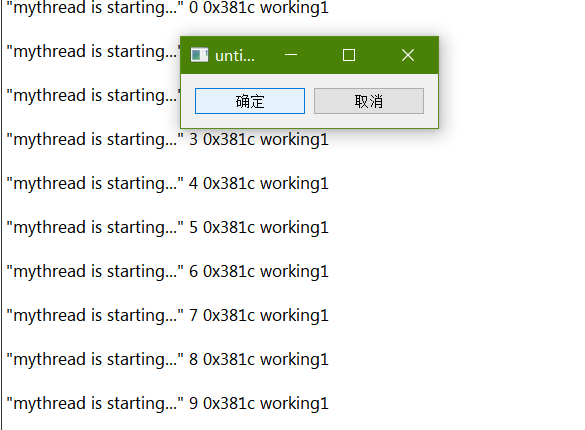
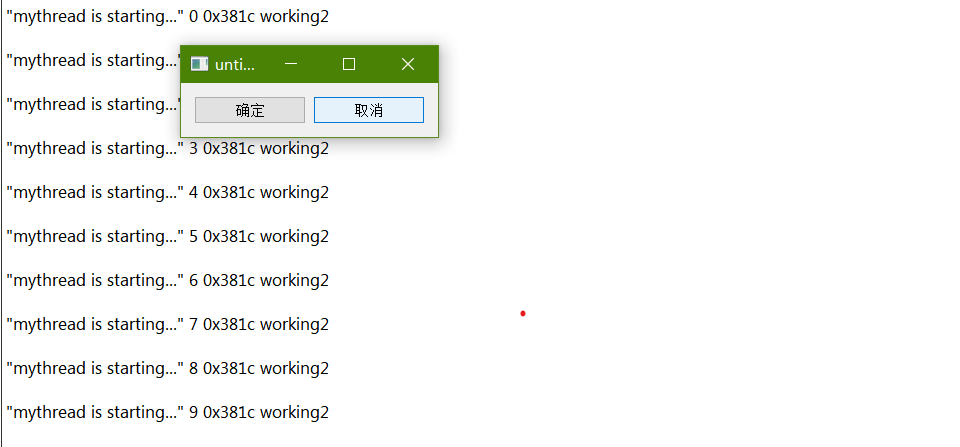
效果:
qt之线程的更多相关文章
- Qt经典—线程、事件与Qobject(耳目一新)
介绍 You’re doing it wrong. — Bradley T. Hughes 线程是qt channel里最流行的讨论话题之一.许多人加入了讨论并询问如何解决他们在运行跨线程编程时所遇到 ...
- Qt同步线程(比较清楚,而且QMutex QMutexLocker QReadWriteLock QSemaphore QWaitCondition 每个都有例子)
Qt同步线程 我们知道,多线程有的时候是很有用的,但是在访问一些公共的资源或者数据时,需要进行同步,否则会使数据遭到破坏或者获取的值不正确.Qt提供了一些类来实现线程的同步,如QMutex,QMute ...
- [转]QT子线程与主线程的信号槽通信-亲测可用!
近用QT做一个服务器,众所周知,QT的主线程必须保持畅通,才能刷新UI.所以,网络通信端采用新开线程的方式.在涉及到使用子线程更新Ui上的控件时遇到了点儿麻烦.网上提供了很多同一线程不同类间采用信号槽 ...
- Qt 的线程与事件循环
Qt 的线程与事件循环
- Qt经典—线程、事件与Qobject
介绍 You’re doing it wrong. — Bradley T. Hughes 线程是qt channel里最流行的讨论话题之一.许多人加入了讨论并询问如何解决他们在运行跨线程编程时所遇到 ...
- Qt 子线程更新Ui
最近做练习,写一个Qt版的飞机大战,需要用子线程更新UI,发现Qt子线程不能更新Ui,否则程序会崩溃.在网上百度了下,说是需要在子线程自定义信号,然后在线程回调的run()函数里发射信号,主线程连接信 ...
- Qt同步线程(QMutex QMutexLocker QReadWriteLock QSemaphore QWaitCondition )
Qt同步线程 我们知道,多线程有的时候是很有用的,但是在访问一些公共的资源或者数据时,需要进行同步,否则会使数据遭到破坏或者获取的值不正确.Qt提供了一些类来实现线程的同步,如QMutex,QMute ...
- Qt之线程基础
何为线程 线程与并行处理任务息息相关,就像进程一样.那么,线程与进程有什么区别呢?当你在电子表格上进行数据计算的时候,在相同的桌面上可能有一个播放器正在播放你最喜欢的歌曲.这是一个两个进程并行工作的例 ...
- Qt跨线程信号和槽的连接(默认方式是直连和队列的折中)
Qt支持三种类型的信号-槽连接:1,直接连接,当signal发射时,slot立即调用.此slot在发射signal的那个线程中被执行(不一定是接收对象生存的那个线程)2,队列连接,当控制权回到对象属于 ...
- Qt新建线程的方法(四种办法,很详细,有截图)
看了不少Qt线程的东西,下面总结一下Qt新建一个线程的方法. 一.继承QThread 继承QThread,这应该是最常用的方法了.我们可以通过重写虚函数void QThread::run ()实现我们 ...
随机推荐
- centos7安装docker,并配置镜像加速
yum安装gcc yum -y install gcc yum -y install gcc-c++ 卸载旧版本 (没有可忽略) yum -y remove docker docker-common ...
- JAVA获取当前年份,月份、日期、小时、分钟、秒等
import java.util.Calendar; public class Main { public static void main(String[] args) { Calendar cal ...
- 【LeetCode】152. Maximum Product Subarray 解题报告(Python & C++)
作者: 负雪明烛 id: fuxuemingzhu 个人博客: http://fuxuemingzhu.cn/ 目录 题目描述 题目大意 解题方法 双重循环 动态规划 参考资料 日期 题目地址:htt ...
- 【LeetCode】714. Best Time to Buy and Sell Stock with Transaction Fee 解题报告(Python & C++)
作者: 负雪明烛 id: fuxuemingzhu 个人博客: http://fuxuemingzhu.cn/ 目录 题目描述 题目大意 解题方法 动态规划 日期 题目地址:https://leetc ...
- Codeforces 855B:Marvolo Gaunt's Ring(枚举,前后缀)
B. Marvolo Gaunt's Ring Professor Dumbledore is helping Harry destroy the Horcruxes. He went to Gaun ...
- 【项目管理】《IT项目管理》Kathy Schwalbe 第2章 IT项目管理和IT背景
1.对项目管理采取系统的观点有何意义?如何在项目管理中采用系统的观点? 意义:有效处理复杂的环境 采用系统方法,系统分析,系统管理.2.解释组织的四个框架.他们是如何帮助项目经理理解项目的组织环境的? ...
- 数据结构作业——P53算法设计题(6):设计一个算法,通过一趟遍历确定长度为n的单链表中值最大的结点
思路: 设单链表首个元素为最大值max 通过遍历元素,与最大值max作比较,将较大值附给max 输出最大值max 算法: /* *title:P53页程序设计第6题 *writer:weiyuexin ...
- haproxy-详解
负载均衡类型: 四层: LVS (Linux Virtual Server)HAProxy (High Availability Proxy)Nginx (1.9以上) 七层: HAProxyNgin ...
- Layui的本地存储方法-Layui.data的基本使用
本地存储是对 localStorage 和 sessionStorage 的友好封装,可更方便地管理本地数据. localStorage 持久化存储:layui.data(table, setting ...
- Spring Boot 整合 Fisco Bcos(区块链)
简介 FISCO BCOS是由国内企业主导研发.对外开源.安全可控的企业级金融联盟链底层平台,由金链盟开源工作组协作打造,并于2017年正式对外开源. 目前,成熟的区块链的平台不少,之所以选择FISC ...