
实用程序包utils - 基于Rollup打包输出各模块文件(二)
上一次,我们讲到了如何去搭建一个前端工具库的工程,那么今天我们来聊一聊如何去将其打包输出。
需求
事情是这个样子的。我有一个这样的需求,或者是我发现有这么一个需求。就是有时候吧,我也不想搞的那么复杂,我就想写一个简简单单的demo,引入一个JS脚本,CTRL + S一按,浏览器一打开,啪的一下,我就能看见效果,我就能爽起来,我不想npm init 、npm install这种去搞一个规范的工程,我就想回到远古时代,感受最纯真的爱。再比如后端的同学或者测试的同学,我不想知道npm是什么,我也不想去搞什么前端工程化,我就想像在学校老师教我的那样,引入一个JS脚本,啪地一下能出效果,就像layui、jquery那样,引入相关的脚本,it works。
好,今天围绕着楼上这个问题,我们去思考上一次工程化留下来的问题。 ------ 怎么将开发的模块打包输出?

JS中的模块规范
随着时代的发展,社会的进步。为了更好地解决代码的冲突和依赖等问题,JS的模块也经历了很大的发展。比如写服务端Node.js同学熟悉的CommonJS规范,以及专为浏览器设计的AMD(Asynchronous Module Definition)规范,还有它们的结合体UMD(Universal Module Definition)规范,还有2015年推出的ES Module规范。这里具体的示例我们放到后面再讲。
Rollup介绍
Rollup是一个Javascript的模块打包器,它可以做这样一件事,将一大串代码打包成一个模块文件,这个模块可以是我们上面提到的模块规范,比如著名的Vue.js框架就是使用了rollup进行打包相关的文件输出。
如何在项目中运用rollup
这里我主要是用了这5个主要的辅助包
执行相关命令npm install package name即可,欧,不要忘了安装rollup本包
@rollup/plugin-json
这个插件主要是将JSON文件转换为ES Module
https://github.com/rollup/plugins/tree/master/packages/json
rollup-plugin-babel
我们知道babel是JS的一个语法编译器,有了它,或者说加上它的一些插件(比如说垫片),你可以在一些低版本或者不支持ES高级语法的环境下使用它
https://github.com/rollup/plugins/tree/master/packages/babel
rollup-plugin-terser
可能我们生成的代码体积很大,用这个插件可以有效地减小我们输出包的体积
https://github.com/trysound/rollup-plugin-terser
@rollup/plugin-commonjs
这个插件就是将commonJS的语法转化成ES Module的
https://github.com/rollup/plugins/blob/master/packages/commonjs
@rollup/plugin-node-resolve
这个是处理npm包的相关引入依赖的
https://github.com/rollup/plugins/tree/master/packages/node-resolve
下面是我的utils项目的一份配置文件rollup.config.js
import json from '@rollup/plugin-json';

import babel from 'rollup-plugin-babel';

import { terser } from 'rollup-plugin-terser';

import commonjs from '@rollup/plugin-commonjs';

import resolve from '@rollup/plugin-node-resolve';

import pkg from './package.json';

const banner =

  '/*!\n' +

  ` * ataola-utils.js v${pkg.version}\n` +

  ` * (c) 2021-${new Date().getFullYear()} ataola(Jiangtao Zheng)\n` +

  ' * Released under the MIT License.\n' +

  ' */';

export default [

  // browser-friendly UMD build

  {

    input: 'index.js',

    output: {

      name: 'ataola-utils',

      file: pkg.browser,

      format: 'umd',

      sourcemap: true,

      banner,

    },

    plugins: [

      json({

        compact: true,

      }),

      resolve(),

      commonjs(),

      babel({

        exclude: 'node_modules/**',

        runtimeHelpers: true,

        presets: ['@babel/preset-env'],

        plugins: [

          [

            '@babel/plugin-transform-runtime',

            { useESModules: true /**, corejs: 3  */ },

          ],

        ],

      }),

    ],

  },

  {

    input: 'index.js',

    output: [

      { file: pkg.main, format: 'cjs', banner, sourcemap: true },

      { file: pkg.module, format: 'esm', banner, sourcemap: true },

      {

        name: 'ataola-utils',

        file: 'dist/ataola-utils.amd.js',

        format: 'amd',

        extend: true,

        sourcemap: true,

        banner,

      },

      {

        name: 'ataola-utils',

        file: 'dist/ataola-utils.js',

        format: 'iife',

        extend: true,

        sourcemap: true,

        banner,

      },

      {

        name: 'ataola-utils',

        file: 'dist/ataola-utils.min.js',

        format: 'iife',

        extend: true,

        banner,

        sourcemap: true,

        plugins: [terser()],

      },

    ],

    plugins: [

      json({

        compact: true,

      }),

      resolve(),

      commonjs(),

      babel({

        // https://github.com/rollup/rollup-plugin-babel#configuring-babel

        exclude: 'node_modules/**',

        runtimeHelpers: true,

        presets: ['@babel/preset-env'],

        plugins: [

          [

            '@babel/plugin-transform-runtime',

            { useESModules: true /**, corejs: 3  */ },

          ],

        ],

      }),

    ],

  },

];
https://github.com/ataola/utils/blob/main/rollup.config.js
楼上的配置项通俗易懂,字面意思就是它的意思,就不过多解释了。这里我输出的是一个数组,其实也可以是个对象,然后我们在output上面去配置输出的格式,这个根据项目可以灵活配置的。主要是配置了打包输出umd、amd、commonjs、esmodule以及IIFE(Immediately Invoked Function Expression)立即调用函数表达式

打包出来的文件怎么使用
AMD
<!DOCTYPE html>

<html lang="en">

<head>

  <meta charset="UTF-8">

  <meta http-equiv="X-UA-Compatible" content="IE=edge">

  <meta name="viewport" content="width=device-width, initial-scale=1.0">

  <title>ataola utils</title>

</head>

<body>

</body>

<script src="https://cdn.bootcdn.net/ajax/libs/require.js/2.3.6/require.js"></script>

<script>

requirejs(["https://unpkg.com/@ataola/utils@0.1.10/dist/ataola-utils.amd.js"], function(ataola) {

   console.log(ataola)

   console.log(ataola.getVersion())

});

</script>

</html>
https://zhengjiangtao.cn/show/zj/ataola-utils-amd.html
UMD
<!DOCTYPE html>

<html lang="en">

<head>

  <meta charset="UTF-8">

  <meta http-equiv="X-UA-Compatible" content="IE=edge">

  <meta name="viewport" content="width=device-width, initial-scale=1.0">

  <title>ataola utils</title>

</head>

<body>

</body>

<script src="https://unpkg.com/@ataola/utils@0.1.10/dist/ataola-utils.umd.js"></script>

<script>

  const ataola = this['ataola-utils'];

  console.log(ataola);

  console.log(ataola.getVersion());

</script>

</html>
https://zhengjiangtao.cn/show/zj/ataola-utils-umd.html
IIFE
<!DOCTYPE html>

<html lang="en">

<head>

  <meta charset="UTF-8">

  <meta http-equiv="X-UA-Compatible" content="IE=edge">

  <meta name="viewport" content="width=device-width, initial-scale=1.0">

  <title>ataola utils</title>

</head>

<body>

</body>

<script src="https://unpkg.com/@ataola/utils@0.1.10/dist/ataola-utils.min.js"></script>

<script>

  // https://unpkg.com/@ataola/utils@0.1.10/dist/ataola-utils.js

  // https://cdn.jsdelivr.net/npm/@ataola/utils@0.1.10/dist/ataola-utils.js

  // use this['ataola-utils'] || window['ataola-utils']

  const ataola = this['ataola-utils'];

  console.log(ataola);

  console.log(ataola.getVersion());

</script>

</html>
https://zhengjiangtao.cn/show/zj/ataola-utils.html
ES Module
<!DOCTYPE html>

<html lang="en">

<head>

  <meta charset="UTF-8">

  <meta http-equiv="X-UA-Compatible" content="IE=edge">

  <meta name="viewport" content="width=device-width, initial-scale=1.0">

  <title>utils unpkg</title>

</head>

<body>

</body>

<script type="module">

import * as ataola from 'https://unpkg.com/@ataola/utils@0.1.10/dist/ataola-utils.esm.js';

console.log(ataola);

</script>

</html>
https://zhengjiangtao.cn/show/zj/ataola-utils-amd.html
ComonJS
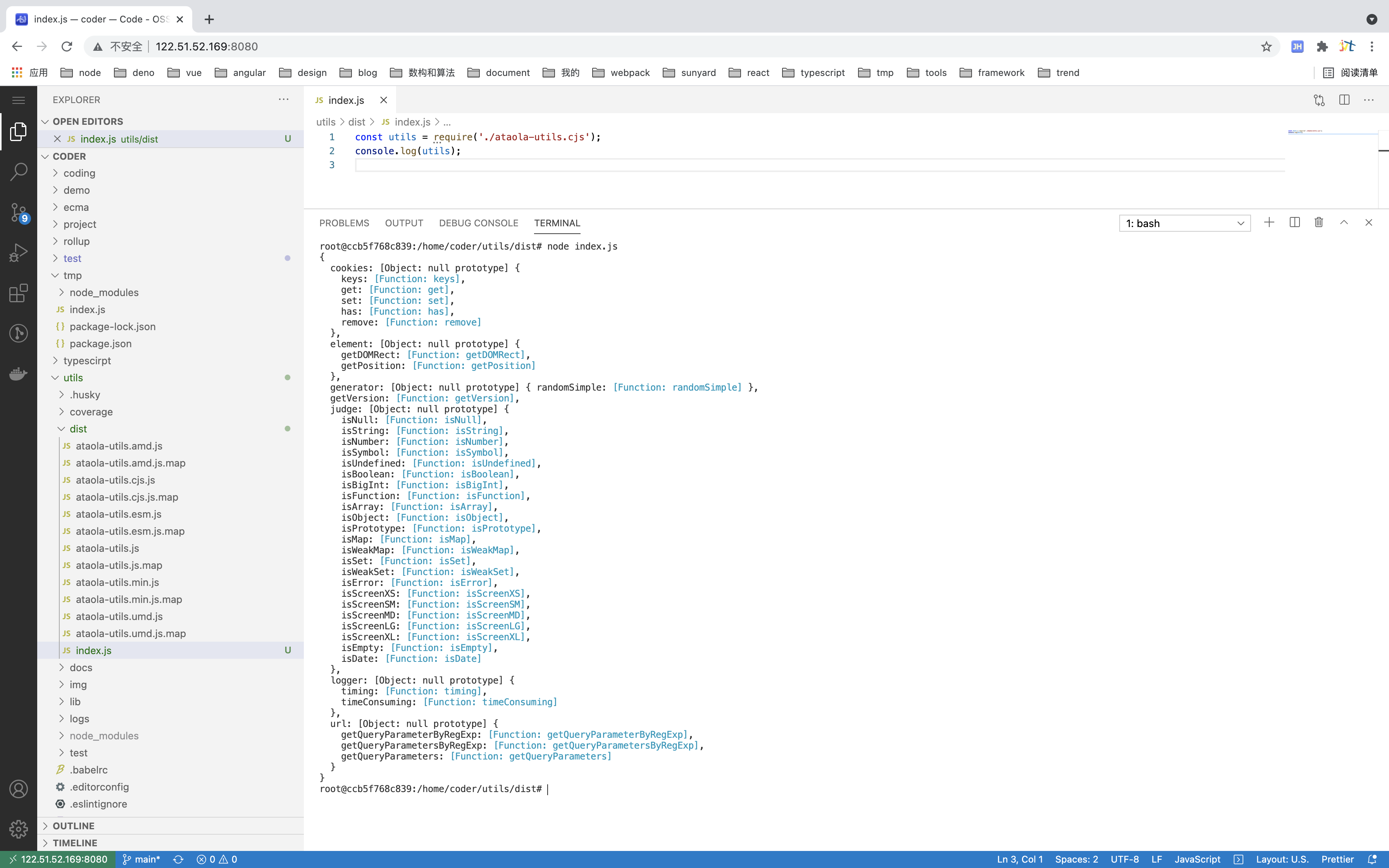
这里AMD相关的引入需要你先引入require.js的支持,如果是commonJS模块的话,需要用seajs,我试了下不是很好使,我放弃了别打我,建议直接在node.js环境下引入,如楼上
参考文献
Rollup官方文档:https://rollupjs.org/guide/zh/
Rollup插件库: https://github.com/rollup/plugins
IIFE: https://developer.mozilla.org/zh-CN/docs/Glossary/IIFE
实用程序包utils - 基于Rollup打包输出各模块文件(二)的更多相关文章
- 学习rollup.js模块文件打包
学习rollup.js模块文件打包 一:rollup 是什么?Rollup 是一个 JavaScript 模块打包器,可以将小块代码编译成大块复杂的代码. webpack 和 Rollup 对比不同点 ...
- X264-编码模块和NAL打包输出
在上一篇介绍了编码器的VCL编码操作,分析了函数x264_slice_write().函数x264_slice_write()里有四个关键模块,分别是宏块分析模块.宏块编码模块.熵编码模块和滤波模块, ...
- vite的项目,使用 rollup 打包的方法
官网资料 构建生产版本--库模式 https://cn.vitejs.dev/guide/build.html#library-mode 详细设置 https://cn.vitejs.dev/conf ...
- 基于FPGA的VGA可移植模块终极设计【转】
本文转载自:http://www.cnblogs.com/lueguo/p/3373643.html 略过天涯 基于FPGA的VGA可移植模块终极设计 一.VGA的诱惑 首先,VGA的驱动,这事, ...
- 基于webpack实现多html页面开发框架二 css打包、支持scss、文件分离
本节主要介绍webpack打包的时候CSS的处理方式 一.解决什么问题 1.CSS打包 2.CSS处理浏览器兼容 3.SASS支持 4.CSS分离成单独的文件 ...
- 介绍一种基于gulp对seajs的模块做合并压缩的方式
之前的项目一直采用grunt来构建,然后用requirejs做模块化,requirejs官方有提供grunt的插件来做压缩合并.现在的项目切到了gulp,模块化用起了seajs,自然而然地也想到了模块 ...
- Python日志输出——logging模块
Python日志输出——logging模块 标签: loggingpythonimportmodulelog4j 2012-03-06 00:18 31605人阅读 评论(8) 收藏 举报 分类: P ...
- openerp模块收藏 基于Lodop的报表打印模块(转载)
基于Lodop的报表打印模块 原文:http://shine-it.net/index.php/topic,7397.0.html 前段时间写了个小模块,来解决OE中报表打印不方便的问题.借鉴了 @b ...
- 打包发布Python模块或程序,安装包
Python模块.扩展和应用程序可以按以下几种形式进行打包和发布: python setup.py获取帮助的方式 python setup.py --help python setup.py --he ...
随机推荐
- git 让忽略.gitignore文件马上生效
在.gitignore文件里面输入 *.zip 表示所有zip文件忽略更改 /bin 表示忽略整个根目录的bin文件夹 /src/aa.jar 表示忽略/src/aa.jar文件 设置完.gitign ...
- Fiddler高级用法
Fiddler高级用法 1. 简单用法 Fiddler作为一个基于http协议的抓包工具,一直在业界有广泛使用.很多测试或者前端在使用Fiddler时,仅仅用于查看前端和服务端之间的请求信息.包括我作 ...
- P7518 & 省选联考2021 宝石
这是一篇极其简单连像我这样省三参加不了省选的蒟蒻都能看懂的题解 前置知识: 倍增LCA 二分 栈 题意 PS:这是一篇完全面向初学者的题解,会非常细,大佬请无视 题目传送门 没有思路的时候, 我们往 ...
- Selenium3自动化测试【14】元素定位之ID
元素定位 Selenium需要告知其如何去定位元素,来模拟用户动作.例如要操作Bing搜索页. 首先要找到搜索框与搜索按钮: 通过键盘输入检索的关键字: 用鼠标单击搜索按钮: 提交搜索请求. Sele ...
- 利用宝塔面板搭建 Laravel 5.5 环境
1.更新系统 yum install epel-release #rpm -Uvh https://dl.fedoraproject.org/pub/epel/epel-release-latest- ...
- 【Java】说说你对ThreadLocal的理解
思路: 0.ThreadLocal是什么?有什么用? 1.ThreadLocal用在什么地方? 2.ThreadLocal的一些细节 3.ThreadLocal的最佳实践 一.ThreadLocal用 ...
- 【布隆过滤器】基于Hutool库实现的布隆过滤器Demo
布隆过滤器出现的背景: 如果想判断一个元素是不是在一个集合里,一般想到的是将集合中所有元素保存起来,然后通过比较确定.链表.树.散列表(又叫哈希表,Hash table)等等数据结构都是这种思路,存储 ...
- hdu1529 差分约束(好题)
题意: 超市在每个时间都有需要的人数(24小时)比如 1 0 0 0 0 ....也就是说在第0个小时的时候要用一个人,其他的时间都不用人,在给你一些人工作的起始时间,如果雇佣了这个人,那 ...
- IPC$共享和其他共享(C$、D$)
目录 net use共享命令的用法 IPC$ IPC空连接 ipc$使用的端口 关闭IPC$共享 net use共享命令的用法 net use #查看连接 net share ...
- POJ1149 最大流经典建图PIG
题意: 有一个人,他有m个猪圈,每个猪圈里都有一定数量的猪,但是他没有钥匙,然后依次来了n个顾客,每个顾客都有一些钥匙,还有他要卖猪的数量,每个顾客来的时候主人用顾客的钥匙打开相应的门,可 ...