
Win10手记-为应用集成SQLite(二)
接上篇内容,这里给大家分享我的辅助访问类,采用了异步方法,封装了常用的访问操作,一些操作还是纯CLI的。
SQLiteDBManager
using System;

using System.Collections.Generic;

using System.Collections;

using System.Threading.Tasks;

using SQLite.Net;

using SQLite.Net.Async;

using Windows.Storage;

using System.Diagnostics;

using YunshouyiUWP.Model;

namespace YunshouyiUWP.Data

{

    public class SQLiteDBManager

    {

        private static SQLiteDBManager dbManager;

        /// <summary>

        /// construct function

        /// </summary>

        public SQLiteDBManager()

        {

            InitDBAsync();

        }

        /// <summary>

        /// get current instance

        /// </summary>

        /// <returns></returns>

        public static SQLiteDBManager Instance()

        {

            if (dbManager == null)

                dbManager = new SQLiteDBManager();

            return dbManager;

        }

        private static SQLiteAsyncConnection dbConnection;

        /// <summary>

        /// get current DBConnection

        /// </summary>

        /// <returns></returns>

        public async Task<SQLiteAsyncConnection> GetDbConnectionAsync()

        {

            if (dbConnection == null)

            {

                var path = await GetDBPathAsync();

                dbConnection = new SQLiteAsyncConnection(() => new SQLiteConnectionWithLock(new SQLite.Net.Platform.WinRT.SQLitePlatformWinRT(), new SQLiteConnectionString(path, true)));

            }

            return dbConnection;

        }

        /// <summary>

        /// insert a item

        /// </summary>

        /// <param name="item">item</param>

        /// <returns></returns>

        public async Task<int> InsertAsync(object item)

        {

            try

            {

                var dbConnect = await GetDbConnectionAsync();

                return await dbConnect.InsertOrReplaceAsync(item);

            }

            catch (Exception ex)

            {

                Debug.WriteLine(ex.Message);

                return -;

            }

        }

        /// <summary>

        /// insert lots of items

        /// </summary>

        /// <param name="items">items</param>

        /// <returns></returns>

        public async Task<int> InsertAsync(IEnumerable items)

        {

            try

            {

                var dbConnect = await GetDbConnectionAsync();

                return await dbConnect.InsertOrReplaceAllAsync(items);

            }

            catch (Exception ex)

            {

                Debug.WriteLine(ex.Message);

                return -;

            }

        }

        /// <summary>

        /// find a item in database

        /// </summary>

        /// <typeparam name="T">type of item</typeparam>

        /// <param name="pk">item</param>

        /// <returns></returns>

        public async Task<T> FindAsync<T>(T pk) where T : class

        {

            try

            {

                var dbConnect = await GetDbConnectionAsync();

                return await dbConnect.FindAsync<T>(pk);

            }

            catch (Exception ex)

            {

                Debug.WriteLine(ex.Message);

                return null;

            }

        }

        /// <summary>

        /// find a collection of items

        /// </summary>

        /// <typeparam name="T">type of item</typeparam>

        /// <param name="sql">sql command</param>

        /// <param name="parameters">sql command parameters</param>

        /// <returns></returns>

        public async Task<List<T>> FindAsync<T>(string sql, object[] parameters) where T : class

        {

            try

            {

                var dbConnect = await GetDbConnectionAsync();

                return await dbConnect.QueryAsync<T>(sql, parameters);

            }

            catch (Exception ex)

            {

                Debug.WriteLine(ex.Message);

                return null;

            }

        }

        /// <summary>

        /// update item in table

        /// </summary>

        /// <typeparam name="T">type of item</typeparam>

        /// <param name="item">item</param>

        /// <returns></returns>

        public async Task<int> UpdateAsync<T>(T item) where T : class

        {

            try

            {

                var dbConnect = await GetDbConnectionAsync();

                return await dbConnect.UpdateAsync(item);

            }

            catch (Exception ex)

            {

                Debug.WriteLine(ex.Message);

                return -;

            }

        }

        /// <summary>

        /// update lots of items in table

        /// </summary>

        /// <typeparam name="T">type of item</typeparam>

        /// <param name="items">items</param>

        /// <returns></returns>

        public async Task<int> UpdateAsync<T>(IEnumerable items) where T : class

        {

            try

            {

                var dbConnect = await GetDbConnectionAsync();

                return await dbConnect.UpdateAllAsync(items);

            }

            catch (Exception ex)

            {

                Debug.WriteLine(ex.Message);

                return -;

            }

        }

        /// <summary>

        /// delete data from table

        /// </summary>

        /// <typeparam name="T">type of item</typeparam>

        /// <param name="item">item</param>

        /// <returns></returns>

        public async Task<int> DeleteAsync<T>(T item) where T : class

        {

            try

            {

                var dbConnect = await GetDbConnectionAsync();

                return await dbConnect.DeleteAsync<T>(item);

            }

            catch (Exception ex)

            {

                Debug.WriteLine(ex.Message);

                return -;

            }

        }

        /// <summary>

        /// delete all items in table

        /// </summary>

        /// <param name="t">type of item</param>

        /// <returns></returns>

        public async Task<int> DeleteAsync(Type t)

        {

            try

            {

                var dbConnect = await GetDbConnectionAsync();

                return await dbConnect.DeleteAllAsync(t);

            }

            catch (Exception ex)

            {

                Debug.WriteLine(ex.Message);

                return -;

            }

        }

        /// <summary>

        /// get local path in application local folder

        /// </summary>

        /// <returns></returns>

        private async Task<string> GetDBPathAsync()

        {

            var file = await ApplicationData.Current.LocalFolder.GetFileAsync("db.sqlite");

            if (file == null)

            {

                var dbFile = await StorageFile.GetFileFromApplicationUriAsync(new Uri("ms-appx:///Data/db.sqlite"));

                file = await dbFile.CopyAsync(ApplicationData.Current.LocalFolder);

            }

            return file.Path;

        }

        /// <summary>

        /// init db

        /// </summary>

        private static async void InitDBAsync()

        {

            try

            {

                var file = await ApplicationData.Current.LocalFolder.TryGetItemAsync("db.sqlite");

                if (file == null)

                {

                    var dbFile = await StorageFile.GetFileFromApplicationUriAsync(new Uri("ms-appx:///Data/db.sqlite"));

                    file = await dbFile.CopyAsync(ApplicationData.Current.LocalFolder);

                    var dbConnect = new SQLiteAsyncConnection(() => new SQLiteConnectionWithLock(new SQLite.Net.Platform.WinRT.SQLitePlatformWinRT(), new SQLiteConnectionString(file.Path, true)));

                    var result = await dbConnect.CreateTablesAsync(new Type[] { typeof(Fund), typeof(P2P) });

                    Debug.WriteLine(result);

                }

            }

            catch (Exception ex)

            {

                Debug.WriteLine(ex.Message);

            }

        }

    }

}
使用方法
以查找数据为例,如下:
public async Task<List<Fund>> GetFundDataAsync()

        {

            var result = await SQLiteDBManager.Instance().FindAsync<Fund>("select * from Fund where Id=?", new string[] { Guid.NewGuid().ToString() });

            if (result != null)

                return result;

            return null;

        }
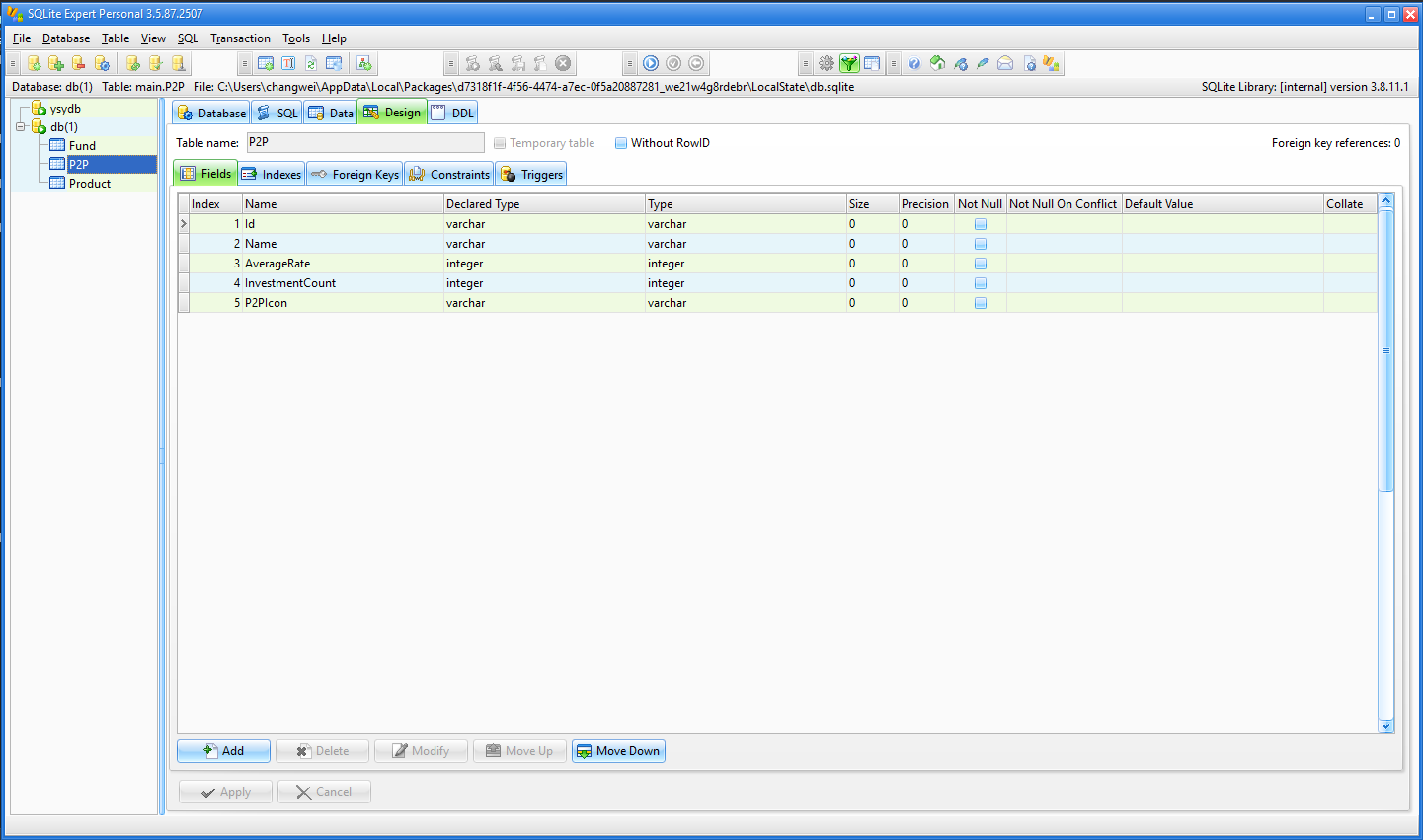
初始化数据库时可以一次性创建需要的表,我创建的表如下:
注意事项
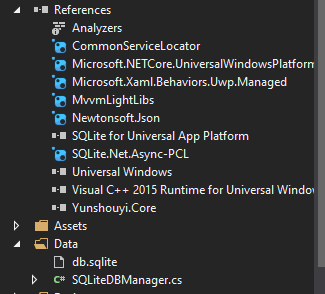
1.要为项目引入SQLite.Net.Async-PCL以及VC++ runtime类库,如下:
2.具体操作SQLite方法请查看SQLite.Net项目详细说明,地址如下:
https://github.com/oysteinkrog/SQLite.Net-PCL
Win10手记-为应用集成SQLite(二)的更多相关文章
- Win10手记-为应用集成SQLite(一)
SQLite是什么?熟悉移动端开发的朋友都会经常接触,无论是iOS的CoreData还是安卓的内置数据库,他们都是采用了SQLite这个轻量高效数据库,微信也是如此.可以说SQLite是目前移动端最为 ...
- Win10手记-为应用集成日志工具Logger
日志工具由来已久,是很受大家欢迎的debug工具.其中.NET平台上很出名的是log4net,但是由于Windows 10通用应用项目没有了System.Configuration引用,所以也就不能很 ...
- ibatis集成Sqlite:小数据库也有大作用
作者:Vinkn 来自http://www.cnblogs.com/Vinkn/ 一.简介 Ibatis简介: Ibatis是一个类似于Hibernate的数据库ORM(对象关系映射,通俗点就是将数据 ...
- 持续集成之二:搭建SVN服务器(subversion)
安装环境 Red Hat Enterprise Linux Server release 7.3 (Maipo) jdk1.7.0_80 subversion-1.10.3.tar.gz apr-1. ...
- nodejs集成sqlite
正在物色node上面的轻量级嵌入式数据库,作为嵌入式数据库的代表,sqlite无疑是个理想的选择方案.npm上集成sqlite的库主要有两个——sqlite3和realm. realm是一个理想的选择 ...
- 使用Visual Studio Team Services持续集成(二)——为构建定义属性
使用Visual Studio Team Services持续集成(二)--为构建定义属性 1.从VSTS帐户进入到Build 2.编辑构建定义并单击Options Description:如果这里明 ...
- 集成学习二: Boosting
目录 集成学习二: Boosting 引言 Adaboost Adaboost 算法 前向分步算法 前向分步算法 Boosting Tree 回归树 提升回归树 Gradient Boosting 参 ...
- iOS- 详解如何使用ZBarSDK集成扫描二维码/条形码,点我!
1.前言 目前市场主流APP里,二维码/条形码集成主要分两种表现形式来集成: a. 一种是调用手机摄像头并打开系统照相机全屏去拍摄 b. 一种是自定义照相机视图的frame,自己控制并添加相关扫码指南 ...
- 2017.2.13 开涛shiro教程-第十二章-与Spring集成(二)shiro权限注解
原博客地址:http://jinnianshilongnian.iteye.com/blog/2018398 根据下载的pdf学习. 第十二章-与Spring集成(二)shiro权限注解 shiro注 ...
随机推荐
- Object.assign()怎么用?
用于对象的合并,将源对象(source)的所有可枚举属性,复制到目标对象(target). 1.以对象为参数的合并1)Object.assign方法的第一个参数是目标对象,后面的参数都是源对象 con ...
- 合并数组,改变原数组apply与不改变原数组
一看见合并数组,可能第一反应就是concat,concat确实具有我们想要的行为,但它实际上并不附加到现有数组,而是创建并返回一个新数组. 同样你也许会想到ES6的扩展运算符... 但 ...
- python入门(二):isinstance、内置函数、常用运算等
1. isinstance(变量名,类型) #判断什么类型 ps: 只支持输入两个参数,输入3个参数会报错 >>> isin ...
- 转载:轻量级Config文件AppSettings节点编辑帮助类
using System.Configuration; using System.Windows.Forms; namespace Allyn.Common { public class XmlHep ...
- 【JAVA】杨辉三角
ソース public Yanghui3jiao() { List<String[]> rowList = new ArrayList<String[]>(); List< ...
- Educational Codeforces Round 63-D(基础DP)
题目链接:https://codeforces.com/contest/1155/problem/D 题意:给定n个数,可以选择一段连续子段将其乘x,也可以不操作,求最大连续子段和. 思路:比赛时觉得 ...
- layui模板和jfinal混合使用注意
<!-- 列表信息展示 --> <div class="layui-row"> <table class="layui-table" ...
- Entity Framework Core: A second operation started on this context before a previous operation completed
我这边报错是因为函数声明的是async void 而实现中有多个task任务,导致的线程不安全
- How Xtuner E3 works for BMW 520d Diagnosis and initialization of CBS service
Using Xtuner E3 to perform BMW 520d Diagnosis and initialization of CBS service in step by step proc ...
- Django获取数据库数据时根据id筛选
filter(id__in=models.Teacher.objects.all()[0:5]) teacher_list = models.Teacher.objects.filter(id__in ...