
python入门(二):isinstance、内置函数、常用运算等
1. isinstance(变量名,类型) #判断什么类型
ps:
只支持输入两个参数,输入3个参数会报错
>>> isinstance (a,int,float)
Traceack (most recent call last):
File "<stdin>", line 1, in <module>
TypeError: isinstance expected 2 arguments, got 3
>>> isinstance (a,int)
True
>>> b=1.1234
>>> isinstance(b,float)
True
>>> c=1+1j
>>> isinstance(c,complex)
True
>>> d=[1,2,3,4]
>>> isinstance(d,list)
True
>>> e=(1,2,3,4)
>>> isinstance (e,tuple)
True
>>> f="abc"
>>> isinstance(f,str)
True
>>> g={1:4,a:b}
>>> isinstance(g,dict)
True
>>> h={1,2,3,4}
>>> type(h)
<class 'set'>
>>> isinstance (h,set)
True
>>> isinstance(False,bool)
True
>>> isinstance(False,bool)
True
>>> bool(a)
True
>>> bool(1)
True
>>> bool(-1)
True
>>> bool(1+1j)
True
>>> bool([])
False
>>> bool({})
False
>>> bool( )
False
>>> bool("")
False
>>> bool(0)
False
用途:在实现函数时,需要传入一些变量,因为python是弱语言类型,实现不需要声明变量类型就可以使用的。赋予什么值,就默认为什么类型。所以在给函数传参的时候,事先要判断一下是什么类型。如果类型不对,就会报错儿。
>>> a=1
>>> b="2"
>>> a+b
Traceback (most recent call last):
File "<stdin>", line 1, in <module>
TypeError: unsupported operand type(s) for +: 'int' and 'str'
>>> type=1.2
>>> isinstance(type,float)
True
>>> type(1.2)
Traceback (most recent call last):
File "<stdin>", line 1, in <module>
TypeError: 'float' object is not callable
类型错误:'float'对象不可调用
原因:将关键字赋了值,在代码里重内置类型.新定义了type,如type=1.2,这时你自己调用的是代码里定义的type,而不是python
解决方法:删掉重新定义的关键字del type
2. 常用的计算:
1) 加+
>>> 1+1
2
2) 减-
>>> 1-1
0
3) 乘*
>>> 56*2
112
4) 除/
>>> 1/2
0.5
>>> 1/3
0.3333333333333333 #自动取小数,而非取整。
>>> 1/0
Traceback (most recent call last):
File "<stdin>", line 1, in <module>
ZeroDivisionError: division by zero #0不能做除数:
5) 取整//
>>> 1//2
0
>>> 9//2
4
>>> 9//10
0 #不存在四舍五入的情况,只取商。
6) 四舍五入round(数字,保留的位数)
>>> round(1.25,1) #小数点要保留的位数后面如果是5,5会更加靠近偶数。
1.2 如果5前面是偶数,那不会进位
>>> round(1.25,0) 如果5前面是奇数,那就会进位
1.0
>>> round(1.5) #如果没有写明保留几位,默认输出整数
2 保留0位和保留1的结果一样。
>>> round(0.5)
0
>>> round(2.675,2)
2.67 #结果都应该是2.68的,结果它偏偏是2.67,为什么?这跟浮点数的精度有关。我们知道在机器中浮点数不一定能精确表达,因为换算成一串1和0后可能是无限位数的,机器已经做出了截断处理。那么在机器中保存的2.675这个数字就比实际数字要小那么一点点。这一点点就导致了它离2.67要更近一点点,所以保留两位小数时就近似到了2.67。
除非对精确度没什么要求,否则尽量避开用round()函数
浮点数精度要求如果很高的话,请用decimal模块
>>> round(-100.55,1) #负数也可使用round
-100.5
7) 取余%
>>> 8%3
2
>>> 100%3
1
8) 取商取余divmod(,)
>>> divmod(10,3)
(3, 1)
>>> divmod(9,2)
(4, 1)
>>> divmod(9,2)[0] #只取商
4
>>> divmod(9,2)[1] #只取余
1
9) 取最大值max
>>> max([1,2,3,45])
45
>>> max(1,2,3,45)
45
10) 乘方**/pow
>>> 2**3
8
>>> 2*2*2
8
>>> 10**3
1000
>>> pow(2,3)
8
>>> pow(10,3)
1000
11) 开方math.sqrt
>>> math.sqrt(8)
2.8284271247461903
>>> math.sqrt(4)
2.0
>>> math.pi
3.141592653589793
3. dir(__builtins__) #查看内置函数
['ArithmeticError', 'AssertionError', 'AttributeError', 'BaseException', 'BlockingIOError', 'BrokenPipeError', 'BufferError', 'BytesWarning', 'ChildProcessError', 'ConnectionAbortedError', 'ConnectionError', 'ConnectionRefusedError', 'ConnectionResetError', 'DeprecationWarning', 'EOFError', 'Ellipsis', 'EnvironmentError', 'Exception', 'False', 'FileExistsError', 'FileNotFoundError', 'FloatingPointError', 'FutureWarning', 'GeneratorExit', 'IOError', 'ImportError', 'ImportWarning', 'IndentationError', 'IndexError', 'InterruptedError', 'IsADirectoryError', 'KeyError', 'KeyboardInterrupt', 'LookupError', 'MemoryError', 'ModuleNotFoundError', 'NameError', 'None', 'NotADirectoryError', 'NotImplemented', 'NotImplementedError', 'OSError', 'OverflowError', 'PendingDeprecationWarning', 'PermissionError', 'ProcessLookupError', 'RecursionError', 'ReferenceError', 'ResourceWarning', 'RuntimeError', 'RuntimeWarning', 'StopAsyncIteration', 'StopIteration', 'SyntaxError', 'SyntaxWarning', 'SystemError', 'SystemExit', 'TabError', 'TimeoutError', 'True', 'TypeError', 'UnboundLocalError', 'UnicodeDecodeError', 'UnicodeEncodeError', 'UnicodeError', 'UnicodeTranslateError', 'UnicodeWarning', 'UserWarning', 'ValueError', 'Warning', 'WindowsError', 'ZeroDivisionError', '_', '__build_class__', '__debug__', '__doc__', '__import__', '__loader__', '__name__', '__package__', '__spec__', 'abs', 'all', 'any', 'ascii', 'bin', 'bool', 'bytearray', 'bytes', 'callable', 'chr', 'classmethod', 'compile', 'complex', 'copyright', 'credits', 'delattr', 'dict', 'dir', 'divmod', 'enumerate', 'eval', 'exec', 'exit', 'filter', 'float', 'format', 'frozenset', 'getattr', 'globals', 'hasattr', 'hash', 'help', 'hex', 'id', 'input', 'int', 'isinstance', 'issubclass', 'iter', 'len', 'license', 'list', 'locals', 'map', 'max', 'memoryview', 'min', 'next', 'object', 'oct', 'open', 'ord', 'pow', 'print', 'property', 'quit', 'range', 'repr', 'reversed', 'round', 'set', 'setattr', 'slice', 'sorted', 'staticmethod', 'str', 'sum', 'super', 'tuple', 'type', 'vars', 'zip']
12) 与或非
1) and:
>>> True and True
True
>>> True and False
False
>>> False and True
False
>>> False and False
False
>>> a=10
>>> a<5 and a<11 and isinstance (a,floassss)
False #floassss是一个错误的字符,但是依然正确输出False,是因为前面的条件a<5为False,直接输出False,短路了后面的字符。
>>> 1 and 9 #如果两边都为真,则返回第二个值
9
>>> 5 and 3
3
2) or:
>>> True or False
True
>>> True or True
True
>>> False or True
True
>>> False or False
False
>>> a<5 or a<11 or isinstance (a,floassss)
True #依然存在短路效应
3) not:
>>> not False
True
>>> not True
False
>>> not(0)
True
>>> not(1)
False
>>> not[]
True
>>> not{}
True
>>> not("")
True
>>> not()
True
>>> 1 and 2 or not 3 #不加括号的情况下 not的优先级大于and, and的优先级大于 or
2
>>> (1 and 2) or (not 3)
2
>>> not False #一般用这个
True
>>> not(False) #用的是函数,但是两者输出结果一样。
True
4. help(函数名) #查看函数的用法
>>> help(round)
Help on built-in function round in module builtins:
round(...)
round(number[, ndigits]) -> number
Round a number to a given precision in decimal digits (default 0 digits).
This returns an int when called with one argument, otherwise the
same type as the number. ndigits may be negative.
>>> help(pow)
Help on built-in function pow in module builtins:
pow(x, y, z=None, /)
Equivalent to x**y (with two arguments) or x**y % z (with three arguments)
Some types, such as ints, are able to use a more efficient algorithm when
invoked using the three argument form.
>>> pow(2,3)
8
>>> pow(10,10)
10000000000
>>> pow(2,3,2) #2的3次方后除2取余=0
0
>>> pow(2,3,3) #2的3次方后除3取余=2
2
>>> help(math)
Help on built-in module math:
NAME
math
DESCRIPTION
This module is always available. It provides access to the
mathematical functions defined by the C standard.
FUNCTIONS
acos(...)
acos(x)
Return the arc cosine (measured in radians) of x.
pow(...)
pow(x, y)
Return x**y (x to the power of y).
>>> math.pow(2,3) #与pow不同的是,返回的是小数
8.0
>>> math.pow(2,3,3)
Traceback (most recent call last):
File "<stdin>", line 1, in <module>
TypeError: pow expected 2 arguments, got 3 #注意,math.pow支持输入两个函数。
5. ord #返回一个字符串的Unicode编码
Return the Unicode code point for a one-character string.
>>> ord("a")
97
>>> ord("z")
122
>>> ord("A")
65
>>> ord("Z")
90
6. chr #返回指定序号的字符
Return a Unicode string of one character with ordinal i; 0 <= i <= 0x10ffff.
>>> chr(97)
'a'
>>> chr(65)
'A'
>>> chr(90)
'Z'
>>> chr(122)
'z'
7. print #打印输出
>>> print("hello world!")
hello world! #默认换行输出
>>> print("hello world",end="")
hello world>>> #增加end=” ”后,不会换行
8. input #输入
>>> age=input("how old are you?")
how old are you?10
>>> age
'10'
>>> type(age)
<class 'str'> #input获取到的所有数据的类型均是字串
>>> age+10
Traceback (most recent call last):
File "<stdin>", line 1, in <module>
TypeError: must be str, not int #字串和数字不能相加
>>> age+"20"
'1020' #两个字串相加,是拼字符串
>>> int(age)+10
20 #将age由str强制转换成int,可实现输出数字的相加
>>> age+str(10) #强制类型转换,也可实现拼字符串
'1010'
9. if else
>>> score=input("请输入你的数学成绩:")
请输入你的数学成绩:98
>>> if int(score)>85:
... print("优秀")
... elif int(score)>=60 and int(score)<=85:
... print("及格")
... else:
... print("差")
...
优秀
10. len() #求长度
>>> len("gloaryroad")
10
>>> len(121212)
Traceback (most recent call last):
File "<stdin>", line 1, in <module>
TypeError: object of type 'int' has no len() #int类型没有长度
>>> len(1.123)
Traceback (most recent call last):
File "<stdin>", line 1, in <module>
TypeError: object of type 'float' has no len() #float类型没有长度
>>> len((1,2,3,4))
4
>>> len([1,2,3,4])
4
>>> len({1,2,2,2,2,2})
2 #集合中重复的元素不算长度
11. ASCII码
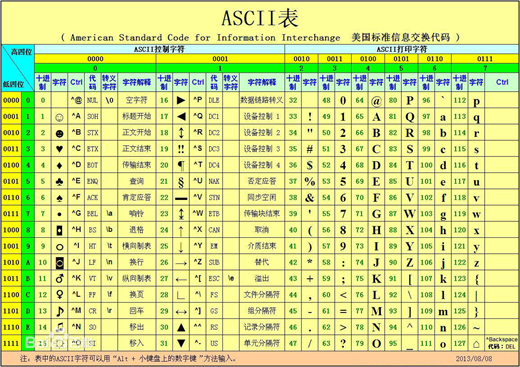
>>> "a">"A"
True #比对的是ASCII码
a-97
A-65 #要牢记!
知识点:
1. 集合{}与列表[]在用法上的区别:
集合值:不能重复
>>> h={1,2,3,3,4,4} #在赋值时可以重复
>>> h
{1, 2, 3, 4} #在查看时,就自动去重了。
列表值:可以重复
>>> i=[1,2,3,3,4,4] #在赋值时也可以重复
>>> i
[1, 2, 3, 3, 4, 4] #在查看时也未去重
2. 元祖与列表的区别:
List是[],且是可以改变的
Tuple是(),且是不可以
小练习:
输入一个数,如果可以被2和5整除,打印ok
>>> a=input("请输入一个数字:")
请输入一个数字:10
>>> if int(a)%2==0 and int(a)%5==0:
... print ("ok")
...
ok
小练习:
输入一个数字,如果可以被3或5整除,打印ok
>>> a=input("请输入一个数字:")
请输入一个数字:10
>>> if int(a)%3==0 or int(a)%5==0:
... print ("ok")
...
ok
小练习:
如果输入的数字不等于3,返回ok
方法1:
>>> a=input("请输入一个数字:")
请输入一个数字:4
>>> if int(a)!=3:
... print ("ok")
...
ok
方法2:
>>> a=input("请输入一个数字:")
请输入一个数字:4
>>> if not(a==3):
... print ("ok")
...
ok
小练习:
not 1 or 0 and 1 or 3 and 4 or 5 and 6 or 7 and 8 and 9
not 1=0
0 and 1 = 0
3 and 4 = 4
5 and 6 = 6
7 and 8 = 8
8 and 9 = 9
0 or 0 or 4 or 6 or 9 = 4
#and运算时,如果第一个为False返回第一个值,否则返回第二个值
#or 运算时,如果第一个为False返回第二个值,否则返回第一个值
小练习:
输入一个字符串,长度如果大于3打印大于3,长度小于3打印小于3,长度等于3打印等于3
>>>
a=input("请输入一个字符串:")
请输入一个字符串:gloaryroad
>>>
if len(a)>3:
... print ("大于3")
...
elif len(a)==3:
... print ("等于3")
...
else:
... print ("小于3")
...
大于3
python入门(二):isinstance、内置函数、常用运算等的更多相关文章
- python 类(object)的内置函数
python 类(object)的内置函数 # python 类(object)的内置函数 ### 首先 #### 以__双下划线开头的内置函数 __ #### __往往会在某些时候被自动调用,例如之 ...
- Python 的基本运算和内置函数
一.运算符 (一)Python算术运算符 以下假设变量: a=10,b=20: 运算符 描述 实例 + 加 - 两个对象相加 a + b 输出结果 30 - 减 - 得到负数或是一个数减去另一个数 a ...
- SQL入门(2): Oracle内置函数-字符/数值/日期/转换/NVL/分析函数与窗口函数/case_decode
本文介绍Oracle 的内置函数. 常用! 一. 字符函数 ASCII 码与字符的转化函数 chr(n) 例如 select chr(65) || chr(66) || chr(67) , ch ...
- python字符串——"奇葩“的内置函数
一.前言 python编程语言里的字符串与我们初期所学的c语言内的字符串还是有一定不同的,比如python字符串里的内置函数就比语言的要多得多:字符串内的书写格式也会有一点差异,例:字符串内含有引 ...
- Python标准库:内置函数hasattr(object, name)
Python标准库:内置函数hasattr(object, name) 本函数是用来判断对象object的属性(name表示)是否存在.如果属性(name表示)存在,则返回True,否则返回False ...
- 学习Python函数笔记之二(内置函数)
---恢复内容开始--- 1.内置函数:取绝对值函数abs() 2.内置函数:取最大值max(),取最小值min() 3.内置函数:len()是获取序列的长度 4.内置函数:divmod(x,y),返 ...
- python基础学习笔记——内置函数
一. 简介 python内置了一系列的常用函数,以便于我们使用,python英文官方文档详细说明:点击查看, 为了方便查看,将内置函数的总结记录下来. 二. 使用说明 以下是Python3版本所有的内 ...
- Python学习日记(十一) 内置函数
什么是内置函数? 就是Python中已经写好了的函数,可以直接使用 内置函数图表: 以3.6.2为例 内置函数分类: 一.反射相关 1.hasattr() 2.getattr() 3.setattr( ...
- python: 基本数据类型 与 内置函数 知识整理
列表 list.append(val) #末尾追加,直接改变无返回 list.inert(2,val) #插入到指定位置 list.extend(mylist1) #list会被改变 list2=li ...
- python生成器对象&常见内置函数
内容概要 异常捕获(补充) for循环本质 生成器 yield 和 return优缺点 笔试题 常用内置函数 内容详细 一.异常捕获补充 try: print(name) except NameErr ...
随机推荐
- javax/servlet/jsp/jstl/core/Config
javax/servlet/jsp/jstl/core/Config springmvc出现的问题. 尝试了各种jar,问题依旧. DispatcherServlet配置如下. <bean id ...
- python 数据库查询
查询多个为空返回是() 查询一个为空返回是None
- jwt 接口加密
什么是JWT Json web token (JWT), 是为了在网络应用环境间传递声明而执行的一种基于JSON的开放标准((RFC 7519).该token被设计为紧凑且安全的,特别适用于分布式站点 ...
- 位运算 - 最短Hamilton路径
给定一张 n 个点的带权无向图,点从 0~n-1 标号,求起点 0 到终点 n-1 的最短Hamilton路径. Hamilton路径的定义是从 0 到 n-1 不重不漏地经过每个点恰好一次. 输入格 ...
- 20155208徐子涵 《网络对抗》Exp1 PC平台逆向破解
20155208徐子涵 <网络对抗>Exp1 PC平台逆向破解 实践目标 本次实践的对象是一个名为pwn1的linux可执行文件. 该程序正常执行流程是:main调用foo函数,foo函数 ...
- C# 线程安全集合
转载 对于并行任务,与其相关紧密的就是对一些共享资源,数据结构的并行访问.经常要做的就是对一些队列进行加锁-解锁,然后执行类似插入,删除等等互斥操作. .NetFramework 4.0 中提供了一些 ...
- day052 django第三天 url和视图
一.基本格式 from django.conf.urls import url from . import views #循环urlpatterns,找到对应的函数执行,匹配上一个路径就找到对应的函数 ...
- pac4j探索(一)之buji-pac4j shiro整合Cas实现单点登录
https://blog.csdn.net/hxm_code/article/details/79181218 https://blog.csdn.net/hxm_code/article/detai ...
- centos 7中监控mysql 数据库脚本(监控端口)
centos 7中监控mysql 数据库脚本(监控端口) 监控mysql数据库的方法如下: 1.监控端口 netstat -nltp |grep 3306 2.监控进程 ps -ef |grep 33 ...
- Word中一条删除不掉的单或双横线的解决办法
Word中一条删除不掉的单或双横线 有时你或许会遇到这样一种情况:在word中,有一条单或双横线怎么都删除不了,并且具有这样的特点: 在上面输入文字,横线会自动下调一行,如果文章过页,每页的尾部会有一 ...