
Win10手记-为应用集成SQLite(二)
接上篇内容,这里给大家分享我的辅助访问类,采用了异步方法,封装了常用的访问操作,一些操作还是纯CLI的。
SQLiteDBManager
using System;

using System.Collections.Generic;

using System.Collections;

using System.Threading.Tasks;

using SQLite.Net;

using SQLite.Net.Async;

using Windows.Storage;

using System.Diagnostics;

using YunshouyiUWP.Model;

namespace YunshouyiUWP.Data

{

    public class SQLiteDBManager

    {

        private static SQLiteDBManager dbManager;

        /// <summary>

        /// construct function

        /// </summary>

        public SQLiteDBManager()

        {

            InitDBAsync();

        }

        /// <summary>

        /// get current instance

        /// </summary>

        /// <returns></returns>

        public static SQLiteDBManager Instance()

        {

            if (dbManager == null)

                dbManager = new SQLiteDBManager();

            return dbManager;

        }

        private static SQLiteAsyncConnection dbConnection;

        /// <summary>

        /// get current DBConnection

        /// </summary>

        /// <returns></returns>

        public async Task<SQLiteAsyncConnection> GetDbConnectionAsync()

        {

            if (dbConnection == null)

            {

                var path = await GetDBPathAsync();

                dbConnection = new SQLiteAsyncConnection(() => new SQLiteConnectionWithLock(new SQLite.Net.Platform.WinRT.SQLitePlatformWinRT(), new SQLiteConnectionString(path, true)));

            }

            return dbConnection;

        }

        /// <summary>

        /// insert a item

        /// </summary>

        /// <param name="item">item</param>

        /// <returns></returns>

        public async Task<int> InsertAsync(object item)

        {

            try

            {

                var dbConnect = await GetDbConnectionAsync();

                return await dbConnect.InsertOrReplaceAsync(item);

            }

            catch (Exception ex)

            {

                Debug.WriteLine(ex.Message);

                return -;

            }

        }

        /// <summary>

        /// insert lots of items

        /// </summary>

        /// <param name="items">items</param>

        /// <returns></returns>

        public async Task<int> InsertAsync(IEnumerable items)

        {

            try

            {

                var dbConnect = await GetDbConnectionAsync();

                return await dbConnect.InsertOrReplaceAllAsync(items);

            }

            catch (Exception ex)

            {

                Debug.WriteLine(ex.Message);

                return -;

            }

        }

        /// <summary>

        /// find a item in database

        /// </summary>

        /// <typeparam name="T">type of item</typeparam>

        /// <param name="pk">item</param>

        /// <returns></returns>

        public async Task<T> FindAsync<T>(T pk) where T : class

        {

            try

            {

                var dbConnect = await GetDbConnectionAsync();

                return await dbConnect.FindAsync<T>(pk);

            }

            catch (Exception ex)

            {

                Debug.WriteLine(ex.Message);

                return null;

            }

        }

        /// <summary>

        /// find a collection of items

        /// </summary>

        /// <typeparam name="T">type of item</typeparam>

        /// <param name="sql">sql command</param>

        /// <param name="parameters">sql command parameters</param>

        /// <returns></returns>

        public async Task<List<T>> FindAsync<T>(string sql, object[] parameters) where T : class

        {

            try

            {

                var dbConnect = await GetDbConnectionAsync();

                return await dbConnect.QueryAsync<T>(sql, parameters);

            }

            catch (Exception ex)

            {

                Debug.WriteLine(ex.Message);

                return null;

            }

        }

        /// <summary>

        /// update item in table

        /// </summary>

        /// <typeparam name="T">type of item</typeparam>

        /// <param name="item">item</param>

        /// <returns></returns>

        public async Task<int> UpdateAsync<T>(T item) where T : class

        {

            try

            {

                var dbConnect = await GetDbConnectionAsync();

                return await dbConnect.UpdateAsync(item);

            }

            catch (Exception ex)

            {

                Debug.WriteLine(ex.Message);

                return -;

            }

        }

        /// <summary>

        /// update lots of items in table

        /// </summary>

        /// <typeparam name="T">type of item</typeparam>

        /// <param name="items">items</param>

        /// <returns></returns>

        public async Task<int> UpdateAsync<T>(IEnumerable items) where T : class

        {

            try

            {

                var dbConnect = await GetDbConnectionAsync();

                return await dbConnect.UpdateAllAsync(items);

            }

            catch (Exception ex)

            {

                Debug.WriteLine(ex.Message);

                return -;

            }

        }

        /// <summary>

        /// delete data from table

        /// </summary>

        /// <typeparam name="T">type of item</typeparam>

        /// <param name="item">item</param>

        /// <returns></returns>

        public async Task<int> DeleteAsync<T>(T item) where T : class

        {

            try

            {

                var dbConnect = await GetDbConnectionAsync();

                return await dbConnect.DeleteAsync<T>(item);

            }

            catch (Exception ex)

            {

                Debug.WriteLine(ex.Message);

                return -;

            }

        }

        /// <summary>

        /// delete all items in table

        /// </summary>

        /// <param name="t">type of item</param>

        /// <returns></returns>

        public async Task<int> DeleteAsync(Type t)

        {

            try

            {

                var dbConnect = await GetDbConnectionAsync();

                return await dbConnect.DeleteAllAsync(t);

            }

            catch (Exception ex)

            {

                Debug.WriteLine(ex.Message);

                return -;

            }

        }

        /// <summary>

        /// get local path in application local folder

        /// </summary>

        /// <returns></returns>

        private async Task<string> GetDBPathAsync()

        {

            var file = await ApplicationData.Current.LocalFolder.GetFileAsync("db.sqlite");

            if (file == null)

            {

                var dbFile = await StorageFile.GetFileFromApplicationUriAsync(new Uri("ms-appx:///Data/db.sqlite"));

                file = await dbFile.CopyAsync(ApplicationData.Current.LocalFolder);

            }

            return file.Path;

        }

        /// <summary>

        /// init db

        /// </summary>

        private static async void InitDBAsync()

        {

            try

            {

                var file = await ApplicationData.Current.LocalFolder.TryGetItemAsync("db.sqlite");

                if (file == null)

                {

                    var dbFile = await StorageFile.GetFileFromApplicationUriAsync(new Uri("ms-appx:///Data/db.sqlite"));

                    file = await dbFile.CopyAsync(ApplicationData.Current.LocalFolder);

                    var dbConnect = new SQLiteAsyncConnection(() => new SQLiteConnectionWithLock(new SQLite.Net.Platform.WinRT.SQLitePlatformWinRT(), new SQLiteConnectionString(file.Path, true)));

                    var result = await dbConnect.CreateTablesAsync(new Type[] { typeof(Fund), typeof(P2P) });

                    Debug.WriteLine(result);

                }

            }

            catch (Exception ex)

            {

                Debug.WriteLine(ex.Message);

            }

        }

    }

}
使用方法
以查找数据为例,如下:
public async Task<List<Fund>> GetFundDataAsync()

        {

            var result = await SQLiteDBManager.Instance().FindAsync<Fund>("select * from Fund where Id=?", new string[] { Guid.NewGuid().ToString() });

            if (result != null)

                return result;

            return null;

        }
初始化数据库时可以一次性创建需要的表,我创建的表如下:
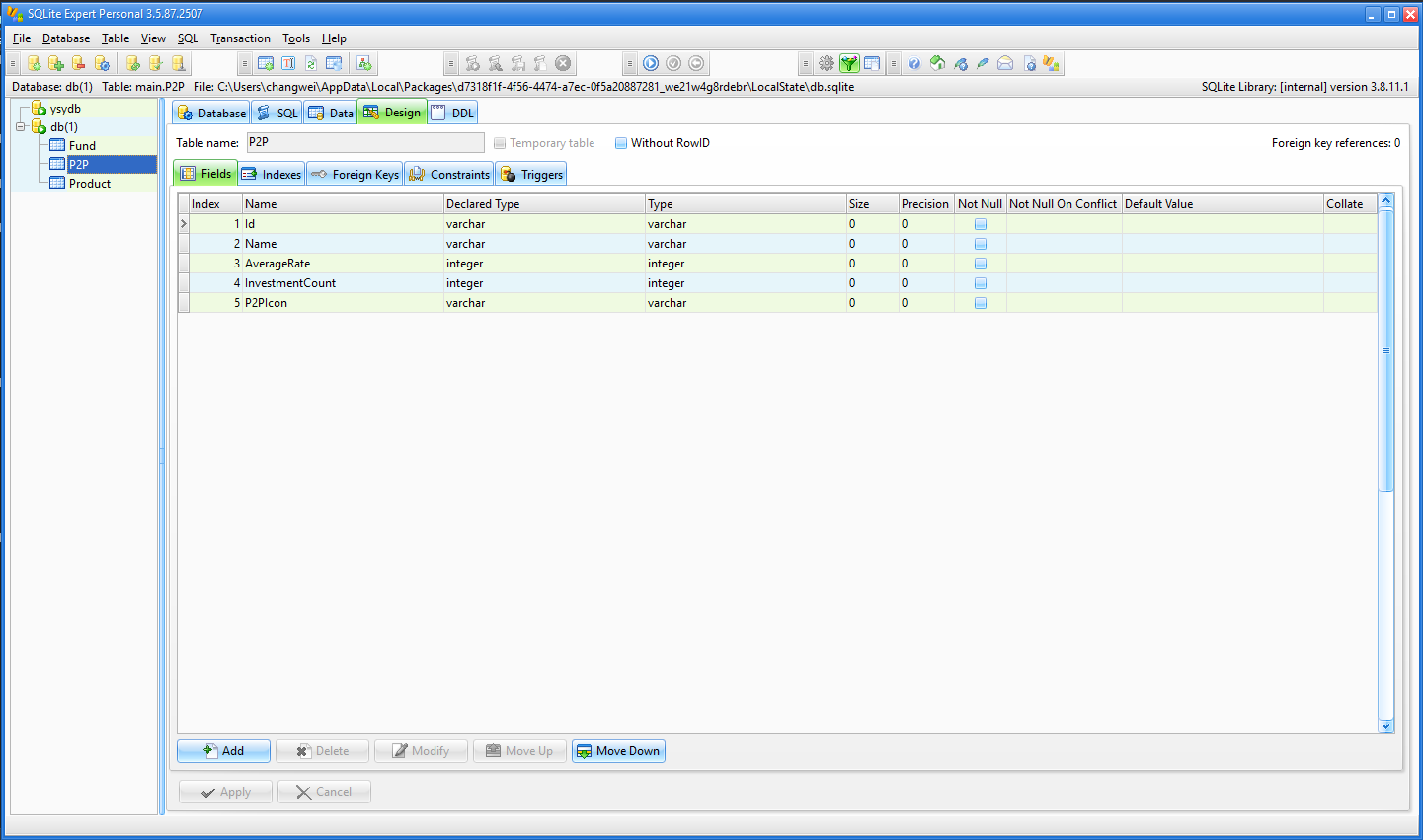
注意事项
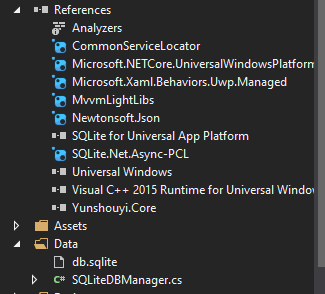
1.要为项目引入SQLite.Net.Async-PCL以及VC++ runtime类库,如下:
2.具体操作SQLite方法请查看SQLite.Net项目详细说明,地址如下:
https://github.com/oysteinkrog/SQLite.Net-PCL
Win10手记-为应用集成SQLite(二)的更多相关文章
- Win10手记-为应用集成SQLite(一)
SQLite是什么?熟悉移动端开发的朋友都会经常接触,无论是iOS的CoreData还是安卓的内置数据库,他们都是采用了SQLite这个轻量高效数据库,微信也是如此.可以说SQLite是目前移动端最为 ...
- Win10手记-为应用集成日志工具Logger
日志工具由来已久,是很受大家欢迎的debug工具.其中.NET平台上很出名的是log4net,但是由于Windows 10通用应用项目没有了System.Configuration引用,所以也就不能很 ...
- ibatis集成Sqlite:小数据库也有大作用
作者:Vinkn 来自http://www.cnblogs.com/Vinkn/ 一.简介 Ibatis简介: Ibatis是一个类似于Hibernate的数据库ORM(对象关系映射,通俗点就是将数据 ...
- 持续集成之二:搭建SVN服务器(subversion)
安装环境 Red Hat Enterprise Linux Server release 7.3 (Maipo) jdk1.7.0_80 subversion-1.10.3.tar.gz apr-1. ...
- nodejs集成sqlite
正在物色node上面的轻量级嵌入式数据库,作为嵌入式数据库的代表,sqlite无疑是个理想的选择方案.npm上集成sqlite的库主要有两个——sqlite3和realm. realm是一个理想的选择 ...
- 使用Visual Studio Team Services持续集成(二)——为构建定义属性
使用Visual Studio Team Services持续集成(二)--为构建定义属性 1.从VSTS帐户进入到Build 2.编辑构建定义并单击Options Description:如果这里明 ...
- 集成学习二: Boosting
目录 集成学习二: Boosting 引言 Adaboost Adaboost 算法 前向分步算法 前向分步算法 Boosting Tree 回归树 提升回归树 Gradient Boosting 参 ...
- iOS- 详解如何使用ZBarSDK集成扫描二维码/条形码,点我!
1.前言 目前市场主流APP里,二维码/条形码集成主要分两种表现形式来集成: a. 一种是调用手机摄像头并打开系统照相机全屏去拍摄 b. 一种是自定义照相机视图的frame,自己控制并添加相关扫码指南 ...
- 2017.2.13 开涛shiro教程-第十二章-与Spring集成(二)shiro权限注解
原博客地址:http://jinnianshilongnian.iteye.com/blog/2018398 根据下载的pdf学习. 第十二章-与Spring集成(二)shiro权限注解 shiro注 ...
随机推荐
- Spark SQL例子
综合案例分析 现有数据集 department.json与employee.json,以部门名称和员工性别为粒度,试计算每个部门分性别平均年龄与平均薪资. department.json如下: {&q ...
- vue.js核心最基本的功能
Vue.js 的核心是一个允许采用简洁的模板语法来声明式地将数据渲染进 DOM 的系统: , text: , text: , text: '随便其它什么人吃的东西' } ] }}) 蔬菜 奶酪 随便其 ...
- [leetcode]50. Pow(x, n)求幂
Implement pow(x, n), which calculates x raised to the power n (xn). Example 1: Input: 2.00000, 10 Ou ...
- [leetcode]96. Unique Binary Search Trees给定节点形成不同BST的个数
Given n, how many structurally unique BST's (binary search trees) that store values 1 ... n? Input: ...
- 源码安装 odoo12 -- 问题记录
odoo12启动过程中遇到的问题,及解决办法:1.ImportError: No module named ‘win32service’pipenv install pypiwin32 2.Impor ...
- 每10秒执行定时任务-crontab
* * * * * /data/crontab.sh * * * * * sleep 10; /data/crontab.sh * * * * * sleep 20; /data/crontab.sh ...
- 配置apache虚拟域名(phpStudy2016)
以前也一个个的配置过apache.php和mysql,现在嫌麻烦,就用的phpStudy. 装好之后,发现127.0.0.1可以访问,但是localhost就不可以访问.大概是因为apache没有配置 ...
- Python开发——函数【装饰器、高阶函数、函数嵌套、闭包】
装饰器 装饰器本质就是函数,为其他函数添加附加功能. 原则: 不修改被修饰函数的源代码 不修改被修饰函数的调用方法 装饰器知识储备:装饰器 = 高阶函数 + 函数嵌套 + 闭包 案例:求函数运行时间! ...
- java多线程系列14 设计模式 Master-Worker
Master-Worker模式是常用的并行设计模式,可以将大任务划分为小任务,是一种分而治之的设计理念. 系统由两个角色组成,Master和Worker,Master负责接收和分配任务,Worker负 ...
- python之模块调用
1.以 atm_run 为入口,在atm中的main模块调用config中的settings from config import settings 2.以atm_run为入口,在main中调用log ...