
JAVA自学笔记21
JAVA自学笔记21
1、转换流
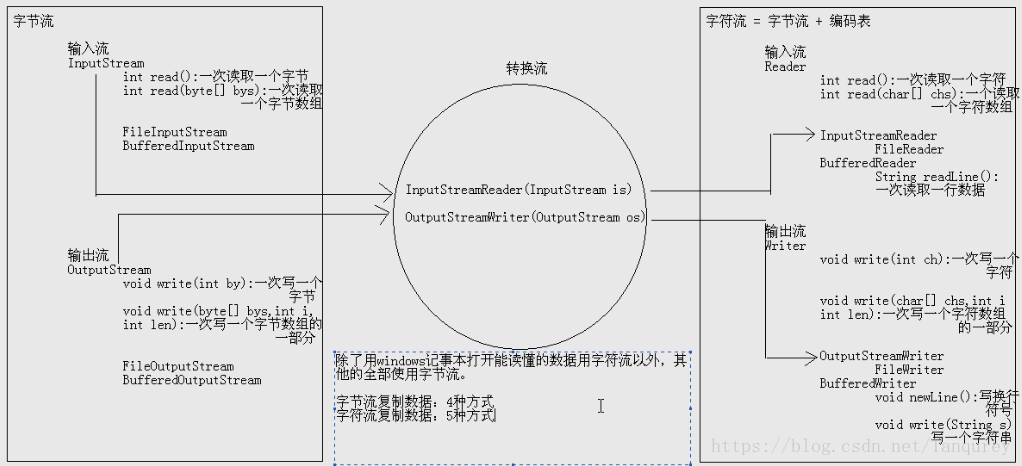
由于字节流操作中文不是非常方便,因此java提供了转换流
字符流=字节流+编码表
1)编码表
由字符及其对应的数值组成的一张表
图解: 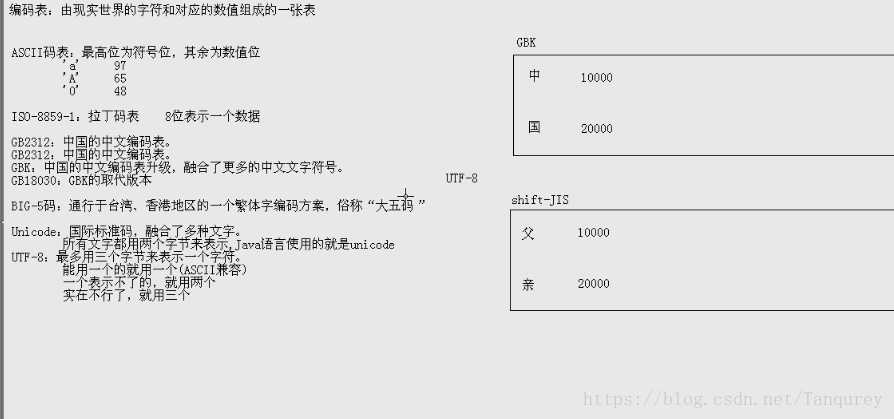
2)String类的编码和解码
String(byte[] bytes,String charsetName):
通过指定的字符集解码字节数组
byte[]getBytes(String charsetName)
使用指定的字符串编码为字节数组
String s="你好";

//编码String-byte[]

byte[] bys=s.getBytes();//无参默认为gbk编码,还可填"UTF-8"等

System.out.println(Arrays.toString(bys));

//译码

String ss=new String(bys);bys后无参默认gbk

System.out.pintln(ss);
2)OutputStreamWriter
OutputStreamWriter(OutputStream out)
根据默认编码表,把字节流转换成字符流
OutputStreamWriter(OutputStream out,String charsetName)
根据指定编码表,把字节流转换成字符流
//创建对象

OutputStreamWriter osw=new OutputStreamWriter(new FileOutStream("osw.txt"));

//写数据

osw.write("你好");

osw.close();
3)InputStreamReader()
InputStreamReader(InputStream is)
用默认的编码读取数据
InputStreamReader(InputStream is,String charsetName)
用指定的编码读取数据
InputStreamReader isr=new String InputStreamReader(new FileInputStream)(osw.txt));

int ch=0;

while((ch=isr.read())!=-1){System.out.print((char) ch);

isr.close();
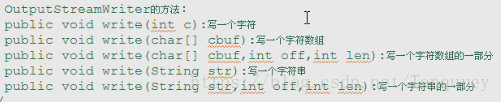
4)5种写数据方式
//创建对象

OutputStreamWriter osw=new OutputStreamWriter(new FileOutputStream("osw2.txt") )

osw.write('a');

char chs={'a','b','c','d','e'};

ose.write(chs);

ose.write(chs,1,3);

osw.write("火狐");

osw.write("天天开心火狐",2,3);

osw.flush();//刷新缓冲区

osw.close();//也有刷新功能,但关闭后流对象不能继续被使用
5)2种读数据方法
InputStreamReader
int read();一次读取一个字符
int read(char chs)l//一次读取一个字符数组
InputStreamReader isr=new InputStreamReader(new FileInputStream());

int ch=;

while((ch=isr.read()0!=-1){System.out.println((char) ch);

}

char[] chs=new char[1024];

int len=0;

while((len=isr.read(chs))!=-1){

System.out.print(new String(chs,0,len));

}

isr.close();
@例题1:字符流复制文本文件
读取数据-字符转换流-InputStreamRreader
写出数据-字符转换流-OuputStreamRreader
InputStreamRreader isr=InputStreamRreader(new FileInputStream("a.txt"));

OuputStreamWriter osw=new OuputStreamWriter (new FileOutputStream("b.txt"));

//方式1

int ch=0;

while((ch=isr.read()0!=-1){

osw.writer(ch);

osw.close();

isr.close();

//方式2

char[] chs=new chat[1024];

int len=0;

while((len=isr.read(chs))!=-1){

osw.write(chs,0,len);

osw.fush();

}

osw.close();

isr.close();

}
转换流的名字较长,而我们常见的操作都是按照本地默认的编码实现的,所以,为了简化我们的书写,转换流提供了对应的子类
FileWriter:=FileOutputStream+编码表(gbk)
FileReader:=FileInputStream+编码表(gbk)
FileReader fr=new FileReader("a.txt");

FileWriter fw=new FileWriter("b.txt");

while((len=isr.read(chs))!=-1){

osw.write(chs,0,len);

osw.fush();

}

fw.close();

fr.close();

}
FileReader fr=new FileReader("a.txt");
FileWriter fw=new FileWriter("b.txt");
int ch;
while((ch=fr.read())!=-1){
fw.write(ch);
}
fw.close();
fr.close();6)字符缓冲输出(入)流
BufferedWriter
将文本写入字符输出流,缓冲各个字符,从而提供单个字符、数组和字符串的高效写入,接收默认值的大小。
BufferedReader
从字符输入流读取文本,缓冲各个字符,从而实现字符、数组和行的高效读取。
写数据
/*

BufferedWriter bw=new BufferedWriter(new BufferedWriter(new FileOutputStream("bw.txt")));

*///复杂

BufferedWriter bw=new BufferedWriter(new FileWriter(bw.txt));

bw.write("hello");

bw.flush();

bw.close();
读数据
BufferedReader br=new BufferedReader(new FileReader("bw.txt"));

int ch=0;

while((ch=br.read())!=-1{

System.out.print((char)ch);

br.close();//方式2略
//字符缓冲流复制文件

BufferedReader br=new BufferedReader(new FileReader("a.txt"));

BufferedWriter bw=new BufferedWriter(new FileWriter("b.txt"));

char[] chs=new char[1024];

int len=0;

while((len=br.read(chs))!=-1){

bw.write(chs,0,len);

bw.flush();

]

bw.close();

br.close();
图片和视频不能使用字符流
7)字符缓冲流的特殊功能
public String readLine()
一次读取一行数据,不会读取换行与回车
BufferedWriter bw=new BufferedWriter(new FileWriter("b2.txt"));

for(int x=0;x<10;x++){

bw.write("hello"+x);

bw.newLine();//换行

bw.flush();

}

bw.close();

//读功能:

public static void read(){

BufferedReader(new FileReader("bw2.txt"));

String line=null;

while((line=br.readerLine())!=null){

System.out.println();

}

}
//用上述特殊功能复制文件

BufferedReader br=new BufferedReader(new FileReader("a.txt"));

BufferedReader bw=new BufferedWriter(new FileWriter("a.txt"));

String line=null;

while((ine=br.readLine())!=null{

bw.write(line);

bw.newLine();

bw.flush();

}

bw.close();

br.close();
8)总结
/*把集合中的数据存储到文本文件

ArrayList集合里存储的是字符串

遍历ArrayList集合,把数据获取到

然后存储到文本文件中,使用字符流*/

ArrayList<String>array=new Arrayist<String>();

array.add("a");

array.add("ab");

array.add("abv");

BufferedWriter bw=new BufferedWriter(new FileWriter("a.txt"));

for(String s:array){

bw.write(s);

bw.newLine();

bw.fush();

}

bw.close();

}
//将文本文件中的数据存储到集合
BufferedReader br=new BufferedReader(new FileReader("b.txt"));
ArrayList<String>array=new Arrayist<String>();
String line=null;
while((line=br.readLine())!=null){
array.add(line);
}
br.close();
for(String s:array){
System.out.println(s);
}/*随机获取文本文件中的名字
-把文本文件中的数据存储到集合中
-随机产生一个索引
-根据该索引获取一个值
*/
BufferedReader br=new BufferedReader(new FileReader("b.txt"));
ArrayList<String>array=new Arrayist<String>();
String line=null;
while((line=br.readLine())!=null){
array.add(line);
}
br.close();
Random r=new Random();
int dex=r.nextInt(array.size());
String name=array.get(index);
System.out.print("name");//复制单级文件夹
/*
-封装目录
-获取该目录下的所有文本文件的File数组
-遍历该File数组,得到每一个File对象
-把该File进行复制
File srcFolder=new File("e:\\demo");
//目的文件夹若不存在将自动创建
File destFolder=new File("w:\\test");
if(!destFolder.exists()){
destFolder.mkdir();
}
//获取该目录下所有文本的File数据
File[] fileArray=srcFolder.listFiles();
遍历该File数组,得到每一个File对象
for(File file:fileArray){
String name=fie.getName();
File newFile=new File(destFolder,name);
copyFile(file,newFile);
private static void copyFile(File file,File newFile){
BufferedInputStream bis=new BufferedInputStream(new FileInputStream(file));
BufferedOutputStream bos=new BufferedOutputStream(new FileOutputStream(file));
byte[] bys=new byte[1024];
int len=0;
while((len=bis.read(bys)!=-1){
bos.write(bys,0,len);
}
bos.close();
bis.c;ose();
}数据源:e:\\java\\a.java
目的地:e:\\jad\\a.jad
//复制指定目录下指定后缀名的文件并修改文件名
public class CopyFolderDemo {
public static void main(String[] args) throws IOException {
// 封装目录
File srcFolder = new File("e:\\java");
// 封装目的地
File destFolder = new File("e:\\jad");
// 如果目的地目录不存在,就创建
if (!destFolder.exists()) {
destFolder.mkdir();
}
// 获取该目录下的java文件的File数组
File[] fileArray = srcFolder.listFiles(new FilenameFilter() {
@Override
public boolean accept(File dir, String name) {
return new File(dir, name).isFile() && name.endsWith(".java");
}
});
// 遍历该File数组,得到每一个File对象
for (File file : fileArray) {
// System.out.println(file);
// 数据源:e:\java\DataTypeDemo.java
// 目的地:e:\\jad\DataTypeDemo.java
String name = file.getName();
File newFile = new File(destFolder, name);
copyFile(file, newFile);
}
// 在目的地目录下改名
File[] destFileArray = destFolder.listFiles();
for (File destFile : destFileArray) {
// System.out.println(destFile);
// e:\jad\DataTypeDemo.java
// e:\\jad\\DataTypeDemo.jad
String name =destFile.getName(); //DataTypeDemo.java
String newName = name.replace(".java", ".jad");//DataTypeDemo.jad
File newFile = new File(destFolder,newName);
destFile.renameTo(newFile);
}
}
private static void copyFile(File file, File newFile) throws IOException {
BufferedInputStream bis = new BufferedInputStream(new FileInputStream(
file));
BufferedOutputStream bos = new BufferedOutputStream(
new FileOutputStream(newFile));
byte[] bys = new byte[1024];
int len = 0;
while ((len = bis.read(bys)) != -1) {
bos.write(bys, 0, len);
}
bos.close();
bis.close();
}
}//复制多级文件夹
-封装数据源目录
-封装目的地目录
-判断该file是文件还是文件夹,若是文件,直接复制;若是文件夹,就在目的地目录下创建该文件夹,并获取该File对象下的所有文件或者文件夹File对象,遍历得到每一个File对象,在该目录下重复上述操作
//封装数据源目录
File srcFile=new File("E:\\JavaSE\\day21");
-封装目的地目录
File destFile=new File("E:\\");
//复制文件夹的方法
copyFolder(srcFile,destFile);
private static void copyFolder(File srcFile,File destFile){
if(srcFile.isDirectory()){
//文件夹
File newFolder=new File(destFile,srcFile.getName());
newFolder.mkdir();
//获取该File对象下的所有文件或者文件夹File对象
File[] fileArray=srcfile.listFiles();
for(File file:fileArray){
copyFolder(null,newFolder);
}
}else{
//文件
File newFile=new File(destFile.srcFile.getName());
copyFile(srcFile,destFile);
}
}
//复制文件的方法
private static void copyFile(File srcFile,File newFile){
BufferedInputStream bis = new BufferedInputStream(new FileInputStream(
srcfile));
BufferedOutputStream bos = new BufferedOutputStream(
new FileOutputStream(newFile));
byte[] bys = new byte[1024];
int len = 0;
while ((len = bis.read(bys)) != -1) {
bos.write(bys, 0, len);
}
bos.close();
bis.close();
}
}//键盘录入学生信息按照总分排序并写入文本文件
//Student类
public class Student{
private String name;
private int math;
private int Chinese;
private int English;
//其余略}
//创建集合对象
TreeSet<Student>ts=new TreeSet<Student>(new Comparator<Student>(){
public int compare(Student s1,Student s2){
int num=s2.getSum()-s1.getSum();
int num2=num==0?s1.getChinese()-s2.getChinese():num;
int num3=num2==0?s1.getMath(0-s2.getMath:num2;
int num4=num3==0?s1.getEnglish(0-s2.getEnglish:num2;
int num5=num4==0?s1.getName().compareTo(s1.getName()):num4;
return num5;
}
});
//键盘录入学生信息到集合
for(int x=1;x<=5;x++){
//略
}
Student s=new Student();
s.setName(Name);
s.setName(Chinese);
s.setName(math);
s.setName(English);
//把学生信息添加到集合
ts.add(s);
//遍历集合,把数据写到文本文件中
BufferedWriter bw=new BufferedWriter(new FileWriter("Students.txt"));
bw.write("学生信息如下");
bw.newLine();
bw.flush();
bw.write("姓名,语文成绩,英语成绩");
bw.newLine();
bw.flush();
for(Student s:ts){
StringBuilder sb=new StringBuilder();
sb.append(s.getName()).append(",").append(s.getChinese()).append(",").append(s.getEnglish());
bw.write(sb.toString());
bw.newLine();
bw.flush();
}
//释放资源
bw.close()
}
@例题5:
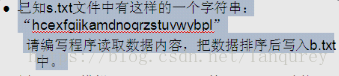
分析:

 *      A:把s.txt这个文件给做出来

 *      B:读取该文件的内容,存储到一个字符串中

 *      C:把字符串转换为字符数组

 *      D:对字符数组进行排序

 *      E:把排序后的字符数组转换为字符串

 *      F:把字符串再次写入ss.txt中

 */

public class StringDemo {

    public static void main(String[] args) throws IOException {

        // 读取该文件的内容,存储到一个字符串中

        BufferedReader br = new BufferedReader(new FileReader("s.txt"));

        String line = br.readLine();

        br.close();

        // 把字符串转换为字符数组

        char[] chs = line.toCharArray();

        // 对字符数组进行排序

        Arrays.sort(chs);

        // 把排序后的字符数组转换为字符串

        String s = new String(chs);

        // 把字符串再次写入ss.txt中

        BufferedWriter bw = new BufferedWriter(new FileWriter("ss.txt"));

        bw.write(s);

        bw.newLine();

        bw.flush();

        bw.close();

    }

}
//登录注册IO版
//这是用户操作的具体实现类

public class UserDaoImpl implements

private static File file=new File("user.txt")

static{

try{

file.createNewFile();

}catch(IOException e){

System.out.println("创建文件失败")

}

}

UserDao{

boolean flag=false;

public boolean isLogin(String username,String password){

return false;

}

public void regist(User user){

BufferedWriter bw=null;

try{

br=new BufferedReader(new FileReader("user.txt"));

String line=null;

while((line=br.readLine())!=null){

String[] datas=line.split("=");

if(data[0].equals(username)&&datas[1].equals(password)){

falg=true;

break;

}

}catch(FileNOtFoundException e){

System.out.println("登录找不到信息所在文件");

}catch(IOException e){

System.out.println("登录失败");

}

return false;}

try{

bw=new BufferedWriter(new FileWriter("wser.txt"));

bw.write(user.getUsername()+"="+user.getPassword());

bw.newLine();

bw.Flush();

}catch(IOException e){

e.printStackTrace();

}finally{if(bw!=null))

try{

bw.close();

}

catch(IOException e){

}finally{

if(br!=null){

try{

br.close();

}catch(IOException e){

System.out.println(内存释放失败);

}

}

}

}

}

return flag;

}
JAVA自学笔记21的更多相关文章
- JAVA自学笔记20
JAVA自学笔记20 1.递归: 1)方法定义中定义中调用方法本身的现象 2)要有出口,否则就是死递归 次数不能太多.否则内存将溢出 构造方法不能递归使用 //斐波那契数列:1,1,2,3,5,8,1 ...
- JAVA自学笔记09
JAVA自学笔记09 1.子类的方法会把父类的同名方法覆盖(重写) 2.final: 1)可修饰类.方法.变量 2)修饰类时:此时该类变为最终类,它将无法成为父类而被继承 3)修饰方法时:该方法将无法 ...
- JAVA自学笔记05
JAVA自学笔记05 1.方法 1)方法就是完成特定功能的代码块,类似C语言中的函数. 2)格式: 修饰符 返回值类型 方法名(参数类型 参数名1,参数类型 参数名2,-){ 函数体; return ...
- JAVA自学笔记06
JAVA自学笔记06 1.二维数组 1)格式: ①数据类型[][]数组名 = new 数据类型[m][n]; 或 数据类型[]数组名[]=new 数据类型[m][n]; m表示这个二维数组有多少个一维 ...
- JAVA自学笔记04
JAVA自学笔记04 1.switch语句 1)格式:switch(表达式){ case 值1: 语句体1; break; case 值2: 语句体2; break; - default: 语句体n+ ...
- JAVA自学笔记07
JAVA自学笔记07 1.构造方法 1) 例如:Student s = new Student();//构造方法 System.out.println(s);// Student@e5bbd6 2)功 ...
- JAVA自学笔记10
JAVA自学笔记10 1.形式参数与返回值 1)类名作为形式参数(基本类型.引用类型) 作形参必须是类的对象 2)抽象类名作形参 需要该抽象类的子类对象,通过多态实现 3)接口名为形参 需要的是该接口 ...
- JAVA自学笔记13
JAVA自学笔记13 1.StringBuffer类 1)线程安全的可变字符序列 线程安全(即同步) 2)StringBuffer与String的区别:一个可变一个不可变 3)构造方法: ①publi ...
- JAVA自学笔记11
JAVA自学笔记11 1:Eclipse的安装 2:用Eclipse写一个HelloWorld案例,最终在控制台输出你的名字 A:创建项目 B:在src目录下创建包.cn.itcast C:在cn.i ...
随机推荐
- OAuth2:隐式授权(Implicit Grant)类型的开放授权
适用范围 仅需临时访问的场景 用户会定期在API提供者那里进行登录 OAuth客户端运行在浏览器中(Javascript.Flash等) 浏览器绝对可信,因为该类型可能会将访问令牌泄露给恶意用户或应用 ...
- Python学习(二十二)—— 前端基础之BOM和DOM
转载自http://www.cnblogs.com/liwenzhou/p/8011504.html 一.前言 到目前为止,我们已经学过了JavaScript的一些简单的语法.但是这些简单的语法,并没 ...
- Django 1.11.7学习,配置MySQL数据库(python3.5)
1.链接MySQL数据库 a.导入pymysql包 import pymysql pymysql.install_as_MySQLdb() b.改变DATABASES参数 ENGINE : 指定数据库 ...
- loadrunner之运行方式:线程还是进程?
loadrunner controller将使用驱动程序mmdrv运行Vuser. 用户可以在controller的run-time setting中选择Vuser的运行方式: 是多进程方式还是多线程 ...
- day41 mycql 函数
一些经典的练习题,以及函数的简单用法,內建函数 -- 函数 python函数 def fun1(a1,a2,a3): sum = a1+a2+a3 return sum fun1(1,2,3) jav ...
- java中可以对时间进行加减处理,有时候不用在sql语句中处理
String ssny = (String) pd.get("ssny"); SimpleDateFormat simpleDateFormat=new SimpleDateF ...
- eclipse里面svn比较之前版本的代码
team——显示资源历史记录比较
- Oracle date-time
Name Description ADDDATE() Add time values (intervals) to a date value ADDTIME() Add time CONVERT_TZ ...
- 牛客练习赛35-背单词-线性DP
背单词 思路 :dp[ i ] [ 0 ]表示 第i 位放的元音 dp[ i ] [ 1 ]表示 第i 位放的辅音 ,cnt [ i ]含义是 长度为 i 的方案数. 转移 :dp[ i ] ...
- Python 面向对象的补充
isinstance(obj,cls)和issubclass(sub,super) isinstance(obj,cls)检查是否obj是否是类 cls 的对象 1 class Foo(object) ...