
Importing Swift into Objective-C
Overview
You can work with types declared in Swift from within the Objective-C code in your project by importing an Xcode-generated header file. This file is an Objective-C header that declares the Swift interfaces in your target, and you can think of it as an umbrella header for your Swift code. You don’t need to do anything special to create the generated header—just import it to use its contents in your Objective-C code.
The header's name is generated from your product module name, followed by "-Swift.h". By default, this name is the same as your product name, with any nonalphanumeric characters replaced with an underscore (_). If the name begins with a number, the first digit is replaced with an underscore.
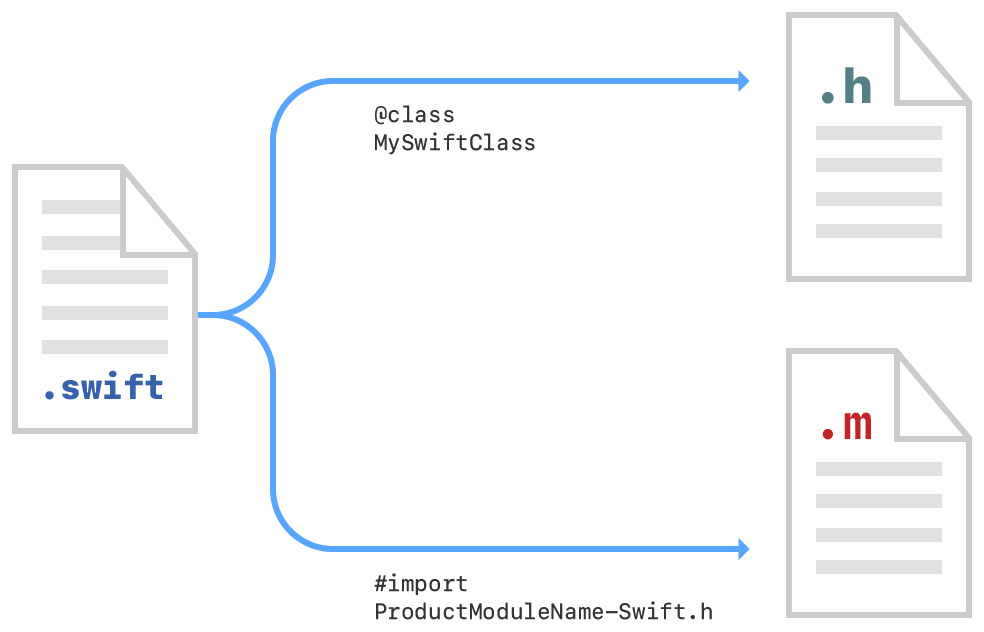
The process for importing Swift declarations into Objective-C code differs slightly depending on whether you’re writing an app or a framework. Both processes are described below.
Import Code Within an App Target
When you're building an app target, you can import your Swift code into any Objective-C .m file within that same target using this syntax and substituting the appropriate name:
By default, the generated header contains interfaces for Swift declarations marked with the public or open modifier. If your app target has an Objective-C bridging header, the generated header also includes interfaces marked with the internal modifier. Declarations marked with the private or fileprivate modifier don't appear in the generated header, and aren't exposed to the Objective-C runtime unless they are explicitly marked with a @IBAction, @IBOutlet, or @objc attribute. Inside unit test targets, you can access imported internal declarations as if they were public by prepending @testable to the product module import statement.
The Swift interfaces in the generated header include references to all of the Objective-C types used in them, so make sure to import the Objective-C headers for those types first.
When building an app target, you can provide a custom name for the product module by changing the Product Module Name build setting. Xcode uses this name when naming the generated header file.
Import Code Within a Framework Target
To import a set of Swift files in the same framework target as your Objective-C code, import the Xcode-generated header for your Swift code into any Objective-C .m file where you want to use your Swift code.
Because the generated header is part of the framework’s public interface, only declarations marked with the public or open modifier appear in the generated header for a framework target. Methods and properties that are marked with the internal modifier and declared within a class that inherits from an Objective-C class are accessible to the Objective-C runtime. However, they're inaccessible at compile time and don't appear in the generated header for a framework target.
Import Swift code into Objective-C within the same framework:
Under Build Settings, in Packaging, make sure the Defines Module setting for that framework target is set to Yes.
Import the Swift code from that framework target into any Objective-C
.mfile within that target using this syntax and substituting the appropriate names:
Include Swift Classes in Objective-C Headers Using Forward Declarations
When declarations in an Objective-C header file refer to a Swift class or protocol that comes from the same target, importing the generated header creates a cyclical reference. To avoid this, use a forward declaration of the Swift class or protocol to reference it in an Objective-C interface.
Forward declarations of Swift classes and protocols can be used only as types for method and property declarations.
https://developer.apple.com/documentation/swift/imported_c_and_objective-c_apis/importing_swift_into_objective-c
Importing Swift into Objective-C的更多相关文章
- IOS-Swift、Objective-C、C++混合编程
1.Objective-C调用C++代码 后缀为m文件的是Objective-C的执行文件,而后缀为mm文件的是Objective-C++文件. 直接在Objective-C中是无法调用C++代码的, ...
- Swift与Objective-C中的闭包
Swift Code: func makeIncrementor(forIncrement amount: Int) -> (() -> Int,() -> Int) { func ...
- Swift调用Objective C的FrameWork
很多Github的库经过很多年的发展,源码都是OC写的,,所以,用Swift调用OC的库就是开发中难免遇到的的一个问题,本文以AFNetworking为例,讲解如何跨语言调用. 第一步 创建一个空的工 ...
- Swift和Objective C关于字符串的一个小特性
一.Unicode的一个小特性 首先,Unicode规定了许多code point,每一个code point表示一个字符.如\u0033表示字符"3",\u864e表示字符&qu ...
- 在项目里交叉使用Swift和OC【转】
Swift and Objective-C in the Same Project在项目里交叉使用Swift和OC Swift与OC的兼容性使得你可以在项目里使用Swift+OC的方式编写应用程序,称 ...
- 在项目里交叉使用Swift和OC
Swift and Objective-C in the Same Project 在项目里交叉使用Swift和OC Swift与OC的兼容性使得你能够在项目里使用Swift+OC的方式编写应用程序, ...
- 开发 Swift 和 Objective-C 混编的 Framework
来源:黄文臣 blog.csdn.net/hello_hwc/article/details/58320433 前言 为什么要写这样一篇文章,因为昨天和一个朋友讨论到Swift和Objective C ...
- 使用命令行工具运行Xcode 7 UI Tests
原文:Run Xcode 7 UI Tests from the command line 苹果在Xcode 7中引入了一项新技术UI Tests,允许开发者使用Swift或Objective C代码 ...
- 手把手教你从Core Data迁移到Realm
来源:一缕殇流化隐半边冰霜 (@halfrost ) 链接:http://www.jianshu.com/p/d79b2b1bfa72 前言 看了这篇文章的标题,也许有些人还不知道Realm是什么,那 ...
随机推荐
- UESTC149 解救小Q
小Q被邪恶的大魔王困在了迷宫里,love8909决定去解救她.迷宫里面有一些陷阱,一旦走到陷阱里,就会被困身亡:(,迷宫里还有一些古老的传送阵,一旦走到传送阵上,会强制被传送到传送阵的另一头.现在请你 ...
- Buildroot 龙芯1C支持指南
本文转载自:https://github.com/pengphei/smartloong-sphinx/blob/master/source/cn/loongson1c_buildroot_guide ...
- YTU 2438: 三人三鬼
2438: 三人三鬼 时间限制: 1 Sec 内存限制: 128 MB 提交: 35 解决: 9 题目描述 目标是将东岸的3人3鬼通过一只小船转移到西岸,希望以尽可能少的摆渡次数. 船的容量有限, ...
- 一步一步学Silverlight 2系列(5):实现简单的拖放功能
述 Silverlight 2 Beta 1版本发布了,无论从Runtime还是Tools都给我们带来了很多的惊喜,如支持框架语言Visual Basic, Visual C#, IronRuby, ...
- BZOJ1143:祭祀river(二分图求有向图的最大点独立集)
在遥远的东方,有一个神秘的民族,自称Y族.他们世代居住在水面上,奉龙王为神.每逢重大庆典, Y族都 会在水面上举办盛大的祭祀活动.我们可以把Y族居住地水系看成一个由岔口和河道组成的网络.每条河道连接着 ...
- Goland软件使用教程(一)
Goland软件使用教程(一) Goland是由JetBrains公司旨在为go开发者提供的一个符合人体工程学的新的商业IDE.这个IDE整合了IntelliJ平台的有关go语言的编码辅助功 ...
- asp.net mvc4 不支持EF6
参考文章:http://www.cnblogs.com/zeusro/p/3403771.html http://q.cnblogs.com/q/40926/ 解决方法是 1.把EF6删除改用EF5. ...
- Ubuntu 12.04 root默认密码? 如何使用root登录? (转载)
转自:http://www.lupaworld.com/article-219280-1.html 在安装Ubuntu 12.04时并没有设置root的密码,登录的时候也没有使用root账户.当我们使 ...
- Codeforces Round #382 (Div. 2) (模拟|数学)
题目链接: A:Ostap and Grasshopper B:Urbanization C:Tennis Championship D:Taxes 分析:这场第一二题模拟,三四题数学题 A. 直接模 ...
- bzoj 1055: [HAOI2008]玩具取名【区间dp】
不难想,就是处理起来比较麻烦 设f[i][j][k]为是否可以把区间(i,j)合并为k,初始状态是f[i][j][s[i]]=1,转移的话另一段枚举长度x,向(i-x,j),(i,j+x)转移 把四个 ...