
WCF学习之旅—实现支持REST服务端应用(二十三)
在上一篇(WCF学习之旅—实现REST服务(二十二))文章中简单介绍了一下RestFul与WCF支持RestFul所提供的方法,本文讲解一下如何创建一个支持REST的WCF服务端程序。
四、在WCF中创建REST服务
1. 在SCF.Contracts 在创建一个服务契约IBookRestService.
这里提供两个方法,分别采用GET和POST方式访问。
我们可以看到,与普通WCF服务契约不同的是,需要额外用WebGet或者WebInvoke指定REST访问的方式。另外还要指定消息包装样式和消息格式,默认的消息请求和响应格式为XML,若选择JSON需要显式声明。
UriTemplate用来将方法映射到具体的Uri上,但如果不指定映射,将映射到默认的Uri。比如采用Get访问的GetBook方法,默认映射是:/ GetBook?BookId={BookId}。
在编写代码的过程中,会出现如下图中1的错误,请引用下图2处的
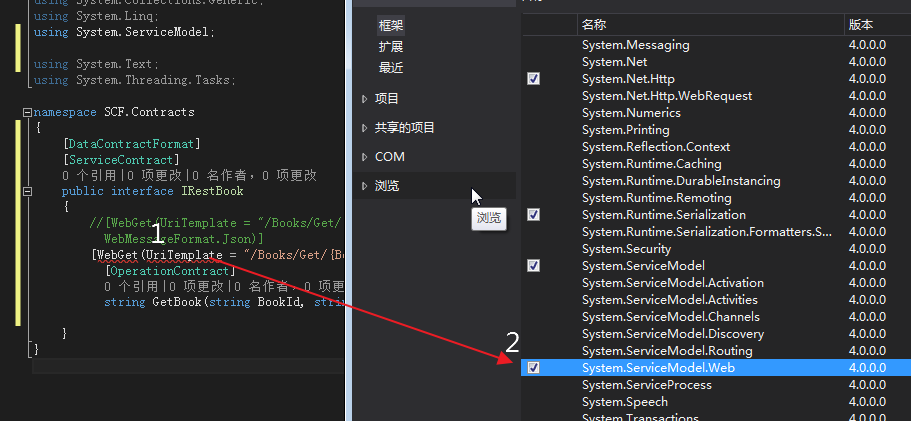
using SCF.Model;

using System;

using System.Collections.Generic;

using System.Linq;

using System.ServiceModel;

using System.ServiceModel.Web;

using System.Text;

using System.Threading.Tasks;

namespace SCF.Contracts

{

    [DataContractFormat]

    [ServiceContract]

    public interface IBookRestService

    {

        //[WebGet(UriTemplate = "/Books/Get/{BookId}/{categroy}", BodyStyle = WebMessageBodyStyle.Bare, ResponseFormat = WebMessageFormat.Json)]

        [WebGet(UriTemplate = "/Books/Get/{BookId}", BodyStyle = WebMessageBodyStyle.Bare)]

          [OperationContract]

          List<Books> GetBook(string BookId);

        //[WebInvoke(Method = "POST", UriTemplate = "/Books/Create", BodyStyle = WebMessageBodyStyle.Bare, ResponseFormat = WebMessageFormat.Json, RequestFormat = WebMessageFormat.Json)]

        [WebInvoke(Method = "POST", UriTemplate = "/Books/Add", BodyStyle = WebMessageBodyStyle.Bare)]

         [OperationContract]

         Result AddBook(Books book);

     }

}
2. 在项目SCF.Model中创建一个实体对象Books与一个返回对象Result,用作数据传输的载体,下面是Books.cs的内容
namespace SCF.Model

{

    using System;

    using System.Collections.Generic;

    using System.ComponentModel.DataAnnotations;

    using System.ComponentModel.DataAnnotations.Schema;

    using System.Data.Entity.Spatial;

using System.Runtime.Serialization;

 ///DataContract 数据契约:服务端和客户端之间要传送的自定义数据类型

    [DataContract(Namespace = "http://tempuri.org/")]

    public partial class Books

{

 /// <summary>

/// 在数据传送过程中,只有成员变量可以被传送而成员方法不可以。

/// 并且只有当成员变量加上DataMember时才可以被序列进行数据传输,

/// 如果不加DataMember,客户端将无法获得该属性的任何信息

/// </summary>

        [DataMember]

        [Key]

        public int BookID { get; set; }

        [DataMember]

        [Required]

        public string Category { get; set; }

        [DataMember]

        [Required]

        public string Name { get; set; }

        [DataMember]

        public int Numberofcopies { get; set; }

        [DataMember]

        public int AuthorID { get; set; }

        [DataMember]

        public decimal Price { get; set; }

        [DataMember]

        public DateTime PublishDate { get; set; }

        [StringLength()]

        [DataMember]

        public string Rating { get; set; }

    }

}

using System;

using System.Collections.Generic;

using System.Linq;

using System.Runtime.Serialization;

using System.Text;

using System.Threading.Tasks;

namespace SCF.Model

{

    [DataContract(Namespace = "http://tempuri.org/")]

    public class Result

    {

        [DataMember]

        public string Message

        { get; set; }

    }

}
3. 在SCF.WcfService项目中实现在SCF.Contracts项目中定义的服务契约。这里最简单的实现GetBook和AddBook两个方法的逻辑。
using SCF.Contracts;

using System;

using System.Collections.Generic;

using System.Linq;

using System.Runtime.Serialization;

using System.ServiceModel;

using System.Text;

using SCF.Model;

using SCF.Common;

namespace SCF.WcfService

{

    // 注意: 使用“重构”菜单上的“重命名”命令,可以同时更改代码、svc 和配置文件中的类名“BookRestService”。

    // 注意: 为了启动 WCF 测试客户端以测试此服务,请在解决方案资源管理器中选择 BookRestService.svc 或 BookRestService.svc.cs,然后开始调试。

    public class BookRestService : IBookRestService

    {

        Entities db = new Entities();

        public Result AddBook(Books book)

        {

            Result result = new Result();

            try

            {

                db.Books.Add(book);

                db.SaveChanges();

                result.Message = string.Format("书名:{0} 已经添加!",book.Name);

            }

            catch (Exception ex)

            {

                result.Message =ex.Message;

            }

            return result;

        }

        public List<Books> GetBook(string BookId)

        {

            var cateLst = new List<string>();

            var cateQry = from d in db.Books

                          orderby d.Category

                          select d.Category;

            cateLst.AddRange(cateQry.Distinct());

            var books = from m in db.Books

                        select m;

            if (!String.IsNullOrEmpty(BookId))

            {

                books = books.Where(s => s.Name.Contains(BookId));

            }

            List<Books> list = null;

              list = books.ToList<Books>();

            return list;

        }

    }

}
4. 在配置文件在中配置我们的Rest服务,必须使用WebHttpBehavior对服务的终结点进行配置。
<?xml version="1.0" encoding="utf-8"?>
<configuration>
<configSections>
<!-- For more information on Entity Framework configuration, visit http://go.microsoft.com/fwlink/?LinkID=237468 -->
<section name="entityFramework" type="System.Data.Entity.Internal.ConfigFile.EntityFrameworkSection, EntityFramework,
Version=6.0.0.0, Culture=neutral, PublicKeyToken=b77a5c561934e089" requirePermission="false" />
</configSections>
<entityFramework>
<defaultConnectionFactory type="System.Data.Entity.Infrastructure.SqlConnectionFactory, EntityFramework" />
<providers>
<provider invariantName="System.Data.SqlClient" type="System.Data.Entity.SqlServer.SqlProviderServices, EntityFramework.SqlServer" />
</providers> </entityFramework> <system.serviceModel> <bindings>
<webHttpBinding>
<binding name="RestWebBinding">
</binding>
</webHttpBinding>
</bindings> <behaviors>
<serviceBehaviors>
<behavior name="metadataBehavior"> <serviceMetadata httpGetEnabled="true" httpGetUrl="http://127.0.0.1:8888/BookService/metadata" />
<serviceDebug includeExceptionDetailInFaults="True" />
</behavior> <behavior name="RestServiceBehavior">
</behavior>
</serviceBehaviors>
<endpointBehaviors>
<behavior name="RestWebBehavior">
<!--这里必须设置-->
<webHttp />
</behavior>
</endpointBehaviors> </behaviors> <services>
<service behaviorConfiguration="metadataBehavior" name="SCF.WcfService.BookService">
<endpoint address="http://127.0.0.1:8888/BookService" binding="wsHttpBinding"
contract="SCF.Contracts.IBookService" />
</service> <service name="SCF.WcfService.BookRestService" behaviorConfiguration="RestServiceBehavior">
<endpoint address="http://127.0.0.1:8888/" behaviorConfiguration="RestWebBehavior"
binding="webHttpBinding" bindingConfiguration="RestWebBinding" contract="SCF.Contracts.IBookRestService">
</endpoint>
</service> </services>
</system.serviceModel> <startup>
<supportedRuntime version="v4.0" sku=".NETFramework,Version=v4.5.2" />
</startup>
<connectionStrings> <add name="Entities" connectionString="metadata=res://*/BookModel.csdl|res://*/BookModel.ssdl|res://*/BookModel.msl;
provider=System.Data.SqlClient;provider connection string="data source=.\SQLEXPRESS;initial catalog=Test;
integrated security=SSPI;MultipleActiveResultSets=True;App=EntityFramework"" providerName="System.Data.EntityClient" />
</connectionStrings> </configuration>
WCF学习之旅—实现支持REST服务端应用(二十三)的更多相关文章
- WCF学习之旅—实现支持REST客户端应用(二十四)
WCF学习之旅—实现REST服务(二十二) WCF学习之旅—实现支持REST服务端应用(二十三) 在上二篇文章中简单介绍了一下RestFul与WCF支持RestFul所提供的方法,及创建一个支持RES ...
- WCF学习之旅—第三个示例之三(二十九)
上接WCF学习之旅—第三个示例之一(二十七) WCF学习之旅—第三个示例之二(二十八) 在上一篇文章中我们创建了实体对象与接口协定,在这一篇文章中我们来学习如何创建WCF的服务端代码.具体步骤见下面. ...
- WCF学习之旅—第三个示例之一(二十七)
一.前言 通过前面二十几个章节的学习,我们知道了什么是WCF:WCF中的A.B.C:WCF的传输模式:WCF的寄宿方式:WCF的异常处理.本文综合应用以上知识点,一步一步写一个小的WCF应用程序——书 ...
- 一、WCF学习之旅-创建第一个服务
WCF基本介绍:http://baike.baidu.com/link?url=TGjLYt3HS4dt4-hIiGRknLy6udRsZ52QxJz9cmRKlR4NXbP9rCZDsKn2fDfG ...
- WCF学习之旅—第三个示例之四(三十)
上接WCF学习之旅—第三个示例之一(二十七) WCF学习之旅—第三个示例之二(二十八) WCF学习之旅—第三个示例之三(二十九) ...
- WCF学习之旅—第三个示例之五(三十一)
上接WCF学习之旅—第三个示例之一(二十七) WCF学习之旅—第三个示例之二(二十八) WCF学习之旅—第三个示例之三(二十九) WCF学习 ...
- WCF学习之旅—第三个示例之二(二十八)
上接WCF学习之旅—第三个示例之一(二十七) 五.在项目BookMgr.Model创建实体类数据 第一步,安装Entity Framework 1) 使用NuGet下载最新版的Entity Fram ...
- WCF学习之旅—WCF服务的WAS寄宿(十二)
上接 WCF学习之旅—WCF服务部署到IIS7.5(九) WCF学习之旅—WCF服务部署到应用程序(十) WCF学习之旅—WCF服务的Windows 服务程序寄宿(十一) 八.WAS宿主 IIS ...
- WCF学习之旅—WCF服务的批量寄宿(十三)
上接 WCF学习之旅—WCF服务部署到IIS7.5(九) WCF学习之旅—WCF服务部署到应用程序(十) WCF学习之旅—WCF服务的Windows 服务程序寄宿(十一) WCF学习之旅—WCF ...
随机推荐
- Javascript 的执行环境(execution context)和作用域(scope)及垃圾回收
执行环境有全局执行环境和函数执行环境之分,每次进入一个新执行环境,都会创建一个搜索变量和函数的作用域链.函数的局部环境不仅有权访问函数作用于中的变量,而且可以访问其外部环境,直到全局环境.全局执行环境 ...
- XStream将java对象转换为xml时,对象字段中的下划线“_”,转换后变成了两个的解决办法
在前几天的一个项目中,由于数据库字段的命名原因 其中有两项:一项叫做"市场价格"一项叫做"商店价格" 为了便于区分,遂分别将其命名为market ...
- C# 多种方式发送邮件(附帮助类)
因项目业务需要,需要做一个发送邮件功能,查了下资料,整了整,汇总如下,亲测可用- QQ邮箱发送邮件 #region 发送邮箱 try { MailMessage mail = new MailMess ...
- Android注解使用之注解编译android-apt如何切换到annotationProcessor
前言: 自从EventBus 3.x发布之后其通过注解预编译的方式解决了之前通过反射机制所引起的性能效率问题,其中注解预编译所采用的的就是android-apt的方式,不过最近Apt工具的作者宣布了不 ...
- JS判断鼠标进入容器方向的方法和分析window.open新窗口被拦截的问题
1.鼠标进入容器方向的判定 判断鼠标从哪个方向进入元素容器是一个经常碰到的问题,如何来判断呢?首先想到的是:获取鼠标的位置,然后经过一大堆的if..else逻辑来确定.这样的做法比较繁琐,下面介绍两种 ...
- 算法与数据结构(十七) 基数排序(Swift 3.0版)
前面几篇博客我们已经陆陆续续的为大家介绍了7种排序方式,今天博客的主题依然与排序算法相关.今天这篇博客就来聊聊基数排序,基数排序算法是不稳定的排序算法,在排序数字较小的情况下,基数排序算法的效率还是比 ...
- 个人网站对xss跨站脚本攻击(重点是富文本编辑器情况)和sql注入攻击的防范
昨天本博客受到了xss跨站脚本注入攻击,3分钟攻陷--其实攻击者进攻的手法很简单,没啥技术含量.只能感叹自己之前竟然完全没防范. 这是数据库里留下的一些记录.最后那人弄了一个无限循环弹出框的脚本,估计 ...
- 《LoadRunner12七天速成宝典》签售会2016-12-17北京
报名地址: http://www.after615.com/actives/s?id=3141&time=1480042829608&sign=9ac8e25e9ab3cf57f613 ...
- 简单Linux命令学习笔记
1.查看进程 ps -ef | grep 关键字 /*关键字为服务名*/ netstat -unltp | grep 关键字 /*关键字为服务名或者是端口均可*/ 2.杀死进 ...
- #ifndef
关于c的#ifndef条件编译: 1)最好把头文件的内容都放在#ifndef和#endif中 2)一般格式: #ifndef <标识> #define <标识> ...... ...