
WCF学习之旅—实现支持REST服务端应用(二十三)
在上一篇(WCF学习之旅—实现REST服务(二十二))文章中简单介绍了一下RestFul与WCF支持RestFul所提供的方法,本文讲解一下如何创建一个支持REST的WCF服务端程序。
四、在WCF中创建REST服务
1. 在SCF.Contracts 在创建一个服务契约IBookRestService.
这里提供两个方法,分别采用GET和POST方式访问。
我们可以看到,与普通WCF服务契约不同的是,需要额外用WebGet或者WebInvoke指定REST访问的方式。另外还要指定消息包装样式和消息格式,默认的消息请求和响应格式为XML,若选择JSON需要显式声明。
UriTemplate用来将方法映射到具体的Uri上,但如果不指定映射,将映射到默认的Uri。比如采用Get访问的GetBook方法,默认映射是:/ GetBook?BookId={BookId}。
在编写代码的过程中,会出现如下图中1的错误,请引用下图2处的
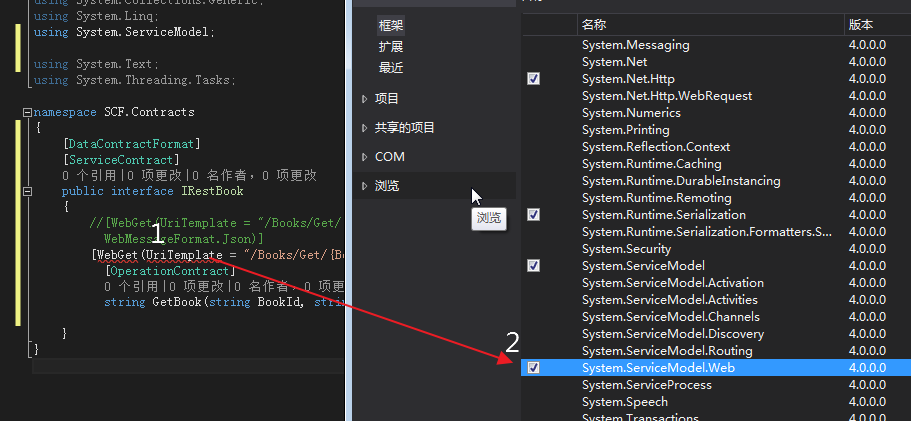
using SCF.Model;

using System;

using System.Collections.Generic;

using System.Linq;

using System.ServiceModel;

using System.ServiceModel.Web;

using System.Text;

using System.Threading.Tasks;

namespace SCF.Contracts

{

    [DataContractFormat]

    [ServiceContract]

    public interface IBookRestService

    {

        //[WebGet(UriTemplate = "/Books/Get/{BookId}/{categroy}", BodyStyle = WebMessageBodyStyle.Bare, ResponseFormat = WebMessageFormat.Json)]

        [WebGet(UriTemplate = "/Books/Get/{BookId}", BodyStyle = WebMessageBodyStyle.Bare)]

          [OperationContract]

          List<Books> GetBook(string BookId);

        //[WebInvoke(Method = "POST", UriTemplate = "/Books/Create", BodyStyle = WebMessageBodyStyle.Bare, ResponseFormat = WebMessageFormat.Json, RequestFormat = WebMessageFormat.Json)]

        [WebInvoke(Method = "POST", UriTemplate = "/Books/Add", BodyStyle = WebMessageBodyStyle.Bare)]

         [OperationContract]

         Result AddBook(Books book);

     }

}
2. 在项目SCF.Model中创建一个实体对象Books与一个返回对象Result,用作数据传输的载体,下面是Books.cs的内容
namespace SCF.Model

{

    using System;

    using System.Collections.Generic;

    using System.ComponentModel.DataAnnotations;

    using System.ComponentModel.DataAnnotations.Schema;

    using System.Data.Entity.Spatial;

using System.Runtime.Serialization;

 ///DataContract 数据契约:服务端和客户端之间要传送的自定义数据类型

    [DataContract(Namespace = "http://tempuri.org/")]

    public partial class Books

{

 /// <summary>

/// 在数据传送过程中,只有成员变量可以被传送而成员方法不可以。

/// 并且只有当成员变量加上DataMember时才可以被序列进行数据传输,

/// 如果不加DataMember,客户端将无法获得该属性的任何信息

/// </summary>

        [DataMember]

        [Key]

        public int BookID { get; set; }

        [DataMember]

        [Required]

        public string Category { get; set; }

        [DataMember]

        [Required]

        public string Name { get; set; }

        [DataMember]

        public int Numberofcopies { get; set; }

        [DataMember]

        public int AuthorID { get; set; }

        [DataMember]

        public decimal Price { get; set; }

        [DataMember]

        public DateTime PublishDate { get; set; }

        [StringLength()]

        [DataMember]

        public string Rating { get; set; }

    }

}

using System;

using System.Collections.Generic;

using System.Linq;

using System.Runtime.Serialization;

using System.Text;

using System.Threading.Tasks;

namespace SCF.Model

{

    [DataContract(Namespace = "http://tempuri.org/")]

    public class Result

    {

        [DataMember]

        public string Message

        { get; set; }

    }

}
3. 在SCF.WcfService项目中实现在SCF.Contracts项目中定义的服务契约。这里最简单的实现GetBook和AddBook两个方法的逻辑。
using SCF.Contracts;

using System;

using System.Collections.Generic;

using System.Linq;

using System.Runtime.Serialization;

using System.ServiceModel;

using System.Text;

using SCF.Model;

using SCF.Common;

namespace SCF.WcfService

{

    // 注意: 使用“重构”菜单上的“重命名”命令,可以同时更改代码、svc 和配置文件中的类名“BookRestService”。

    // 注意: 为了启动 WCF 测试客户端以测试此服务,请在解决方案资源管理器中选择 BookRestService.svc 或 BookRestService.svc.cs,然后开始调试。

    public class BookRestService : IBookRestService

    {

        Entities db = new Entities();

        public Result AddBook(Books book)

        {

            Result result = new Result();

            try

            {

                db.Books.Add(book);

                db.SaveChanges();

                result.Message = string.Format("书名:{0} 已经添加!",book.Name);

            }

            catch (Exception ex)

            {

                result.Message =ex.Message;

            }

            return result;

        }

        public List<Books> GetBook(string BookId)

        {

            var cateLst = new List<string>();

            var cateQry = from d in db.Books

                          orderby d.Category

                          select d.Category;

            cateLst.AddRange(cateQry.Distinct());

            var books = from m in db.Books

                        select m;

            if (!String.IsNullOrEmpty(BookId))

            {

                books = books.Where(s => s.Name.Contains(BookId));

            }

            List<Books> list = null;

              list = books.ToList<Books>();

            return list;

        }

    }

}
4. 在配置文件在中配置我们的Rest服务,必须使用WebHttpBehavior对服务的终结点进行配置。
<?xml version="1.0" encoding="utf-8"?>
<configuration>
<configSections>
<!-- For more information on Entity Framework configuration, visit http://go.microsoft.com/fwlink/?LinkID=237468 -->
<section name="entityFramework" type="System.Data.Entity.Internal.ConfigFile.EntityFrameworkSection, EntityFramework,
Version=6.0.0.0, Culture=neutral, PublicKeyToken=b77a5c561934e089" requirePermission="false" />
</configSections>
<entityFramework>
<defaultConnectionFactory type="System.Data.Entity.Infrastructure.SqlConnectionFactory, EntityFramework" />
<providers>
<provider invariantName="System.Data.SqlClient" type="System.Data.Entity.SqlServer.SqlProviderServices, EntityFramework.SqlServer" />
</providers> </entityFramework> <system.serviceModel> <bindings>
<webHttpBinding>
<binding name="RestWebBinding">
</binding>
</webHttpBinding>
</bindings> <behaviors>
<serviceBehaviors>
<behavior name="metadataBehavior"> <serviceMetadata httpGetEnabled="true" httpGetUrl="http://127.0.0.1:8888/BookService/metadata" />
<serviceDebug includeExceptionDetailInFaults="True" />
</behavior> <behavior name="RestServiceBehavior">
</behavior>
</serviceBehaviors>
<endpointBehaviors>
<behavior name="RestWebBehavior">
<!--这里必须设置-->
<webHttp />
</behavior>
</endpointBehaviors> </behaviors> <services>
<service behaviorConfiguration="metadataBehavior" name="SCF.WcfService.BookService">
<endpoint address="http://127.0.0.1:8888/BookService" binding="wsHttpBinding"
contract="SCF.Contracts.IBookService" />
</service> <service name="SCF.WcfService.BookRestService" behaviorConfiguration="RestServiceBehavior">
<endpoint address="http://127.0.0.1:8888/" behaviorConfiguration="RestWebBehavior"
binding="webHttpBinding" bindingConfiguration="RestWebBinding" contract="SCF.Contracts.IBookRestService">
</endpoint>
</service> </services>
</system.serviceModel> <startup>
<supportedRuntime version="v4.0" sku=".NETFramework,Version=v4.5.2" />
</startup>
<connectionStrings> <add name="Entities" connectionString="metadata=res://*/BookModel.csdl|res://*/BookModel.ssdl|res://*/BookModel.msl;
provider=System.Data.SqlClient;provider connection string="data source=.\SQLEXPRESS;initial catalog=Test;
integrated security=SSPI;MultipleActiveResultSets=True;App=EntityFramework"" providerName="System.Data.EntityClient" />
</connectionStrings> </configuration>
WCF学习之旅—实现支持REST服务端应用(二十三)的更多相关文章
- WCF学习之旅—实现支持REST客户端应用(二十四)
WCF学习之旅—实现REST服务(二十二) WCF学习之旅—实现支持REST服务端应用(二十三) 在上二篇文章中简单介绍了一下RestFul与WCF支持RestFul所提供的方法,及创建一个支持RES ...
- WCF学习之旅—第三个示例之三(二十九)
上接WCF学习之旅—第三个示例之一(二十七) WCF学习之旅—第三个示例之二(二十八) 在上一篇文章中我们创建了实体对象与接口协定,在这一篇文章中我们来学习如何创建WCF的服务端代码.具体步骤见下面. ...
- WCF学习之旅—第三个示例之一(二十七)
一.前言 通过前面二十几个章节的学习,我们知道了什么是WCF:WCF中的A.B.C:WCF的传输模式:WCF的寄宿方式:WCF的异常处理.本文综合应用以上知识点,一步一步写一个小的WCF应用程序——书 ...
- 一、WCF学习之旅-创建第一个服务
WCF基本介绍:http://baike.baidu.com/link?url=TGjLYt3HS4dt4-hIiGRknLy6udRsZ52QxJz9cmRKlR4NXbP9rCZDsKn2fDfG ...
- WCF学习之旅—第三个示例之四(三十)
上接WCF学习之旅—第三个示例之一(二十七) WCF学习之旅—第三个示例之二(二十八) WCF学习之旅—第三个示例之三(二十九) ...
- WCF学习之旅—第三个示例之五(三十一)
上接WCF学习之旅—第三个示例之一(二十七) WCF学习之旅—第三个示例之二(二十八) WCF学习之旅—第三个示例之三(二十九) WCF学习 ...
- WCF学习之旅—第三个示例之二(二十八)
上接WCF学习之旅—第三个示例之一(二十七) 五.在项目BookMgr.Model创建实体类数据 第一步,安装Entity Framework 1) 使用NuGet下载最新版的Entity Fram ...
- WCF学习之旅—WCF服务的WAS寄宿(十二)
上接 WCF学习之旅—WCF服务部署到IIS7.5(九) WCF学习之旅—WCF服务部署到应用程序(十) WCF学习之旅—WCF服务的Windows 服务程序寄宿(十一) 八.WAS宿主 IIS ...
- WCF学习之旅—WCF服务的批量寄宿(十三)
上接 WCF学习之旅—WCF服务部署到IIS7.5(九) WCF学习之旅—WCF服务部署到应用程序(十) WCF学习之旅—WCF服务的Windows 服务程序寄宿(十一) WCF学习之旅—WCF ...
随机推荐
- HttpClient的替代者 - RestTemplate
需要的包 ,除了Spring的基础包外还用到json的包,这里的数据传输使用json格式 客户端和服务端都用到一下的包 <!-- Spring --> <dependency> ...
- .NET基础拾遗(5)多线程开发基础
Index : (1)类型语法.内存管理和垃圾回收基础 (2)面向对象的实现和异常的处理基础 (3)字符串.集合与流 (4)委托.事件.反射与特性 (5)多线程开发基础 (6)ADO.NET与数据库开 ...
- 使用ServiceStack构建Web服务
提到构建WebService服务,大家肯定第一个想到的是使用WCF,因为简单快捷嘛.首先要说明的是,本人对WCF不太了解,但是想快速建立一个WebService,于是看到了MSDN上的这一篇文章 Bu ...
- JdbcTemplate+PageImpl实现多表分页查询
一.基础实体 @MappedSuperclass public abstract class AbsIdEntity implements Serializable { private static ...
- 安卓易学,爬坑不易——腾讯老司机的RecyclerView局部刷新爬坑之路
针对手游的性能优化,腾讯WeTest平台的Cube工具提供了基本所有相关指标的检测,为手游进行最高效和准确的测试服务,不断改善玩家的体验.目前功能还在免费开放中. 点击地址:http://wetest ...
- 理解nodejs模块的scope
描述 原文档地址:https://docs.npmjs.com/misc/scope 所有npm模块都有name,有的模块的name还有scope.scope的命名规则和name差不多,同样不能有ur ...
- 如何安全的将VMware vCenter Server使用的SQL Server Express数据库平滑升级到完整版
背景: 由于建设初期使用的vSphere vCenter for Windows版,其中安装自动化过程中会使用SQL Server Express的免费版数据库进行基础环境构建.而此时随着业务量的增加 ...
- Python自然语言处理工具小结
Python自然语言处理工具小结 作者:白宁超 2016年11月21日21:45:26 目录 [Python NLP]干货!详述Python NLTK下如何使用stanford NLP工具包(1) [ ...
- 项目管理_FindBugs的使用
本章将讲述如何在Myeclipse下,使用FindBugs,静态分析工具,无需开发人员费劲就能找出代码中已有的缺陷. 一:Myeclipse下如何安装FindBugs插件 1:FindBugs插件下载 ...
- Linux文件查找.md
Linux 文件查找 在Linux系统的查找相关的命令: which 查看可执行文件的位置 whereis 查看文件的位置 locate 配合数据库查看文件位置 find 实际搜寻硬盘查询文件名称 w ...