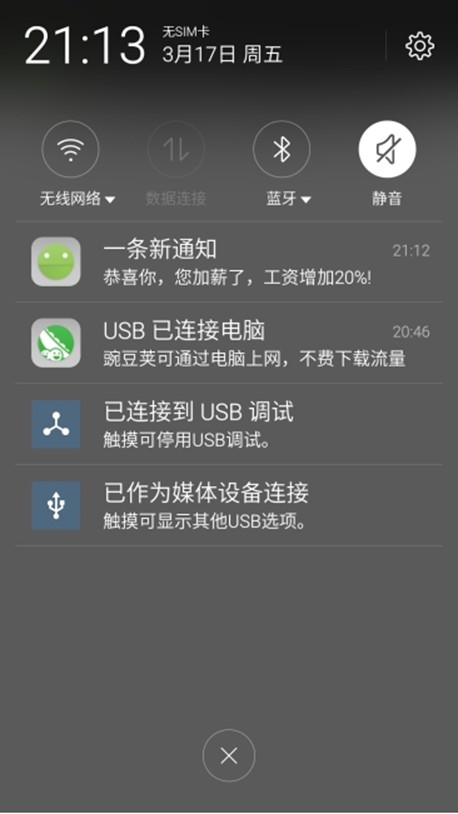
实现通知栏消息的生成和消除

  1. MainActivity.java  
  2.     
  3. public class MainActivity extends Activity  
  4. {  
  5.     static final int NOTIFICATION_ID = 0x123;  
  6.     NotificationManager nm;  
  7.     @Override  
  8.     public void onCreate(Bundle savedInstanceState)  
  9.     {  
  10.         super.onCreate(savedInstanceState);  
  11.         setContentView(R.layout.main);  
  12.         // 获取系统的NotificationManager服务  
  13.         nm = (NotificationManager)  
  14.                 getSystemService(NOTIFICATION_SERVICE);  
  15.     }  
  16.     // 为发送通知的按钮的点击事件定义事件处理方法  
  17.     public void send(View source)  
  18.     {  
  19.         // 创建一个启动其他Activity的Intent  
  20.         Intent intent = new Intent(MainActivity.this  
  21.                 , OtherActivity.class);  
  22.         PendingIntent pi = PendingIntent.getActivity(  
  23.                 MainActivity.this, 0, intent, 0);  
  24.         Notification notify = new Notification.Builder(this)  
  25.                 // 设置打开该通知,该通知自动消失  
  26.                 .setAutoCancel(true)  
  27.                 // 设置显示在状态栏的通知提示信息  
  28.                 .setTicker("有新消息")  
  29.                 // 设置通知的图标  
  30.                 .setSmallIcon(R.drawable.notify)  
  31.                 // 设置通知内容的标题  
  32.                 .setContentTitle("一条新通知")  
  33.                 // 设置通知内容  
  34.                 .setContentText("恭喜你,您加薪了,工资增加20%!")  
  35.                 // 设置使用系统默认的声音、默认LED灯  
  36.                 // .setDefaults(Notification.DEFAULT_SOUND  
  37.                 // |Notification.DEFAULT_LIGHTS)  
  38.                 // 设置通知的自定义声音  
  39.                 .setSound(Uri.parse("android.resource://org.crazyit.ui/"  
  40.                         + R.raw.msg))  
  41.                 .setWhen(System.currentTimeMillis())  
  42.                 // 设改通知将要启动程序的Intent  
  43.                 .setContentIntent(pi)  // ①  
  44.                 .build();  
  45.         // 发送通知  
  46.         nm.notify(NOTIFICATION_ID, notify);  
  47.     }  
  48.     // 为删除通知的按钮的点击事件定义事件处理方法  
  49.     public void del(View v)  
  50.     {  
  51.         // 取消通知  
  52.         nm.cancel(NOTIFICATION_ID);  
  53.     }  
  54. }  
  55.     
  56.     
  57. OtherActivity  
  58.     
  59. public class OtherActivity extends Activity  
  60. {  
  61.    @Override  
  62.    public void onCreate(Bundle savedInstanceState)  
  63.    {  
  64.       super.onCreate(savedInstanceState);  
  65.       //设置该Activity显示的页面  
  66.       setContentView(R.layout.other);  
  67.    }  
  68. }  
  69.     
  70. XML文件  
  71.     
  72. <?xml version="1.0" encoding="utf-8"?>  
  73. <LinearLayout xmlns:android="http://schemas.android.com/apk/res/android"  
  74.    android:orientation="horizontal"  
  75.    android:layout_width="match_parent"  
  76.    android:layout_height="match_parent"  
  77.    android:gravity="center_horizontal">  
  78. <Button  
  79.    android:layout_width="wrap_content"   
  80.    android:layout_height="wrap_content"   
  81.    android:text="发送Notification"  
  82.    android:onClick="send"  
  83.    />  
  84. <Button  
  85.    android:layout_width="wrap_content"   
  86.    android:layout_height="wrap_content"   
  87.    android:text="删除Notification"  
  88.    android:onClick="del"  
  89.    />   
  90. </LinearLayout>  
  91.     
  92. other.xml  
  93.     
  94. <?xml version="1.0" encoding="utf-8"?>  
  95. <LinearLayout  xmlns:android="http://schemas.android.com/apk/res/android"  
  96.    android:layout_width="match_parent"  
  97.    android:layout_height="wrap_content"  
  98.    android:gravity="center_horizontal"  
  99.    android:orientation="vertical">  
  100. <!-- 定义一个ImageView -->  
  101. <ImageView  
  102.    android:layout_width="match_parent"  
  103.    android:layout_height="wrap_content"  
  104.    android:src="@drawable/swift"  
  105.    android:layout_gravity="center_horizontal"  
  106.    />  
  107. </LinearLayout>  
  108.     
  109. Menu.xml  
  110.     
  111. <menu xmlns:android="http://schemas.android.com/apk/res/android"  
  112.      xmlns:tools="http://schemas.android.com/tools"  
  113.      tools:context=".MainActivity">  
  114.    <item android:id="@+id/action_settings"  
  115.         android:title="@string/app_name"  
  116.         android:orderInCategory="100"  
  117.         android:showAsAction="never"/>  
  118. </menu>  

效果

Notification的功能和用法 加薪通知的更多相关文章

  1. Notification的功能与用法

    Notification是显示在手机状态的通知——手机状态栏位于手机屏幕的最上方,那里一般显示了手机当前的网络状态.时间等.Notification所代表的是一种具有全局效果的通知,程序一般通过Not ...

  2. 2.6.2 Notification的功能与用法

    <LinearLayout xmlns:android="http://schemas.android.com/apk/res/android" android:layout ...

  3. Javascript自定义事件功能与用法实例分析

    原文地址:https://www.jb51.net/article/127776.htm 本文实例讲述了javascript自定义事件功能与用法.分享给大家供大家参考,具体如下: 概述 自定义事件很难 ...

  4. Android 自学之画廊视图(Gallery)功能和用法

    Gallery与之前讲的Spinner有共同的父类:AbsSpinner,表明Gallery和Spinner都是一个列表框.他们之间的区别在于Spinner显示的是一个垂直的列表框,而Gallery显 ...

  5. 搜索框(SearchView)的功能与用法

    SearchView是搜索框组件,它可以让用户在文本框内输入汉字,并允许通过监听器监控用户输入,当用户用户输入完成后提交搜索按钮时,也通过监听器执行实际的搜索. 使用SearchView时可以使用如下 ...

  6. 数值选择器(NumberPicker)的功能与用法

    数值选择器用于让用户输入数值,用户既可以通过键盘输入数值,也可以通过拖动来选择数值.使用该组件常用如下三个方法. setMinValue(int minVal):设置该组件支持的最小值. setMax ...

  7. 日历视图(CalendarView)组件的功能和用法

    日历视图(CalendarView)可用于显示和选择日期,用户既可选择一个日期,也可通过触摸来滚动日历.如果希望监控该组件的日历改变,可调用CalendarView的setOnDateChangeLi ...

  8. 星级评分条(RatingBar)的功能和用法

    星级评分条与拖动条有相同的父类:AbsSeekBar,因此它们十分相似.实际上星级评分条与拖动条的用法.功能都十分接近:它们都是允许用户通过拖动条来改变进度.RatingBar与SeekBar最大区别 ...

  9. 拖动条(SeekBar)的功能和用法

    拖动条和进度条非常相似,只是进度条采用颜色填充来表明进度完成的程序,而拖动条则通过滑块的位置来标识数值——而且拖动条允许用户拖动滑块来改变值,因而拖动条通常用于对系统的某种数值进行调节,比如调节音量等 ...

随机推荐

  1. UI5-文档-4.15-Nested Views

    我们的面板内容变得越来越复杂,现在是时候将面板内容移动到一个单独的视图中了.使用这种方法,应用程序结构更容易理解,应用程序的各个部分可以重用. Preview The panel content is ...

  2. 超简单,webpack配置

    有看过我的博客的童鞋可能有看到我最近有在利用闲暇时间做一个前后台均涵盖的音乐播放器项目,但是呢,我是一个小小的前端,对后台的了解可以说只停留在很初级的阶段,当然了音乐播放器的音乐列表是后台轮循出来的, ...

  3. WP8.1 在默认浏览器中打开url

    Windows.System.Launcher.LaunchUriAsync(new Uri("http://www.google.com")); PS: This is for ...

  4. H5 缓存机制解析

    在web项目开发中,我们可能都曾碰到过这样一个棘手的问题: 线上项目需要更新一个有问题的资源(可能是图片,js,css,json数据等),这个资源已经发布了很长一段时间,为什么页面在浏览器里打开还是没 ...

  5. C++ 0x 使用 shared_ptr 自动释放, 防止内存泄漏

    最近在研究 cocos2d-x 3.0 ,它在创建类的对象时比如 Layer 时, 并不是直接使用 new , 而是使用一个宏方法  CREATE_FUNC(MyLayer);. 这个宏就是自动的创建 ...

  6. scala -- 传名参数

    object Test{ def main(args: Array[String]): Unit = { def test(code : => Unit){// 传名参数 不计算函数值,而是把函 ...

  7. redis lua 用来传输日志

    2.8 Lua Script Redis2.6内置的Lua Script支持,可以在Redis的Server端一次过运行大量逻辑,就像存储过程一样,避免了海量中间数据在网路上的传输. Lua自称是在S ...

  8. 构造函数中的super和this的使用

    super用于调用父类构造函数的部分,其必须出现在构造函数的第一行.super在调用时第一件事就是去执行父类构造函数的部分,所执行的父类构造函数与super()括号中的参数相对应. this用于在一个 ...

  9. 获取Activity中得到焦点的EditText

    Android Activity中获取当前焦点的控件,自动化输入EditText 获取焦点的view对象 View view=getWindow().getDecorView().findFocus( ...

  10. eclispe 通过git向码云上传

    本文将介绍如何将本地的项目提交到开源中国上去,过程比较详细,实现起来很简单.由于自己也算是一个新手,所以没有做过多的解释,只是单纯的描述了该如何去做. 1.在开源中国上面新建一个空项目 到这里也就结束 ...