
[翻译] USING GIT IN XCODE [1] 在XCODE中使用GIT[1]
USING GIT IN XCODE

http://www.cimgf.com/2013/12/10/using-git-in-xcode/
Git has become a very popular version control system in iOS and Mac development. Git comes with a set of command line tools to check status, commit changes, view logs, make and merge branches, and coordinate commits with a remote repository. There are a number of desktop apps that can perform these functions, including Xcode. When I ask other iOS and Mac developers how they interact with Git, most say they use the command line or a separate desktop app like Tower. I find very few developers use Xcode for even some basic Git tasks, and many developers are not aware of the Git support Xcode offers.
Git已经成为了非常流行的版本控制工具。Git是一系列的命令行工具,用以检查状态、提交更改、查看日志、创建和对比分支、并将源码远程提交到服务器上。有很多很多工具都能做这项事情,Xcode自身也有Git的功能。我问了很多iOS以及Mac的开发者他们是怎么使用Git的,大部分都说他们使用命令行工具,或者是一个独立的app例如Tower。我发现很少有人使用Xcode自带的Git来进行最基本的一些操作,还有,很多开发者根本就不知道Xcode自身就支持Git,提供了Git的相关服务。
For my own workflow, I like to minimize the number of tools used and number of switches between apps needed to complete a task. So, I decided to attempt to use Xcode exclusively to interact with Git and share my results. So far I have been pleasantly surprised at what all Xcode can do with Git. If you have not taken a look at Xcode’s support for Git, you may be surprised how much you can accomplish.
在我的大部分工程当中,我喜欢用最少的工具来控制不同版本的app。所以,我决定尝试一下使用Xcode自带的Git以及分享我的经验。至今为止,我发现Xcode可以用Git做到很多相当不错的功能。如果你还没有用过Xcode自带的Git,当你在使用它的时候也许会被惊艳到。
This article assumes basic familiarity with Xcode and Git, and describes Git functionality present in Xcode version 4.6.2.
这篇文章假定你熟悉Xcode以及Git的使用,文章中的Git的功能描述是在Xcode的4.6.2版本上进行的。
NEW GIT PROJECT SETUP IN XCODE
Since Git is a distributed version control system, a repository can be created locally when starting a project, or on a remote server and then cloned. Xcode can handle both situations.
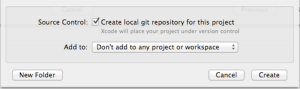
When creating a new Xcode project, you can include a local git repository by checking the “Create local git repository for this project” option. Xcode will initialize the repository and perform an initial commit with the template files for you.
自从发布了Git这个版本控制工具之后,一个工程拷贝既可以在本地创建,也可以通过从服务器的拷贝来完成。Xcode能处理这两种情形。
当在创建一个新的Xcode工程项目时,你可以在选项 Create local git repository for this project 来包含一个本地的git拷贝。Xcode会初始化这个拷贝并获取到文件供你使用。
If you are sharing your project with a team or just want a backup of your project on another machine, you can set up a remote copy of the repository. The typical way this is done is to create an empty repository on a git service like GitHub or Bitbucket. Once the repository is available, return to Xcode and open the Organizer. Select Repositories to view all the version control repositories that Xcode is aware of, and find the new project repository. Select Remotes for the new project, add then click the Add Remote button.
如果你是团队开发,或者仅仅只想在另外的一台电脑上获取一个拷贝,你可以创建一个远程的拷贝。常用的方式是在Github或者Bitbucket上创建一个空的拷贝。一旦这个拷贝可以被你使用了,回到Xcode后打开Organizer。选择 Repositories 后可以查看所有你可以操作的版本,然后找到创建新版本那一项,然后点击 Add Remote 按钮添加。

Xcode will present a dialog to add the remote. You can follow the default naming standard for a git remote and give it the name “origin”, or you use a custom name. Then specify the remote URL for the repository, which will be provided by Bitbucket.
Xcode会显示一个提示框来添加远程版本,你可以根据默认值给个名字抑或自己起个名字。然后,你提供一个远程版本的URL地址,这个地址是由远程服务器提供的(比如Github或者Bitbucket)。

If the remote repository is private and requires authentication, you can enter it after the remote is added. Select the remote in the Organizer list, and an authentication interface will appear below the list.
如果这个远程的版本是私有的需要你提供验证信息,你可以在添加完了之后输入验证信息。你在Organizer选择这个远程版本,一个提示框会提示你输入信息的。

Once the remote is added and authentication provided, the master branch needs to be pushed to it. Return to the Xcode project window. From the Xcode menu, select File | Source Code | Push… Xcode will present a sheet which will allow you to select a remote to push to, and a branch to push. Note that Xcode has checked with the remote repository, and indicates that the master branch will be created in the remote repository with the push.
一旦远程的版本被添加了,你也输入了验证信息,你就需要选择要push的主分支了。回到Xcode工程当中,在Xcode菜单中,选择 File | Source Code | Push… Xcode 后会出现提示框,让你选择一个版本来作为你push所用。

Once the push is complete, the remote repository is available for updates and for other users.
一旦push操作成功了,你就可以使用这个远程版本用来提交代码了。
[翻译] USING GIT IN XCODE [1] 在XCODE中使用GIT[1]的更多相关文章
- git篇之二----团体项目中使用git
上篇说了git的简单入门,本篇来说一下在团体项目中我们该如何简单使用git 一般来说,当我们进入公司之后,就前端项目而言,若是有多个同事共同开发一个系统,我们可能会每个人去负责各自的模块. 若是人员较 ...
- [.net 面向对象程序设计进阶] (27) 团队开发利器(六)分布式版本控制系统Git——在Visual Studio 2015中使用Git
[.net 面向对象程序设计进阶] (26) 团队开发利器(六)分布式版本控制系统Git——在Visual Studio 2015中使用Git 本篇导读: 接上两篇,继续Git之旅 分布式版本控制系统 ...
- (转载)在Visual Studio 2015中使用Git
原文:http://blog.csdn.net/damon316/article/details/51885802 1. VS2015在对Git的支持 VS2015是微软IDE集成开发环境的重量级升级 ...
- Git权威指南学习笔记(二)Git暂存区
例如以下图所看到的: 左側为工作区,是我们的工作文件夹. 右側为版本号库,当中: index标记的是暂存区(stage),所处文件夹为.git/index,记录了文件的状态和变更信息. master标 ...
- 如何在cmd中集成git
1.要在cmd中集成git,要解决在cmd中输入git命令时不提示git不是内部或外部命令: 即需要将git添加到path变量中,即将D:\Git\mingw64\bin和D:\Git\mingw64 ...
- 不懂Git,别说自己是程序猿–20分钟git快速上手(转)
在Git如日中天的今天,不懂git都不好意思跟人说自己是程序猿.你是不是早就跃跃欲试了,只是苦于没有借口(契机). 好吧,机会就在今天. 给我20分钟,是的,只要20分钟, 让你快速用上git. 我们 ...
- [翻译] USING GIT IN XCODE [5] 在XCODE中使用GIT[5]
USING GIT IN XCODE USING BRANCHES Branches can be a very effective tool to isolate new features or e ...
- [翻译] USING GIT IN XCODE [3] 在XCODE中使用GIT[3]
USING GIT IN XCODE MAKING AND COMMITTING CHANGES Once you have a working copy of your project, it’s ...
- 在Xcode中使用Git进行源码版本控制
http://www.cocoachina.com/ios/20140524/8536.html 资讯 论坛 代码 工具 招聘 CVP 外快 博客new 登录| 注册 iOS开发 Swift Ap ...
随机推荐
- 利用ggplot2画出各种漂亮图片详细教程
1.Why use ggplot2 ggplot2是我见过最human friendly的画图软件,这得益于Leland Wilkinson在他的著作<The Grammar of Graphi ...
- 从入门到不放弃系列之Koa2
一.Koa2入门 本来是想Express入门的,但是既然都是要学,干嘛不学最新的呢? 其实我想说,我本来只是想学个小程序开发,现在已经陆陆续续开了好多坑了.. 本文参考廖雪峰教程 二.Async 最新 ...
- lucene源码分析(4)Similarity相似度算法
lucene 7.5.0默认的评分Similarity是BM25Similarity (IndexSearcher.java) // the default Similarity private st ...
- HTTP协议以及HTTP请求中8种请求方法
HTTP协议以及HTTP请求中8种请求方法 什么是协议? 协议,是指通信的双方,在通信流程或内容格式上,共同遵守的标准. 什么是http协议? http协议,是互联网中最常见的网络通信标准. http ...
- jquery操作字符串常用方法总结及工作代码
1.javascript数组用法 方法 描述 FF IE concat() 连接两个或更多的数组,并返回结果. 1 4 join() 把数组的所有元素放入一个字符串.元素通过指定的分隔符进行分隔. 1 ...
- LeetCode刷题第二天
2.给出两个 非空 的链表用来表示两个非负的整数.其中,它们各自的位数是按照 逆序 的方式存储的,并且它们的每个节点只能存储 一位 数字. 如果,我们将这两个数相加起来,则会返回一个新的链表来表示它们 ...
- 深入理解java虚拟机---4虚拟机类加载机制
本文来源于翁舒航的博客,点击即可跳转原文观看!!!(被转载或者拷贝走的内容可能缺失图片.视频等原文的内容) 若网站将链接屏蔽,可直接拷贝原文链接到地址栏跳转观看,原文链接:https://www.cn ...
- Python Django 获取表单数据的三种方式
# In viewsdef zbsservice(request): #返回一个列表 v1 = models.Business.objects.all() # .value返回一个字典 v2 = mo ...
- 慕课网 javascript深入浅出编程练习
任务 请在index.html文件中,编写arraysSimilar函数,实现判断传入的两个数组是否相似.具体需求: 1. 数组中的成员类型相同,顺序可以不同.例如[1, true] 与 [false ...
- egg.js-基于koa2的node.js入门
一.Egg.JS 简介 Egg.JS是阿里开发的一套node.JS的框架,主要以下几个特点: Egg 的插件机制有很高的可扩展性,一个插件只做一件事,Egg 通过框架聚合这些插件,并根据自己的业务场景 ...