
ACTIVEMQ主题、队列设置用户名密码
修改文件%ACTIVEMQ_BASE%/conf/activemq.xml,用户名密码储存在文件%ACTIVEMQ_BASE%/conf/credentials.properties中,
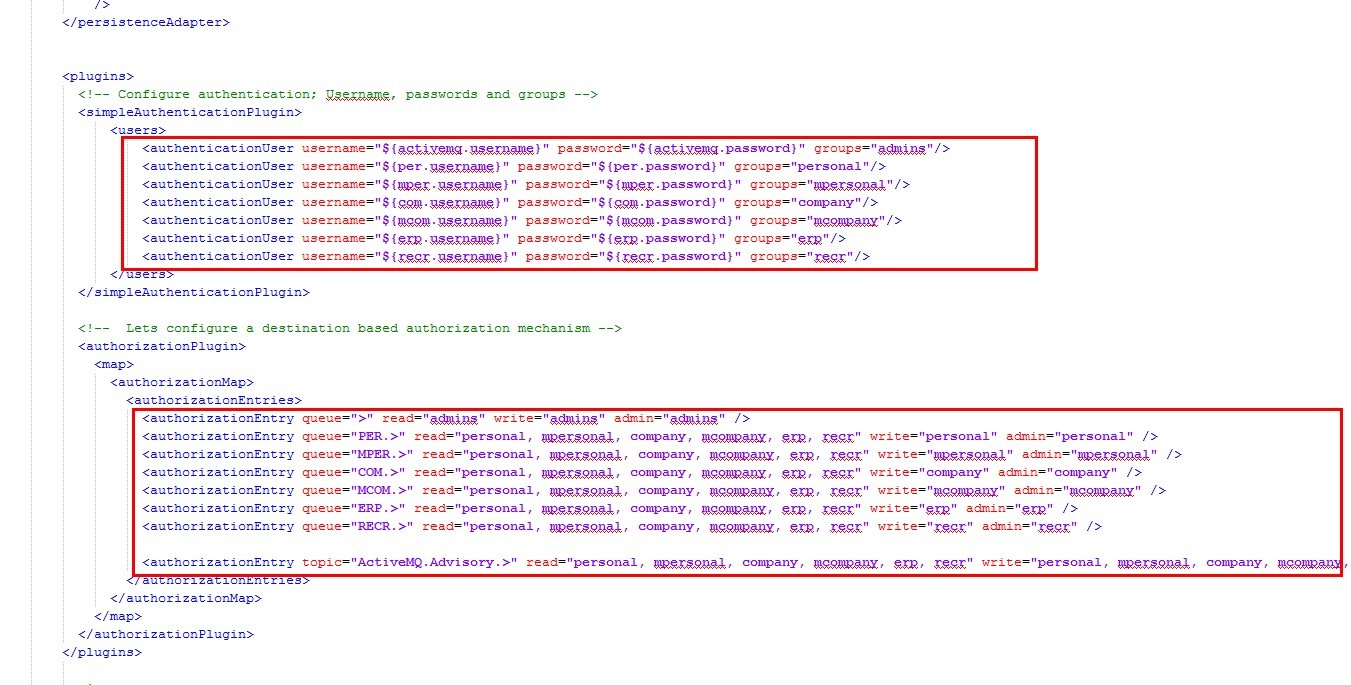
activemq.xml详细如下:
<!--
Licensed to the Apache Software Foundation (ASF) under one or more
contributor license agreements. See the NOTICE file distributed with
this work for additional information regarding copyright ownership.
The ASF licenses this file to You under the Apache License, Version 2.0
(the "License"); you may not use this file except in compliance with
the License. You may obtain a copy of the License at
http://www.apache.org/licenses/LICENSE-2.0
Unless required by applicable law or agreed to in writing, software
distributed under the License is distributed on an "AS IS" BASIS,
WITHOUT WARRANTIES OR CONDITIONS OF ANY KIND, either express or implied.
See the License for the specific language governing permissions and
limitations under the License.
-->
<!-- START SNIPPET: example -->
<beans
xmlns="http://www.springframework.org/schema/beans"
xmlns:xsi="http://www.w3.org/2001/XMLSchema-instance"
xsi:schemaLocation="http://www.springframework.org/schema/beans http://www.springframework.org/schema/beans/spring-beans.xsd
http://activemq.apache.org/schema/core http://activemq.apache.org/schema/core/activemq-core.xsd">
<!-- Allows us to use system properties as variables in this configuration file -->
<bean class="org.springframework.beans.factory.config.PropertyPlaceholderConfigurer">
<property name="locations">
<value>file:${activemq.conf}/credentials.properties</value>
</property>
</bean>
<!-- Allows log searching in hawtio console -->
<bean id="logQuery" class="org.fusesource.insight.log.log4j.Log4jLogQuery"
lazy-init="false" scope="singleton"
init-method="start" destroy-method="stop">
</bean>
<!--
The <broker> element is used to configure the ActiveMQ broker.
-->
<broker xmlns="http://activemq.apache.org/schema/core" brokerName="localhost" dataDirectory="${activemq.data}" useJmx="true">
<destinationPolicy>
<policyMap>
<policyEntries>
<policyEntry queue=">" producerFlowControl="true" memoryLimit="1mb">
<!-- The constantPendingMessageLimitStrategy is used to prevent
slow topic consumers to block producers and affect other consumers
by limiting the number of messages that are retained
For more information, see:
http://activemq.apache.org/slow-consumer-handling.html
-->
<!-- 分发策略 -->
<dispatchPolicy>
<!-- 按顺序分发 -->
<strictOrderDispatchPolicy/>
</dispatchPolicy>
<!-- 恢复策略-->
<subscriptionRecoveryPolicy>
<!-- 只恢复最后一个message -->
<lastImageSubscriptionRecoveryPolicy/>
</subscriptionRecoveryPolicy>
<pendingQueuePolicy>
<!-- 首先在内存中保存消息的引用,如果内存使用量达到上限,那么会把消息引用保存到临时文件中 -->
<fileQueueCursor/>
</pendingQueuePolicy>
<pendingMessageLimitStrategy>
<constantPendingMessageLimitStrategy limit="1000"/>
</pendingMessageLimitStrategy>
</policyEntry>
<!-- 个人简历 -->
<policyEntry queue="PER.>" producerFlowControl="true" memoryLimit="10mb">
<!-- The constantPendingMessageLimitStrategy is used to prevent
slow topic consumers to block producers and affect other consumers
by limiting the number of messages that are retained
For more information, see:
http://activemq.apache.org/slow-consumer-handling.html
-->
<!-- 分发策略 -->
<dispatchPolicy>
<!-- 按顺序分发 -->
<strictOrderDispatchPolicy/>
</dispatchPolicy>
<!-- 恢复策略-->
<subscriptionRecoveryPolicy>
<!-- 只恢复最后一个message -->
<lastImageSubscriptionRecoveryPolicy/>
</subscriptionRecoveryPolicy>
<pendingQueuePolicy>
<!-- 首先在内存中保存消息的引用,如果内存使用量达到上限,那么会把消息引用保存到临时文件中 -->
<fileQueueCursor/>
</pendingQueuePolicy>
<pendingMessageLimitStrategy>
<constantPendingMessageLimitStrategy limit="1000"/>
</pendingMessageLimitStrategy>
</policyEntry>
<!-- 企业 -->
<policyEntry queue="COM.>" producerFlowControl="true" memoryLimit="10mb">
<!-- The constantPendingMessageLimitStrategy is used to prevent
slow topic consumers to block producers and affect other consumers
by limiting the number of messages that are retained
For more information, see:
http://activemq.apache.org/slow-consumer-handling.html
-->
<!-- 分发策略 -->
<dispatchPolicy>
<!-- 按顺序分发 -->
<strictOrderDispatchPolicy/>
</dispatchPolicy>
<!-- 恢复策略-->
<subscriptionRecoveryPolicy>
<!-- 只恢复最后一个message -->
<lastImageSubscriptionRecoveryPolicy/>
</subscriptionRecoveryPolicy>
<pendingQueuePolicy>
<!-- 首先在内存中保存消息的引用,如果内存使用量达到上限,那么会把消息引用保存到临时文件中 -->
<fileQueueCursor/>
</pendingQueuePolicy>
<pendingMessageLimitStrategy>
<constantPendingMessageLimitStrategy limit="1000"/>
</pendingMessageLimitStrategy>
</policyEntry>
<!-- 招聘会 -->
<policyEntry queue="RECR.>" producerFlowControl="true" memoryLimit="10mb">
<!-- The constantPendingMessageLimitStrategy is used to prevent
slow topic consumers to block producers and affect other consumers
by limiting the number of messages that are retained
For more information, see:
http://activemq.apache.org/slow-consumer-handling.html
-->
<!-- 分发策略 -->
<dispatchPolicy>
<!-- 按顺序分发 -->
<strictOrderDispatchPolicy/>
</dispatchPolicy>
<!-- 恢复策略-->
<subscriptionRecoveryPolicy>
<!-- 只恢复最后一个message -->
<lastImageSubscriptionRecoveryPolicy/>
</subscriptionRecoveryPolicy>
<pendingQueuePolicy>
<!-- 首先在内存中保存消息的引用,如果内存使用量达到上限,那么会把消息引用保存到临时文件中 -->
<fileQueueCursor/>
</pendingQueuePolicy>
<pendingMessageLimitStrategy>
<constantPendingMessageLimitStrategy limit="1000"/>
</pendingMessageLimitStrategy>
</policyEntry>
<!-- 微招聘 -->
<policyEntry queue="MCOM.>" producerFlowControl="true" memoryLimit="10mb">
<!-- The constantPendingMessageLimitStrategy is used to prevent
slow topic consumers to block producers and affect other consumers
by limiting the number of messages that are retained
For more information, see:
http://activemq.apache.org/slow-consumer-handling.html
-->
<!-- 分发策略 -->
<dispatchPolicy>
<!-- 按顺序分发 -->
<strictOrderDispatchPolicy/>
</dispatchPolicy>
<!-- 恢复策略-->
<subscriptionRecoveryPolicy>
<!-- 只恢复最后一个message -->
<lastImageSubscriptionRecoveryPolicy/>
</subscriptionRecoveryPolicy>
<pendingQueuePolicy>
<!-- 首先在内存中保存消息的引用,如果内存使用量达到上限,那么会把消息引用保存到临时文件中 -->
<fileQueueCursor/>
</pendingQueuePolicy>
<pendingMessageLimitStrategy>
<constantPendingMessageLimitStrategy limit="1000"/>
</pendingMessageLimitStrategy>
</policyEntry>
<!-- 微求职 -->
<policyEntry queue="MPER.>" producerFlowControl="true" memoryLimit="10mb">
<!-- The constantPendingMessageLimitStrategy is used to prevent
slow topic consumers to block producers and affect other consumers
by limiting the number of messages that are retained
For more information, see:
http://activemq.apache.org/slow-consumer-handling.html
-->
<!-- 分发策略 -->
<dispatchPolicy>
<!-- 按顺序分发 -->
<strictOrderDispatchPolicy/>
</dispatchPolicy>
<!-- 恢复策略-->
<subscriptionRecoveryPolicy>
<!-- 只恢复最后一个message -->
<lastImageSubscriptionRecoveryPolicy/>
</subscriptionRecoveryPolicy>
<pendingQueuePolicy>
<!-- 首先在内存中保存消息的引用,如果内存使用量达到上限,那么会把消息引用保存到临时文件中 -->
<fileQueueCursor/>
</pendingQueuePolicy>
<pendingMessageLimitStrategy>
<constantPendingMessageLimitStrategy limit="1000"/>
</pendingMessageLimitStrategy>
</policyEntry>
<!-- 后台 -->
<policyEntry queue="ERP.>" producerFlowControl="true" memoryLimit="10mb">
<!-- The constantPendingMessageLimitStrategy is used to prevent
slow topic consumers to block producers and affect other consumers
by limiting the number of messages that are retained
For more information, see:
http://activemq.apache.org/slow-consumer-handling.html
-->
<!-- 分发策略 -->
<dispatchPolicy>
<!-- 按顺序分发 -->
<strictOrderDispatchPolicy/>
</dispatchPolicy>
<!-- 恢复策略-->
<subscriptionRecoveryPolicy>
<!-- 只恢复最后一个message -->
<lastImageSubscriptionRecoveryPolicy/>
</subscriptionRecoveryPolicy>
<pendingQueuePolicy>
<!-- 首先在内存中保存消息的引用,如果内存使用量达到上限,那么会把消息引用保存到临时文件中 -->
<fileQueueCursor/>
</pendingQueuePolicy>
<pendingMessageLimitStrategy>
<constantPendingMessageLimitStrategy limit="1000"/>
</pendingMessageLimitStrategy>
</policyEntry>
</policyEntries>
</policyMap>
</destinationPolicy>
<!--
The managementContext is used to configure how ActiveMQ is exposed in
JMX. By default, ActiveMQ uses the MBean server that is started by
the JVM. For more information, see:
http://activemq.apache.org/jmx.html
-->
<managementContext>
<managementContext createConnector="false"/>
</managementContext>
<!--
Configure message persistence for the broker. The default persistence
mechanism is the KahaDB store (identified by the kahaDB tag).
For more information, see:
http://activemq.apache.org/persistence.html
-->
<persistenceAdapter>
<kahaDB directory="E:/activemq_data"
enableJournalDiskSyncs="false"
indexWriteBatchSize="1000"
indexCacheSize="10000"
journalMaxFileLength="32mb"
/>
</persistenceAdapter>
<plugins>
<!-- Configure authentication; Username, passwords and groups -->
<simpleAuthenticationPlugin>
<users>
<authenticationUser username="${activemq.username}" password="${activemq.password}" groups="admins"/>
<authenticationUser username="${per.username}" password="${per.password}" groups="personal"/>
<authenticationUser username="${mper.username}" password="${mper.password}" groups="mpersonal"/>
<authenticationUser username="${com.username}" password="${com.password}" groups="company"/>
<authenticationUser username="${mcom.username}" password="${mcom.password}" groups="mcompany"/>
<authenticationUser username="${erp.username}" password="${erp.password}" groups="erp"/>
<authenticationUser username="${recr.username}" password="${recr.password}" groups="recr"/>
</users>
</simpleAuthenticationPlugin>
<!-- Lets configure a destination based authorization mechanism -->
<authorizationPlugin>
<map>
<authorizationMap>
<authorizationEntries>
<authorizationEntry queue=">" read="admins" write="admins" admin="admins" />
<authorizationEntry queue="PER.>" read="personal, mpersonal, company, mcompany, erp, recr" write="personal" admin="personal" />
<authorizationEntry queue="MPER.>" read="personal, mpersonal, company, mcompany, erp, recr" write="mpersonal" admin="mpersonal" />
<authorizationEntry queue="COM.>" read="personal, mpersonal, company, mcompany, erp, recr" write="company" admin="company" />
<authorizationEntry queue="MCOM.>" read="personal, mpersonal, company, mcompany, erp, recr" write="mcompany" admin="mcompany" />
<authorizationEntry queue="ERP.>" read="personal, mpersonal, company, mcompany, erp, recr" write="erp" admin="erp" />
<authorizationEntry queue="RECR.>" read="personal, mpersonal, company, mcompany, erp, recr" write="recr" admin="recr" />
<authorizationEntry topic="ActiveMQ.Advisory.>" read="personal, mpersonal, company, mcompany, erp, recr" write="personal, mpersonal, company, mcompany, erp, recr" admin="personal, mpersonal, company, mcompany, erp, recr" />
</authorizationEntries>
</authorizationMap>
</map>
</authorizationPlugin>
</plugins>
<!--
The systemUsage controls the maximum amount of space the broker will
use before disabling caching and/or slowing down producers. For more information, see:
http://activemq.apache.org/producer-flow-control.html
-->
<systemUsage>
<systemUsage>
<memoryUsage>
<memoryUsage percentOfJvmHeap="100" />
</memoryUsage>
<storeUsage>
<storeUsage limit="1 gb"/>
</storeUsage>
<tempUsage>
<tempUsage limit="100 mb"/>
</tempUsage>
</systemUsage>
</systemUsage>
<!--
The transport connectors expose ActiveMQ over a given protocol to
clients and other brokers. For more information, see:
http://activemq.apache.org/configuring-transports.html
-->
<transportConnectors>
<!-- DOS protection, limit concurrent connections to 1000 and frame size to 100MB -->
<transportConnector name="openwire" uri="tcp://0.0.0.0:61616?maximumConnections=1000&wireFormat.maxFrameSize=104857600"/>
<transportConnector name="amqp" uri="amqp://0.0.0.0:5672?maximumConnections=1000&wireFormat.maxFrameSize=104857600"/>
<transportConnector name="stomp" uri="stomp://0.0.0.0:61613?maximumConnections=1000&wireFormat.maxFrameSize=104857600"/>
<transportConnector name="mqtt" uri="mqtt://0.0.0.0:1883?maximumConnections=1000&wireFormat.maxFrameSize=104857600"/>
<transportConnector name="ws" uri="ws://0.0.0.0:61614?maximumConnections=1000&wireFormat.maxFrameSize=104857600"/>
</transportConnectors>
<!-- destroy the spring context on shutdown to stop jetty -->
<shutdownHooks>
<bean xmlns="http://www.springframework.org/schema/beans" class="org.apache.activemq.hooks.SpringContextHook" />
</shutdownHooks>
</broker>
<!--
Enable web consoles, REST and Ajax APIs and demos
The web consoles requires by default login, you can disable this in the jetty.xml file
Take a look at ${ACTIVEMQ_HOME}/conf/jetty.xml for more details
-->
<import resource="jetty.xml"/>
</beans>
<!-- END SNIPPET: example -->
credentials.properties详细如下:
## ---------------------------------------------------------------------------
## Licensed to the Apache Software Foundation (ASF) under one or more
## contributor license agreements. See the NOTICE file distributed with
## this work for additional information regarding copyright ownership.
## The ASF licenses this file to You under the Apache License, Version 2.0
## (the "License"); you may not use this file except in compliance with
## the License. You may obtain a copy of the License at
##
## http://www.apache.org/licenses/LICENSE-2.0
##
## Unless required by applicable law or agreed to in writing, software
## distributed under the License is distributed on an "AS IS" BASIS,
## WITHOUT WARRANTIES OR CONDITIONS OF ANY KIND, either express or implied.
## See the License for the specific language governing permissions and
## limitations under the License.
## ---------------------------------------------------------------------------
# Defines credentials that will be used by components (like web console) to access the broker
activemq.username=***
activemq.password=***
per.username=***
per.password=***
mper.username=***
mper.password=***
com.username=***
com.password=***
mcom.username=***
mcom.password=***
erp.username=***
erp.password=***
recr.username=***
recr.password=***
以上配置今天发现队列监控出现异常,最后查到问题出现在这里:
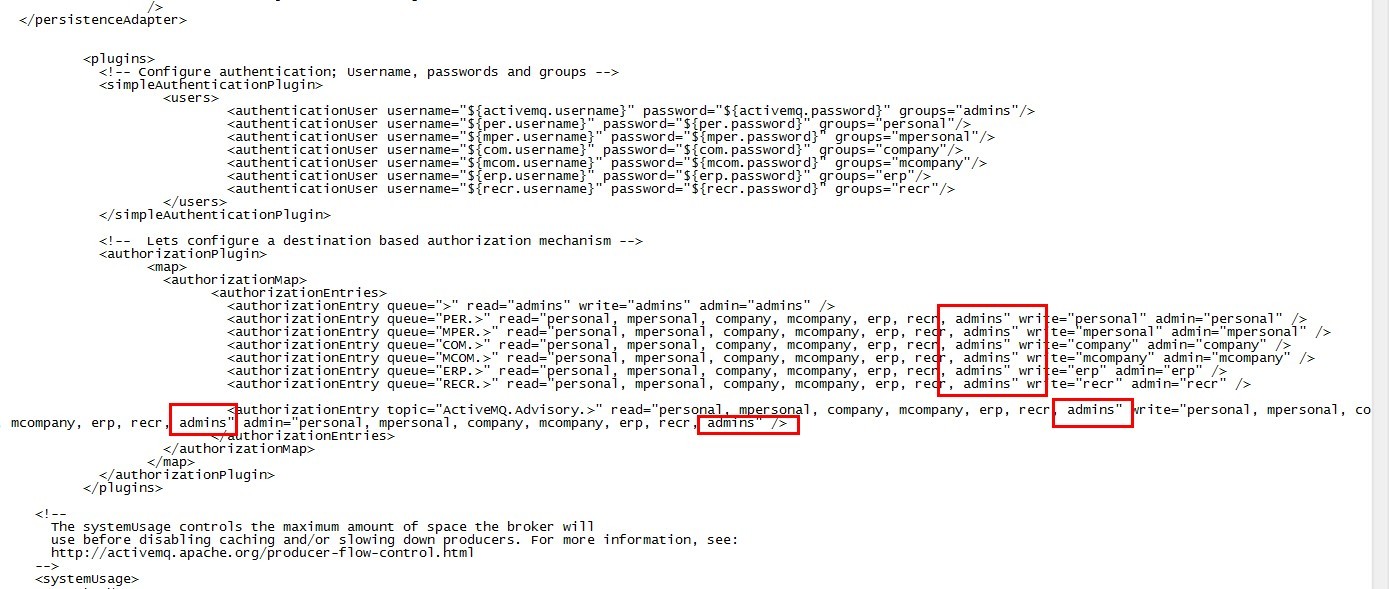
由于队列监控项目admin里使用的账户为system/manager(webapps\admin\WEB-INF\webconsole-embedded.xml
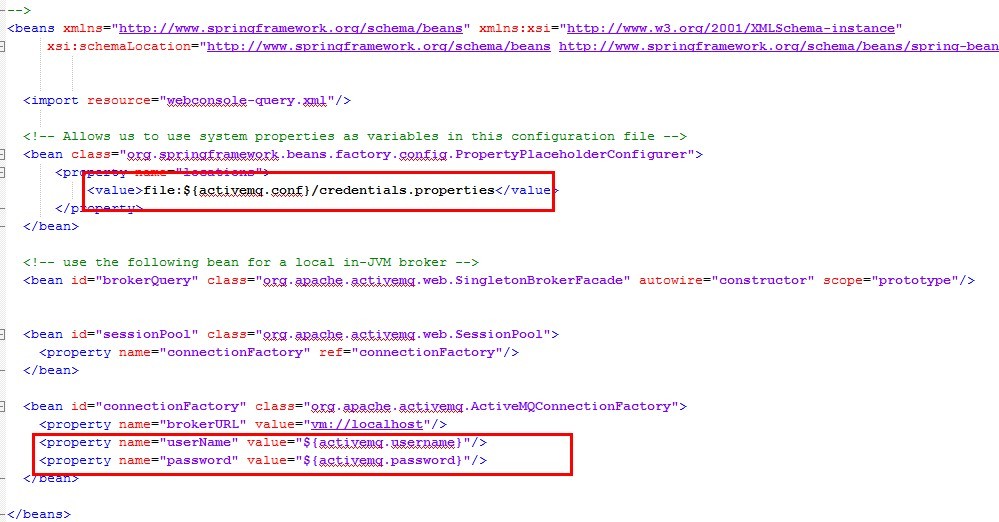
),属于admins群组,需要加上权限。
ACTIVEMQ主题、队列设置用户名密码的更多相关文章
- windows下mongodb设置用户名密码&用python连接
环境: 主机:WIN10 python版本:3.5 mongodb版本:3.4.2 开发环境:pyCharm mongodb设置用户名密码: 编写mongodb配置文件mongodb.confdbpa ...
- 你的MongoDB Redis设置用户名密码了吗?看看shodan这款邪恶的搜索引擎吧!~
早上看新闻的时候看到了个醒目的新闻 开源中国:MongoDB 赎金事件持续发酵,究竟是谁之过? 博客园:MongoDB数据库勒索,中国受害者数量超乎你的想象,SOS! 1. 由于自己之前做过的项目,R ...
- ElasticSearch设置用户名密码访问
版本号:7.3.1 1.需要在配置文件中开启x-pack验证, 修改config目录下面的elasticsearch.yml文件,在里面添加如下内容,并重启. xpack.security.enabl ...
- eureka注册中心设置用户名密码
1.加入安全认证依赖 <dependency> <groupId>org.springframework.boot</groupId> <artifactId ...
- 创建一个MongoDB数据库再到配置成Window服务再设置用户名密码
1.安装MongoDB数据在官网下载安装 然后在C盘找到C:\Program Files\MongoDB\Server\4.0\bin这个可执行目录 使用cmd进入到这: 2.在C盘根目录创建一个名为 ...
- ActiveMQ修改连接的用户名密码
安装目录下conf/activemq.xml 添加如下内容: <plugins> <simpleAuthenticationPlugin> <users> < ...
- mongodb3 设置用户名密码 ,linux
--29T09:: I CONTROL [initandlisten] ** WARNING: You are running on a NUMA machine. --29T09:: I CONTR ...
- 不同版本的 Tomcat 设置用户名密码 的方法
Tomcat : tomcat根目录\conf\tomcat-users.xml,找到 <tomcat-users> 标签,在后面添加 <user username="ad ...
- ActiveMQ安全机制设置
一.设置后台管理密码a.ActiveMQ使用的是jetty服务器,找到D:\div\apache-activemq-5.11.1\conf\jetty.xml文件: <bean id=" ...
随机推荐
- 还不好好读书吗?清华3D录取通知书出炉,还能动!
近日,清华大学2018录取通知书“亮相”!看完后,网友直呼:哪里可以买到? 打开录取通知书 3D“二校门”跃然纸上 由清华师生共同打造.手工定制.独一无二的2018新版录取通知书来了!在新版录取通知书 ...
- Mockplus教程:分分钟搞定APP首页原型设计
Mockplus是一款快速原型设计工具,支持包括APP原型在内的多种原型与线框图设计.除了快速,Mockplus广受欢迎更因为它极低的上手门槛.今天小编就为大家展示如何用Mockplus在3分钟内完成 ...
- struts2乱码问题
简介:做了个功能,用的struts2,表单提交到后台,接收后打印出来的数据乱码. 解决步骤: 1. struts.xml中配置<constant name="struts.i18n ...
- Monte carlo
转载 http://blog.sciencenet.cn/blog-324394-292355.html 蒙特卡罗(Monte Carlo)方法,也称为计算机随机模拟方法,是一种基于"随机数 ...
- 2018.09.30 bzoj2741: 【FOTILE模拟赛】L(分块+可持久化01trie)
传送门 数据结构经典题. 首先考虑另外一种询问方式. 已知权值val,在区间[1,n][1,n][1,n]中找一个数使得valvalval^a[i]a[i]a[i]最大. 这个可以直接01trie. ...
- 2018.09.27 bzoj2118: 墨墨的等式(最短路+背包)
传送门 好题啊. 首先找到最小的一个非零系数记做a1a_1a1,然后如果WWW modmodmod a1=W′a_1=W'a1=W′ modmodmod a1a_1a1,且WWW是方程的一个可行 ...
- 2018.06.29 NOIP模拟 Minimum(最小生成树)
Minimum 题目背景 SOURCE:NOIP2015-SHY-2 题目描述 给出一幅由 n 个点 m 条边构成的无向带权图. 其中有些点是黑点,另外点是白点. 现在每个白点都要与他距离最近的所有黑 ...
- 全球晶圆代工厂哪家强?2016年Top30名单
1.台积电(TSMC) 总部:台湾 简介:世界上最大的独立半导体晶圆代工企业,与联华电子并称“晶圆双雄”. 主要客户:苹果,高通,联发科,华为海思 官网:http://www.tsmc.com/ 2. ...
- mysql date_sub用法
查询一天: select * from table where to_days(column_time) = to_days(now()); select * from table where dat ...
- Libevent学习之SocketPair实现
Libevent设计的精化之一在于把Timer事件.Signal事件和IO事件统一集成在一个Reactor中,以统一的方式去处理这三种不同的事件,更确切的说是把Timer事件和Signal事件融合到了 ...