
java代码解析二维码
java代码解析二维码一般步骤
本文采用的是google的zxing技术进行解析二维码技术,解析二维码的一般步骤如下:
一、下载zxing-core的jar包:
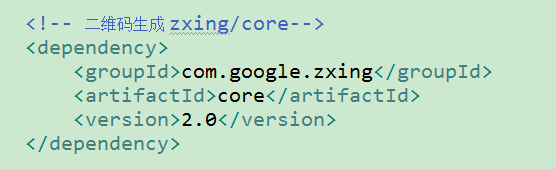
二、创建一个BufferedImageLuminanceSource类继承LuminanceSource,此类在google的源码中有,但是为了使用方便,下面有此类的源码,可以直接复制使用:
	private final BufferedImage image;

	private final int left;

	private final int top;

	public BufferedImageLuminanceSource(BufferedImage image) {

		this(image, 0, 0, image.getWidth(), image.getHeight());

	}

	public BufferedImageLuminanceSource(BufferedImage image, int left, int top, int width, int height) {

		super(width, height);

		int sourceWidth = image.getWidth();

		int sourceHeight = image.getHeight();

		if (left + width > sourceWidth || top + height > sourceHeight) {

			throw new IllegalArgumentException("Crop rectangle does not fit within image data.");

		}

		for (int y = top; y < top + height; y++) {

			for (int x = left; x < left + width; x++) {

				if ((image.getRGB(x, y) & 0xFF000000) == 0) {

					image.setRGB(x, y, 0xFFFFFFFF); // = white

				}

			}

		}

		this.image = new BufferedImage(sourceWidth, sourceHeight, BufferedImage.TYPE_BYTE_GRAY);

		this.image.getGraphics().drawImage(image, 0, 0, null);

		this.left = left;

		this.top = top;

	}

	@Override

	public byte[] getRow(int y, byte[] row) {

		if (y < 0 || y >= getHeight()) {

			throw new IllegalArgumentException("Requested row is outside the image: " + y);

		}

		int width = getWidth();

		if (row == null || row.length < width) {

			row = new byte[width];

		}

		image.getRaster().getDataElements(left, top + y, width, 1, row);

		return row;

	}

	@Override

	public byte[] getMatrix() {

		int width = getWidth();

		int height = getHeight();

		int area = width * height;

		byte[] matrix = new byte[area];

		image.getRaster().getDataElements(left, top, width, height, matrix);

		return matrix;

	}

	@Override

	public boolean isCropSupported() {

		return true;

	}

	@Override

	public LuminanceSource crop(int left, int top, int width, int height) {

		return new BufferedImageLuminanceSource(image, this.left + left, this.top + top, width, height);

	}

	@Override

	public boolean isRotateSupported() {

		return true;

	}

	@Override

	public LuminanceSource rotateCounterClockwise() {

		int sourceWidth = image.getWidth();

		int sourceHeight = image.getHeight();

		AffineTransform transform = new AffineTransform(0.0, -1.0, 1.0, 0.0, 0.0, sourceWidth);

		BufferedImage rotatedImage = new BufferedImage(sourceHeight, sourceWidth, BufferedImage.TYPE_BYTE_GRAY);

		Graphics2D g = rotatedImage.createGraphics();

		g.drawImage(image, transform, null);

		g.dispose();

		int width = getWidth();

		return new BufferedImageLuminanceSource(rotatedImage, top, sourceWidth - (left + width), getHeight(), width);

	}
三、创建一个启动类,用来解析二维码:
	public static void main(String[] args) {

		try {

	        MultiFormatReader formatReader = new MultiFormatReader();

	        String filePath = "D:/test/博客.jpg";

	        File file = new File(filePath);

	        BufferedImage image = ImageIO.read(file);

	        LuminanceSource source = new BufferedImageLuminanceSource(image);

	        Binarizer  binarizer = new HybridBinarizer(source);

	        BinaryBitmap binaryBitmap = new BinaryBitmap(binarizer);

	        Map hints = new HashMap();

	        //解码设置为UTF-8

	        hints.put(EncodeHintType.CHARACTER_SET, "UTF-8");

	        //优化精度

	        hints.put(DecodeHintType.TRY_HARDER, Boolean.TRUE);

	        //复杂模式,开启PURE_BARCODE模式

	        hints.put(DecodeHintType.PURE_BARCODE, Boolean.TRUE);

	        Result result = formatReader.decode(binaryBitmap,hints);

	        System.out.println("result = "+ result.toString());

	        System.out.println("resultFormat = "+ result.getBarcodeFormat());

	        System.out.println("resultText = "+ result.getText());

		} catch (Exception e) {

			e.printStackTrace();

		}

	}
四、经过亲自测试可以实现对二维码的解析,可以获取二维码的url等信息;
java代码解析二维码的更多相关文章
- java生成/解析二维码
package a; import java.awt.BasicStroke; import java.awt.Graphics; import java.awt.Graphics2D; import ...
- JAVA生成解析二维码
package com.mohe.twocode; import java.awt.Color; import java.awt.Graphics2D; import java.awt.image.B ...
- 使用zxing生成解析二维码
1. 前言 随着移动互联网的发展,我们经常在火车票.汽车票.快餐店.电影院.团购网站以及移动支付等各个场景下见到二维码的应用,可见二维码以经渗透到人们生活的各个方面.条码.二维码以及RFID被人们应用 ...
- JAVA中生成、解析二维码图片的方法
JAVA中生成.解析二维码的方法并不复杂,使用google的zxing包就可以实现.下面的方法包含了生成二维码.在中间附加logo.添加文字功能,并有解析二维码的方法. 一.下载zxing的架包,并导 ...
- Java使用QRCode.jar生成与解析二维码
原文V:http://www.cnblogs.com/bigroc/p/7496995.html#3797682 正题:Java使用QRCode.jar生成与解析二维码demo 欢迎新手共勉,大神监督 ...
- Java使用ZXing生成/解析二维码图片
ZXing是一种开源的多格式1D/2D条形码图像处理库,在Java中的实现.重点是在手机上使用内置摄像头来扫描和解码设备上的条码,而不与服务器通信.然而,该项目也可以用于对桌面和服务器上的条形码进行编 ...
- Java生成与解析二维码
1.下载支持二维码的jar包qrcode.jar和qrcode_swetake.jar, 其中qrcode_swetake.jar用于生成二维码,rcode.jar用于解析二维码,jar包下载地址(免 ...
- java代码生成二维码以及解析二维码
package com.test; import java.awt.Color; import java.awt.Graphics2D; import java.awt.image.BufferedI ...
- asp.net C#生成和解析二维码代码
类库文件我们在文件最后面下载 [ThoughtWorks.QRCode.dll 就是类库] 使用时需要增加: using ThoughtWorks.QRCode.Codec;using Thought ...
随机推荐
- 彻底剖析RMI底层源码 、手写轻量级RMI框架
https://blog.csdn.net/Z0157/article/details/82049975 User public class User { private int age; publi ...
- win 7启动tensorboard的详尽步骤
TensorBoard是TensorFlow下的一个可视化的工具,能够帮助我们在训练大规模神经网络过程中出现的复杂且不好理解的运算.TensorBoard能展示你训练过程中绘制的图像.网络结构等. 1 ...
- ( 2018 Multi-University Training Contest 2)
2018 Multi-University Training Contest 2) HDU 6311 Cover HDU 6312 Game HDU 6313 Hack It HDU 6314 Mat ...
- Count on a tree II SPOJ - COT2 && bzoj1086 王室联邦 && bzoj2589
https://cn.vjudge.net/problem/SPOJ-COT2 这个是树上莫队模版啊.. 树上莫队有两种,第一种就是括号序莫队 设节点i在括号序中首次出现位置为pl[i] 那么路径(i ...
- php 几个比较实用的函数
最近在看代码,发现以下是几个比较实用的函数. 1,取客户端IP 查看复制打印? function getOnlineIp() { $strOnlineIp = ""; if(get ...
- Spring之WebContext不使用web.xml启动 初始化重要的类源码分析(Servlet3.0以上的)
入口: org.springframework.web.SpringServletContainerInitializer implements ServletContainerInitializer ...
- ReferenceError: password is not defined
报错提示位置at c:\Users\Administrator\WebstormProjects\blogtest\routes\index.js:19:16 原因是我这个password没有定义,p ...
- 报错:Error: ENOENT, no such file or directory 'c:\Users\Administrator\WebstormProjects\blogtest\views\footer.ejs'
这是我在index上引用<%- include footer %>,找不到该文件 所以报错 建立文件footer.ejs
- 前端之CSS常见兼容性问题
1.双倍浮动BUG: 描述:块状元素设置了float属性后,又设置了横向的margin值,在IE6下显示的margin值要比设置的值大: 解决方案:给float的元素添加 display:inline ...
- git命令收集
$ git clone ... $ git status 查看状态 $ git commit -am "XXX" 提交信息 $ git commit -am "XXXX& ...