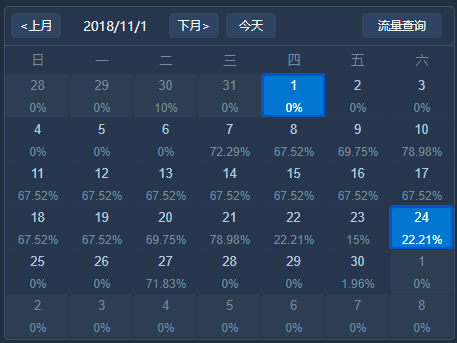
<template>
<div class="">
<div class="calendarTraffic" name="CalendarTraffic">
<!-- 年份/月份 流量查询-->
<div class="monthHeader">
<!--绑定click事件,点击按钮;重新刷新当前日期-->
<button class="lf oprButton oprButton-bg ml5"
@click="pickPre(currentYear, currentMonth)">❮上月</button>
<span class="lf oprButton title-data">{{ nowFullYear }}/{{ nowMonth }}/{{ nowDay }}</span>
<button class="lf oprButton oprButton-bg"
@click="pickNext(currentYear,currentMonth)">下月❯</button>
<button class="lf oprButton oprButton-bg ml5"
@click="pickToday(currentYear,currentMonth)">今天</button>
<button class="rt oprButton oprButton-bg mr10">流量查询</button>
</div>
<!-- 日历 -->
<div class="calendar-list calendar-date">
<!-- 星期 -->
<ul class="calendar-weekadys clearfix">
<li class="weekadys-item">一</li>
<li class="weekadys-item">二</li>
<li class="weekadys-item">三</li>
<li class="weekadys-item">四</li>
<li class="weekadys-item">五</li>
<li class="weekadys-item">六</li>
<li class="weekadys-item">日</li>
</ul>
<!-- 日期 -->
<ul class="calendar-days clearfix">
<!-- 核心 v-for循环 每一次循环用<li>标签创建一天 -->
<li class="daysList" v-for="(dayobject,inedx) in days" :key="dayobject.id">
<!--本月-->
<!--如果不是本月 改变类名加灰色-->
<div class="daysList-cont daysList-invalid"
v-if="dayobject.day.getMonth()+1 != currentMonth">
<div class="daysList-mid">
<p class="daysList-item"> {{ dayobject.day.getDate() }}</p>
<p class="daysList-item">{{ dayobject.parccent}}</p>
</div>
</div>
<!-- 如果是本月 判断是不是该月第一天-->
<div class="daysList-cont daysList-normal"
:class="{active:inedx==number}"
v-else-if="dayobject.day.getFullYear() == currentYear && //当前年份
((dayobject.day.getMonth()+1 == currentMonth &&//本月且不是系统月份
dayobject.day.getMonth() != new Date().getMonth())&&
dayobject.day.getDate() == currentDay)||
(dayobject.day.getMonth() == new Date().getMonth() &&//当前系统时间
dayobject.day.getDate() ==new Date().getDate())"
@click="pickDays(currentYear,currentMonth,dayobject.day.getDate(),inedx)">
<div class="daysList-mid">
<p class="daysList-item">{{ dayobject.day.getDate() }}</p>
<p class="daysList-item">{{ dayobject.parccent}}</p>
</div>
</div>
<!-- 如果是本月-->
<div class="daysList-cont daysList-normal" v-else
:class="{active:inedx==number}"
@click="pickDays(currentYear,currentMonth,dayobject.day.getDate(),inedx)">
<div class="daysList-mid">
<p class="daysList-item">{{ dayobject.day.getDate() }}</p>
<p class="daysList-item">{{ dayobject.parccent}}</p>
</div>
</div>
</li>
</ul>
</div>
</div>
</div>
</template>
<script>
export default {
name: "CalendarTraffic",
data(){
return{
number:0,//active样式索引
currentDay: 1,//当前日
currentMonth: 1,//当前月份
currentYear: 1970,//当前年份
currentWeek: 1,//前星期X
nowFullYear:1970,//中间显示当前年
nowMonth:1,//中间显示当前月
nowDay:1,//中间显示当前日
days: []
}
},
created() {
//在vue初始化时调用
this.initData(null);
},
methods: {
initData(cur) {
let date;
if (cur) {
date = new Date(cur);
} else {
const now = new Date();
const d = new Date(this.formatDate(now.getFullYear(), now.getMonth(), 1));
d.setDate(35);
date = new Date(this.formatDate(d.getFullYear(), d.getMonth() + 1, 1));
}
// 初始化年月日
this.currentDay = date.getDate();
this.currentYear = date.getFullYear();
this.currentMonth = date.getMonth() + 1;
this.nowDay = new Date().getDate();
this.nowFullYear = date.getFullYear();
this.nowMonth = date.getMonth() + 1;
this.currentWeek = date.getDay(); //获取当前星期X(0-6,0代表星期天)
if (this.currentWeek == 0) {
this.currentWeek = 7;
}
const str = this.formatDate(
this.currentYear,
this.currentMonth,
this.currentDay,
);
this.days.length = 0;
// 例今天是周五,放在第一行第5个位置,前面4个上个月的
//初始化本周
for (let i = this.currentWeek - 1; i >= 0; i--) {
const d = new Date(str);
d.setDate(d.getDate() - i);
const dayobject = {}; //用一个对象包装Date对象 以便为以后预定功能添加属性
dayobject.day = d;
dayobject.parccent = '100%';
this.days.push(dayobject);//将日期放入data 中的days数组 供页面渲染使用
}
//this.nowDay-1(今天几号索引)this.currentWeek-1(当月第一天周几索引)
//得到今天的索引值 初始化active样式
this.number=this.nowDay+this.currentWeek-2;
//列表显示的天数6*7减去前星期X
for (let i = 1; i <= 42 - this.currentWeek; i++) {
const d = new Date(str);
d.setDate(d.getDate() + i);
const dayobject = {};
dayobject.day = d;
dayobject.parccent = '100%';
this.days.push(dayobject);
}
//console.log(this.days)
},
//上个月
pickPre(year, month) {
// setDate(0); 上月最后一天
// setDate(-1); 上月倒数第二天
// setDate(dx) 参数dx为 上月最后一天的前后dx天
const d = new Date(this.formatDate(year, month, 1));
d.setDate(0);
this.initData(this.formatDate(d.getFullYear(), d.getMonth() + 1, 1));
this.nowDay=1;
this.number=this.currentWeek-1;//active样式
},
//下个月
pickNext(year, month) {
const d = new Date(this.formatDate(year, month, 1));
d.setDate(35);
this.initData(this.formatDate(d.getFullYear(), d.getMonth() + 1, 1));
this.nowDay=1;
// console.log(this.currentWeek)
this.number=this.currentWeek-1;//active样式
// console.log(this.number)
//console.log(this.formatDate(d.getFullYear(), d.getMonth() + 1, 1))
},
//今天
pickToday(year, month) {
const d = new Date();
this.initData(this.formatDate(d.getFullYear(), d.getMonth()+1, 1));
//this.number=this.currentWeek-1;//active样式
//console.log(this.formatDate(d.getFullYear(), d.getMonth()+1, d.getDate()))
},
pickYear(year, month) {
//alert(year + "," + month);
},
//当前日历时间点击
pickDays(year, month,clickCurrentDay,index){
const d = new Date();
const day=clickCurrentDay;
//active样式的更改
this.number=index;
// 年月日更改
this.nowFullYear= year;
this.nowMonth= month;
this.nowDay= clickCurrentDay;
// console.log(year,month,clickCurrentDay);
},
// 格式化日期
formatDate(year, month, day) {
let y = year;
let m = month;
if (m < 10) m = "0" + m;
let d = day;
if (d < 10) d = "0" + d;
return y + "/" + m + "/" + d;
}
}
};
</script>
<style lang="scss" scoped>
@import '../../../common/css/common.scss';
//定义基本长度
$line10:10px;
$lf:left;
$rt:right;
$color-fff:#ffffff;
//按钮背景颜色
$button-bg:#314D68;
//正文颜色
$text-color:#B8C9DA;
//hover蓝色
$table-deepBlue:#0c8ceb;
$table-blue:#289cf4;
//失效颜色
$invalid-color:#2F3F53;
$item-color:#B8C9DA;
$item-invalid-color:#77899c;
//字体居中
$text-center:center;
button {
outline: none;
border: none;
}
ul li{
list-style: none;
}
.lf{
float: $lf;
}
.rt{
float: $rt;
}
.topWrap{
height: $line10*33.5;
}
//清楚浮动
.clearfix {
zoom: 1;
}
.clearfix:after {
content: '';
display: block;
height: 0;
font-size: 0;
clear: both;
overflow: hidden;
}
//日历表头按钮
.calendarTraffic{
width: 100%;
height: 100%;
}
//日历表头
.monthHeader{
height:$line10*3.6;
padding-top: $line10*0.6;
//按钮样式
.oprButton{
height: $line10*2.5;
padding: 0 $line10;
border-radius:$line10/2;
color: $color-fff;
line-height: $line10*2.5;
cursor: pointer;
}
.oprButton-bg{
background-color: $button-bg
}
.title-data{
text-align: $text-center;
width: $line10*10;
}
.ml5{
margin-left: $line10/2;
}
.mr10{
margin-right: $line10;
}
}
//日历
.calendar-list{
color:$text-color;
//日历星期头
.calendar-weekadys{
width: 100%;
}
.calendar-weekadys .weekadys-item{
height: $line10*2.4;
line-height: $line10*2.4;
}
.calendar-weekadys .weekadys-item,
.calendar-days .daysList{
width: 14%;
float: $lf;
text-align: $text-center;
color:$text-color;
margin-right: $line10*0.1;
}
.calendar-days .daysList{
cursor: pointer;
height: $line10*4.5;
color: $item-color;
.daysList-cont{
width: 100%;
float: $lf;
}
}
.calendar-days .daysList-normal .daysList-item:nth-child(2n){
color: $item-invalid-color;
}
.calendar-days .daysList-normal .daysList-item:nth-child(2n+1){
color: $item-color;
}
.calendar-days .daysList-mid{
height: $line10*3.4;
margin: $line10*0.4;
}
.calendar-days .daysList-cont.daysList-normal:hover,
.daysList-normal.active{
border-radius:$line10/2;
background-color: $table-deepBlue;
}
.calendar-days .daysList-cont.daysList-normal:hover .daysList-mid,
.daysList-normal.active .daysList-mid{
background-color: $table-blue;
}
.calendar-days .daysList-cont.daysList-normal:hover p,
.daysList-normal.active p{
color: $color-fff !important;
}
.daysList-item{
height: $line10*1.6;
}
// 上个月或者下个月
.daysList-invalid{
background-color: $invalid-color;
border-radius:$line10/2;
}
.daysList-invalid .daysList-item{
color:$item-invalid-color;
}
}
</style>
- Vue自定义日历组件
今天给大家介绍Vue的日历组件,可自定义样式.日历类型及支持扩展,可自定义事件回调.Props数据传输. 线上demo效果 示例 Template: <Calendar :sundayStart ...
- vue自定义日历组件的实现
实现一个日期组件,如图: components.js代码如下: Vue.component('sc-calendar',{ template:'<div class="scCalend ...
- 使用ant design vue的日历组件,实现一个简单交易日与非交易日的切换
使用ant design vue的日历组件,实现一个简单交易日与非交易日的切换 需求: 日历区分交易日.非交易日 可以切换面板查看整年交易日信息 可以在手动调整交易日.非交易日 演示实例 序--使用软 ...
- vue自定义全局组件(自定义插件)
有时候我们在做开发的时候,就想自己写一个插件然后就可以使用自己的插件,那种成就感很强.博主最近研究element-ui和axios的时候,发现他们是自定义组件,但是唯一有一点不同的是,在用elemen ...
- 一个vue的日历组件
说明: 1.基于element-ui开发的vue日历组件. 地址 更新: 1.增加value-format指定返回值的格式2.增加头部插槽自定义头部 <ele-calendar > < ...
- vue初学实践之路——vue简单日历组件(1)
---恢复内容开始--- 最近做的项目有一个需求,需要有一个日历组件供预定功能使用,之前的代码过于繁琐复杂,所以我采用vue重写了这个组件. npm.vue等等安装. 只是一个简单的日历组件,所以并不 ...
- vue 自定义报警组件
1.自定义报警组件 Alarm.vue <!-- 报警 组件 --> <template> <div class="alarm"> <!- ...
- vue自定义select组件
1.目的 看了很多element-ui的源码,决定自己实现一个简单的select组件,遇到的几个难点,便记录下来. 2.难点一 element-ui中的select组件通过v-model可以绑定数据, ...
- vue 自定义分页组件
vue2.5自定义分页组件,可设置每页显示条数,带跳转框直接跳转到相应页面 Pagination.vue 效果如下图: all: small(只显示数字和上一页和下一页): html <temp ...
随机推荐
- while嵌套应用二:九九乘法表
__author__ = 'zht' #!/usr/bin/env python # -*- coding: utf-8 -*- ''' #努力学习每一天 ''' #while嵌套应用二:九九乘法表 ...
- main函数与命令行参数
main函数的概念 C语言中main函数称之为主函数 一个c程序从main函数开始执行的 下面的main函数定义正确吗? main函数的本质 main函数是操作系统调用的函数 操作系统总是将main函 ...
- Android实现按钮点击效果(第一次点击变色,第二次恢复)
1.首先创建一个按钮 <Button android:id="@+id/click" android:layout_width="fill_parent" ...
- windows的cmd和git bash的常用命令
windows下使用git bash,使用的事linux下的命令,整理常用命令如下: windows下的命令 linux下的命令 命令的含义 cd e:\xx cd /e/xx 切换到xx目录 cd ...
- 增加和减少mongodb复制集中的节点
MongoDB Replica Sets不仅提供高可用性的解决方案,同时也提供负载均衡的解决方案,增减 Replica Sets节点在实际应用中非常普通.例如,当应用的读压力暴增时,3台节点的环境已不 ...
- codeforces 121 E. Lucky Array
time limit per test 4 seconds memory limit per test 256 megabytes input standard input output standa ...
- 洛谷 P1276 校门外的树(增强版)
题目描述 校门外马路上本来从编号0到L,每一编号的位置都有1棵树.有砍树者每次从编号A到B处连续砍掉每1棵树,就连树苗也不放过(记 0 A B ,含A和B):幸运的是还有植树者每次从编号C到D 中凡是 ...
- navicate与mysql连接的中文乱码问题
1. 在navicate中查看 show variables like'char%'; show variables like 'collation_%'; 2.在mysql中查看 通过对比可以发现两 ...
- select *from where 和select *from jion on 语句的差别
https://zhidao.baidu.com/question/541791438.html select 学号 a,成绩 a,姓名 b from 成绩表 a,学生表 b where a.学号=b ...
- block总结
3.编译器中的block 3.1 block的数据结构定义 我们通过大师文章中的一张图来说明: 上图这个结构是在栈中的结构,我们来看看对应的结构体定义: 1 2 3 4 5 6 7 8 9 10 11 ...