
svn报“Previous operation has not finished; run 'cleanup' if it was interrupted”的错误
-、叙述
今天需要更新接口文檔,所以就update了一下,結果報了如下錯誤:
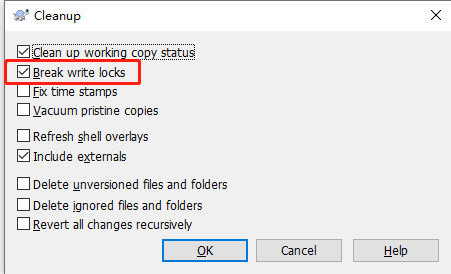
勾选了以后发现,等待它执行了很久,还是给了报错,依旧是文档拒绝访问。也许别人这样做就成功了呢,反正我是没成功。
下图为在网上找的旧版svn的cleanUp界面,
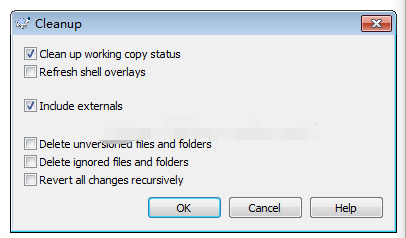
二、解决方案——使用db管理工具sqlite3
我们错误的提示是:“Previous operation has not finished”,出现这个问题的说法是,Svn的operation是存放在本地.svn\wc.db数据库文件里面,即在内嵌数据库wc.db的work_queue表中的。所以我们需要使用sqlite来操作。
sqlite是一个常用的嵌入式数据库,就是一个db文件。
1、在网上下载下载db管理工具sqlite3
2、将sqlite3.exe放置到对应cleanup异常的svn项目下的.svn文件夹下,如下图:
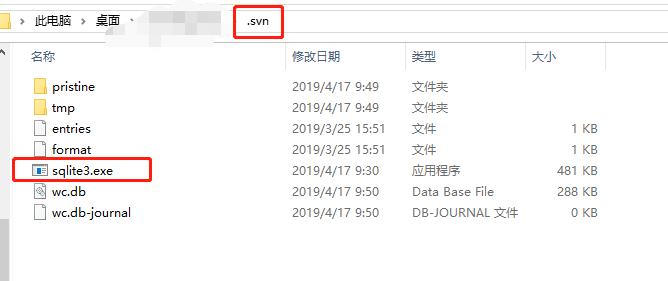
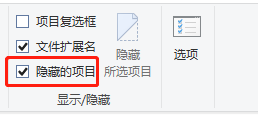
需注意的是,.svn默认是隐藏的,我们需要勾选将其显示出来。
3、在.svn目录下打开cmd命令
4、输入输入sqlite3 wc.db
5、输入 .table 查看所有表:会看到WORK_QUEUE
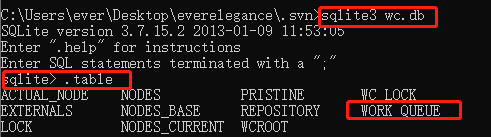
6、删除WORK_QUEUE表:输入delete from work_queue;
(在这里需注意要加分号!因为现在输入的是sql语句,结尾要加;(分号)才算完整 ,否则就进入…>的状态)
7、可以查看是否删除成功:输入select * from work_queue;
(我第一遍删除后查看发现WORK_QUEUE依旧存在,所以就又执行了一次delete语句)
8、 最后在出现问题的目录下,鼠标右键找到clean up,去执行Cleanup命令,如下图。
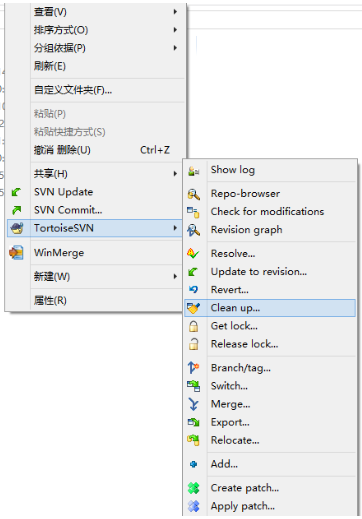
9、clean up成功

svn报“Previous operation has not finished; run 'cleanup' if it was interrupted”的错误的更多相关文章
- SVN报Previous operation has not finished; run 'cleanup' if it was interrupted错误的解决方法
做着项目突然SVN报Previous operation has not finished; run 'cleanup' if it was interrupted,进度又要继续,烦.百度一下发现很多 ...
- SVN报Previous operation has not finished; run 'cleanup'&
做着项目突然SVN报Previous operation has not finished; run 'cleanup' if it was interrupted,进度又要继续,烦.百度一下发现很多 ...
- 解决svn更新项目目录时“Error:svn: E155037: Previous operation has not finished; run 'cleanup' if it was interrupted”的报错问题
今天在IDEA更新项目目录时,发现报错“Error:svn: E155037: Previous operation has not finished; run 'cleanup' if it was ...
- SVN Commit报错 svn: E155037: Previous operation has not finished; run 'cleanup' if it was interrupted
svn commit 文件出错 svn: E155037: Commit failed (details follow): svn: E155037: Previous operation has n ...
- SVN:Previous operation has not finished; run 'cleanup' if it was interrupted
异常处理汇总-开发工具 http://www.cnblogs.com/dunitian/p/4522988.html cleanup failed to process the following ...
- SVN在拉取(更新)代码的时候出现Error:svn: E155037: Previous operation has not finished; run 'cleanup' if it was interrupted问题 ---window版
简易方法1 今天朋友看到朋友报错这个错误,偷偷学习了下他的方法并做记录以防忘记 简易方法2 今天使用svn时报了一个这个错,网上搜索时都说是要使用sqllite来删除svn队列. 其实可以直接使用id ...
- 解决SVN更新代码是出现previous operation has not finished; run cleanup if it was interrupted这个错误
解决方法:清空svn的队列 1.下载sqlite3.exe 2.找到你项目的.svn文件,查看是否存在wc.db (查看.svn文件需要打开显示隐藏文件夹) 3.将sqlite3.exe放到.sv ...
- svn出现“Previous operation has not finished; run 'cleanup' if it was interrupted”,解决方法
1.首先不需要动svn的服务器端.2.在客户端安装svn的客户端工具,自定义工具中为:command line client tools 安装完之后,在本地目录有svn.exe执行程序3.然后c ...
- svn error: "Previous operation has not finished; run 'cleanup' if it was interrupted"
出现这种问题,有几个原因 1.本身文件确实是锁住了 2.之前clean up 过很多次,但是每次都可能以失败告终,造成work queue存在缓存队列 3.svn lock 有lock记录 以下是简单 ...
随机推荐
- Android 服务入门
前言:硬着头皮把数据库SQLite看完了,接下来就是android服务了,因为自己本身就是菜鸟,所以呢,也只是做做笔记,技术上的东西就别指望我了. 1.什么是服务呢?举个例子,百度地图,美团外卖,OF ...
- TCP/IP网络编程之套接字的多种可选项
套接字可选项进而I/O缓冲大小 我们进行套接字编程时往往只关注数据通信,而忽略了套接字具有的不同特性.但是,理解这些特性并根据实际需要进行更改也十分重要.之前我们写的程序在创建好套接字后都是未经特别操 ...
- SetUnhandledExceptionFilter
SetUnhandledExceptionFilter 设置未捕获异常处理 通常windows程序长时间运行,会发生各种问题,例如访问异常,内存溢出,堆栈破坏等. 这时候通常希望程序自己能增加处理,而 ...
- LR11生成图表后修正Analysis中显示请求的地址长度过短50个字符的问题
在LR11的安装目录下找到LRAnalysis80.ini文件,在其中的[WPB]下添加SURLSize=255内容. 其次还需要修改LR目录下loader2.mdb文件,将其中的Breakdown_ ...
- putty的基本使用
1.输入你要连接的目标的IP地址,输入你要给它取的名字,点击保存 2.选中你保存的会话,点击打开,即可打开会话 3.输入你连接的目标的用户账号,回车,再输入密码.即可正常使用. 4.编码的设置 在出现 ...
- Pycharm注册码最新版本2019激活码activation code + 最实用的激活方法(亲测有效)
同时适用于jetbrains全系列可用例:IDEA.WebStorm.phpstor 由于想趁着这个寒假多学习下python,所以这些实用小技巧分享给大家,拿走不谢~ 这里为大家提供了两种最实用的激活 ...
- Swift全栈开发
前段时间学习了一下Swift web framework-Vapor, 类似于PHP Laravel的web框架. Apple也成立了Server APIs Project, Server-side ...
- 【转】超简单利用UGUI制作圆形小地图
http://sanwen.net/a/ithhtbo.html 由于UI都是Achor自己用PS做的,比较粗糙,大家见谅,不过丝毫不影响功能的实现,下面我们看看今天的笔记: 首先我们看看需要哪些组件 ...
- Bajtman i Okrągły Robin
Bajtman i Okrągły Robin 题目描述 你是一个保安,你发现有n个强盗,其中第i个强盗会在[a[i],a[i]+1],[a[i]+1,a[i]+2],...,[b[i]-1,b[i] ...
- svg图片做图标字体
https://icomoon.io 这个网站,把svg变图标