
Some 3D Graphics (rgl) for Classification with Splines and Logistic Regression (from The Elements of Statistical Learning)(转)
This semester I'm teaching from Hastie, Tibshirani, and Friedman's book, The Elements of Statistical Learning, 2nd Edition. The authors provide aMixture Simulation data set that has two continuous predictors and a binary outcome. This data is used to demonstrate classification procedures by plotting classification boundaries in the two predictors. For example, the figure below is a reproduction of Figure 2.5 in the book:
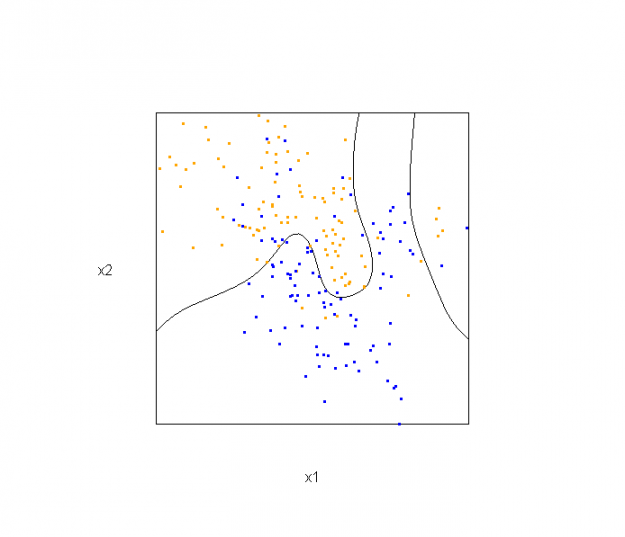
The solid line represents the Bayes decision boundary (i.e., {x: Pr("orange"|x) = 0.5}), which is computed from the model used to simulate these data. The Bayes decision boundary and other boundaries are determined by one or more surfaces (e.g., Pr("orange"|x)), which are generally omitted from the graphics. In class, we decided to use the R package rgl to create a 3D representation of this surface. Below is the code and graphic (well, a 2D projection) associated with the Bayes decision boundary:
library(rgl)

load(url("http://statweb.stanford.edu/~tibs/ElemStatLearn/datasets/ESL.mixture.rda"))

dat <- ESL.mixture

## create 3D graphic, rotate to view 2D x1/x2 projection

par3d(FOV=1,userMatrix=diag(4))

plot3d(dat$xnew[,1], dat$xnew[,2], dat$prob, type="n",

       xlab="x1", ylab="x2", zlab="",

       axes=FALSE, box=TRUE, aspect=1)

## plot points and bounding box

x1r <- range(dat$px1)

x2r <- range(dat$px2)

pts <- plot3d(dat$x[,1], dat$x[,2], 1,

              type="p", radius=0.5, add=TRUE,

              col=ifelse(dat$y, "orange", "blue"))

lns <- lines3d(x1r[c(1,2,2,1,1)], x2r[c(1,1,2,2,1)], 1)

## draw Bayes (True) decision boundary; provided by authors

dat$probm <- with(dat, matrix(prob, length(px1), length(px2)))

dat$cls <- with(dat, contourLines(px1, px2, probm, levels=0.5))

pls <- lapply(dat$cls, function(p) lines3d(p$x, p$y, z=1))

## plot marginal (w.r.t mixture) probability surface and decision plane

sfc <- surface3d(dat$px1, dat$px2, dat$prob, alpha=1.0,

            color="gray", specular="gray")

qds <- quads3d(x1r[c(1,2,2,1)], x2r[c(1,1,2,2)], 0.5, alpha=0.4,

            color="gray", lit=FALSE)
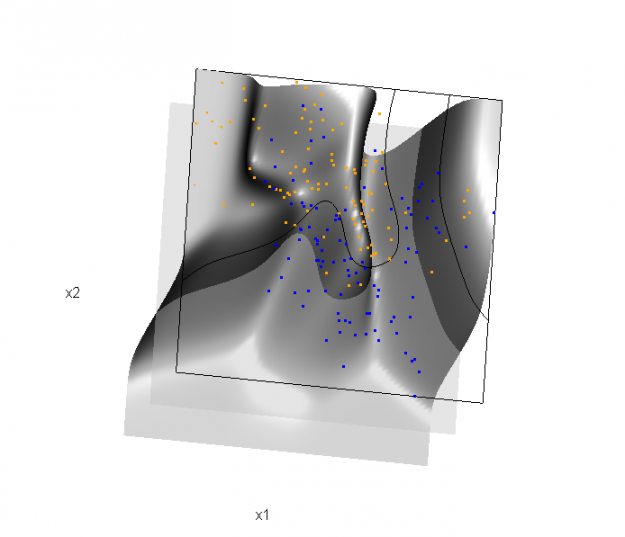
In the above graphic, the probability surface is represented in gray, and the Bayes decision boundary occurs where the plane f(x) = 0.5 (in light gray) intersects with the probability surface.
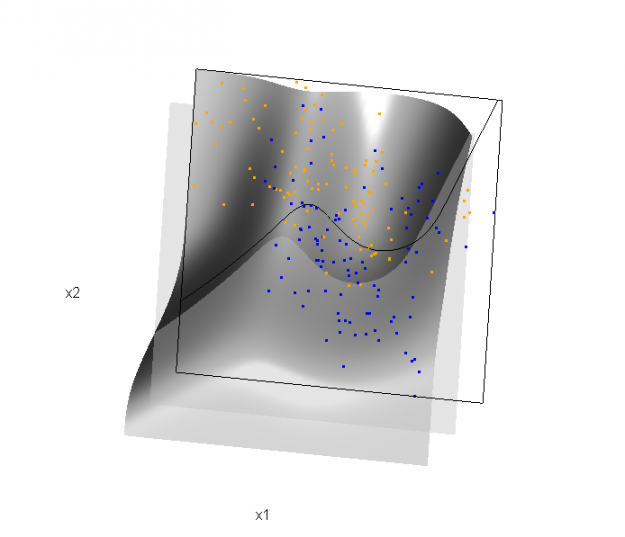
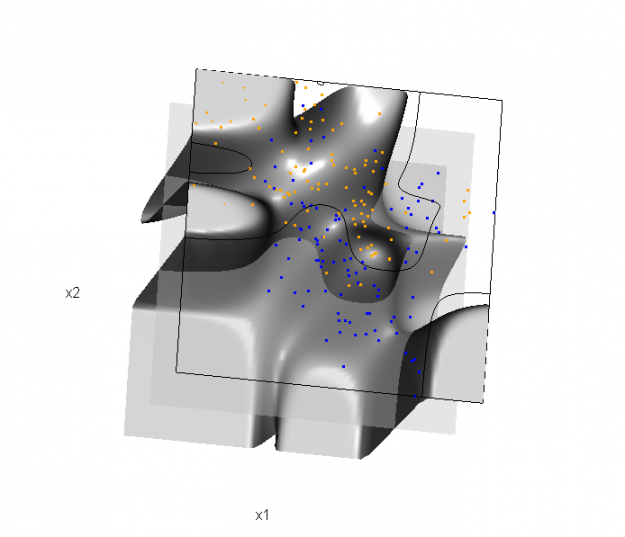
Of course, the classification task is to estimate a decision boundary given the data. Chapter 5 presents two multidimensional splines approaches, in conjunction with binary logistic regression, to estimate a decision boundary. The upper panel of Figure 5.11 in the book shows the decision boundary associated with additive natural cubic splines in x1 and x2 (4 df in each direction; 1+(4-1)+(4-1) = 7 parameters), and the lower panel shows the corresponding tensor product splines (4x4 = 16 parameters), which are much more flexible, of course. The code and graphics below reproduce the decision boundaries shown in Figure 5.11, and additionally illustrate the estimated probability surface (note: this code below should only be executed after the above code, since the 3D graphic is modified, rather than created anew):
Reproducing Figure 5.11 (top):
## clear the surface, decision plane, and decision boundary

par3d(userMatrix=diag(4)); pop3d(id=sfc); pop3d(id=qds)

for(pl in pls) pop3d(id=pl)

## fit additive natural cubic spline model

library(splines)

ddat <- data.frame(y=dat$y, x1=dat$x[,1], x2=dat$x[,2])

form.add <- y ~ ns(x1, df=3)+

                ns(x2, df=3)

fit.add  <- glm(form.add, data=ddat, family=binomial(link="logit"))

## compute probabilities, plot classification boundary

probs.add <- predict(fit.add, type="response",

                     newdata = data.frame(x1=dat$xnew[,1], x2=dat$xnew[,2]))

dat$probm.add <- with(dat, matrix(probs.add, length(px1), length(px2)))

dat$cls.add <- with(dat, contourLines(px1, px2, probm.add, levels=0.5))

pls <- lapply(dat$cls.add, function(p) lines3d(p$x, p$y, z=1))

## plot probability surface and decision plane

sfc <- surface3d(dat$px1, dat$px2, probs.add, alpha=1.0,

                 color="gray", specular="gray")

qds <- quads3d(x1r[c(1,2,2,1)], x2r[c(1,1,2,2)], 0.5, alpha=0.4,

               color="gray", lit=FALSE)
Reproducing Figure 5.11 (bottom)
## clear the surface, decision plane, and decision boundary

par3d(userMatrix=diag(4)); pop3d(id=sfc); pop3d(id=qds)

for(pl in pls) pop3d(id=pl)

## fit tensor product natural cubic spline model

form.tpr <- y ~ 0 + ns(x1, df=4, intercept=TRUE):

                    ns(x2, df=4, intercept=TRUE)

fit.tpr  <- glm(form.tpr, data=ddat, family=binomial(link="logit"))

## compute probabilities, plot classification boundary

probs.tpr <- predict(fit.tpr, type="response",

                     newdata = data.frame(x1=dat$xnew[,1], x2=dat$xnew[,2]))

dat$probm.tpr <- with(dat, matrix(probs.tpr, length(px1), length(px2)))

dat$cls.tpr <- with(dat, contourLines(px1, px2, probm.tpr, levels=0.5))

pls <- lapply(dat$cls.tpr, function(p) lines3d(p$x, p$y, z=1))

## plot probability surface and decision plane

sfc <- surface3d(dat$px1, dat$px2, probs.tpr, alpha=1.0,

                 color="gray", specular="gray")

qds <- quads3d(x1r[c(1,2,2,1)], x2r[c(1,1,2,2)], 0.5, alpha=0.4,

               color="gray", lit=FALSE)
Although the graphics above are static, it is possible to embed an interactive 3D version within a web page (e.g., see the rgl vignette; best with Google Chrome), using the rgl function writeWebGL. I gave up on trying to embed such a graphic into this WordPress blog post, but I have created a separate page for the interactive 3D version of Figure 5.11b. Duncan Murdoch's work with this package is reall nice!
This entry was posted in Technical and tagged data, graphics, programming, R, statistics on February 1, 2015.
转自:http://biostatmatt.com/archives/2659
Some 3D Graphics (rgl) for Classification with Splines and Logistic Regression (from The Elements of Statistical Learning)(转)的更多相关文章
- More 3D Graphics (rgl) for Classification with Local Logistic Regression and Kernel Density Estimates (from The Elements of Statistical Learning)(转)
This post builds on a previous post, but can be read and understood independently. As part of my cou ...
- 机器学习理论基础学习3.3--- Linear classification 线性分类之logistic regression(基于经验风险最小化)
一.逻辑回归是什么? 1.逻辑回归 逻辑回归假设数据服从伯努利分布,通过极大化似然函数的方法,运用梯度下降来求解参数,来达到将数据二分类的目的. logistic回归也称为逻辑回归,与线性回归这样输出 ...
- 李宏毅机器学习笔记3:Classification、Logistic Regression
李宏毅老师的机器学习课程和吴恩达老师的机器学习课程都是都是ML和DL非常好的入门资料,在YouTube.网易云课堂.B站都能观看到相应的课程视频,接下来这一系列的博客我都将记录老师上课的笔记以及自己对 ...
- Logistic Regression Using Gradient Descent -- Binary Classification 代码实现
1. 原理 Cost function Theta 2. Python # -*- coding:utf8 -*- import numpy as np import matplotlib.pyplo ...
- Classification week2: logistic regression classifier 笔记
华盛顿大学 machine learning: Classification 笔记. linear classifier 线性分类器 多项式: Logistic regression & 概率 ...
- Android Programming 3D Graphics with OpenGL ES (Including Nehe's Port)
https://www3.ntu.edu.sg/home/ehchua/programming/android/Android_3D.html
- Logistic Regression and Classification
分类(Classification)与回归都属于监督学习,两者的唯一区别在于,前者要预测的输出变量\(y\)只能取离散值,而后者的输出变量是连续的.这些离散的输出变量在分类问题中通常称之为标签(Lab ...
- Logistic Regression求解classification问题
classification问题和regression问题类似,区别在于y值是一个离散值,例如binary classification,y值只取0或1. 方法来自Andrew Ng的Machine ...
- 分类和逻辑回归(Classification and logistic regression)
分类问题和线性回归问题问题很像,只是在分类问题中,我们预测的y值包含在一个小的离散数据集里.首先,认识一下二元分类(binary classification),在二元分类中,y的取值只能是0和1.例 ...
随机推荐
- javaScript 基本类型之间转换
在Java中,基本类型之间的强制转换也不是这样的,比如,整数要转换成字符串,必须使用Integer.toString()静态方法或者String.valueOf()静态方法,把字符串转换为整数,必须使 ...
- Divide Groups(分组)
题目链接 题目大意是说输入数字n 然后告诉你第i个人都认识谁? 让你把这些人分成两堆,使这每个堆里的人都互相认识. 做法:把不是互相认识的人建立一条边,则构建二分图,两堆的人肯定都互相认识,也就是说, ...
- 关于string类型定义占几个字节??
测试代码: #include <iostream>using namespace std;int main(void){ string name; cout<<"si ...
- Mvc自定义验证
假设我们书店需要录入一本书,为了简单的体现我们的自定义验证,我们的实体定义的非常简单,就两个属性,一个名称Name,一个出版社Publisher. public class BookInfo { pu ...
- java spring mvc 全注解
本人苦逼学生一枚,马上就要毕业,面临找工作,实在是不想离开学校.在老师的教导下学习了spring mvc ,配置文件实在繁琐,因此网上百度学习了spring mvc 全注解方式完成spring的装配工 ...
- JS基础与循环
JS 简介 [JS的三种方式] 1.HTML标签中内嵌JS <button onclick="javascript:alert('白痴')">呵呵呵</butto ...
- 漏洞预警 | Apache Struts2 曝任意代码执行漏洞 (S2-045)
近日,Apache官方发布Apache Struts 2.3.5–2.3.31版本及2.5–2.5.10版本存在远程代码执行漏洞(CNNVD-201703-152 ,CVE-2017-5638)的紧急 ...
- 【整理】hash算法原理及常见函数
简介 Hash,一般翻译做"散列",也有直接音译为"哈希"的,就是把任意长度的输入,通过散列算法,变换成固定长度的输出,该输出就是散列值. 散列表 ...
- Python中使用with语句同时打开多个文件
下午小伙伴问了一个有趣的问题, 怎么用 Python 的 with 语句同时打开多个文件? 首先, Python 本身是支持同时在 with 中打开多个文件的 with open('a.txt', ' ...
- 蓝桥杯-土地测量-java
/* (程序头部注释开始) * 程序的版权和版本声明部分 * Copyright (c) 2016, 广州科技贸易职业学院信息工程系学生 * All rights reserved. * 文件名称: ...