
More 3D Graphics (rgl) for Classification with Local Logistic Regression and Kernel Density Estimates (from The Elements of Statistical Learning)(转)
This post builds on a previous post, but can be read and understood independently.
As part of my course on statistical learning, we created 3D graphics to foster a more intuitive understanding of the various methods that are used to relax the assumption of linearity (in the predictors) in regression and classification methods.
The authors of our text (The Elements of Statistical Learning, 2nd Edition) provide a Mixture Simulation data set that has two continuous predictors and a binary outcome. This data is used to demonstrate classification procedures by plotting classification boundaries in the two predictors, which are determined by one or more surfaces (e.g., a probability surface such as that produced by logistic regression, or multiple intersecting surfaces as in linear discriminant analysis). In our class laboratory, we used the R package rgl to create a 3D representation of these surfaces for a variety of semiparametric classification procedures.
Chapter 6 presents local logistic regression and kernel density classification, among other kernel (local) classification and regression methods. Below is the code and graphic (a 2D projection) associated with the local linear logistic regression in these data:
library(rgl)

load(url("http://statweb.stanford.edu/~tibs/ElemStatLearn/datasets/ESL.mixture.rda"))

dat <- ESL.mixture

ddat <- data.frame(y=dat$y, x1=dat$x[,1], x2=dat$x[,2])

## create 3D graphic, rotate to view 2D x1/x2 projection

par3d(FOV=1,userMatrix=diag(4))

plot3d(dat$xnew[,1], dat$xnew[,2], dat$prob, type="n",

       xlab="x1", ylab="x2", zlab="",

       axes=FALSE, box=TRUE, aspect=1)

## plot points and bounding box

x1r <- range(dat$px1)

x2r <- range(dat$px2)

pts <- plot3d(dat$x[,1], dat$x[,2], 1,

              type="p", radius=0.5, add=TRUE,

              col=ifelse(dat$y, "orange", "blue"))

lns <- lines3d(x1r[c(1,2,2,1,1)], x2r[c(1,1,2,2,1)], 1)

## draw Bayes (True) classification boundary in blue

dat$probm <- with(dat, matrix(prob, length(px1), length(px2)))

dat$cls <- with(dat, contourLines(px1, px2, probm, levels=0.5))

pls0 <- lapply(dat$cls, function(p) lines3d(p$x, p$y, z=1, color="blue"))

## compute probabilities plot classification boundary

## associated with local linear logistic regression

probs.loc <-

  apply(dat$xnew, 1, function(x0) {

    ## smoothing parameter

    l <- 1/2

    ## compute (Gaussian) kernel weights

    d <- colSums((rbind(ddat$x1, ddat$x2) - x0)^2)

    k <- exp(-d/2/l^2)

    ## local fit at x0

    fit <- suppressWarnings(glm(y ~ x1 + x2, data=ddat, weights=k,

                                family=binomial(link="logit")))

    ## predict at x0

    as.numeric(predict(fit, type="response", newdata=as.data.frame(t(x0))))

  })

dat$probm.loc <- with(dat, matrix(probs.loc, length(px1), length(px2)))

dat$cls.loc <- with(dat, contourLines(px1, px2, probm.loc, levels=0.5))

pls <- lapply(dat$cls.loc, function(p) lines3d(p$x, p$y, z=1))

## plot probability surface and decision plane

sfc <- surface3d(dat$px1, dat$px2, probs.loc, alpha=1.0,

                 color="gray", specular="gray")

qds <- quads3d(x1r[c(1,2,2,1)], x2r[c(1,1,2,2)], 0.5, alpha=0.4,

               color="gray", lit=FALSE)
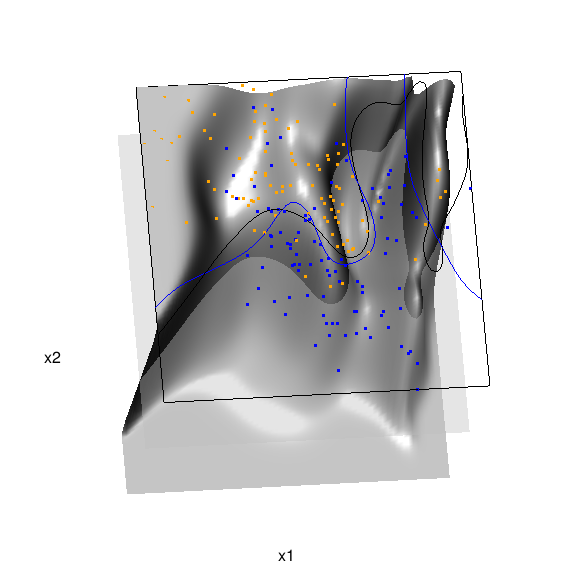
In the above graphic, the solid blue line represents the true Bayes decision boundary (i.e., {x: Pr("orange"|x) = 0.5}), which is computed from the model used to simulate these data. The probability surface (generated by the local logistic regression) is represented in gray, and the corresponding Bayes decision boundary occurs where the plane f(x) = 0.5 (in light gray) intersects with the probability surface. The solid black line is a projection of this intersection. Here is a link to the interactive version of this graphic: local logistic regression.
Below is the code and graphic associated with the kernel density classification (note: this code below should only be executed after the above code, since the 3D graphic is modified, rather than created anew):
## clear the surface, decision plane, and decision boundary

pop3d(id=sfc); pop3d(id=qds)

for(pl in pls) pop3d(id=pl)

## kernel density classification

## compute kernel density estimates for each class

dens.kde <-

  lapply(unique(ddat$y), function(uy) {

    apply(dat$xnew, 1, function(x0) {

      ## subset to current class

      dsub <- subset(ddat, y==uy)

      ## smoothing parameter

      l <- 1/2

      ## kernel density estimate at x0

      mean(dnorm(dsub$x1-x0[1], 0, l)*dnorm(dsub$x2-x0[2], 0, l))

    })

  })

## compute prior for each class (sample proportion)

prir.kde <- table(ddat$y)/length(dat$y)

## compute posterior probability Pr(y=1|x)

probs.kde <- prir.kde[2]*dens.kde[[2]]/

  (prir.kde[1]*dens.kde[[1]]+prir.kde[2]*dens.kde[[2]])

## plot classification boundary associated

## with kernel density classification

dat$probm.kde <- with(dat, matrix(probs.kde, length(px1), length(px2)))

dat$cls.kde <- with(dat, contourLines(px1, px2, probm.kde, levels=0.5))

pls <- lapply(dat$cls.kde, function(p) lines3d(p$x, p$y, z=1))

## plot probability surface and decision plane

sfc <- surface3d(dat$px1, dat$px2, probs.kde, alpha=1.0,

                 color="gray", specular="gray")

qds <- quads3d(x1r[c(1,2,2,1)], x2r[c(1,1,2,2)], 0.5, alpha=0.4,

               color="gray", lit=FALSE)
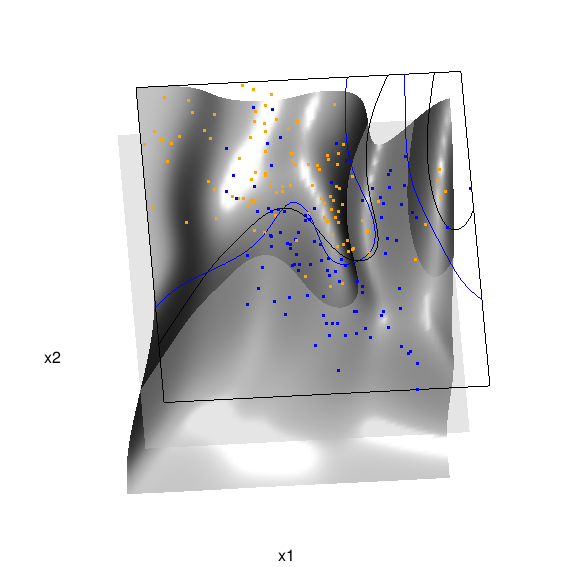
Here are links to the interactive versions of both graphics: local logistic regression, kernel density classification
This entry was posted in Technical and tagged data, graphics, programming, R, statistics on February 7, 2015.
More 3D Graphics (rgl) for Classification with Local Logistic Regression and Kernel Density Estimates (from The Elements of Statistical Learning)(转)的更多相关文章
- Some 3D Graphics (rgl) for Classification with Splines and Logistic Regression (from The Elements of Statistical Learning)(转)
This semester I'm teaching from Hastie, Tibshirani, and Friedman's book, The Elements of Statistical ...
- 李宏毅机器学习笔记3:Classification、Logistic Regression
李宏毅老师的机器学习课程和吴恩达老师的机器学习课程都是都是ML和DL非常好的入门资料,在YouTube.网易云课堂.B站都能观看到相应的课程视频,接下来这一系列的博客我都将记录老师上课的笔记以及自己对 ...
- Logistic Regression Using Gradient Descent -- Binary Classification 代码实现
1. 原理 Cost function Theta 2. Python # -*- coding:utf8 -*- import numpy as np import matplotlib.pyplo ...
- Classification week2: logistic regression classifier 笔记
华盛顿大学 machine learning: Classification 笔记. linear classifier 线性分类器 多项式: Logistic regression & 概率 ...
- Classification and logistic regression
logistic 回归 1.问题: 在上面讨论回归问题时.讨论的结果都是连续类型.但假设要求做分类呢?即讨论结果为离散型的值. 2.解答: 假设: 当中: g(z)的图形例如以下: 由此可知:当hθ( ...
- Android Programming 3D Graphics with OpenGL ES (Including Nehe's Port)
https://www3.ntu.edu.sg/home/ehchua/programming/android/Android_3D.html
- Logistic Regression and Classification
分类(Classification)与回归都属于监督学习,两者的唯一区别在于,前者要预测的输出变量\(y\)只能取离散值,而后者的输出变量是连续的.这些离散的输出变量在分类问题中通常称之为标签(Lab ...
- Logistic Regression求解classification问题
classification问题和regression问题类似,区别在于y值是一个离散值,例如binary classification,y值只取0或1. 方法来自Andrew Ng的Machine ...
- 分类和逻辑回归(Classification and logistic regression)
分类问题和线性回归问题问题很像,只是在分类问题中,我们预测的y值包含在一个小的离散数据集里.首先,认识一下二元分类(binary classification),在二元分类中,y的取值只能是0和1.例 ...
随机推荐
- idea2015的使用心得
今天打开myeclipse感觉里面全是project,也懒着换地方了,因为这些代码还要时常看,索性安装了idea试试水,感觉还不错,用起来并不比myeclipse差,跟webstorm差不多,他俩就是 ...
- [Python]peewee使用经验
peewee 使用经验 本文使用案例是基于 python2.7 实现 以下内容均为个人使用 peewee 的经验和遇到的坑,不会涉及过多的基本操作.所以,没有使用过 peewee,可以先阅读文档 正确 ...
- python黑魔法之metaclass
最近了解了一下python的metaclass,在学习的过程中,把自己对metaclass的理解写出来和大家分享. 首先, metaclass 中文叫元类,这个元类怎么来理解呢.我们知道,在Pytho ...
- es6 module + webpack
其实在之前本人就看了 es6 里面的一部分内容,当然是阮一峰大神的 ECMAScript 6 入门. 最近闲来无事又来看下,其中 Module 的语法 这章时候,用里面代码跑的时候,理所当然的报错 S ...
- html的常用基础应用
HTML结构 如下一段最简单的HTML代码:<html> <head> <title>HTML页面</title> ...
- User Browsing Model简介
搜索引擎的点击日志提供了很多有价值的query-doc相关性信息,但是这些信息是有偏的,因为对于用户没有点击过的doc,我们无法确定其是否真实地被用户浏览过.即日志中记录的展现信息与实际的展现信息之间 ...
- lighttpd启动问题
/home/yuna/web/app/lighttpd/sbin/lighttpd -f /home/yuna/web/app/lighttpd/lighttpd.conf -m /home/yuna ...
- EXT 可选择图片列表的表单控件实现
先看一下表单效果: 点击图标,显示图标列表: 实现代码: var appform = new Ext.form.FormPanel({ id: 'appform', cardStep:0, url:A ...
- 读入一个自然数n,计算其各位数字之和,用汉语拼音写出和的每一位数字。 输入格式:每个测试输入包含1个测试用例,即给出自然数n的值。这里保证n小于10的100次幂。 输出格式:在一行内输出n的各位数字之和的每一位,拼音数字间有1 空格,但一行中最后一个拼音数字后没有空格。 输入样例: 1234567890987654321123456789 输出样例: yi san wu
这是PAT中的一道练习题 刚开始的时候我想着直接定义正整数n,结果走了很大的弯路,因为题目中要求n小于10的100次幂,即最大的正整数n有100位,而C语言中整型数字最大占8个字节的存储空间,如果按无 ...
- 不同浏览器的margin值与padding值
IE-7: 有默认外边距margin样式的元素: dd,menu, ol, ul, blockquote, body, dd, dl, form, h1-6, ul 有默认内边距padding样式的元 ...